DSH needs a restart when a change alters the installed bundle layers that are assembled at startup. By contrast, edits to the profile or home cordis.patch.yml files are documented to hot-reload. The right action depends on what changed: configuration, a bundle, plugin code, browser assets, or the web process.
Why bundle changes need a restart
DSH composes bundle layers when its process starts. A bundle is a distribution layer that can contribute configuration rows and code; a plugin is a TypeScript module whose exported apply function registers contributions through a Cordis context. A package joins the bundle stack only when it declares dsh.bundle; an ordinary dependency remains a library. See the DSH Hub installation guide and the official first-plugin tutorial.
As an Amazon Associate I earn from qualifying purchases.
Adding, removing, or rebuilding an installed bundle changes the composition DSH loads at startup, so the official tutorial says those changes require a restart. Think of it as changing which modules are assembled at launch rather than editing a live setting; that is an analogy, not a separate DSH mechanism.
What’s actually slowing this PC down?
Pick the symptom - the matching free tool is one click away.
Which changes can hot-reload?
| Change | Documented refresh behavior | What to do |
|---|---|---|
Profile or home cordis.patch.yml edit |
Hot-reloads, according to the official tutorial. | Allow the reload and inspect the active configuration. |
settings.yaml key |
Some keys hot-reload; the install guide does not list which ones. | Check the documentation for the particular key. |
| Installed bundle added, removed, or rebuilt | Requires restart, according to the official tutorial. | Restart the web profile so DSH composes the updated layers. |
| UI plugin | Most UI plugins need a web restart, according to the Hub guide. | Follow the plugin README and the profile’s instructions. |
These distinctions are documented in the first-plugin tutorial and the installation guide. Hot reload is not a promise that every plugin edit, patch source, or setting will take effect without restarting.
#1 Best Overall

- External Desktop PC Power Button – Ideal for home use, computer labs, barebone systems, and custom chassis builds. If your PC case is placed in a hard-to-reach location, this extension switch allows you to relocate the power button for easy access and convenient operation.
- Easy Sticker Installation: Simply connect the POWER SW, RESET SW, POWER LED, and HDD LED cables to the corresponding motherboard headers, then secure the button in place using the adhesive sticker.
- Replacement Solution for Damaged Chassis Power Button If your PC case’s built-in power button is faulty, this external switch is an excellent replacement. The wiring can be easily routed through various openings, such as: front panel optical drive bay,rear panel fan vent, back panel expansion slot
- Comes with 1 to 2 splitter boards & splitter cables: The small 1-to-2 splitter allows the power button to work alongside your original one. If space is limited, use the included 1-to-2 splitter cable instead.
- Package included: 1x Computer Power Switch ON/OFF with 2M cable; 1x 1 to 2 splitter board; 1x 1 to 2 splitter cable; 1x adhesive stickers; 1x installation manua.
Why reloads need cleanup
The official tutorial explains that the harness undoes registrations when a plugin unloads. Resources Cordis does not manage—such as timers or network connections—need explicit cleanup. Plugin authors should acquire them inside ctx.effect() and return a disposer. That gives the unload/reload lifecycle a way to release resources before the plugin is applied again. Details are in the plugin tutorial.
Choose the right refresh for your change
- Identify the change: distinguish a profile or home patch edit, a setting, a bundle change, plugin code, browser assets, or framework code.
- Check where it is configured: the documented hot-reload behavior covers profile and home
cordis.patch.ymlfiles; a command-line--patchoverlay is not watched in the specific workflow described below. - Refresh the layer that changed: allow a documented patch reload; verify a setting key’s behavior; restart the web profile for a bundle change. Some development workflows also call for a browser refresh or a full process restart.
- Check plugin dependencies: reloading a service provider can affect plugins that inject its services, so consult the profile and the plugin README.
The last three caveats come from one developer’s web-profile plugin development workflow, not a universal guarantee for every DSH setup. In that configuration, browser client assets require a page refresh after rebuild, framework files trigger a full restart, command-line --patch overlays are not watched, and reloading a service provider can dispose dependent plugins. Check whether your own profile behaves the same way.
Quick Recap
Best Value

- External Desktop PC Power Switch: It is recommended for home users, computer rooms, bare board machines, water-cooled chassis DIY, etc. If the case is placed in a hard-to-reach place, use this switch to lead to a place where it is convenient to operate.
- Easy to install by Sticker: Please check the installation instructions on product description. Just connect the POWER LED+, POWER LED-,POWER SW connectors with motherboard and stick the adhesive
- If the button on the chassis panel is damaged, this repair is a very good choice. The switch wiring can be inserted from the optical drive position on the front panel, the fan window on the back panel, the expansion slot on the back panel, etc.
- Comes with 1 to 2 Splitter: the small 1 to 2 splitter board makes the power button works with your original power supply works together
- Package included: 1x Computer Power Switch ON/OFF with 1.7M cable; 1x 1 to 2 splitters; 1x adhesive stickers; 1x installation manua.
Rank #4

- ★ External Desktop PC Power Switch: controlling your computer from the comfort place in the room using the power button with long cable. Even your computer in a hard to reach place, this power button can make PC tower power switch ON/OFF much easier.
- ★ 2 Meter Long Cable PC Power Switch Control: this power switch adapter comes with 2M long power sw cable, keep the enough range for you.
- ★ Easy to install: the package comes with installation instructions. Just connect the POWER SW and +HDD- connectors with motherboard and stick the adhesive plate in the right place.
- ★ Small and Portable: this power switch on PC is size 1.5cm thickness, with weight only 1 ounces.
- ★ Package included: 1* Computer Power Switch ON/OFF with 2M cable; 1* Power SW splitter cable. You can place or stick the plate in comfort place.
Rank #3

- Computer chassis switch cable with LED is mainly used to replace old or damaged ATX power reset switch or computer host switch. Suitable for DIY computer switch and restart button
- PC case LED power button easy to install, one end connect the motherboard POWER or RESET jack, the other end of the switch connect to the chassis panel.
- ATX supply on/off cable maximum 3A current ,The rated voltage and current of the LED of the switch: rated voltage 3-6V, rated current ≤ 20mA.Switch rated load : 12mm switch - AC / DC 220V 3A max, 16mm switch - AC / DC 0-220V 5A Max.
- DIY atx power switch with light button adopts high brightness solid color LED, built-in resistance step-down. When button is red, it is the restart key, and when it is blue, it is the start key.
- The pc power button is made of nickel plated aluminum alloy with long service life. The length of switch wire is about 60cm / 23.6in, for your computer case enough
Rank #2
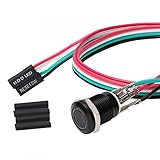
- Specifications: This product includes a 12mm power reset button switch, a switch wire about 60cm/23.6 inches long, and four heat shrink tubes. Structure: 1NO, switch class: 12V DC 5A, contact material: silver alloy, protection class: IP65, electrical life: 100,000 times.
- Function: Replacing this blue LED DIY computer restart button can not only replace the original faulty computer restart button, but also make the low-profile restart button more dynamic.
- Design: Unlike the original buttons of the computer case, ours have blue LED lights. After replacing the installed product, press the restart button, the button will be solid blue.
- Applicability: Since the length of the switch cable is designed to be 60cm, this product can meet the needs of different sizes of chassis, and it comes with a heat shrinkable tube to make it more secure.
- After sales: The electrical life of this product is 100,000 times. If you encounter problems during use, please feel free to contact us.
If the change still is not visible
- For a profile or home patch, confirm the edit is in the watched file and inspect the active configuration after allowing the reload.
- For a setting, verify that the specific
settings.yamlkey supports hot reload; the Hub guide says only that some keys do. - For an installed bundle change, restart the web profile rather than expecting a patch-style reload.
- For rebuilt UI assets, determine whether your development setup requires a browser refresh; framework changes may require restarting the process.
- Check the plugin README and active profile. The Hub installation guide advises following the plugin README.
Product prices and availability are accurate as of the date/time indicated and are subject to change. Any price and availability information displayed on Amazon at the time of purchase will apply.




