Recommended Free Tools
For a quick timeline of failures, start with Reliability Monitor. Use Event Viewer to inspect related system and application records, WinDbg to examine a crash dump in depth, and Windows Memory Diagnostics when memory is a specific concern. These tools serve different purposes; available documentation does not establish a universal winner for reliability, diagnostic accuracy, or ease of use.
How the Windows crash tools differ
| Tool | Best use | Detail and effort | Important limit |
|---|---|---|---|
| Reliability Monitor | See when reported crashes and failures occurred and whether they recur. | A time-ordered overview is easier to scan than raw logs; event details can be expanded. | A timeline helps identify when to investigate, but does not prove a cause. The available interface description is Windows 10-era and does not verify current Windows 11 navigation. |
| Event Viewer | Inspect system and application log records around a crash. | Offers more granular context, but requires finding relevant events and interpreting them. | An event near the time of a crash is a clue, not proof that the component it names caused the failure. |
| WinDbg | Analyze a crash dump in depth. | The most technically demanding option here; symbols and debugger output require interpretation. | Conclusions depend on the dump and analysis context. A dump does not necessarily identify the root cause. |
| Windows Memory Diagnostics | Run a focused check when memory problems are suspected. | A targeted diagnostic action, not a broad crash-history view. | Microsoft directs users to Event Viewer for results. A clean test is not established as ruling out every memory or hardware fault. |
| Diagnostic Data Viewer | Review Windows diagnostic data being sent to Microsoft. | Shows telemetry in categories; viewing requires downloading the app and enabling data viewing. | It is not a substitute for local event logs or crash-dump debugging. |
Which tool should you use first?
Start with Reliability Monitor for timing and recurrence
Use its timeline to identify when reported failures began and whether they recur. Microsoft Press describes a time-based history with expandable event details. Treat that overview as a way to narrow the period to investigate, not as a diagnosis. The available documentation does not verify the current Windows 11 path to open it.
As an Amazon Associate I earn from qualifying purchases.
Use Event Viewer to add log context
Inspect relevant system and application records around the failure. Microsoft recommends reviewing logs for stop errors. Focus on events close to the crash and compare them with other evidence rather than assuming that the event’s named driver or component is responsible.
Move to WinDbg when a dump needs deeper analysis
WinDbg can help examine a crash dump, but the workflow demands more technical interpretation. Microsoft documents debugger tools and symbols; neither a symbol match nor a line in debugger output should be treated as automatic proof of root cause. Consider the dump alongside relevant logs, updates, and device-specific context.
#1 Best Overall
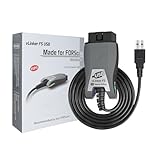
- [Custom Your Car]: vLinker FS USB Specialized for designing to use the FORScan and Recommended by the FORScan Team. Due to its connection reliability, lightning-fast data transfer speed, and support of the proprietary For-d car CAN buses. Specially designed for For-d, Lincoln, Mazda, & Mercury cars. It's full FORScan's advanced and hidden functions, For-d agreements and modules.
- [Fast, Stable, Efficient Configuration & Programming]: Support FEPS 18V Programming voltage output in FORScan. Reach 3Mpbs transmission rate and the highest 3Mhz baud rate, let you enjoy smoother graphics and real-time meters. The serial buffer is 8192 bytes. OBD request byte up to 4128 bytes. It can meet the needs of some special long frame communication.
- [Fast, Rock-solid, Stable USB Connection]: ECU programming and modification, read and clear fault codes, live data and read the check engine indicator is a piece of cake. No dropped packets, data corruption, network interference. (NOTE: Supports USB port: USB 2.0, USB 3.0)
- [Automatic Electronic Switching]: Allow FORScan to access all CAN buses at the same time and access the advanced functions. vLinker FS USB switches seamlessly between HS-CAN, MS-CAN and For-d Car networks. Don't worry about messing things up if you accidentally transmit on the wrong network.
- [Battery Saver and Protection Technology]: Auto sleep and wake up mode ,over-voltage, over-current, over-temperature and battery drain protection allow vLinker FS USB to be left plugged in without damaging the car and battery. Operating Current is 51mA, automatic sleep in idle state, sleep current is as low as 3mA.
Run Windows Memory Diagnostics when memory is a plausible cause
This is a targeted check, not a general-purpose crash-history tool. Microsoft says to review its results in Event Viewer. A clean result should not be interpreted as excluding all memory or other hardware problems.
How to investigate without over-reading the evidence
- Note the failure time and pattern. Use a timeline view to see when failures occurred and whether they repeat.
- Inspect nearby records. Review relevant system and application log entries around the failure, especially when investigating a stop error.
- Corroborate clues. Compare recurring evidence across failures with dump information, updates, and device context. Do not blame a driver solely because its name appears in a log or dump summary.
- Choose a targeted next step. Use WinDbg if a dump needs deeper analysis, or Windows Memory Diagnostics if memory is specifically suspected.
No controlled comparison establishes diagnostic success rates, accuracy rankings, or measured ease-of-use scores for these tools. The practical distinction is their workflow: summary, logs, dump analysis, targeted memory check, or telemetry review.
Rank #2
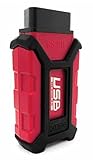
- Item Category: Vehicle Scan Tool
- Item Trademark: Hex code
- manufacturer: Hex code
Local crash analysis is different from diagnostic data sent to Microsoft
Diagnostic Data Viewer is for reviewing Windows diagnostic data sent to Microsoft; it is not a local dump debugger. Microsoft defines it as “a Windows app that lets you review the Windows diagnostic data your device is sending to Microsoft, grouping the info into simple categories based on how it’s used by Microsoft.” See Microsoft’s Diagnostic Data Viewer overview.
Free tools Windows power users keep installed
One-click scans. No signup required.
Microsoft says optional diagnostic data can include memory state associated with a system or app crash, which may unintentionally contain parts of a file in use. This does not mean every crash dump is automatically sent: collection is distinct from locally created dumps, and additional permissions such as opting into optional diagnostic data may apply. Microsoft describes required diagnostic data as “information about your device, its settings and capabilities, and whether it is performing properly.” Review Microsoft’s privacy statement and Windows diagnostic-data guidance to understand the relevant settings.
Quick Recap
Rank #4

- Advanced Protocol Support for Comprehensive Diagnostics: The NEXIQ USB-Link 3 is compatible with the latest vehicle technologies. It is versatile enough to handle diagnostics for both modern and legacy vehicle systems.
- Seamless Wireless and Reliable Wired Connectivity: Enjoy the flexibility of Bluetooth and dual-band Wi-Fi connections to your PC, tablet, or smartphone. When a wired connection is preferred, the included latching USB cable ensures fast, secure, and uninterrupted data transfer.
- Cross-Platform Compatibility for Flexible Use: Whether you prefer a Windows laptop, iOS tablet, or Android smartphone, this tool integrates effortlessly with all major operating systems.
- The USB-Link 3 is suitable for diagnostics on light-duty, medium-duty, and heavy-duty vehicles, maximizing its utility across your fleet.
- Rugged, Portable, and Built for Tough Jobs: Designed with durability in mind, the USB-Link 3 is compact, lightweight, and built to withstand the harsh conditions of shop or field environments. Its portable design ensures it’s easy to carry, making it the perfect diagnostic companion for both mobile and shop-based technicians.
Rank #3
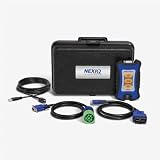
- Newest USB Link from Nexiq
- Allows for a wired connection to PC, tablet or smart phone via a USB cable
- Supports the latest protocols (CAN FD, DoIP)
Product prices and availability are accurate as of the date/time indicated and are subject to change. Any price and availability information displayed on Amazon at the time of purchase will apply.




