Start With the Obvious Checks (Yes, They Matter)
- Confirm the charger is supported: Use the original ASUS charger or one that meets the Ally’s power requirements. Underpowered chargers can make the device behave like it’s “charging” but never actually reach a true charge state.
- Try a different wall outlet: If the outlet is unreliable (loose connection, surge strip issues, etc.), the Ally may refuse to charge.
- Inspect the charging cable and connector: Look for bent pins, fraying, or a connector that doesn’t seat firmly. A slightly misaligned USB-C/charging connection can cause intermittent charging.
Verify Power Settings and Battery Mode
Sometimes the issue isn’t the charger—it’s how Windows/Armoury Crate is managing power. Check:
- Windows power mode: Make sure you’re not locked into an aggressive battery-saving mode that’s throttling power behavior.
- Battery/charging behavior in Armoury Crate (if applicable): Review any battery-related settings or “performance vs. battery” profiles. Toggle between profiles and plug in again after changes.
Quick test: Unplug the charger, power the Ally fully off (not sleep), then plug it back in and turn it on while connected. This forces the system to re-negotiate charging properly.
As an Amazon Associate I earn from qualifying purchases.
Soft Reset the Charging System
If the Ally is stuck in a weird “not charging” state, a soft reset can clear it.
Windows Errors? Fix Them Before They Spread
Repair common Windows errors and clear accumulated junk for a smoother, more stable PC - no reinstall needed.Free scan · no reinstallOutdated Drivers Are Slowing You Down
One free scan finds every outdated or missing driver and matches the right update for your exact hardware.Free scan · exact hardware match- Shut down the Ally completely.
- Unplug the charger.
- Hold the power button for about 10–15 seconds to discharge residual power.
- Plug the charger back in and power on.
This is one of those fixes that’s surprisingly effective when the battery controller or charge negotiation gets confused.
#1 Best Overall
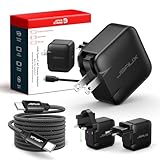
- Supports TV Mode & Handheld Mode Charging for Switch 2: JSAUX 65W USB C charger fully supports charging for Nintendo Switch 2 in both TV Mode (via dock) and Handheld Mode (direct USB C connection). Designed to meet the power requirements of Switch 2 for smooth gameplay without interruption. Important: This charger supplies power only and does NOT transmit HDMI, video, or audio signals
- 65W GaN USB C Fast Charger for Most USB C Devices: Powered by advanced GaN technology, this 65W USB C fast charger delivers efficient, high-output Power Delivery for Nintendo Switch 2, Switch OLED, and Switch in both docked and handheld use. Ideal as a Xbox Ally charger, Steam Deck charger, ROG Ally charger, MacBook charger, USB C laptop charger, tablet charger, and fast phone charger for iPhone, Galaxy, Pixel, and more. Compact yet powerful — replace multiple chargers with one versatile 65W GaN power adapter
- International Travel USB C Charger with US, UK & EU Plugs: JSAUX 65 watt travel USB C charger features a built-in foldable US plug and includes interchangeable UK and EU plug adapters, supporting worldwide 100–240V input for use in over 150 countries. Ideal for international travel, business trips, vacations, and portable gaming setups, it combines global compatibility with a compact, space-saving design that replaces multiple country-specific adapters
- Includes 6.6FT (2M) Braided USB C to USB C Cable: Comes with a durable 6.6ft braided USB C cable supporting Power Delivery 3.0 fast charging and high-speed data transfer. Reinforced connectors improve longevity, while the extended length gives you flexibility for dock setups, desks, hotel rooms, or couch gaming
- Wide Compatibility & Safe Charging: Compatible with Steam Frame, Nintendo Switch 2, ROG Xbox Ally, Switch OLED, Steam Deck, ROG Ally, MacBook Pro/Air, iPad Pro, iPhone 18 Pro/18 Pro Max, iPhone Duo, iPhone Air, iPhone 17/16/15 Series, Galaxy S26/S25/S24/S23/S22/S20, Pixel 9/8/7, and more. Features built-in protection against over-voltage, over-current, and short-circuit for worry-free charging
Check the Charging Port (Clean + Reseat)
A dirty or partially blocked charging port is a common culprit. Dust, lint, or pocket debris can interfere with a solid connection.
- Power off the Ally before touching the port.
- Use a flashlight to inspect the port for debris.
- Gently clean with compressed air or a soft, non-metal tool. Avoid anything conductive (no metal picks inside the port).
- Reseat the charger firmly—make sure it fully locks into place.
If cleaning doesn’t help, try another compatible cable/charger (not just “another USB-C cable,” but one that actually supports the required charging wattage).
Rank #2

- This 65W USB-C charger is designed for popular gaming handheld consoles and laptops, including ROG Ally X / Z1 Extreme, Steam Deck, For Lenovo Legion Go, For MSI Claw, GPD Win 4, ONEXPLAYER, and more. Also supports For Nintendo Switch / OLED / Lite and other USB-C devices requiring up to 65W (20V 3.25A).
- Supports PD 3.0 fast charging with intelligent power adjustment (65W / 45W / 30W). Delivers stable and efficient charging performance similar to original adapters, keeping your gaming and work uninterrupted.
- Lightweight and portable (only 298g), perfect for travel, office, or daily use. Features universal 100–240V input for worldwide compatibility and a 6ft (1.8m) cable for flexible charging anywhere.
- Built-in smart chip with multiple protections against overcurrent, overvoltage, overheating, and short circuit. Made with flame-retardant materials to ensure safe and reliable charging for your devices.
- Package includes 1 × 65W USB-C Power Adapter and 1 × Power Cord. Backed by a 12-month warranty and responsive customer support for a worry-free experience.
Look at Battery Status vs. Reality
Sometimes Windows shows a battery icon, but the status can lag behind what’s happening. To confirm whether charging truly works:
- Watch the battery percentage for 10–20 minutes while the Ally stays plugged in and idle or lightly used.
- Check performance behavior: If it “acts” like it’s still on battery-only (rapid drain, frequent low-power prompts), it’s likely not actually charging.
If the percentage never climbs at all (or drops while plugged in), keep troubleshooting—this points to power delivery/port/battery issues rather than software-only quirks.
Rank #3
- [Compatibility]; This 65W charger is designed to be fully compatible with major high-performance handhelds and laptops, including ASUS ROG Ally X / Z1 Extreme, MSI Claw A1M, Steam Deck, and Lenovo Legion Go. It intelligently supports 65W, 45W, and lower power devices with a USB-C (Type-C) connector. If your model requires a 20V/3.25A or lower output with a USB-C port, this is your perfect match for devices like Nintendo Switch OLED, GPD Win 4, and AYANEO series.
- [Portable Design]; Whether you are heading on a business trip or a family vacation, this lightweight power adapter (only 298.3g) is your ideal travel companion. With a wide input range of 100-240V and a compact size, it works seamlessly in any country. The slim profile slides easily into carry-on luggage, while the 1.8m (6ft) total reach ensures you can stay powered even when the wall outlet is far from your desk, airport seat, or gaming setup.
- [Safety with Overheat Protection] Safety is our priority. Unlike standard chargers, this unit features a built-in LBS (Load Break Switch) and smart chip that provides multi-layer protection against overcharging, overcurrent, and short circuits. The flame-retardant, high-temperature resistant materials prevent overheating up to 50°C during intense use. The intelligent heat management system automatically regulates power based on battery status, keeping your home and family secure while extending your device's battery life.
- [Smart Fast Charging Efficiency]; Experience rapid power delivery that mirrors original performance. This charger can power your device from 0% to 100% in just 0.6 to 1.2 hours (based on standard battery capacities). The intelligent internal chip detects your device’s temperature and battery health to optimize charging speed, ensuring less heat generation and more efficient energy transfer. It’s the smart way to keep your workflow and gaming uninterrupted at home, in the office, or at a coffee shop.
- [Full Package & 12-Month Peace of Mind]; Your purchase includes 1x 65W AC Adapter and 1x Power Cable, all backed by a professional 12-month warranty and a 30-day easy return policy. We focus on providing high-quality power solutions and responsive customer support. If you have any questions about compatibility or specifications for your handheld console or laptop, our team is here to help, ensuring a worry-free shopping experience from day one.
Try Different Charging Combinations
To narrow down the cause, test systematically:
- Different charger brick (known-good wattage)
- Different charging cable (again, ensure it supports the required power)
- Different USB-C port/adapter setup (if you’re using a dock or hub, remove it and plug directly into the Ally)
If charging works with a different setup, your original charger/cable was the bottleneck. If it fails across multiple known-good chargers, it’s more likely a hardware issue on the Ally side.
Update and Reboot (Software Can Still Get In the Way)
Battery and power management rely on drivers and system components. If you’re comfortable doing basic updates:
Rank #4

- 【Wide Compatibility】FSJTD 65W USB C compatible with ROG Ally charger, for ROG Xbox Ally X, ROG Xbox Ally, ROG Ally X, ROG Ally, Nintendo Switch 1/2, Switch OLED, Switch Lite, Steam Deck, Legion Go, MSI Claw, GPD Win Mini/4, GPD Pocket 3, Ayaneo, Onexplayer, MacBook Pro/Air, iphone and more
- 【Flawless TV Mode for Switch】Compatible with the Nintendo Switch charger, this power supply delivers rock-solid, stable power to ensure a perfect, flicker-free display when using Nintendo Switch TV Mode for a seamless big-screen gaming experience
- 【Smart & Safe Charging】Advanced multi-protection technology safeguards against overcharging, overheating, and short circuits. It intelligently delivers stable, optimized power through a premium cable, ensuring fast, safe charging for your devices and complete peace of mind
- 【Ultra-Portable Design】Our unique foldable metal prongs make this steam deck charger incredibly compact and safe to toss in your bag. Say goodbye to scratches on your gear and hello to the ultimate portable power solution for your home, office, and travels
- 【Type C Charger Specifications】Input: 100-240V, 50-60Hz Output: 5V-3A, 9V-3A, 12V-3A, 15V-3A, 20V-3.25A ; Power: 45W/65W; Connector: USB-C/Type C
- Update Windows (including optional updates).
- Update Armoury Crate and any ASUS power-related utilities.
- Reboot after updates.
In some cases, outdated power management components can misreport battery/charging behavior. Updates won’t fix a damaged port, but they can resolve “software-only” charging glitches.
Recommended Free Tools
When It’s Likely Hardware (Stop Guessing and Inspect Deeper)
If the Ally refuses to charge across known-good chargers/cables—and after cleaning the port—then you’re likely dealing with one of these:
Best Value
- 【Fast Charging & Safe】- USB C Fast Charger intelligently identify your devices automatically and provide the fastest and most efficient output current. Our USB type-c charger adapter have multi-protection safety features, including over-current protection, over-voltage protection, over-temperature protection, overload protection, short circuit protection, and leakage protection.
- 【Wide Compatibility】- This 65W USB C laptop Charger is compatible with Mac Book pro 13 inch 2016, Mac Book Air 2018, Dell Latitude, Lenovo, HP Spectre, Think pad, Nintendo Switch, Samsung Chrome book Pro, Acer Spin 7, iPad Pro 2018 and other smart phones devices with the USB C interface.
- 【Super Compact & Durable Charging Cable】- The charging cord passed 10000+ times swing tests, which can withstand bending at any angle and daily wear, super long bend lifespan. Stylish appearance and tangle-free cable design endow it high value.
- 【Portable & Easy to Carry】- This adapter is very portable with light weight, fitting perfectly in a small pocket inside your laptop bag and easy to carry with. It charges devices which is connected with a USB type C connection. This is an ideal type c charger for office, home and travel use.
- 【What We Offer】- Refund or replacement for you without any hesitate; If you have any question, feel free to contact us, we will make things right to you in twenty-four hours.
- Charging port damage (loose connector, worn contact points)
- Faulty charging circuitry
- Battery degradation or controller issues
At that point, continuing random troubleshooting is just time-consuming. Consider checking warranty coverage or having the device inspected by ASUS or a qualified technician—especially if physical port wobble or contact issues are present.
Bottom Line
If your ASUS ROG Ally isn’t charging, the fastest path to a solution is to verify the charger (wattage + cable quality), reseat and inspect/clean the charging port, then do a full power cycle to reset the charging system. Those steps resolve a surprising number of “not charging” cases.
If the Ally still won’t charge with multiple known-good charger setups, the odds shift toward a hardware issue (port or internal charging circuitry). At that point, the smart move is to stop troubleshooting and get it serviced—because no amount of software tweaking can replace a physically failing charge connection.
What’s actually slowing this PC down?
Pick the symptom - the matching free tool is one click away.
Quick Recap
Product prices and availability are accurate as of the date/time indicated and are subject to change. Any price and availability information displayed on Amazon at the time of purchase will apply.




