Crashes, No Sound, or Screen Glitches?
Random freezes, missing sound and display glitches usually trace back to one bad driver. Find and replace yours safely.Free scan · under a minutePC Slower Than It Used to Be?
A free scan shows the junk files, broken settings and background clutter dragging Windows down - then fixes them in one click.Free scan · Windows 10 & 11SAE’s six driving-automation levels describe which parts of driving a system performs and what the human must still do. They are not a score of a vehicle’s overall intelligence, safety, or quality. To understand any level, consider both the driver’s role and the conditions in which the feature is designed to operate.
What SAE driving-automation levels describe
SAE J3016, Taxonomy and Definitions for Terms Related to Driving Automation Systems for On-Road Motor Vehicles, classifies systems that perform some or all of the dynamic driving task on a sustained basis. The classification applies to a particular feature or system in its operating context—not to a vehicle as a whole or to every kind of autonomous machine. SAE’s public catalog lists J3016_202104 as revised April 30, 2021. Standards catalogs also list a September 2026 edition; its full text has not been reviewed here, so specific changes to detailed definitions should be confirmed against SAE’s current standard. SAE J3016_202104 catalog record SAE J3016_202609 catalog listing


As an Amazon Associate I earn from qualifying purchases.
What are the six levels of autonomous driving?
The level number reflects the division of driving responsibilities between the system and the human—not a simple progression from “less safe” to “more safe.” The descriptions below follow the SAE 2021 catalog names and definitions summarized in the public materials; 2026 catalog summaries use simpler descriptors and caution that those are not the full definitions.
| Level | SAE name (2021 catalog) | What the system does | What the human does |
|---|---|---|---|
| 0 | No Driving Automation | May issue warnings or make momentary interventions, but does not provide sustained driving automation. | Performs the driving task. |
| 1 | Driver Assistance | Provides sustained support for steering or speed control. | Continues to supervise and drive. |
| 2 | Partial Driving Automation | Can support steering and speed control together. | Continuously supervises and remains ready to intervene. |
| 3 | Conditional Driving Automation | Performs the complete driving task within defined conditions. | Must be available to respond to a takeover request or system failure. |
| 4 | High Driving Automation | Performs the driving task within defined conditions and can mitigate risk without a human driver when it reaches the conditions’ limits. | Is not needed to mitigate risk at the limit of those conditions. |
| 5 | Full Driving Automation | Is designed to perform the driving task under all conditions in which humans can drive. | No human driver is needed. |
The 2026 SAE catalog summaries describe Levels 1 and 2 as supporting steering or speed, and steering and speed, respectively, with continual driver supervision. They describe Levels 3 and 4 as automation under defined conditions, with human driving needed after an alert or evident malfunction at Level 3 but not needed to mitigate risk at Level 4. Level 5 applies under all conditions in which humans can drive. Those summaries are simplified descriptors, not substitutes for the full standard. SAE J3016_202609 catalog listing
#1 Best Overall
How Level 2 differs from Level 3
The essential difference is who performs the driving task while the feature is active and how closely the human must monitor it. At Level 2, the system can manage steering and speed together, but the person remains responsible for supervising the roadway continuously and intervening when needed. At Level 3, the system performs the complete driving task while operating within its defined conditions; the human is a fallback who must respond when requested or when the system cannot continue.
That distinction is not simply “hands on” versus “hands off.” A steering-wheel rule or a marketing label does not, by itself, establish a system’s SAE level. Consider the feature’s operating conditions, who performs the dynamic driving task, and whether the human must monitor continuously or be available for fallback.
Rank #2
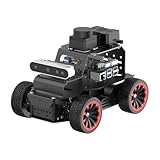
- For Raspberry Pi 5 & ROS2 Robot Car. MentorPi A1 smart AI robot car is powered by Raspberry Pi 5, compatible with ROS2, and programmed in Python, making it an ideal platform for AI robot development.
- High-Performance Hardware. Equipped with Ackerman chassis, closed-loop encoder motors, TOF lidar, depth camera, AI voice interaction box, and other advanced components to ensure optimal performance and efficiency.
- Advanced AI Capabilities. Supports SLAM mapping, path planning, multi-robot coordination, vision recognition, target tracking, and more, covering a wide range of AI applications.
- Autonomous Driving with Deep Learning. Utilizes YOLO model training to enable road sign and traffic light recognition, along with other autonomous driving features, helping users explore and develop autonomous driving technologies.
- Empowered by Large AI Model, Human-Robot Interaction Redefined. MentorPi AI robot car deploys multimodal models with ChatGPT at its core, integrating 3D vision and Al voice interaction box. This synergy enhances its perception, reasoning, and actuation capabilities, enabling advanced embodied AI applications and delivering natural, context-aware human-robot interaction.
How Level 4 differs from Level 5
Both levels describe systems that perform the driving task without requiring a human to supervise it continuously. The difference is the scope of the operating conditions. Level 4 is limited to defined conditions and must be able to mitigate risk without a human driver if it reaches their limits. Level 5 is designed for all conditions in which humans can drive, without needing a human driver.
The Tool Desk
Outbyte PC Repair FREEClear out junk files and repair common Windows errorsFree Scan →Outbyte Driver Updater FREEScan for outdated or missing drivers - takes under a minuteDriver Scan →Why “self-driving” can mislead
A vehicle feature described casually as “self-driving” may still require the person to supervise it. NHTSA cautions against using that phrase loosely because it can imply that the driver need not interact even when a system’s capabilities require supervision. Identify the SAE level only when the feature’s actual responsibilities and operating conditions support it; the phrase alone does not say what the human must do.
Quick Recap
Best Value

- For Raspberry Pi 5 & ROS2 Robot Car. MentorPi M1 smart AI robot car kit is powered by Raspberry Pi 5, compatible with ROS2, and programmed in Python, making it an ideal platform for AI robot development.
- High-Performance Hardware. Equipped with mecanum-wheel chassis, closed-loop encoder motors, TOF lidar, 3D depth camera, AI voice interaction box, high-torque servos, and other advanced components to ensure optimal performance and efficiency.
- Advanced AI Capabilities. Supports SLAM mapping, path planning, multi-robot coordination, vision recognition, target tracking, and more, covering a wide range of AI applications.
- Autonomous Driving with Deep Learning. Utilizes YOLO model training to enable road sign and traffic light recognition, along with other autonomous driving features, helping users explore and develop autonomous driving technologies.
- Empowered by Large AI Model, Human-Robot Interaction Redefined. MentorPi deploys multimodal models with ChatGPT at its core, integrating 3D vision and AI voice interaction. This synergy enhances its perception, reasoning, and actuation capabilities, enabling advanced embodied AI applications and delivering natural, context-aware human-robot interaction.
Rank #4
- For Raspberry Pi 5 & ROS2 Robot Car. MentorPi A1 smart AI robot car is powered by Raspberry Pi 5, compatible with ROS2, and programmed in Python, making it an ideal platform for AI robot development.
- High-Performance Hardware. Equipped with Ackerman chassis, closed-loop encoder motors, TOF lidar, depth camera, AI voice interaction box, and other advanced components to ensure optimal performance and efficiency.
- Advanced AI Capabilities. Supports SLAM mapping, path planning, multi-robot coordination, vision recognition, target tracking, and more, covering a wide range of AI applications.
- Autonomous Driving with Deep Learning. Utilizes YOLO model training to enable road sign and traffic light recognition, along with other autonomous driving features, helping users explore and develop autonomous driving technologies.
- Empowered by Large AI Model, Human-Robot Interaction Redefined. MentorPi AI robot car deploys multimodal models with ChatGPT at its core, integrating 3D vision and Al voice interaction box. This synergy enhances its perception, reasoning, and actuation capabilities, enabling advanced embodied AI applications and delivering natural, context-aware human-robot interaction.
Product prices and availability are accurate as of the date/time indicated and are subject to change. Any price and availability information displayed on Amazon at the time of purchase will apply.




