Free tools Windows power users keep installed
One-click scans. No signup required.
ErP Ready in BIOS is a power-saving setting that helps a PC meet low standby power requirements when it is shut down or in certain sleep states. When enabled, the motherboard cuts or limits standby power to features that normally remain active while the computer appears to be off.
This can reduce power draw at the wall, but it may also disable conveniences such as USB charging, Wake-on-LAN, and power to a keyboard or mouse while the PC is off. Whether you should enable it depends on whether lower standby power matters more than always-on wake and charging features.
As an Amazon Associate I earn from qualifying purchases.
What ErP Ready Means in BIOS
ErP Ready is a BIOS or UEFI power-management setting that helps a computer meet the European Union’s energy-related products requirements for very low standby power use. On many motherboards, enabling ErP Ready limits how much power the PC can draw when it is shut down or in certain sleep states. In practical terms, it tells the motherboard to cut power to selected onboard controllers, ports, and wake circuits when the system is not fully running.
Quick wins for a faster PC:
Fix the driver behind crashes, sound loss and screen glitchesFind Drivers →Clear out junk files and repair common Windows errorsFree Scan →Scan for outdated or missing drivers - takes under a minuteDriver Scan →The “ErP” part comes from the Energy-related Products directive, which targets reduced energy consumption from electronics when they are idle, off, or in standby. Desktop PCs can still consume a small amount of electricity after shutdown because the power supply continues to provide standby power to the motherboard. This standby power can keep features active, such as USB power, network wake functions, RGB lighting, and keyboard or mouse wake support. ErP Ready is designed to reduce or remove that background draw.
#1 Best Overall

- [Quick PC Diagnostic Tool] Is your new PC build showing a black screen? This motherboard speaker translates silent hardware failures into clear BIOS beep codes. Instantly identify if your RAM, CPU, or GPU is causing the boot failure without guessing.
- [Essential for DIY PC Builders] Modern motherboards often lack built-in audio alerts. Plugging in this mini piezo buzzer before your first boot ensures you hear the satisfying “single beep” of a successful POST, giving builders immediate peace of mind.
- [Universal 4-Pin Header Compatibility] Wondering if it fits your board? It features a standard 4-pin female connector (with 2 active wires) that perfectly matches the “SPEAKER” or “SPK” front panel header on almost all ATX, Micro-ATX, and Mini-ITX motherboards.
- [Clean Wiring & Loud Alarm] Designed with an approx. 3-inch cable, it is long enough to easily plug into the motherboard but short enough to reduce PC case wiring clutter. The premium piezo element delivers a loud, crisp beep that is impossible to miss.
- [Valuable 3-Pack for IT Repair] Includes 3 internal BIOS buzzers in one pack. Perfect for IT technicians keeping spare diagnostic tools in their repair kits, or PC enthusiasts testing multiple rigs. A cost-effective solution to save hours of troubleshooting.
In BIOS, this setting may appear under names such as ErP Ready, ErP Support, EuP Ready, Energy-Related Products, or Deep Sleep, depending on the motherboard brand. It is usually found in a power management menu, advanced settings page, or ACPI configuration section. The exact behavior varies by board, but the purpose is the same: reduce power consumption when the PC is not actively being used.
What the setting controls
- Standby power delivery: The motherboard reduces power supplied to devices and controllers while the PC is off or sleeping.
- USB behavior: USB ports may stop providing power after shutdown, which can affect charging phones, headsets, or controllers.
- Wake features: Wake-on-LAN, wake by keyboard, wake by mouse, or wake by USB device may be disabled in supported low-power states.
- Onboard lighting: Motherboard LEDs, RGB lighting, and peripheral lighting may turn off completely when the system is shut down.
ErP Ready does not normally change CPU performance, gaming performance, fan curves, memory speed, or storage speed while the computer is powered on. It mainly affects what remains powered after shutdown or during low-power sleep states. If the PC is running normally, the setting is usually invisible to the user. The differences become noticeable only when the machine is off, asleep, or expected to wake from a network, keyboard, mouse, or USB event.
Some BIOS menus let you choose whether ErP applies to S4, S5, or both. S4 is hibernation, where the system state is saved to storage and the computer powers down more deeply than normal sleep. S5 is soft-off, the state reached after a standard shutdown. If ErP is applied to S5, the PC aims for very low power use after shutdown. If it is applied to S4 and S5, hibernation may also lose certain wake or charging functions.
Crashes, No Sound, or Screen Glitches?
Random freezes, missing sound and display glitches usually trace back to one bad driver. Find and replace yours safely.Free scan · under a minuteWindows Errors? Fix Them Before They Spread
Repair common Windows errors and clear accumulated junk for a smoother, more stable PC - no reinstall needed.Free scan · no reinstallFor most users, the setting is best understood as a tradeoff. Enabling ErP Ready lowers off-state power consumption and can stop lights or USB devices from staying active after shutdown. Disabling it keeps more convenience features available, including USB charging while the PC is off, Wake-on-LAN for remote access, and waking the system with a keyboard or mouse. The right choice depends on whether saving a small amount of standby power matters more than those always-ready functions.
How ErP Ready Reduces Power Consumption
ErP Ready reduces power consumption by limiting how much standby power the motherboard can supply while the PC is shut down or in certain low-power sleep states. Even when a computer looks “off,” the power supply can still provide a small amount of +5V standby power, often called 5VSB. This standby rail keeps selected circuits alive so the system can respond to wake events, power USB ports, maintain network activity, or detect input from peripherals.
When ErP Ready is enabled in BIOS, the motherboard changes its behavior to meet stricter standby power targets, commonly associated with the European Union’s energy-related product requirements. In practical terms, the board cuts or reduces power to nonessential devices during shutdown. Instead of leaving USB ports, network controllers, RGB lighting controllers, and other onboard circuits partially powered, it turns many of them off until the PC is started normally with the power button.
The biggest reduction usually comes from disabling features that quietly draw power after shutdown. A desktop PC with ErP disabled may continue supplying power to USB devices, keeping a mouse LED lit, charging a phone, or allowing the Ethernet controller to listen for a Wake-on-LAN packet. Each of these functions uses a small amount of electricity, but together they can keep standby consumption above the low limits targeted by ErP mode.
Recommended Free Tools
Rank #2

- Used to obtain beep codes from motherboards,alarm systems and other electronics. Keep your computer case internal cable tidy.
- Plugs right into your motherboard where the speaker hooks up. Red Line: connected to the positive(
- After the computer is turned on, we will hear the familiar sound of
- These internal speaker will emit a series of beep codes both long and short and also steady and intermittent to indicate to the troubleshooter what the source of the error is.
- Material: Metals and plastics.Package Includes: 3 PCS.
- USB standby power is reduced or removed: USB ports may stop charging phones, powering external drives, or lighting keyboards while the PC is off.
- Network standby functions may be disabled: The Ethernet controller may no longer stay active for Wake-on-LAN from a shutdown state.
- Peripheral wake detection is limited: Keyboard, mouse, and other USB wake features may not work after shutdown.
- Onboard lighting may turn off: RGB LEDs on the motherboard, memory, or connected devices may no longer remain illuminated after power-off.
- Auxiliary controllers are powered down: Audio, USB hub, and other motherboard controllers may be placed into deeper off states.
This reduction is most noticeable over long periods when the PC is not being used. The savings from a single night may be small, but for a computer that remains plugged in all year, lower standby draw can reduce wasted electricity. It is also useful for offices, labs, and shared environments where many systems sit powered off outside working hours. ErP Ready helps ensure those machines are not quietly using more standby power than necessary.
Enabling ErP Ready does not usually affect power consumption while the computer is fully running under Windows, Linux, or another operating system. It mainly affects what happens after shutdown, and sometimes after hibernation or sleep depending on the motherboard’s ErP mode options. The tradeoff is that the system becomes less responsive to wake and charging features while off, because those features require the same standby power that ErP is designed to cut.
What Changes When ErP Ready Is Enabled
When ErP Ready is enabled in BIOS, the motherboard changes how it behaves after shutdown or, depending on the mode, after hibernation. The main change is that the board stops supplying standby power to many components that normally remain partially powered while the PC is “off.” This helps the system meet low standby power targets, but it also means some convenience features may stop working until the computer is fully powered on again.
The most visible change is usually at the USB ports. On many desktops, USB ports can provide power after shutdown for charging a phone, powering RGB accessories, or keeping a keyboard and mouse lit. With ErP Ready enabled, that standby USB power is often cut off in the S5 soft-off state. As a result, a phone may not charge from the PC while it is shut down, keyboard backlighting may turn off, and devices connected to USB ports may appear completely unpowered.
Do these 3 things before closing this tab:
1Fix the driver behind crashes, sound loss and screen glitches2Repair Windows errors before they cause bigger problems3Scan for outdated or missing drivers - takes under a minuteNetwork wake features can also be affected. Wake-on-LAN depends on the network adapter receiving a small amount of standby power so it can listen for a wake packet while the system is off. If ErP Ready disables standby power to the LAN controller in S5, Wake-on-LAN from shutdown will no longer work. Some systems may still allow Wake-on-LAN from sleep, while others disable it more broadly depending on the motherboard design and the selected ErP mode.
- USB charging after shutdown: often disabled, especially from rear motherboard USB ports.
- Keyboard or mouse wake from shutdown: commonly disabled because USB standby power is removed.
- Wake-on-LAN: may stop working from S5 shutdown if the LAN controller is no longer powered.
- RGB lighting while off: usually turns off, including motherboard, RAM, keyboard, mouse, and USB accessory lighting if controlled by standby power.
- Power button behavior: still works normally; the case power button is not disabled by ErP Ready.
ErP Ready does not normally reduce performance while the PC is running. Once the system is powered on, the CPU, GPU, memory, storage devices, fans, and USB ports operate as usual. The setting mainly affects low-power states such as shutdown, and sometimes hibernation or sleep-related behavior depending on whether the BIOS option applies to S4, S5, or both. It is not an undervolting setting, a performance limiter, or a fan-control option.
The exact effects vary by motherboard vendor and BIOS version. Some boards offer separate options such as ErP Ready S4+S5, ErP Ready S5, USB power in soft off state, or Power On By PCI-E. If enabling ErP Ready disables a feature you need, check nearby power management settings as well. In many cases, ErP Ready overrides those features because the system cannot both meet strict standby power limits and keep several devices powered while off.
Rank #3
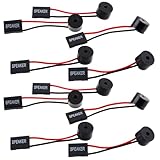
- Essential Tool: This PC motherboard internal speaker is a crucial diagnostic component for any computer build or repair. When you start your computer, the familiar boot 'beep' sound indicates normal system operation. More importantly, specific beep code patterns emitted by this BIOS alarm buzzer help diagnose hardware issues like memory errors, graphics card failures, or power supply problems
- Simple Plug and Play Installation: Installing this computer case speaker is straightforward and requires no technical expertise. It comes equipped with a standard 4-pin female connector designed to match the speaker header pins on the front panel of virtually any motherboard. The wiring is clearly indicated with red for positive and black for negative, though polarity is often interchangeable
- Durable and Reliable Construction: Built for long-term reliability, this motherboard speaker is constructed from sturdy metal and plastic materials. The robust build ensures it won't break easily during installation or from regular system vibrations. Its reliable performance means it will serve you consistently over the long term, providing clear, audible beep codes whenever you power on your PC
- Clear POST Code Audibility: In environments where external multimedia speakers are unnecessary, such as office servers, test benches, or minimalist setups, this internal PC speaker is indispensable. It allows you to hear the essential BIOS beep codes that confirm a successful boot or signal hardware faults
- Versatile Multi-Pack Value: This package includes 10 pieces of motherboard speaker offering exceptional value for frequent builders, repair shops, or IT departments. Each unit features an approximately 3-inch cable to minimize wiring clutter inside the computer case
ErP Ready S4 vs S5 Explained
Many BIOS and UEFI setups let you choose an ErP Ready mode such as S4, S5, or S4+S5. These labels refer to ACPI power states, which describe how “off” the computer really is. The setting matters because ErP compliance is usually achieved by cutting standby power to parts of the motherboard when the PC is not actively running.
S4 is the hibernate state. In S4, the system saves the current session to the storage drive, then powers down most hardware. It looks very similar to shutdown from the outside, but the next boot can restore your previous applications and session if hibernation is enabled in the operating system. If ErP is applied to S4, the motherboard may remove standby power from USB ports, RGB controllers, network wake circuits, and other auxiliary devices while the PC is hibernating.
S5 is the soft-off state. This is the normal “shut down” condition after you power off the computer from Windows, Linux, or another operating system. The PC is not running a saved session, but the power supply still provides a small standby rail to the motherboard unless ErP limits it. That standby power is what allows features such as powering on by keyboard, powering on by mouse, Wake-on-LAN, USB charging while off, and some motherboard LEDs to keep working after shutdown.
| BIOS option | Power state affected | Typical effect |
|---|---|---|
| ErP Ready S4 | Hibernate | Reduces standby power during hibernation, often disabling USB power and wake features while hibernated. |
| ErP Ready S5 | Shutdown | Reduces standby power after a normal shutdown, commonly disabling Wake-on-LAN, USB charging, and keyboard or mouse power-on. |
| ErP Ready S4+S5 | Hibernate and shutdown | Applies the low-power behavior to both hibernate and soft-off states for the lowest standby consumption. |
If your BIOS offers separate choices, S5 is usually the one most users notice because it affects the PC after a regular shutdown. For example, if you shut down the computer and expect your phone to keep charging from a rear USB port, enabling ErP in S5 may stop that. Likewise, a PC that used to wake from a network packet may no longer respond because the network adapter is no longer kept in a wake-ready state.
The S4 option mainly matters if you use hibernation. On desktops, many people rarely use hibernate, so changing S4 behavior may have little visible effect. On systems where hibernate is part of the power plan, or where “Fast Startup” blends shutdown with hibernation behavior, S4-related ErP settings can be more noticeable. If enabling ErP causes unexpected wake or resume behavior, it is worth checking both the BIOS ErP mode and the operating system’s hibernate and fast startup settings.
For the lowest off-state power draw, choose S4+S5 if available. For a compromise, choose only the state you care about: S5 for lower power after shutdown, or S4 for lower power during hibernation. If you rely on off-state USB power, Wake-on-LAN, or turning the PC on from a keyboard or mouse, avoid applying ErP to the state where you need those features to remain active.
When You Should Enable ErP Ready
You should enable ErP Ready if your priority is reducing standby power draw when the PC is shut down or in a deep sleep state. On many desktop systems, a small amount of power continues to feed parts of the motherboard even after shutdown, often to support features like USB power, network wake, or keyboard startup. ErP Ready cuts most of that standby supply so the system can meet very low off-state power targets, commonly around 1 watt or less depending on the motherboard, power supply, and selected ErP mode.
Rank #4

- Type: 5PCS PC computer motherboard alarm buzzer, length 2.3 inches
- Uses: The sound made by the buzzer is used to determine the working status of the motherboard.Easy to install, 4-pin female connector, plug and play, easy to plug into the speaker connector on the front panel of the motherboard
- Wiring: red positive pole, black negative pole (in fact, as long as the interface is connected to the speaker, both positive and negative poles can be used)
- How To Use: After turning on the computer, we will hear the familiar "beep" sound, usually indicating that the computer is working properly, the sound comes from this buzzer. If it is not normal, you can judge the fault by its sound
- 100% brand new and high quality
It is a good setting for PCs that are fully powered off for long periods, such as office desktops after business hours, home computers used only a few times per week, lab machines, classroom PCs, or secondary gaming systems. In these cases, the convenience of powered USB ports or remote wake features may not matter, while the lower idle consumption is useful across many hours of downtime. The savings from one PC may be modest, but across mulle systems or long periods, reducing standby draw can make a measurable difference.
Enable ErP Ready if you do not need off-state power features
- You do not charge devices from the PC while it is off: ErP Ready often disables USB power in shutdown, so phones, headsets, controllers, and other USB devices may stop charging once the system powers down.
- You do not use Wake-on-LAN: Many boards disable the network adapter’s standby power in ErP mode, which prevents the PC from waking through a magic packet after shutdown.
- You do not power on the PC with a keyboard or mouse: USB keyboard and mouse wake or power-on functions may stop working from S5 shutdown, and sometimes from S4 hibernation depending on the BIOS option used.
- You want fewer LEDs on after shutdown: ErP Ready can turn off motherboard lighting, USB device LEDs, and some peripheral standby illumination, although RGB behavior varies by board vendor.
ErP Ready is also worth enabling if your PC is connected to a UPS, power strip, or energy-monitoring plug and you want the lowest possible off-state draw without physically switching off the power supply. It lets the system stay plugged in while behaving more like it is electrically off. This can be useful where access to the rear power supply switch is inconvenient, or where you want to avoid standby lighting in a bedroom, studio, or shared workspace.
What’s actually slowing this PC down?
Pick the symptom - the matching free tool is one click away.
Before enabling it, check which ErP option your BIOS offers. If the menu allows separate modes such as S5 only or S4+S5, choose the one that matches how you use the PC. S5-only is usually the safer choice if you only want reduced power after a normal shutdown. S4+S5 is more aggressive because it can also affect hibernation behavior. After changing the setting, test the exact features you care about: shut the PC down, confirm USB charging stops or continues as expected, check whether Wake-on-LAN still works if needed, and verify that your preferred power button behavior remains normal.
Independent reader supportYour contribution helps us test, update, and keep practical guides available for everyone.When You Should Keep ErP Ready Disabled
You should keep ErP Ready disabled if you rely on your PC providing standby power while it is shut down, hibernating, or in a soft-off state. ErP Ready is designed to cut that standby power to meet very low energy-use targets, but the tradeoff is that several convenience and remote-access features may stop working. If your system needs to respond to a network signal, charge a device through USB, or power certain peripherals while off, disabling ErP Ready is usually the better choice.
One of the most common reasons to leave ErP Ready disabled is Wake-on-LAN. Many desktop PCs, home servers, and office workstations are configured to wake remotely for file access, backups, remote desktop sessions, software updates, or maintenance tasks. Wake-on-LAN depends on the network adapter receiving standby power after shutdown or hibernation so it can listen for a magic packet. With ErP Ready enabled, that standby power may be removed, meaning the system will not wake over the network even if the operating system and network driver settings are configured correctly.
You may also want ErP Ready disabled if you use your motherboard’s USB ports for charging devices while the PC is off. Some systems provide power to USB ports after shutdown so you can charge a phone, headset, controller, wireless mouse, or other accessory without turning the computer on. Enabling ErP Ready often disables this behavior because USB standby power is one of the things the setting is intended to reduce. This can also affect RGB devices, USB hubs, external DACs, and peripherals that show charging lights or remain partially active after shutdown.
Situations where disabling ErP Ready makes sense
- You use Wake-on-LAN: Leave ErP Ready disabled if you need to wake the PC remotely from another computer, router, phone app, or management tool.
- You charge devices from USB while the PC is off: Disable ErP Ready if your keyboard, mouse, headset, phone, or controller needs standby USB power.
- You wake the PC with a keyboard or mouse: Some systems require USB standby power for wake from sleep, hibernation, or soft-off states.
- You use scheduled maintenance or remote administration: Office PCs and home servers often need network availability even when they appear powered down.
- You depend on motherboard convenience features: Features such as BIOS Flashback, powered USB ports, and certain onboard LEDs may require standby power, depending on the board design.
ErP Ready can also interfere with wake behavior from keyboards, mice, and other USB devices. On some motherboards, enabling ErP only affects the fully shut down S5 state; on others, it may also affect hibernation or deeper sleep states. If you expect to press a key, move the mouse, or use a USB receiver to wake the system, and that stops working after enabling ErP, the setting is a likely cause. In that case, either disable ErP Ready or check whether your BIOS offers separate options for USB power, wake from S4/S5, PCIe wake, or onboard LAN wake.
Best Value

- AM4 socket: Ready for AMD Ryzen 3000 and 5000 series, plus 5000 and 4000 G-series desktop processors.Bluetooth v5.2
- Best gaming connectivity: PCIe 4.0-ready, dual M.2 slots, USB 3.2 Gen 2 Type-C, plus HDMI 2.1 and DisplayPort 1.2 output
- Smooth networking: On-board WiFi 6E (802.11ax) and Intel 2.5 Gb Ethernet with ASUS LANGuard
- Robust power solution: 12+2 teamed power stages with ProCool power connector, high-quality alloy chokes and durable capacitors
- Renowned software: Bundled 60 days AIDA64 Extreme subscription and intuitive UEFI BIOS dashboard
For most users, the choice is about convenience versus a small reduction in standby power. If your PC is plugged into a power strip that you switch off, or you do not use any wake or charging features, ErP Ready is easy to enable. But if the computer acts as a remote workstation, media server, backup target, or charging station, keeping ErP Ready disabled avoids confusion and preserves the features that depend on standby power.
Frequently Asked Questions
Should I enable ErP Ready in BIOS?
Enable ErP Ready if you want your PC to use as little power as possible when it is shut down or in hibernate, especially to meet low standby power targets. Keep it disabled if you rely on features like USB charging while the PC is off, Wake-on-LAN, or powering on the computer with a keyboard or mouse.
Does ErP Ready stop USB ports from working when the PC is off?
In many systems, yes. Enabling ErP Ready usually cuts standby power to USB ports in shutdown states, so phones may stop charging and USB keyboards or mice may not light up or wake the PC. The exact behavior depends on the motherboard and which ErP mode is selected.
Will Wake-on-LAN still work if ErP Ready is enabled?
Usually Wake-on-LAN from a full shutdown will not work with ErP Ready enabled because the network adapter may no longer receive standby power. Some motherboards allow limited wake features in certain sleep states, but if you need reliable Wake-on-LAN, it is safer to leave ErP Ready disabled and check the BIOS power management options.
What is the difference between ErP Ready S4 and S5?
S4 refers to hibernate, where the system saves the session to storage and powers down most hardware. S5 refers to soft off, which is the normal shutdown state. If your BIOS offers ErP for S4+S5, it applies the low-power behavior to both hibernate and shutdown; if it only applies to S5, hibernate may keep more wake or standby features available.
Can ErP Ready cause my RGB lights, keyboard, or mouse to turn off after shutdown?
Yes. One of the most visible effects of enabling ErP Ready is that motherboard RGB, USB device lighting, and powered peripherals may turn off after shutdown because standby power is reduced or removed. If you want lights, charging, or peripheral power to remain active while the PC is off, leave ErP Ready disabled.
Bottom Line
ErP Ready is a BIOS power-saving option that helps your PC meet low standby-power requirements by cutting power to certain features while the system is shut down or in deep sleep. Enabling it can reduce off-state power use, but it may also disable USB charging, Wake-on-LAN, and keyboard or mouse wake functions depending on your motherboard.
The Tool Desk
Outbyte PC Repair FREEClear out junk files and repair common Windows errorsFree Scan →Outbyte Driver Updater FREEScan for outdated or missing drivers - takes under a minuteDriver Scan →Turn ErP Ready on if you want the lowest idle/off power draw and do not rely on remote wake or powered USB ports when the PC is off. Leave it disabled if you need Wake-on-LAN, charging accessories from USB, or waking the system with a keyboard or mouse.
Quick Recap
Product prices and availability are accurate as of the date/time indicated and are subject to change. Any price and availability information displayed on Amazon at the time of purchase will apply.




