Free tools Windows power users keep installed
One-click scans. No signup required.
An analog telephone adapter (ATA) connects a traditional analog phone or other compatible telephony device to an IP telephone network. It bridges the device’s phone connection to Ethernet, but it does not provide VoIP service on its own: you also need compatible VoIP service or call control, such as a compatible phone system.
What is an analog telephone adapter?
An ATA is a hardware adapter that lets an analog device—such as a desk phone—work with an IP-based telephone system. Cisco describes its ATA 191 as a “2-port handset-to-Ethernet adapter.” In practical terms, the analog device plugs into the ATA, and the ATA connects to the network. The ATA then works with compatible VoIP service or call control to handle calls.
As an Amazon Associate I earn from qualifying purchases.
As Cisco puts it in its ATA 191 user guide, “Your analog telephone adapter (ATA) allows you to connect an analog device, such as an analog phone or fax machine, to your network.”
How does an ATA connect an analog phone to VoIP?
The adapter translates between the analog device’s telephone connection and the IP telephony environment. A typical installation connects the phone to an FXS port on the ATA, then connects the ATA to the local network over Ethernet. The VoIP service or phone system supplies the call control; SIP is one signaling protocol used in packet telephony, and Cisco documents SIP support for its ATA product.
#1 Best Overall

- Supports 2 SIP profiles through 2 FXS ports and a single 10/100Mbps port
- TLS and SRTP security encryption technology to protect calls and accounts
- Automated provisioning options include TR-069 and XML config files
- LED indicators - POWER, NET, PHONE1, PHONE2 Supports 3-way voice conferencing Failover SIP server automatically switches to secondary server if main server loses connection
- Supports T.38 Fax for creating Fax-over-IP
- Connect the analog device: Plug the phone or other supported equipment into the ATA’s FXS port using the phone connection specified by the device.
- Connect to the network: Connect the ATA’s Ethernet port to the network used by the VoIP service or phone system.
- Set up call control: Configure the ATA to work with a compatible VoIP provider or PBX, following that system’s setup instructions. The exact configuration depends on the ATA and service.
What do FXS and FXO ports mean?
FXS and FXO describe different telephone interfaces; they are not interchangeable labels for the same port.
- FXS (Foreign Exchange Station): The phone-facing port used to connect an analog phone or other analog device to the ATA. Cisco identifies the ATA 191’s RJ-11 FXS ports as connections for standard analog phones.
- FXO (Foreign Exchange Office): An interface used toward a traditional PSTN telephone line. Some adapters include both port types. For example, Grandstream describes the HT813 as having one FXS port and one PSTN-line FXO port.
What should you check before choosing an ATA?
Choose an ATA based on the equipment and phone system you intend to use. Specifications differ by model, and a port count or compatibility claim for one product does not apply to all adapters.
Rank #2

- Single Port Connectivity: Supports 1 SIP profile through a single FXS port and a single 10/100Mbps port
- Advanced Security Features: TLS and SRTP security encryption technology to protect calls and accounts
- Flexible Provisioning Options: Automated provisioning options include TR-069 and XML config files
- Multi-Party Conferencing: Supports 3-way voice conferencing for enhanced communication capabilities
- Reliable Failover Protection: Failover SIP server automatically switches to secondary server if main server loses connection
- Provider or PBX compatibility: Verify that the intended VoIP provider or phone system supports the specific ATA and its configuration. For example, Cisco’s ATA 191 data sheet describes two RJ-11 FXS ports and one Ethernet port. Cisco’s multiplatform version documents two standard FXS ports that can be configured independently as SIP registrations and names supported call-control systems; these are product-specific details, not a promise of universal compatibility.
- Number of analog devices: Check how many FXS ports are available and whether they meet your needs. The ATA 191’s two FXS ports are a specification of that model, not a general ATA feature.
- Need for a PSTN line: If the setup must connect to a traditional telephone line, check whether an FXO port is required. The Grandstream HT813 is one example of a model that combines an FXS port and a PSTN-line FXO port.
- Specialized equipment: Confirm support for fax machines, paging systems, or other equipment before connecting it. Cisco lists phones, fax machines, and overhead paging devices among possible connected devices, but that does not guarantee every device or feature will work with every ATA and service.
What an ATA does—and does not do
An ATA provides the connection between compatible analog equipment and an IP telephone system. It is not a VoIP subscription, and owning one alone does not establish telephone service. Compatibility also depends on the adapter’s model, the service or PBX, and the connected equipment.
Quick wins for a faster PC:
Scan for outdated or missing drivers - takes under a minuteDriver Scan →Clear out junk files and repair common Windows errorsFree Scan →Fix the driver behind crashes, sound loss and screen glitchesFind Drivers →Quick Recap
Best Value

- VERSATILE: IP phone adapter brings traditional analog devices into the IP world
- AUDIO: Clear, natural-sounding voice quality via advanced preprocessing, high-performance echo cancellation, voice activity detection, and comfort noise generation
- SECURITY: Supports the latest encryption with Transport Layer Security (TLS), Secure Hash Algorithm (SHA-2) and new Secure Real-time Protocol (sRTP) cipher suites
- HARDWARE: Two RJ-11 FXS ports and one 10/100 Mbps RJ-45 Ethernet port
- PEACE OF MIND: 1-year limited hardware warranty
Rank #4
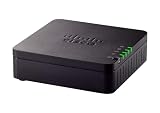
- VERSATILE: IP phone adapter brings traditional analog devices into the IP world
- AUDIO: Clear, natural-sounding voice quality via advanced preprocessing, high-performance echo cancellation, voice activity detection, and comfort noise generation
- SECURITY: Supports the latest encryption with Transport Layer Security (TLS), Secure Hash Algorithm (SHA-2) and new Secure Real-time Protocol (sRTP) cipher suites
- HARDWARE: Two RJ-11 FXS ports and one 10/100 Mbps RJ-45 Ethernet port
- PEACE OF MIND: 1-year limited hardware warranty
Rank #3

- Supports 2 SIP profiles and 2 FXS ports
- Strong AES encryption with security certificate per unit
- Supports T.38 Fax for reliable Fax-over-IP
- High performance NAT router
- 3-way voice conferencing per port
Product prices and availability are accurate as of the date/time indicated and are subject to change. Any price and availability information displayed on Amazon at the time of purchase will apply.




