Outdated Drivers Are Slowing You Down
One free scan finds every outdated or missing driver and matches the right update for your exact hardware.Free scan · exact hardware matchPC Slower Than It Used to Be?
A free scan shows the junk files, broken settings and background clutter dragging Windows down - then fixes them in one click.Free scan · Windows 10 & 11A virtual medical visit is a clinical encounter conducted remotely: a patient and a healthcare professional communicate through electronic technology instead of meeting in the same place. Video is a common option, but a visit may also use a live audio call or an exchange of information that the clinician reviews later.
What counts as a virtual medical visit?
In everyday patient-facing language, a virtual medical visit is a remote encounter in which a patient and clinician discuss a health concern or provide care using electronic communications. The US Department of Health and Human Services (HHS), presenting the Health Resources and Services Administration’s definition, describes telehealth more broadly as technology used to support long-distance clinical care, health-related education, and public health or health administration. That umbrella includes activities beyond an individual medical visit. HHS explains the broader definition here.


As an Amazon Associate I earn from qualifying purchases.
The technology can include videoconferencing, internet-based communication, submitted images, streaming media, or landline and wireless communications. HHS’s FAQ notes that telehealth may use “audio, text messaging, or video communication technology, including videoconferencing software.” The format depends on the service and how the patient and clinician communicate.
The Tool Desk
Outbyte Driver Updater FREEFix the driver behind crashes, sound loss and screen glitchesFind Drivers →Outbyte PC Repair FREERepair Windows errors before they cause bigger problemsFix Now →Does a virtual visit have to be on video?
No. Video is one way to hold a virtual visit, not a requirement for the everyday meaning of the term. The key distinction is whether the patient and clinician communicate remotely using electronic technology; the interaction may be live or may involve information sent for later review.
#1 Best Overall
Live audio or video
Synchronous care happens in real time. The patient and clinician interact at the same time, such as in a video appointment or a live audio-only call. This format allows a conversation as it happens. HHS outlines these synchronous options in its guide to synchronous direct-to-consumer telehealth.
Information reviewed later
Asynchronous care does not involve a live conversation. A patient may send information, such as an image or message, and a clinician reviews it later. This is often described as “store and forward.” It is remote care, though whether a particular exchange is called a visit can depend on the service and context. HRSA’s guide to getting started with telehealth describes these different approaches.
Rank #2

- Capture the moment: With sharp, vibrant 1080p resolution, every video call looks more natural, with better brightness, richer colors, and smoother motion. Whether you’re leading a meeting or catching up with family, they’ll see you exactly as they should.
- Be heard, loud, and clear: No more muffled audio or repeating yourself. With dual built-in microphones, your voice comes through clear, natural, and balanced—so whether you’re speaking softly or laughing out loud, you sound just right.
- Total privacy, in a snap: When you’re not on a call, just slide the built-in privacy shutter closed, and rest easy knowing your camera is completely off.
- Tilt Degree: -20°~10°; Monitor Thickness: 4 mm ~ 40 mm; Maximum Resolution: 1080P; Frame Rate: 30 fps; FOV: 85°
- Connection: USB-A 2.0; Cable Length: 1.8m Integrated Cable; Power Consumption: 5V/1A
Is telehealth the same as telemedicine?
The terms overlap, but they are not interchangeable in every context. The American Medical Association describes telemedicine historically as remote clinical services, while telehealth can be a broader term covering a wider range of synchronous and asynchronous services. In practice, an organization or payer may use narrower definitions for a specific purpose. The AMA’s definitions overview discusses this distinction.
Recommended Free Tools
How is a virtual visit different from remote monitoring?
Remote patient monitoring involves collecting and transmitting a patient’s data from outside a healthcare office so a care team can use it for clinical decisions or follow-up. Monitoring may be part of ongoing care, but monitoring by itself is not necessarily a visit. The AMA notes that CMS does not currently classify remote monitoring as telehealth for its purposes, illustrating why terminology can vary by program.
Rank #3
What can a virtual medical visit address?
HHS lists examples of synchronous direct-to-consumer telehealth that include acute care assessments, primary care, and behavioral health visits. These are examples of possible uses, not a guarantee that every condition can be assessed or treated remotely. Whether a virtual appointment is appropriate depends on the individual concern and the clinician’s assessment; some situations may require an in-person examination or other care.
Independent reader supportYour contribution helps us test, update, and keep practical guides available for everyone.Does Medicare use the same definition?
Not necessarily. HHS uses telehealth as a broad concept, while Medicare materials distinguish among program-specific services and payment categories. CMS describes Medicare telehealth visits as real-time interactive communications with audio and visual capability and separately discusses virtual check-ins and remote evaluation of submitted images. Those billing and coverage categories do not define every kind of virtual care in ordinary use. CMS’s Medicare Telemedicine Health Care Provider Fact Sheet describes those distinctions; coverage rules can change, so check the current rules for the payer, location, service, and date involved.
Quick Recap
Best Value

- 1080P Full HD Webcam for Streaming & Zoom Calls ✅ Experience professional-grade video with this HD webcam, delivering crystal-clear 1920x1080 resolution at a smooth 30fps. The advanced CMOS sensor makes this the perfect computer camera for streaming on Twitch or YouTube, capturing vibrant, lifelike colors for truly clear video calls and recordings
- Superior Low-Light Performance & Auto-Correction ✅ Look your best in any environment. This PC webcam features smart light-adjustment technology that automatically balances brightness and enhances colors, making it an ideal gaming webcam or office camera. Say goodbye to grainy or dim video, even in rooms with poor lighting, ensuring you always present a clear, professional image
- AI Noise-Canceling Webcam with Microphone ✅ Sound like a pro with studio-quality audio. This webcam with microphone features dual mics powered by AI noise reduction to effectively eliminate distracting background sounds like keyboards, fans, and chatter. Your voice remains the focus, making this web camera perfect for important conferences, clear online classes, and professional streams
- Plug & Play Webcam with Privacy Cover ✅ Get started in seconds. This USB camera is a true plug and play webcam – no drivers needed. The convenient 5ft (1.5m) cable provides flexible placement on any laptop or desktop. Plus, the integrated sliding webcam privacy cover gives you instant peace of mind, protecting your lens and securing your privacy when the camera is not in use
- Universal Compatibility - The Ideal Webcam for PC & Mac ✅ Works with everything you use. This versatile webcam for desktop and laptop camera seamlessly connects to Windows 7/8/10/11, Mac OS, and Linux. It’s fully compatible with all major platforms including Zoom, Microsoft Teams, Skype, Twitch, and YouTube. Whether you need a reliable webcam for Mac or a high-performance webcam for PC, this is your all-in-one solution
Rank #4
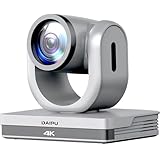
- 【3-Year Warranty】Risk-free shopping. Expert assistance and responses within 24 hours. Remote training and support available upon request. Rest assured, DAIPU remains committed to providing lifelong customer support.
- 【PTZ Camera 4K】: The daipu ptz camera 4k offers UHD image quality with a max resolution of 4k, featuring an 8.29-megapixel, 1/2.8" high-quality CMOS image sensor, can output a frame rate of up to 30 fps, providing you with an exceptional visual experience.
- 【HDMI|USB3.0|LAN|PoE|RS232|VISCA|PELCO-D/P】: The daipu auto tracking ptz camera 4k features a wide range of interfaces, including HDMI, LAN (supports POE), USB 3.0, RS232-IN, DC 12V power supply, also supports multiple control protocols such as VISCA, PELCO-D/P etc.(further content pl click 'show more')
- 【16X Digital Zoom & 12X Optical Zoom】:The 12x optical zoom and 16x digital zoom of the daipu ptz camera 4k, along with advanced autofocus algorithms, enable the lens to quickly, accurately, and stably lock onto subjects or scenes.(further content pl click 'show more')
- 【AI Auto Tracking】: The daipu ptz camera 4k make it possible for users to select real-time or area tracking based on the usage environment, and switch tracking targets by clicking on the person object box on the web page. Real-time tracking has max tracking distance of 22.97ft and supports speakers walking at speeds of 4miles/h. Area tracking supports the setup of 4 tracking areas. Person tracking allows users to select the tracking target by clicking on the person object box via web interface.(further content pl click 'show more')
How to identify the kind of virtual care being offered
- Timing: Is the interaction live, or will a clinician review information later?
- Communication method: Is it by audio, video, messaging, or submitted images?
- Type of service: Is it a clinical encounter, a brief check-in, or ongoing monitoring?
- Coverage: If payment matters, what does the relevant insurer or program currently cover for that specific service?
Product prices and availability are accurate as of the date/time indicated and are subject to change. Any price and availability information displayed on Amazon at the time of purchase will apply.




