A payment gateway securely captures or transmits a customer’s payment details from checkout into the payment-processing system, then returns the transaction response. It is one part of the payment journey—not necessarily the processor, the customer’s bank, or the service that handles every step before money reaches your business.
How a payment gateway works
For a typical card purchase, payment information travels from checkout through several organizations before a business receives the funds. Stripe describes the gateway’s role this way: “When a customer makes a purchase, the gateway securely transmits the payment information to the processor for authorization and completion.” (Stripe, Small Business Payment Processing: A Guide.)
As an Amazon Associate I earn from qualifying purchases.
- The customer submits payment details. This happens on a website or app, or through a point-of-sale system.
- The gateway passes the information securely into the processing chain. It may authenticate or encrypt details and sends them onward so the transaction can be evaluated.
- The processor and acquiring side route the request. The transaction travels through the relevant payment network to the bank that issued the customer’s card.
- The issuer approves or declines. Its response travels back through the network and processing chain to the business’s checkout.
- An approved transaction is captured and later settled. Funds reach the merchant through its acquiring arrangement, generally after fees are deducted.
The steps and provider arrangement can vary. A gateway is the checkout-facing link in the chain; it does not, by itself, mean every part of processing or settlement is complete.
Gateway, processor, banks, and card network: what is the difference?
These names refer to different roles, even though a provider may bundle or abstract some of them. Visa’s overview of the payment flow describes the broader path between merchant and customer sides.
#1 Best Overall
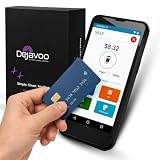
- Honest & Transparent Merchant Accounts: Brought to you by 8 Seconds Processing, a family-owned company dedicated to integrity, proven results, and zero bait-and-switch tactics. We provide seamless merchant onboarding, rapid payouts, and reliable payment infrastructure supported by our dedicated customer service team.
- Compact Payments In The Palm Of Your Hand: Driven by secure Dejavoo hardware and software technology, the P5 is an ergonomic, lightweight mPOS system designed for ultimate handheld portability. Perfect for delivery drivers, curbside pickup, line busting during peak hours, and compact retail setups.
- Integrated Barcode Scanning & Android OS: Run a highly efficient mobile checkout with a fast quad-core 2.0GHz processor running a secure Android operating system. Featuring an integrated barcode scanner, 1GB RAM, and 8GB ROM, this smart terminal allows your staff to manage inventory and transactions simultaneously on the go.
- Universal Tap, Chip, & Digital Wallets: Seamlessly accept all major payment brands and networks. The P5 features an integrated contactless NFC reader with full EMV certification and IC card capability, allowing customers to pay effortlessly via traditional chip cards, Apple Pay, Google Wallet, and Samsung Pay.
- Blazing Fast Hybrid Connectivity: Keep your mobile business moving without interruptions. The P5 is equipped with comprehensive Wi-Fi, 4G cellular network, and Bluetooth capabilities, ensuring an always-on connection to your payment gateway for lightning-fast authorizations anywhere your business takes you.
- Payment gateway: Captures or transmits payment data from checkout and returns the transaction response.
- Payment processor: Handles transaction communications and processing tasks, including interactions with payment networks and banks.
- Acquirer (acquiring bank): Supports the business’s acceptance of card payments and its merchant-side settlement relationship.
- Issuer (issuing bank): The customer’s bank, which decides whether to authorize the payment.
- Card network: Routes messages between the acquiring and issuing sides under its network rules.
A small business may use a provider that combines several of these functions. Describe the arrangement you actually have rather than assuming you need to sign up separately for a gateway, processor, and merchant account.
Why approval is not the same as receiving the money
An approval means the issuer authorized the transaction; it does not mean the funds have already arrived in your business bank account. Authorization and settlement are separate stages. After an approved payment is captured, clearing and settlement take place through the merchant’s acquiring arrangement. The payout timing depends on the provider and setup, so check the terms that apply to your account. Visa’s payment-processing overview explains the flow; it does not establish one payout schedule for all providers.
Rank #2

- Accept all major credit and debit cards and pay one low rate
- No hidden fees and no long-term contracts
- Mobile card reader that accepts payments anywhere & anytime
- Use the free SumUp App on your smartphone or tablet to start accepting transactions
- Simply pay 2.6% +10 per in-person transaction
What payment gateway providers should a small business compare?
Compare the service with your sales channels, tools, and operational needs—not just a headline transaction rate. Payment methods and features vary by provider and setup; for example, Visa Acceptance Solutions describes Authorize.net as supporting cards, wallets, eChecks, recurring payments, security and fraud-screening tools, and reporting on its Authorize.net product page. That is a provider-specific example, not a claim that every gateway includes those features.
What’s actually slowing this PC down?
Pick the symptom - the matching free tool is one click away.
- Payment methods: Check whether you need cards, digital wallets, bank payments, or recurring billing, and confirm that the provider supports them in your market.
- Sales channels: Make sure the service works for the channels you use, such as ecommerce, in-person sales, mobile payments, or a combination.
- Integration: Confirm compatibility with your website or shopping cart, accounting tools, and point-of-sale setup.
- Security and fraud controls: Ask how payment data is handled, whether tokenization or fraud screening is available, and which security duties remain yours.
- Operations and support: Compare payout timing, reporting and reconciliation tools, dispute handling, and access to customer support.
- Total fees: Review transaction charges, monthly costs, and other applicable fees. Provider fees and payouts depend on the service and setup; get current quotes for your business rather than treating one rate as universal.
Stripe reported that US businesses paid US$187.2 billion in payment-processing fees in 2024 in its small-business payment-processing guide. That is Stripe’s reported figure, not an independently verified market total here; it illustrates why comparing the full fee schedule matters.
Rank #3

- Pay one transparent rate per swipe for Visa, Mastercard, Discover and American Express.
- Works in conjunction with most downloadable Square point-of-sale apps on your device. Customers can pay, tip and sign directly on your device. Track payments in cash, gift cards and more. Also lets you send receipts via e-mail or text message, makes it easy to apply discounts, keeps a data and sales history log and more.
- Accepts magstripe credit card payments, including those from Visa, Mastercard, Discover and American Express (fees apply).
- App sends deposits to your bank account within 1 to 2 business days, or enjoy instant deposits (fees apply).
What PCI DSS responsibilities remain when you outsource payment processing?
Using a third-party gateway or processor does not automatically remove your payment-security responsibilities. The PCI Security Standards Council says a merchant that outsources payment processing should ensure the provider is PCI DSS compliant for the service, have written agreements acknowledging responsibilities, monitor the provider’s compliance at least annually, understand shared responsibilities, and validate its own applicable compliance status. See the Council’s guidance on outsourcing payment processing.
PCI DSS is intended for entities involved in payment processing regardless of merchant size or transaction volume. A small business may have a simpler environment and less compliance work, but that does not make it automatically exempt. Payment brands determine validation requirements; ask your acquirer or payment brand what applies to your specific setup. The PCI SSC explains this in its small-merchant guidance and PCI DSS overview.
Quick Recap
Best Value

- Fully Compliant - Complies With All Major Industry Standards, Including Iso/Iec 7816, Usb Ccid, Pc/Sc, And Microsoft Whql. As Well As, Emv 2011 Ver 4.3 Level 1 And Gsa Fips 201.
- Seamless Integration - With Identiv-Specific Smartos You’Ll Get Easy, Complete Support Of All Major Contact Smart Card Ics And Technologies In One Simple Reader.
- Universal Compatibility - Works With Virtually All Contact Chip Cards And Pc Operating Systems, Including Windows, Macos, Linux And Android.
- Fast And Convenient- Shorten Your Transaction Time With A Reader That’S Optimized For Speed. It’S Ultra-Compact And Robust Design Is Streamlined For Mobile Operation, Making This Reader The Best Choice For Convenience, Security And Reliability.
- Ergonomic and cost efficient design
Rank #4

- An intuitive interface to easily accept payments and manage your sales.
- Strong, reliable Wi-Fi connection. Free SIM card and mobile data so you can process payments anywhere.
- Great battery capability with an additional charging station.
- A truly portable device. Stay in control of your business, wherever you go.
- Support when you need it. Get in touch with our US-based support through phone, email and chat.
Product prices and availability are accurate as of the date/time indicated and are subject to change. Any price and availability information displayed on Amazon at the time of purchase will apply.
The Tool Desk
Outbyte PC Repair FREERepair Windows errors before they cause bigger problemsFix Now →Outbyte Driver Updater FREEFix the driver behind crashes, sound loss and screen glitchesFind Drivers →



