The Tool Desk
Outbyte Driver Updater FREEScan for outdated or missing drivers - takes under a minuteDriver Scan →Outbyte PC Repair FREERepair Windows errors before they cause bigger problemsFix Now →A digital audio workstation (DAW) is a device or software application for recording, editing, and producing audio. In everyday computer-based music production, “DAW” usually means the software at the center of the work: it lets you arrange recorded sound and MIDI, add instruments and effects, mix tracks, and export finished audio. The wider setup may also include a computer and optional audio or MIDI equipment.
What is a DAW?
The standards organization DDEX defines a DAW as “an electronic device or computer software application for recording, editing and producing audio files,” including songs, speech, and sound effects. In practice, the term can refer either to the central software or, more broadly, to an integrated hardware workstation or a computer-based audio-production system. Those meanings are compatible: the software is often the hub of a setup that may include other equipment.
As an Amazon Associate I earn from qualifying purchases.
A DAW is not simply a music player. It is a production environment for capturing, changing, organizing, and combining audio.
Quick wins for a faster PC:
Clear out junk files and repair common Windows errorsFree Scan →Scan for outdated or missing drivers - takes under a minuteDriver Scan →What can you do with a DAW?
Common capabilities include multitrack recording, arranging, MIDI sequencing, software instruments, audio editing, effects, mixing, and exporting. A typical project might combine recorded vocals or instruments with MIDI parts, apply effects to individual tracks, balance the sound, and export a shareable audio file. Exact features and workflows vary by program.
#1 Best Overall

- Tight integration with included Studio One Artist and Ableton Live (live 10 Lite included) music production software gets your mind off the screen and back on the beat.
- Produce, play virtual instruments, and trigger samples and loops with unsurpassed expressiveness and flexibility.
- Trigger loops and effects and play virtual instruments with 16 full-size velocity- and pressure-sensitive, RGB LED pads (and 8 assignable pad banks).
- Comes with over $1000 of computer recording software plug-ins – Studio Magic Plug-In Suite.
- Selectable pad velocity curves and pressure thresholds customize the pads' response for maximum expression.
- Record: Capture audio such as vocals, instruments, or speech.
- Arrange and edit: Organize audio clips and MIDI parts, then adjust or refine them.
- Create sounds: Use MIDI to control software instruments, and apply effects or plugins.
- Mix and export: Balance tracks and produce an audio file for sharing or further use.
What is a DAW used for besides making music?
DAWs are used wherever people need to record or manipulate audio. Alongside songs and musical pieces, that includes speech, sound effects, podcasts, radio, television, film, and games. The same core tools can support very different workflows, from composing a track to editing dialogue or building a soundscape.
What equipment does a DAW need?
For a computer-based setup, the DAW software runs on a computer and uses its built-in sound hardware or a separate audio interface. The audio source might be a microphone, instrument, or MIDI device. An interface can help connect microphones and instruments to the computer; a MIDI controller can provide hands-on control or let you perform MIDI parts that trigger software sounds.
Rank #2

- Tactile Control, Visual Feedback: LCD keys, touch strip, and dials for audio, video, lighting, and more. Know that your command has been executed.
- Fully Customizable: Use as an audio mixer, studio controller, production console, etc.
- Multi Actions, Smart Profiles: trigger multiple actions at once or sequentially, automatically switch between interface configurations for different apps.
- Powerful Plugins: Elgato Wave Link, Camera Hub, Control Center, OBS, Twitch, YouTube, Twitter, Discord, Spotify, Philips Hue, and many more
- Stream Deck App and Store: drag and drop setup, download plugins, icons, thousands of royalty-free tracks, SFX, and more. Regular updates and new plugins frequently added.
These devices are options for particular tasks, not universal requirements. The equipment depends on what you want to record or perform and on the computer and software you use.
Do these 3 things before closing this tab:
1Repair Windows errors before they cause bigger problems2Scan for outdated or missing drivers - takes under a minute3Clear out junk files and repair common Windows errorsHow should you compare DAWs?
There is no universally best DAW for every kind of work. Start with the task and workflow you want, then check the details that affect your setup:
Rank #3
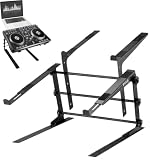
- DUAL ERGONOMIC DESIGN: This is a safe and reliable laptop stand due to its secure prongs that form the dual trays. It can be used for laptops, DJ mixer, turntables, and other sound equipment devices. Perfect for home, gaming, school or business use
- ADJUSTABLE HEIGHT: The standing table has a height adjustment feature to accommodate all needs. The rods and the holes on the supports can be adjusted easily for comfort and convenience
- ANTI-SLIP PRONGS: Made of anti-slip prongs and no loose parts to avoid accidental slides or falls. The prongs or brackets are also adjustable to fit several devices. The top bracket’s width is 9.4-11.4’’ and the bottom bracket width is 11.4-13.4”
- PORTABLE: The unit is very easy to assemble or disassemble for portability. It comes with complete manual instructions. It is best used when traveling, hosting a party for sound equipment and more
- DURABLE CONSTRUCTION: Constructed with heavy duty durable materials for unmatched quality. Steel is the main material used and the maximum weight load capacity is 33 lbs. The assembled dimension (L x W x H) is 14.0’’ x 26.4’’ x 13.4’’
- Workflow: Consider whether you mainly need multitrack recording, electronic composition, live performance, sound design, or audio post-production.
- Included content: Check the virtual instruments, effects, and sound libraries supplied with the software.
- Plugin support: If you rely on third-party plugins, confirm that the DAW supports the ones you need.
- Hardware integration: Check compatibility with your audio interface, MIDI controller, and other equipment.
Product features, supported platforms, and hardware compatibility can change between versions, so confirm current details with the software publisher before choosing.
Quick Recap
Product prices and availability are accurate as of the date/time indicated and are subject to change. Any price and availability information displayed on Amazon at the time of purchase will apply.




