Recommended Free Tools
A disc-drive Xbox Series X can play DVD, Blu-ray and Ultra HD Blu-ray movies, plus Xbox One game discs and supported Xbox 360 and original Xbox games. Older games are not all compatible: check the specific title in Xbox’s backward-compatibility catalog. Xbox also sells an all-digital Series X, so confirm your console has an optical drive before inserting or buying discs.
Xbox Series X disc compatibility at a glance
| Disc | What works | What you need to know |
|---|---|---|
| DVD movie | Supported | Install the Blu-ray Player app from the Store. Xbox’s Series X|S FAQ lists DVD playback. |
| Blu-ray movie | Supported | Install the Blu-ray Player app from the Store. Xbox’s Series X|S FAQ lists Blu-ray playback. |
| Ultra HD Blu-ray movie | Supported | Install the Blu-ray Player app from the Store. Xbox identifies 4K UHD Blu-ray drives on its disc-drive Series X models. Xbox Series X product page |
| Xbox One game | Supported games | Compatibility applies to supported games, not necessarily every disc or title. The disc-based game must be installed and the disc is needed to play. Xbox Series X product page |
| Xbox 360 game | Backward-compatible titles only | Check the specific game in Xbox’s backward-compatibility catalog. A supported disc game downloads to console storage, and the disc must remain in the drive to play. Xbox Series X product page |
| Original Xbox game | Backward-compatible titles only | Check the specific game in Xbox’s backward-compatibility catalog. A supported disc game downloads to console storage, and the disc must remain in the drive to play. Xbox Series X product page |
Can Xbox Series X play DVDs?
Yes, if your Series X has a disc drive. For movie playback, install the Blu-ray Player app from the Store; Xbox lists DVDs among the supported movie formats in its Series X|S FAQ.
As an Amazon Associate I earn from qualifying purchases.
Can it play Blu-ray and 4K Blu-ray movies?
Yes. The disc-drive Series X supports standard Blu-ray and Ultra HD Blu-ray movie discs. Install the Blu-ray Player app from the Store to play movie discs. Xbox’s product page identifies 4K UHD Blu-ray optical drives on its Carbon Black and 2TB Galaxy Black models.
Do these 3 things before closing this tab:
1Clear out junk files and repair common Windows errors2Fix the driver behind crashes, sound loss and screen glitches3Repair Windows errors before they cause bigger problemsDo Xbox 360 and original Xbox discs work?
Some do, but compatibility depends on the individual game. A disc from either older generation is not enough by itself to establish that the title will run. Search for the game in Xbox’s backward-compatibility catalog before relying on it.
#1 Best Overall

- Blu-Ray DVD Disc Drive Deck with Laser Lens Module Replacement Compatible with Microsoft Xbox One /One S/One X/Series X /Series S
- Tips: This is Blu-Ray DVD Disc Drive Deck with Laser Lens Module replacement to replace your old one, don't include instructions, please install it by a professional technician.
- Broken your Blu-Ray DVD Disc Drive Deck with Laser Lens Module, don't need to change new machine, just buy this item and replace your damage one, let your Device work again.
- Compatible with: Microsoft Xbox One /One S/One X/Series X /Series S (Please check your machine model before your purchase)
- Product is fragile, easy to be damage during shipping. So if there are any questions, please contact us first, we will try our best to help you.
For a supported disc game, inserting the disc starts a download to the console’s storage. Keep the disc in the drive to play; it serves as the license check even though the game is installed digitally. Xbox describes this process on its Series X product page.
Check whether your Series X has a disc drive
Not every console called Xbox Series X accepts physical media. Xbox’s current product lineup includes drive-equipped Carbon Black and 2TB Galaxy Black models as well as a 1TB all-digital Series X. Check the exact model or SKU and look for an optical disc slot before buying discs or expecting to use ones you own.
Rank #2

- Replacement for Lite-On DG-6M5S drive for xbox one s (Slim) console. Not fit for xbox one ,xbox one x game console.
- Compatible with all Xbox One S Liteon DG-6M5S drives.
- The product is not plug and play, and two wires need to be soldered.
- An original replacement Blu-ray disc drive for Xbox one s (Slim).Watch video on YouTube,please take your old circuit board from your old drive and install it into the new drive.
- NOTE: Only Fit for Xbox One S (Slim) Console, NOT for Xbox One/ One X or 360 360 S 360 E Consle. Please check The model of your console before purchasing.
Do not confuse that all-digital Series X with the Series S: Xbox’s 2020 FAQ says Series S is fully digital and does not support external USB disc drives. That Series S statement does not establish anything about connecting an external drive to a Series X.
The Tool Desk
Outbyte PC Repair FREERepair Windows errors before they cause bigger problemsFix Now →Outbyte Driver Updater FREEScan for outdated or missing drivers - takes under a minuteDriver Scan →What disc playback does not guarantee
Support for a disc format does not mean every individual disc will work in every circumstance. Xbox’s cited format guidance does not establish universal region-free movie playback, and it does not settle unusual disc edge cases. Check the disc and console details if region coding or a particular release matters to you.
Quick Recap
Best Value

- Original Lite-On DG-6M1S drive for XBOX One game console.This will also replace the DG-6M1S-01B, DG-6M1S-02B and DG-6M2S-01B models, they have the same internal components.
- If your xbox one console is not reading or not spinning the discs,It is possible that your disc drive is damaged don' t need to change new device, just buy this item and replace your damage xbox one disc drive , let your xbox one console work again.
- Only Fit for Xbox One Console, NOT for Xbox One S/ One X or 360 360 S 360 E Consle. Please check The model of your console before purchasing
- Installation This drive is NOT plug-and-play. You must swap the original circuit board over from your original drive. Requires soldering.Need a certain amount of hands-on ability. Or Your Console will Get Damaged or Defective.
- Please Install it under Professional Guide(You can watch some tutorial video on YouTube)
Rank #4
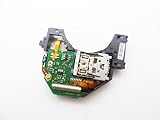
- Blu Ray DVD Drive Laser Lens Module Replacement Compatible with Xbox Series X / Series S Controller
- Tips: This is Blu Ray DVD Drive Laser Lens Module replacement to replace your old damage Blu Ray DVD Drive Laser Lens Module, don't include instructions, please install it by a professional technician.
- Broken your Blu Ray DVD Drive Laser Lens Module, don't need to change new machine, just buy this item and replce your damage Blu Ray DVD Drive Laser Lens Module, let your Device work again again.
- Compatible with: Xbox Series X / Series S Controller (Please check your machine model before your purchase)
- Product is fragile, easy to be damage during shipping. So if there are any questions, please contact the seller first, we will try our best to help you.
Rank #3

- Blu-ray DVD Disc Drive DG-6M5S DG-6M5S-01 Module Replacement Compatible with Microsoft Xbox One Series S / Xbox One Series X
- Tips: This is Blu-ray DVD Disc Drive DG-6M5S DG-6M5S-01 Module replacement to replace your old damage Blu-ray DVD Disc Drive DG-6M5S DG-6M5S-01 Module, don't include instructions, please install it by a professional technician.
- Broken your Blu-ray DVD Disc Drive DG-6M5S DG-6M5S-01 Module, don't need to change new machine, just buy this item and replce your damage Blu-ray DVD Disc Drive DG-6M5S DG-6M5S-01 Module, let your Device work again.
- Compatible with: Microsoft Xbox One Series S / Xbox One Series X (Please check your machine model before your purchase)
- The new DVD drive will need to be “flashed” with your console’s security key or will need to have your old drive's board swapped into the new replacement drive. That's Mean That You need to transfer the PCB board from the old one to the new one since it's paired to the Xbox.
Product prices and availability are accurate as of the date/time indicated and are subject to change. Any price and availability information displayed on Amazon at the time of purchase will apply.




