Quick wins for a faster PC:
Repair Windows errors before they cause bigger problemsFix Now →Scan for outdated or missing drivers - takes under a minuteDriver Scan →An empty M.2 socket can support more than an SSD—but only if your motherboard routes the right signals to it. Some boards use M.2 Key E for Wi-Fi and Bluetooth, and certain B-Key sockets support cellular WWAN or 5G modules. The socket’s key, electrical interface, size, and board-specific support determine what will work; physical fit alone is not enough.
What an M.2 socket can support
M.2 describes a compact module and connector family, not a guarantee that every socket accepts every M.2 device. The keying and electrical signals routed by the motherboard limit compatible devices. Check the documentation for your exact board before choosing a module.
As an Amazon Associate I earn from qualifying purchases.
Wi-Fi and Bluetooth: often Key E
Key E is a common socket for compact wireless modules, often in the 2230 size. ASRock says supported wireless module interfaces vary by motherboard: some boards support standard PCIe/USB modules, some support CNVi, and some support both. Its M.2 FAQ tells buyers to check their particular motherboard’s specifications for the supported type.
The Tool Desk
Outbyte PC Repair FREERepair Windows errors before they cause bigger problemsFix Now →Outbyte Driver Updater FREEFix the driver behind crashes, sound loss and screen glitchesFind Drivers →One concrete example is MSI’s PRO B550M WIFI6E, which lists a preinstalled wireless module in an M.2 Key E slot. That is a board-specific design, not evidence that an unoccupied M.2 socket on another board can take a Wi-Fi card.
#1 Best Overall

- This adapter turns your motherboard's PCIE X4/X8/X16 slot into an M.2 Key M slot for M.2 NVMe SSD installation. PCIE X1/PCI slots aren't supported. It comes with heatsinks that cool M.2 SSDs by 5 - 20°C.
- Works with PCIE 4.0/3.0 M.2 NVMe SSDs. For full PCIE 4.0 X4 speed, your CPU, slots, and SSD must all support it. Note: Intel CPUs below 11th gen don't support PCIE 4.0.
- No capacity limit for M.2 NVMe SSDs (2T, 4T work). Supports 2230/2242/2260/2280 sizes. New SSDs need initialization and formatting. M.2 SATA SSDs aren't supported.
- Compatible with Windows 11/10/8, Linux, and Mac OS. Support OS boot from NVMe SSD, except on some old motherboards (usable as storage then). Windows 7 lacks native NVMe driver; download from Microsoft or SSD manufacture site.
- Includes 12cm regular and 8cm low - profile brackets for any PC frame. FCC and CE certified. Get lifetime tech support - contact us for troubleshooting.
Cellular WWAN or 5G: possible on some B-Key sockets
Some B-Key sockets are designed to support cellular modules. MSI’s MS-98N1 industrial-board guide describes a B-Key 2242/3042 socket for WWAN cards or SSDs and says it supports 5G modules. Supermicro’s A4SAN manual documents a B-Key socket with Nano SIM/5G support and specifies supported sizes and signals. These are examples of board-level support, not a promise that a typical consumer motherboard can host a modem.
Storage remains common, but capabilities differ
M-Key sockets commonly serve storage, but even those are not interchangeable in every respect. The Supermicro A4SAN manual documents SATA/PCIe support for its M-Key socket; MSI’s PRO B550M WIFI6E specifications list the supported PCIe or SATA modes for its M-Key storage sockets. The exact modes depend on the board and socket.
Rank #2

- NVMe PCIe Adapter Apply to 2280/2260/2242/2230mm M.2 NVMe and AHCI SSD, Adapter with Aluminum Heatsink Solution.
- M.2 PCIe Adapter Supports PCI-Express X4, X8, X16 slots. PCIe 4.0 lanes with up to 64Gbps bandwidth, backward compatible with PCIe 1.0 2.0 3.0, Full release the speed of PCIE 3.0/4.0 X4 Full Speed M.2 PCIe SSD, such as 64Gbps M.2 PCIe 4.0 SSD.
- PCIe NVMe Adapter Supports Windows 11/10/8、Windows Server 2012 R2、Linux、Fedora、SUSE、Ubuntu、Red Hat(no driver required) NOTE: Go to NVMe SSD manufacture website for driver installation if your PC can not recognize NVMe SSD. Win7 and Windows Server 2008 R2 need additional driver for NVMe SSD.
- PCIe NVMe 3.0/4.0 x4 Adapter with 2 thermal pads, You put one between the ssd and the carrier and one between the ssd and the heat sink.
- Package Including: ➤1-M.2 PCIe Adapter x1.➤2-SSD Spare bolt(Pre-installed on PCB).➤3-Low Profile Bracket x1.➤4-Screw Driver x1.➤5-Regular Profile Bracket x1.➤6-Heat conducting silica gel pad x2 (thick + thin).➤7-Aluminum Heatsink x1.➤8-Heatsink fixing spring nails x2.➤9-PCB fixing screws x2.➤10-Bracket fixing screws x1.
How to check whether a module will work
- Identify your exact motherboard and revision. Open the matching product specifications and manual; features can differ between board models and revisions.
- Find the socket’s key and stated purpose. Look for a description such as Key E for wireless or B-Key for WWAN. Do not treat a Key M storage socket as a drop-in replacement for Key E.
- Match the module interface and size. Confirm the board supports the module’s electrical interface and physical form factor. For wireless cards, check whether the board supports standard PCIe/USB, CNVi, or the relevant CNVio generation.
- Check the supporting hardware and software. Confirm antenna connectors or an antenna kit can be installed for wireless use. For cellular modules, check SIM implementation and carrier compatibility. In either case, verify operating-system and driver support.
- Do not rely on appearance alone. A module that fits the connector may still lack the required electrical, firmware, antenna, or system support. ASRock’s FAQ specifically directs buyers to the specifications for their own motherboard.
What to verify for each type of upgrade
| Upgrade | Socket and board support | Other checks |
|---|---|---|
| Wi-Fi and Bluetooth module | Confirm Key E or another socket explicitly documented for that module; match PCIe/USB or CNVi/CNVio requirements and the module size. | Check antenna connections or kit, drivers, and operating-system support. |
| WWAN or 5G modem | Confirm that the specific B-Key socket supports the module’s interface and size. | Check SIM implementation, antenna connectors, drivers, operating-system support, and carrier compatibility. |
| SSD | Confirm the socket supports the SSD’s key, size, and SATA or PCIe mode. | Check the motherboard manual for the modes supported by that particular socket. |
Why “M.2” is not enough to choose a card
A connector’s physical shape does not establish which signals reach it or which device types the motherboard supports. For example, a Key E wireless card may depend on PCIe/USB or a compatible CNVi/CNVio implementation; a modem needs board-level WWAN support and its associated SIM and antenna provisions. Buy only after the board’s documentation confirms the match.
Quick Recap
Best Value

- 【Function】M.2 M-Key PCI-E4.0 2280 NGFF to PCIe X4 Extender Cable can convert the M.2 slot on the motherboard into the the PCIe X4 slot, which is used to connect various PCIe X4 devices.
- 【High-Speed Expansion】M.2 M-Key PCIe 4.0 2280 NGFF to PCIe X4 adapter expands the 2280 M-Key system by one PCIe X4 female interface. It is fully compatible with PCIe Gen 3 and Gen 4.
- 【PCIe 4.0 Performance with NVMe Support】Delivering PCIe 4.0 signaling via the NVMe protocol, this cable enables data transfer speeds of up to 64 Gbps. It supports NVMe 1.2 and is compatible with SSDs, and expansion cards, while remaining backward compatible with PCIe 3.0. Cable length: 20cm / 7.87in.
- 【Include SATA Power Cord】The package includes a 12V SATA power cord. Please note: 12V power is available only when the cable is connected.
- 【Secure Installation Notice】To avoid damage to the device, ensure that the installation direction is correct. Due to the delicate structure of the magnetic core inside the product, please hold the PCB hardware part during the disassembly process to avoid damaging the magnetic core. Does not support hot-plugging. (when installing this product, please make sure the motherboard is powered off first)
Rank #4
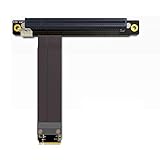
- 1. Wire advantages: using the German patent imported wire, using the Lotes connectors which imported from Taiwan, high frequency support PCIe 3.0 X16 8G/bps stable transfer.
- 2.Cable length: from 10?cm to 100 cm can be customized, our wire has a low impedance, the cable below 60cm can be stable at PCIe3.0 full speed reading and writing.
- 3.Differential signal without hole design, there is no problem of signal attenuation interference in a parasitic capacitance and parasitic inductance, there will be no more CAF micro short circuit, cable is durability.
- 4.PCB use high frequency low resistance of materials with high quality, PCB using high TG board, copper thickness thicken to 1oz, gold finger plating enough gold, Good conductive performance, can reduce oxidize higher impedance caused by the crash blue screen.
- 5.Suitable graphics card:?GTX1080ti High-end graphics CARDS, fireprow7100, radeon RX580, VEGA64, prowx5100, quadroK1200 professional graphics card, support for all the PCIe CARDS after 2015 years.Note: This product does not support external notebook graphics!
Rank #3

- 【M.2 to PCIe Expansion】Effortlessly transform your M.2 interface into a PCIe slot with this expansion card adapter, elevating your desktop computer's performance.
- 【Enhanced Capability】Expand your desktop computer's functionality by adding a PCIe slot, enabling the use of additional hardware components to meet your needs.
- 【Widely Compatible】Compatible with a wide range of M.2 interfaces, supporting M-Key M.2 SSDs for versatile utilization across different desktop systems.
- 【Easy Installation】The expansion card adapter allows for a simple, user-friendly installation process, seamlessly expanding your system's capabilities without added complexity.
- 【High Performance and Practicality】Featuring a compact yet powerful design, the YIKAIEN expansion card adapter meets a wide range of hardware expansion needs, providing outstanding performance for your computer.
Product prices and availability are accurate as of the date/time indicated and are subject to change. Any price and availability information displayed on Amazon at the time of purchase will apply.




