Do these 3 things before closing this tab:
1Scan for outdated or missing drivers - takes under a minute2Repair Windows errors before they cause bigger problems3Fix the driver behind crashes, sound loss and screen glitchesChoose Wayground (formerly Quizizz) if you need varied lesson formats, reporting, AI-assisted creation, or school integrations. Choose Gimkit if you want review sessions built around game modes and an educator account that can remain free after its trial. Neither is a universal winner, and available evidence does not show that one produces better learning outcomes.
What is the main difference between Quizizz and Gimkit?
Quizizz is now called Wayground. The company says its website changed from quizizz.com to wayground.com, while existing accounts, classes, resources, join links, and integrations continued to work. The company’s help article, updated November 4, 2025, says the core product experience remained the same at that time. Quizizz Inc. remains the legal entity. Wayground explains the name change.
As an Amazon Associate I earn from qualifying purchases.
In practical terms, Wayground emphasizes a broader set of classroom activity formats and reporting tools. Gimkit centers review around game modes, in-game currency, power-ups, and customization. Both use game elements; the choice is about which teaching workflow fits your class, not whether one is “fun” and the other “serious.”
How do the features compare?
| Decision | Wayground (formerly Quizizz) | Gimkit | What to consider |
|---|---|---|---|
| Activity formats | Assessments, presentations, interactive videos, flashcards, and passages, with live and student-paced delivery described on its plan page. | Game modes are central to the experience. | Pick Wayground if you want one platform for different activity types; pick Gimkit if the game format is the point of the review session. |
| Reporting | Its comparison page describes participant- and question-level reports, standards tags, downloadable reports, and tracking over time. | The comparison page describes real-time progress tracking and a narrower report view. | These are Wayground’s own comparative claims, not independent test results. Check whether the report fields and exports answer your planning questions. |
| Question creation and formats | The comparison lists multiple question types and AI creation from a prompt, document, webpage, or YouTube URL. | The comparison describes fewer question types and customization of game modes. | Try a representative activity of your own, especially if you use varied prompts or multimedia. |
| Free access | The current plan page lists Basic with a limit of 20 stored activities and up to 100 students, alongside limited features such as question types and Google Classroom sync. | Gimkit Basic is free indefinitely. New educator accounts start with a 14-day Pro trial. | “Free” does not mean equivalent: consider your class size, activity library, and everyday workflow. |
| Paid features | The plan page lists Basic and School and District plans, with some features and integrations dependent on plan. | Pro includes exclusive game modes, assignments, audio questions, and image uploads. | Confirm what is included for your account type and region before planning around a paid feature. |
| Integrations | The plan table includes Google Classroom, Canvas/Schoology LTI 1.3, Clever, and ClassLink features, with availability depending on plan. | A comparable integration list is not established by the reviewed comparison. | Schools should verify roster setup, learning-management-system workflows, grade passback, privacy, and procurement needs directly. |
The feature and reporting comparison comes from Wayground’s own Quizizz-versus-Gimkit page. Treat its comparative descriptions as vendor positioning rather than independent evaluation.
#1 Best Overall

- All New Game: It's the 2nd edition of the quick question “what am I?” Game. Includes 6 new bands- dino, narwhal, robot, flower, butterfly, & brain
- Simple To Play: Pick a headband, place a card in it and play to figure out what's shown on your card. Using yes/no questions, be the first to guess 3 cards correctly and you win
- Family Game Night: Hedbanz is a must-have in your collection of family games for kids and adults. It is for everyone ages 6 and up. For 2-6 players, bring along when you are in need of fun board games for family night
- Funny Random Stuff For Family Game Night: Throw the best party, birthday, game night & Friendsgiving with new party games, family board games & card games for teens & adults
- Spin Master Toys & Games: Looking for kids games, yard games & card games for grown ups, kids or teens? Shop everything from family game night, travel games, puzzles for adults & family games
Which one is better for your classroom?
Choose Wayground when you need more than a quiz game
- You use presentations, interactive videos, flashcards, passages, or assessments as well as quiz-style activities.
- You want reports that may help identify questions or standards for reteaching; inspect the actual report and export options before relying on them.
- You want to try AI-assisted content creation or use named school integrations, and have checked that those features are available on your plan.
Choose Gimkit when game-mode review is the priority
- Your main use is a game-centered review activity with modes and in-game mechanics.
- You value keeping an educator account on a free plan after the initial Pro trial.
- You are comfortable using Basic unless you specifically need Pro features such as exclusive modes, assignments, audio questions, or image uploads.
Do not decide on engagement claims alone
There is no independent head-to-head result in the available evidence establishing which tool is more engaging or effective for learning. Try the same topic, questions, class size, and session length in both, then compare student participation and the teacher workflow you actually need. Those observations can inform your classroom choice, but they are not a controlled learning-outcome study.
What do the free plans and trials include?
Wayground Basic
Wayground’s plan page lists Basic with a maximum of 20 stored activities and up to 100 students; it also marks some capabilities, including question types and Google Classroom sync, as limited. The page lists School and District plans and directs those buyers toward a quote; the captured plan information does not establish a stable, directly comparable individual price. Limits and plan presentation may change, so check the live offer for your country and account type at Wayground’s plans page.
Rank #2
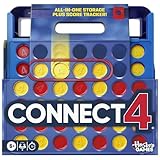
- CONNECT 4 GAME WITH EXCITING UPDATES: This Connect 4 board game features the classic gameplay fans love, plus all-in-1 storage, score trackers, and a modern design
- ALL-IN-1 CARRYING CASE WITH STORAGE: When done playing, release the discs from the grid and they neatly drop into a storage tray. The grid and tray fold into an all-in-1 portable case with a handle
- EFFORTLESS, 1-MOTION SET-UP: No parent’s help needed! Simply fold up the grid to play, and it’s time 4 edge-of-your-seat action
- ADDICTIVE STRATEGY GAME FOR KIDS & ADULTS: The drama builds as the discs drop! Players try to get 4 in a row of their color discs to win this popular game for teens, adults, and kids ages 6+
- BUILT-IN SCORE TRACKERS FOR EPIC COMPETITIONS: Sliding score trackers let players easily track who wins each round. Win 4 rounds to be champ
Gimkit Basic and Pro
According to Gimkit’s Account FAQ, updated May 19, 2026, educators can use Basic for as long as they want, and a new educator account receives a 14-day Pro trial. Pro adds exclusive game modes, assignments, audio questions, and image uploads. Students can join live games and assignments without accounts; accounts are needed for classes or for earning XP and purchasing cosmetics. Check Gimkit’s current checkout for any price rather than relying on older third-party figures.
The Tool Desk
Outbyte Driver Updater FREEFix the driver behind crashes, sound loss and screen glitchesFind Drivers →Outbyte PC Repair FREERepair Windows errors before they cause bigger problemsFix Now →How should a school compare the two?
A school-wide choice needs more than a feature checklist. Test the workflows that matter in your district before committing, and confirm which features are included in the relevant plan.
Rank #3

- FUN FAMILY GAME FOR KIDS: Remember playing the original Trouble board game as a kid? Introduce a new generation to classic Trouble gameplay with this Trouble game for kids
- EASY TO LEARN AND SET UP: The Trouble game is easy to play and quick set up. The object of the game is simple: the first player to get all of their game pieces around the board wins
- POWER UP SPACES: The game instructions include options for classic Trouble gameplay or a version with Power Up Spaces for a more challenging game
- POP-O-MATIC BUBBLE: In this beloved children's board game, players press and pop the plastic bubble to roll the die. The iconic Pop-o-Matic die roller is fun to press, and it keeps the die from getting lost
- BOARD GAMES FOR FAMILY: Adults and kids can play this family board game together. It's a fun indoor game for playdates and a great choice for Family Game Night
- Roster creation and student sign-in, including whether students need accounts for the activities you plan to run.
- Learning-management-system integration, grade passback, and any required data exports.
- Class-size limits, stored-activity limits, and access to the specific question formats or modes teachers use.
- Accessibility, content moderation, privacy requirements, and fit with district procurement rules.
- Current region-specific terms and a written quote for school or district plans where applicable.
The available product information does not establish a controlled classroom comparison or an independent learning-outcome advantage for either platform. For integrations and administrative requirements, validate the current setup with each vendor and your district rather than inferring equivalence from feature lists.
Quick Recap
Best Value

- Add a blue disc to block opponents and lift discs higher
- Features blue Blocker Disc: This game includes blue Blocker Disc that open doors to new strategies
- Features blue Blocker Dics: this game includes blue Blocker Dics that open doors to new strategies
Rank #4

- FUNNY FAMILY GAMES-In fact, happiness is so simple.through Nicecho shut the box,makes you addicted and gives your brain a good tease, leaving you hooked for hours, and offering you a perfect way to beat boredom. simple rules of the game, enjoy the thrilling moments of the game.
- PREMIUM QUALITY DESIGN-Shut the box made of solid pinewood. The design of felt surface reduces noise when the board game is going on. Durable, scratch-resistant and environmentally friendly.Four different colors of acrylic silk-screen technology dice to ensure long-term use.
- LEARNING AND SOCIAL TOOLS-It is not only a math game, to promote children's learning ability of math addition, subtraction, multiplication and division,but aslo a kind of social entertainment, which can develop a sense of rules and exercise their thinking ability, logic ability and reaction ability in an interesting way.
- PORTABLE AND PRACTICAL-The size of shut the box is 8.74*8.74*1.1inch. Because of its light weight, it can be easily carried into any outdoor activity. Perfect for home, classroom, parties, picnics, birthday, and bars. Make your own rules and enjoy the game whenever and wherever you are.
- INTIMATE SERVICE-Shut The Box is a great game for families and friends of all ages. If for any reason you're not 100% SATISFIED, please let us know and our customer service team will help you RETURN OR REFUND.
Product prices and availability are accurate as of the date/time indicated and are subject to change. Any price and availability information displayed on Amazon at the time of purchase will apply.




