Do these 3 things before closing this tab:
1Scan for outdated or missing drivers - takes under a minute2Repair Windows errors before they cause bigger problems3Fix the driver behind crashes, sound loss and screen glitchesWaterfox 6.7.5, released for desktop on September 30, 2026, adds a browser-native place to organize and read RSS-style feed posts. Its manager brings Live Bookmarks together with folders, article search, unread filters, and list or grid views; an integrated reader adds adjustable text and layout, read/unread controls, and saving for later. These are features described in Waterfox’s official release notes, not independently tested performance or privacy claims.
What’s new in Waterfox 6.7.5?
Waterfox labels version 6.7.5 “Read the Feed” and marks it as a desktop release. The main change is a feed manager and built-in reader, bringing posts from Live Bookmarks into a shared browser interface. This follows Waterfox 6.7.4, dated September 22, 2026, whose summary said RSS feeds and Live Bookmarks had returned with new search options.

As an Amazon Associate I earn from qualifying purchases.
The release notes also say 6.7.5 includes security fixes from Mozilla advisory MFSA 2026-100. Waterfox’s changelog does not provide vulnerability names or severity in the 6.7.5 entry, so the advisory identifier alone does not establish those details.
Windows Errors? Fix Them Before They Spread
Repair common Windows errors and clear accumulated junk for a smoother, more stable PC - no reinstall needed.Free scan · no reinstallCrashes, No Sound, or Screen Glitches?
Random freezes, missing sound and display glitches usually trace back to one bad driver. Find and replace yours safely.Free scan · under a minuteHow does the feed manager work?
The manager is intended to make subscriptions and their posts browsable in one place. Waterfox lists controls for organizing and finding articles, as well as choosing how posts appear:
#1 Best Overall

- 【Android Tablet】Equipped with the latest Android system, it has stronger compatibility, faster response speed and smoother operation. It is GMS certified, pre-installed with Google Play, and supports social applications such as Facebook, Twitter, YouTube, and TikTok. It is very suitable for watching videos, online chatting, reading e-books, etc.
- 【Smooth Performance】This tablet is equipped with a 1024x600 IPS touch screen, Unisoc SC7731E quad-core processor, 6GB memory (2GB + 4GB virtual memory), 32GB ROM, and the tablet storage space can be expanded to 1TB using an SD card, which can store everything you need.
- 【Powerful Function】This is a cost-effective tablet. Affordable price and excellent configuration. Equipped with 2MP+5MP dual cameras, Bluetooth, 5G/2.4G dual-band WiFi, FM radio, speakers, 3.5mm headphone jack, etc. Suitable for reading, photography, video, music, etc., meeting most of your daily needs.
- 【Child-friendly functions and parental control】Pre-installed Google Kids Space application, providing rich content suitable for different age groups. Equipped with a parental control mode, it allows you to filter content, set educational goals, and manage screen time limits based on your child's age, providing a safe use environment that does not require constant supervision.
- 【Portable & Lightweight & Protective Case】- The tablet body is slim and lightweight, easy to carry. It can be easily put into a bag, backpack or even back pocket. In addition, the durable and environmentally friendly protective case can effectively protect your tablet from drops, scratches and dust. You can use it anywhere you want.
- Folders and subscription selection: browse feeds together, or choose a bookmark folder or individual subscription.
- Article search: search posts in the manager.
- Unread filter: narrow the view to unread posts.
- List or grid: switch between two presentation styles.
What can you do in the built-in reader?
Waterfox says the integrated reader displays feed articles with adjustable text and layout. It also lets readers change a post’s read or unread state, save it for later, or open the original website. The release notes describe these controls but do not specify how read or saved state is synchronized between devices.
Waterfox also lists previews for supported feed documents opened directly in the browser. The release notes do not identify exact feed-format coverage, so they do not establish which document types are supported.
Rank #2
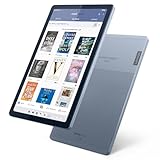
- Stylish design - Max out your chic factor with the dual-tone Arctic Grey Lenovo Tab M9 tablet. A thin and light design make this device perfect for on-the-go use anywhere life takes you.
- Processor: MediaTek Helio G80 (8C, 2x A75 @2.0GHz + 6x A55 @1.8GHz) - Operating System: Android 12
- 4GB Ram and Up to 64GB eMMC (with expandable microSD card)
- Up to 13 hours (video playback) - 3 Ports/Slots (USB-C 2.0, MicroSD, Headphone / mic combo)
- Features 2 Cameras - Front: 2MP Fixed Focus and Rear: 8MP Auto focus
Can you import RSS subscriptions into Waterfox?
Yes. The new Feeds settings page includes OPML import and export. Waterfox says these transfers preserve bookmark-folder structure, which can help retain organization when moving subscriptions. The notes do not describe migration edge cases, so they do not guarantee how every existing OPML file or folder arrangement will be handled.
The same settings page covers feed discovery, article opening, and image loading. Waterfox says discovered feeds are checked before the browser offers them in the address bar. Its release notes do not explain the discovery process in more detail or describe feed-related data handling.
Rank #3

- THE ULTIMATE PAPER TABLET – For the first time on a reMarkable paper tablet, you can write, sketch, and read in color. Ultra-slim and portable, but with a full-size 11.8” color display, adjustable reading light, and an unmatched paper-like writing experience.
- WHAT’S IN THE BOX – You’ll find reMarkable Paper Pro, a digital notebook for unprecedented paper-like writing with 11.8” Canvas Color display; Marker Plus, the reMarkable pen with built-in eraser; 6 spare Marker tips; Book Folio, a stylish protective cover in premium black leather; and USB-C cable.
- PAPER-LIKE WRITING – Designed to work exclusively with the groundbreaking color display to deliver realistic friction and natural writing feel, the included Marker Plus offers precise control, incredible responsiveness, and all-day comfort.
- ALL YOUR WORK, ORGANIZED – Sort your notes and documents with folders and tags, write directly on PDFs, and instantly convert handwriting to typed text. Everything's in one place and easy to find.
- READ IN COMFORT, DAY OR NIGHT – Unlike most laptops and phones, reMarkable Paper Pro has a low-glare display that reflects natural light, so you can read without eye-strain, even outside. An adjustable reading light means you can keep working when the lights go out, too.
Where can you download Waterfox 6.7.5?
Waterfox’s official download page lists 6.7.5 for macOS, Windows x64 and ARM64, and Linux, with Linux package-repository and generic-tarball routes. Platform instructions and package availability can change, so consult that page for current installation options.
The download page also links to Waterfox for Android, but the 6.7.5 changelog entry is marked Desktop. The download listing alone does not establish that this feed manager and reader are available on Android.
Quick Recap
Best Value
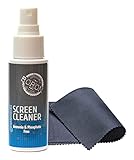
- Great Cleaning - This is a great screen cleaner spray that is perfectly suitable for all kinds of screens. It will clean all tech devices safely. You can use it as a laptop screen cleaner, tv screen cleaner, LCD screen cleaner, computer screen cleaner, camera lens cleaner, and phone screen cleaner. It removes dust, and fingerprints from the screen of tech devices. This is a small size screen cleaner spray for electronic devices.
- Special Formula - This electronics screen cleaner spray contains neither ammonia nor phosphate, and thus can be safely used on sensitive types of screens no matter if it is LCD, LED, CRT or OLED. It has a unique formula which provides an impeccable result by incorporating boron compounds well known for exceptional cleansing features. It ensures better and long-lasting screen cleaning performance. No more stains or streaks on the surfaces of your devices.
- Gentle Clean - This is an easy-to-use liquid cleaning spray. Just spray the liquid onto the microfiber cloth and wipe the screen. You can use it with all kinds of microfiber cloth. Thanks to its compact design, you can carry it anywhere you need. It is easy to store with the ideal bottle size. It will not damage your screens. You can keep your devices clean and protected with this great screen cleaner spray.
- All Kind of Electronic Devices - This screen cleaner not only cleans your screens but also protects them. Your surfaces will shine like it is new. You can use it on cellphones, tablets, Pcs, notebooks, television screens, and camera lenses. It is a compact, convenient, and practical cleaning spray for technological devices. You can use it in your office or at your home. Great gift idea for your friends.
- Easy to Use - This screen cleaner spray can remove dust, dirt oil, and fingerprints totally and effectively. It is effective on all kinds of digital screens and glass surfaces. This cleaner is specially formulated just to clean screens. Screens are the most sensitive part of our devices. To clean them safely, you need sensitive cleaning products. It will gently clean your tech device screens and glass surfaces such as eyeglasses and camera lenses.
Product prices and availability are accurate as of the date/time indicated and are subject to change. Any price and availability information displayed on Amazon at the time of purchase will apply.




