MiniDisc capacity is not defined by disc size alone. A standard-looking disc can hold different amounts of audio depending on the format, recording mode, and compression system used, from classic SP recordings to extended MDLP modes and higher-capacity Hi-MD media.
Understanding those differences matters when buying used discs, transferring old recordings, archiving live sets, or deciding which mode to use on a recorder. The same MiniDisc might represent 74 or 80 minutes of high-quality ATRAC audio, several hours in long-play mode, or a useful amount of computer data in the Hi-MD era.
As an Amazon Associate I earn from qualifying purchases.
This guide breaks down how MiniDisc storage works in practical terms, including audio time, data capacity, sound-quality trade-offs, and how the format compares with CDs, MP3 players, flash storage, and modern digital archives.
Do these 3 things before closing this tab:
1Repair Windows errors before they cause bigger problems2Scan for outdated or missing drivers - takes under a minute3Clear out junk files and repair common Windows errorsHow MiniDisc Storage Capacity Is Measured
MiniDisc capacity is usually described in two different ways: minutes of audio and megabytes of data. For standard audio MiniDiscs, the label on the shell or packaging most often shows a playing time such as 60, 74, or 80 minutes. That number refers to how long the disc can record in the original stereo SP mode, not to an uncompressed audio capacity like a CD. MiniDisc was designed around ATRAC compression, so its practical capacity is tied closely to the codec and recording mode being used.
#1 Best Overall
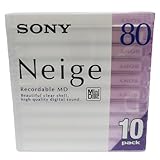
- Made in Japan
- Clear See Through Shell
- High Quality Digital Sound
- For All Critical Digital Audio Recording
- 80 Minutes Recording Time
A standard recordable MiniDisc stores roughly 140 MB to 177 MB of raw disc data depending on the disc length, but users rarely interact with it that way on older audio decks and portable recorders. Instead, the machine presents the disc as available recording time. A 74-minute disc records about 74 minutes in SP mode, while an 80-minute disc records about 80 minutes in SP mode. The same physical disc can hold much more audio when recorded in later long-play modes because those modes use heavier compression and lower bitrates.
Audio time depends on mode, not just the disc
The most common source of confusion is that a MiniDisc does not have one fixed “capacity” in everyday use. Its usable recording time changes according to format generation and selected mode. Original MD equipment records in SP, while MDLP-compatible units add LP2 and LP4. Hi-MD equipment can use standard MD media in a reformatted mode and can also record to dedicated Hi-MD discs with much larger storage.
| Format or mode | Typical capacity on an 80-minute disc | What it means in practice |
|---|---|---|
| SP | 80 minutes | Original stereo MiniDisc quality using ATRAC compression |
| LP2 | 160 minutes | Twice the recording time with more compression |
| LP4 | 320 minutes | Four times the recording time with a larger quality compromise |
| Hi-MD on standard MD media | About 305 MB of data after formatting | Usable for Hi-MD audio modes or file storage on compatible devices |
| 1 GB Hi-MD disc | About 1 GB of data | Much longer audio times or general data storage, depending on recorder support |
Data capacity is most relevant with Hi-MD, because Hi-MD recorders can treat discs more like removable storage. In that context, the same medium may be measured in megabytes or gigabytes instead of minutes. A standard MiniDisc reformatted for Hi-MD offers around 305 MB of usable space, while a dedicated Hi-MD disc offers approximately 1 GB. The exact amount available can vary slightly because formatting, file system overhead, track information, and device behavior all consume a small portion of the disc.
Free tools Windows power users keep installed
One-click scans. No signup required.
Track structure also affects how capacity feels in real use. MiniDiscs store audio in tracks with table-of-contents data, titles, edit points, and other metadata. Simple recording rarely wastes much space, but heavy editing, many tiny tracks, or repeated recording and erasing can make available time appear less straightforward than the label suggests. For collectors and archivists, the safest way to read MiniDisc capacity is to identify the disc type first, then confirm the recording format and mode on compatible hardware.
Standard MiniDisc Capacity: SP Mode and ATRAC Compression
Standard MiniDisc recording is most closely associated with SP mode, short for Stereo Play. On a conventional 60-, 74-, or 80-minute MiniDisc, SP mode provides approximately the same labeled running time as the disc rating: 60 minutes on a 60-minute disc, 74 minutes on a 74-minute disc, and 80 minutes on an 80-minute disc. These figures apply to stereo audio recorded using Sony’s ATRAC compression system, not uncompressed PCM audio as found on a standard audio CD.
ATRAC, or Adaptive Transform Acoustic Coding, was designed to make high-quality digital audio fit within the physical limits of the MiniDisc format. A standard MiniDisc stores around 140 MB of raw disc data, but SP audio is encoded at roughly 292 kbps. This compression allows a full album-length recording to fit on a small magneto-optical disc while still supporting track divisions, titling, editing, and durable random access playback. The result is a format that feels closer to a digital tape replacement than a removable computer storage medium.
In practice, SP mode was the default choice for music recording, radio captures, live performances, and personal mixes throughout the classic MiniDisc era. It offered the best compatibility across standard MiniDisc decks, portables, car units, and later MDLP-capable machines. A disc recorded in SP mode can generally be played on almost any consumer MiniDisc player, including early 1990s models that predate long-play modes.
| Disc label | Typical SP stereo recording time | Common use |
|---|---|---|
| 60-minute MD | About 60 minutes | Singles, interviews, short live sets |
| 74-minute MD | About 74 minutes | Albums, radio programs, mixtapes |
| 80-minute MD | About 80 minutes | Long albums, extended sessions |
The labeled capacity is not usually reduced by ordinary track markers or titles in any meaningful way for normal use. Track names, disc names, and edit information occupy a small area reserved for table-of-contents data. However, very heavy editing, large numbers of short tracks, or extensive titling can occasionally expose format limits before the full audio time is used. This is more common with discs containing hundreds of tiny segments than with typical album-style recordings.
SP mode should also be understood as a family of ATRAC implementations rather than one perfectly fixed sound across every machine. Early recorders used first-generation ATRAC encoding, while later decks and portables used improved ATRAC versions with better handling of transients, cymbals, ambience, and stereo detail. A disc recorded on a later high-quality deck may sound cleaner than one recorded on an early portable, even though both are standard SP recordings and consume the same amount of disc time.
For collectors and archivists, SP recordings are often the safest and most desirable standard MiniDisc format. They provide the highest audio quality available on pre-Hi-MD consumer MiniDisc equipment and the broadest playback compatibility. When transferring old recordings, SP discs are also straightforward to identify: if a 74-minute disc holds roughly 74 minutes of stereo audio and plays on any standard unit, it is almost certainly using classic SP ATRAC rather than one of the later long-play modes.
Rank #2

- Made in Japan
- Powerful and High Resolution Digital Sound
- 80 Minutes Recording Time
- High Reliability indoors and out
- Quantity of 10 Mini Discs
MDLP Recording Modes: Extending Audio Time
MDLP, short for MiniDisc Long Play, expanded the practical capacity of standard MiniDiscs by adding lower-bitrate recording modes. Instead of changing the physical capacity of the disc, MDLP changed how audio was encoded. A 74-minute or 80-minute MiniDisc still held the same amount of digital data, but the recorder used ATRAC3 compression to fit more audio into that space. For listeners who wanted longer unattended recording, more albums on fewer discs, or compact spoken-word archives, MDLP was one of the most useful upgrades in the MiniDisc format’s history.
The main MDLP modes are LP2 and LP4. LP2 roughly doubles the recording time of a standard disc, while LP4 roughly quadruples it. On an 80-minute MiniDisc, that means about 160 minutes in LP2 or 320 minutes in LP4. A 74-minute disc provides about 148 minutes in LP2 or 296 minutes in LP4. These times are approximate because the format also reserves space for track information, titles, editing data, and disc management, but they are the figures most users see when choosing a recording mode on an MDLP-compatible recorder.
| Disc length | SP mode | LP2 mode | LP4 mode |
|---|---|---|---|
| 60-minute MiniDisc | 60 minutes | 120 minutes | 240 minutes |
| 74-minute MiniDisc | 74 minutes | 148 minutes | 296 minutes |
| 80-minute MiniDisc | 80 minutes | 160 minutes | 320 minutes |
LP2 is often considered the best balance between storage time and sound quality. It uses stereo ATRAC3 at a lower bitrate than standard SP recording, but it remains suitable for many portable listening situations, especially with pop, rock, electronic music, radio recordings, and casual mixes. Many MiniDisc enthusiasts used LP2 for daily listening because it allowed two standard album-length CDs to fit on a single 80-minute disc with relatively modest quality loss compared with SP.
LP4 extends capacity much further by using heavier compression and joint stereo techniques. It is valuable for lectures, interviews, audiobooks, rehearsal references, radio shows, and background listening, where maximum duration matters more than full musical fidelity. For complex music, cymbals, ambience, stereo imaging, and dense arrangements may sound less natural in LP4, particularly on revealing headphones or speakers. It is not usually the first choice for archival music transfers, but it can be very practical when preserving long voice recordings or creating portable reference copies.
Compatibility considerations
MDLP recordings require MDLP-capable playback equipment. A disc recorded in LP2 or LP4 will not play correctly on older pre-MDLP MiniDisc machines; those units may show the tracks as silent, unreadable, or marked with an unsupported mode indicator. SP recordings, however, remain broadly compatible with nearly all MiniDisc players and decks. For collectors and archivists, this makes recording mode an essential part of cataloging a disc. A label such as “LP2 live set” or “LP4 interview archive” can prevent confusion later, especially when discs are shared, sold, or transferred.
What’s actually slowing this PC down?
Pick the symptom - the matching free tool is one click away.
- Use SP for maximum compatibility and higher-quality music recording.
- Use LP2 when longer stereo recording time is needed with acceptable music quality.
- Use LP4 for voice, lectures, long radio captures, and non-critical listening.
- Check player support before relying on MDLP discs in older portable units or home decks.
Another practical detail is that MDLP does not increase the number of tracks a disc can manage without limit. MiniDisc recorders still maintain a table of contents for track starts, titles, edits, and divisions. Very long LP4 discs with many short tracks can become cumbersome to navigate, and extensive editing may reduce available management space. For best results, long recordings should be organized into sensible sections, titled clearly, and finalized by allowing the recorder to write the updated table of contents before ejecting the disc or removing power.
Hi-MD Discs and Expanded Data Storage
Hi-MD was Sony’s major capacity upgrade to the MiniDisc format, introduced in 2004. Instead of treating the disc only as an audio carrier, Hi-MD allowed MiniDiscs to function more like removable computer storage while still supporting portable audio recording and playback. The most visible change was disc capacity: a dedicated 1 GB Hi-MD disc could hold far more audio or files than a standard 60-, 74-, or 80-minute MiniDisc.
Hi-MD also made it possible to reformat many ordinary blank MiniDiscs for Hi-MD use. A standard 80-minute MiniDisc, when initialized in Hi-MD format, typically provided about 305 MB of usable storage. A 74-minute disc offered slightly less, and a 60-minute disc less again. This was a significant jump from the original MD audio structure, where capacity was usually described in minutes rather than megabytes. Once formatted as Hi-MD, the disc could store audio recordings, documents, images, or other computer files, depending on the device and software being used.
| Disc type | Approximate Hi-MD storage | Typical use |
|---|---|---|
| Standard 60-minute MD reformatted as Hi-MD | About 219 MB | Short recordings, small file transfer, voice notes |
| Standard 74-minute MD reformatted as Hi-MD | About 270 MB | General audio recording and limited data storage |
| Standard 80-minute MD reformatted as Hi-MD | About 305 MB | Longer field recordings or mixed audio and data use |
| Dedicated Hi-MD disc | About 1 GB | High-quality audio, large transfers, archival capture |
For audio, Hi-MD supported several recording options, including ATRAC3plus compressed modes and uncompressed Linear PCM on compatible recorders. Linear PCM offered CD-style uncompressed recording at 44.1 kHz and 16-bit stereo, but it used capacity quickly. A 1 GB Hi-MD disc could store roughly 94 minutes of Linear PCM audio, making it attractive for live music, interviews, and archival transfers where quality mattered more than maximum duration. In compressed Hi-SP mode, the same disc could hold around 7 hours and 55 minutes, while lower-bitrate Hi-LP mode could extend recording time to roughly 34 hours.
Quick wins for a faster PC:
Repair Windows errors before they cause bigger problemsFix Now →Scan for outdated or missing drivers - takes under a minuteDriver Scan →Clear out junk files and repair common Windows errorsFree Scan →The practical result was that Hi-MD gave users a much wider choice between fidelity and duration than earlier MiniDisc formats. Someone recording a concert might choose Linear PCM or Hi-SP, while a journalist capturing meetings or spoken-word material might use Hi-LP to maximize time. Because Hi-MD discs could also mount on a computer through USB with compatible hardware, they became useful for moving recordings off the recorder more directly than older MiniDisc workflows allowed. For collectors and archivists, this makes Hi-MD equipment especially valuable, though compatibility remains a concern: standard MiniDisc players cannot play Hi-MD-formatted discs, and access often depends on specific Sony software, drivers, or later transfer tools.
Rank #3
- Receive within 1-5 Business Days!
- Mini (8cm) DVD-RW Disc, 1.4GB, 2x, with Jewel Case, Silver
- DISCS - OPTICAL - DVD/-RW
- Manufacturer's limited lifetime warranty.
Audio Quality vs. Recording Time Trade-Offs
MiniDisc capacity is best understood as a balance between duration and fidelity. The same physical disc can hold very different amounts of audio depending on the recording mode, because each mode uses a different bitrate and compression method. SP mode on a standard MiniDisc prioritizes sound quality, while MDLP modes increase recording time by applying more aggressive compression. Hi-MD adds further flexibility, allowing both high-quality linear PCM and compressed ATRAC3plus options on compatible equipment.
For many listeners, SP mode remains the most desirable format for music recording on classic MiniDisc hardware. It uses ATRAC compression designed to fit roughly 74 or 80 minutes of stereo audio onto a disc while preserving a sound character close to CD for typical portable listening. It is not lossless, but on good recordings and with well-maintained equipment, SP can sound detailed, stable, and pleasing. It is also the safest choice for compatibility, since nearly all MiniDisc decks and portable players can play SP recordings.
MDLP changes the equation by extending recording time substantially. LP2 typically doubles capacity, placing about 148 minutes on a 74-minute disc or 160 minutes on an 80-minute disc. LP4 doubles that again, reaching around 296 or 320 minutes. This makes LP2 practical for long albums, radio recordings, lectures, DJ sets, and field s where changing discs is inconvenient. LP4 is better suited to speech, background listening, or archival reference copies where maximum duration matters more than fine audio detail.
Crashes, No Sound, or Screen Glitches?
Random freezes, missing sound and display glitches usually trace back to one bad driver. Find and replace yours safely.Free scan · under a minuteWindows Errors? Fix Them Before They Spread
Repair common Windows errors and clear accumulated junk for a smoother, more stable PC - no reinstall needed.Free scan · no reinstall| Mode | Approximate Time on 80-Minute Disc | Typical Use | Quality Profile |
|---|---|---|---|
| SP | 80 minutes | Albums, mixtapes, high-quality portable listening | Best classic MD compatibility and strong audio quality |
| LP2 | 160 minutes | Long playlists, radio shows, extended recordings | Good compromise between time and fidelity |
| LP4 | 320 minutes | Speech, rough notes, low-priority recordings | Most audible compression, especially with music |
| Hi-MD PCM | Varies by disc type, much shorter than compressed modes | Critical recording and transfer work | Uncompressed, highest fidelity on Hi-MD |
The audible trade-off depends heavily on the source material. Spoken word, interviews, and meetings tolerate lower bitrates well because the signal is relatively simple. Dense music exposes compression more easily, especially cymbals, reverb tails, stereo ambience, distorted guitars, and layered electronic textures. LP2 is often acceptable for casual listening, but LP4 can introduce a thinner stereo image, swishy high frequencies, or reduced clarity during complex passages.
Hi-MD gives recordists a wider quality range. A 1 GB Hi-MD disc can store uncompressed PCM for recordings where editing, preservation, or later conversion matters. It can also store many hours in ATRAC3plus modes for travel listening or voice capture. For archivists and collectors, the best approach is usually to keep valuable music and original live recordings in SP, Hi-SP, or PCM where possible, while reserving LP2 and LP4 for convenience copies or non-critical material. Choosing the right mode is less about the largest number of minutes and more about matching the disc to the recording’s long-term value.
MiniDisc Capacity Compared with CDs, MP3 Players, and Modern Storage
MiniDisc capacity sits in an interesting middle ground between physical audio formats and file-based storage. A standard recordable MiniDisc holds about 60, 74, or 80 minutes in SP mode, which is broadly comparable to an audio CD’s 74 to 80 minutes of uncompressed stereo audio. The difference is that MiniDisc achieves this playing time through ATRAC compression, while a standard audio CD stores linear PCM audio at 16-bit/44.1 kHz. In practical listening terms, both formats can carry a full album, but they do so in very different ways: CD prioritizes uncompressed playback, while MiniDisc prioritizes recordability, editing, shock resistance, and compact reusable media.
MDLP changes the comparison substantially. A single 80-minute MiniDisc can store up to 160 minutes in LP2 or 320 minutes in LP4, making it more flexible than an audio CD for long recordings, radio captures, lectures, and background listening. Hi-MD pushes the format further by allowing around 1 GB of storage on native Hi-MD discs, or roughly 305 MB when some standard MiniDiscs are reformatted for Hi-MD use. That opens the door to longer compressed recordings, PCM recording on some machines, and general file storage when used with compatible hardware and software.
| Format | Typical Capacity | Typical Audio Use | Main Strength |
|---|---|---|---|
| Audio CD | 650–700 MB | 74–80 minutes PCM audio | Uncompressed album playback |
| Standard MiniDisc | About 140 MB | 60–80 minutes in SP mode | Reusable recording and editing |
| MDLP MiniDisc | Same disc capacity, longer modes | Up to 160 minutes LP2 or 320 minutes LP4 | Extended recording time |
| Hi-MD | 305 MB reformatted MD; 1 GB Hi-MD disc | Compressed audio or PCM depending on mode | Higher storage and data support |
| Early MP3 player | 32 MB to several GB | Dozens to thousands of compressed tracks | Pocketable file playback |
| Modern phone or flash drive | 64 GB to multiple TB | Huge libraries, lossless files, video, data | Massive capacity and convenience |
Compared with MP3 players, MiniDisc is less efficient as a pure storage device. Even an early 1 GB flash-based player could hold far more music than a standard MiniDisc when using 128 kbps or 192 kbps MP3 files. Modern phones, microSD cards, SSDs, and cloud storage make the capacity gap enormous: a 128 GB phone can store thousands of albums in compressed formats or a large collection of lossless files. MiniDisc cannot compete on raw capacity, transfer speed, or library search features.
Where MiniDisc remains appealing is in its workflow and physical character. Each disc can be labeled, organized, recorded over, edited on compatible machines, and treated as a self-contained album, mix, interview, or field recording. For collectors and audio enthusiasts, that limitation can be part of the appeal: an 80-minute disc encourages deliberate selection in a way that a multi-terabyte drive does not. For archivists, the comparison is more practical. MiniDisc recordings should usually be transferred to WAV, FLAC, or another preservation format because the hardware ecosystem is aging, and some modes require specific players for reliable playback. In short, MiniDisc offers modest capacity by modern standards, but its combination of portability, durability, editing features, and tactile media still gives it a distinct role among audio formats.
Independent reader supportYour contribution helps us test, update, and keep practical guides available for everyone.Practical Tips for Managing and Preserving MiniDisc Recordings
Managing a MiniDisc collection starts with accurate labeling. Because many discs look nearly identical once they are out of their original cases, write the artist, album, recording mode, date, and source on the label or insert card. If the disc contains live recordings, radio captures, interviews, rehearsals, or field recordings, include track titles and any relevant context such as venue, microphone, deck model, or transfer source. This small habit saves time later, especially when sorting SP, LP2, LP4, and Hi-MD recordings.
Rank #4

- Blank CDs: Ideal for storing digital images, music, and more, this blank CD set includes 50 high-grade non-rewritable blank CD-R discs
- Blazing Drive Speeds: Engineered with performance recording dye, our CD-R blank discs allow you to record a full disc in less than 2 minutes using a 52X CD drive
- 700MB Capacity: Our CD-R blank discs are ideal for storing up to 700MB of digital images, music (including mp3s), video, and more; Each CD disc stores up to 175 songs or 225 photos
- Spindle Storage: Our blank CDs for burning music, images, and video come packaged with a reusable spindle that enables long-term dust-free storage
- Verbatim has been a leader in data storage technology since 1969 and offers a Lifetime Quality Commitment with dedicated technical support
Use the table of contents editing features carefully. MiniDisc decks and portables let you divide, combine, move, erase, and rename tracks without re-recording the audio, which is one of the format’s strengths. However, avoid repeated editing on aging or questionable discs unless necessary. After major edits, play the beginning and end of each track to confirm that track marks are placed correctly and that no accidental erasure occurred. For valuable recordings, make a second copy before editing if you have another deck or a computer-compatible Hi-MD unit.
Storage and handling practices
- Keep discs in their cases: The cartridge protects the magnetic-optical disc surface, but dust and pressure can still damage shutters, labels, and mechanisms.
- Avoid heat and sunlight: Store MiniDiscs away from car dashboards, radiators, windows, and damp basements. Moderate room temperature and low humidity are best.
- Protect the write tab: Slide the record-protect tab open on irreplaceable discs to prevent accidental recording or erasure.
- Use dependable power: When recording or editing, use fresh batteries or an AC adapter. A power loss during table of contents writing can leave a disc unreadable until repaired by a compatible deck.
- Do not force stuck discs: If a recorder struggles to eject or read a disc, stop using it until the mechanism is checked. A failing deck can damage otherwise healthy media.
For preservation, the best approach is to transfer irreplaceable recordings to a computer while the hardware still works. Standard MiniDisc audio can be captured through optical digital output when available, or through a clean analog line output if digital transfer is not possible. Hi-MD units with USB support may allow direct computer transfer depending on model, software, operating system, and the recording’s copy restrictions. When archiving, save files in a lossless format such as WAV, FLAC, or AIFF rather than re-compressing them to MP3 or AAC. Keep the original MiniDisc as a physical backup after transfer.
Collectors should also think about playback equipment. A collection is only useful if there is a working machine to read it. Maintain at least one reliable recorder or deck, ideally with optical input/output and support for the modes used in your library. If your discs include MDLP or Hi-MD recordings, confirm that your backup player supports those formats; older SP-only decks cannot play LP2, LP4, or Hi-MD-formatted discs. Periodically test a sample of discs, clean external connectors, and keep accessories such as remotes, gumstick batteries, chargers, and optical cables organized. With careful labeling, stable storage, and timely digital backup, MiniDisc recordings can remain accessible long after the format’s commercial peak.
Frequently Asked Questions
How much music can a standard MiniDisc actually hold?
A standard MiniDisc usually holds 60, 74, or 80 minutes of stereo audio in SP mode, depending on the disc. SP mode uses ATRAC compression, so the disc is not storing uncompressed CD-quality PCM audio even though the running time is similar to a CD. The exact usable time can be slightly lower if the disc has many tracks, titles, or edits.
Can I fit more than 80 minutes on a regular MiniDisc?
Yes, if your recorder supports MDLP. LP2 mode roughly doubles the recording time, so an 80-minute disc can hold about 160 minutes, while LP4 can stretch it to about 320 minutes. The trade-off is lower audio quality, especially in LP4, and older non-MDLP players may not play those recordings correctly.
Recommended Free Tools
What is the difference between a standard MiniDisc and a Hi-MD disc?
Standard MiniDiscs were designed mainly for compressed audio recording, while Hi-MD added much larger data storage and support for formats such as PCM, ATRAC3plus, and computer files. A dedicated 1 GB Hi-MD disc can store far more audio than a standard MD, and some standard MDs can be reformatted for Hi-MD use at around 305 MB. However, Hi-MD recordings require compatible Hi-MD hardware to play or transfer properly.
Which MiniDisc mode should I use for the best balance of quality and capacity?
For most music listening, SP is the safest choice because it offers good sound quality and the widest compatibility. LP2 is a practical option for speech, long mixes, radio recordings, or portable listening where extra time matters more than maximum fidelity. LP4 is best reserved for voice s or low-priority recordings because compression artifacts are much more noticeable.
Are MiniDiscs a good format for archiving old recordings today?
MiniDiscs can be worth preserving, especially if they contain unique live recordings, interviews, demos, or personal material. For long-term archiving, it is best to transfer the audio to a computer as WAV, FLAC, or another stable file format rather than relying only on the original disc and hardware. Keep the discs in their cases, avoid heat and moisture, and preserve a working player or recorder if you have a large collection.
Bottom Line
MiniDisc capacity depends on the format, disc type, and recording mode: standard MD prioritizes reliable compressed audio, MDLP stretches recording time through heavier compression, and Hi-MD expands the format into higher-capacity audio and data storage. Understanding those differences helps you choose the right discs and settings for listening, archiving, field recording, or collecting.
The Tool Desk
Outbyte PC Repair FREERepair Windows errors before they cause bigger problemsFix Now →Outbyte Driver Updater FREEScan for outdated or missing drivers - takes under a minuteDriver Scan →If you want the best results, match the mode to the job: use higher-quality modes for recordings, longer-play modes when runtime matters, and Hi-MD when maximum flexibility is needed. For collectors and archivists, careful labeling, compatible hardware, and thoughtful transfer planning are just as important as the advertised capacity on the disc.
Quick Recap
Product prices and availability are accurate as of the date/time indicated and are subject to change. Any price and availability information displayed on Amazon at the time of purchase will apply.




