Tuta’s Nextcloud integration connects two specific actions: saving an attachment received in Tuta Mail to a Nextcloud folder, and adding a Nextcloud Talk link to a Tuta Calendar event. It does not amount to full mailbox or file synchronization. To use it, a Nextcloud administrator installs the Tuta Mail app, then a Tuta administrator enables the plugin.
What the Tuta–Nextcloud integration does
Announced by Tuta on October 1, 2026, the integration has two parts: an app installed on a Nextcloud instance and a plugin enabled in Tuta. Tuta describes the plugin as free. That description applies to the plugin; the announcement does not establish that Nextcloud hosting or every Tuta plan is free.

As an Amazon Associate I earn from qualifying purchases.
- Save an email attachment: Send an attachment received in Tuta Mail to a folder in Nextcloud with one click.
- Add a Talk link to a calendar event: When creating a Tuta Calendar event, add a Nextcloud Talk link in the event’s location settings.
These are targeted handoff and meeting-link actions—not a claim that Tuta Mail appears as a fully synchronized mailbox in Nextcloud Mail, or that Nextcloud files are automatically mirrored. Tuta calls this its first officially supported plugin integration and presents it as part of a broader plugin system; those are Tuta’s descriptions of its own product direction.
Recommended Free Tools
How to enable the integration
Both sides must be configured. Tuta says the plugin actions work only when the Tuta Mail app is installed on the user’s own Nextcloud instance.
- Install the Tuta Mail app in Nextcloud. A Nextcloud administrator installs it from the Nextcloud App Store on the relevant instance. Tuta describes the app as usable with locally hosted or managed Nextcloud.
- Allow users to access the app, if needed. For a family or business instance, the Nextcloud administrator or hosting provider must permit its use.
- Enable the plugin in Tuta. A Tuta account administrator opens Settings → Plugins in Tuta’s Admin Settings and enables the Nextcloud plugin. For an individual account, the account holder acts as the administrator.
- Use the relevant action. In Tuta Mail, use the attachment-upload action to save an attachment to Nextcloud. When creating a Tuta Calendar event, add a Nextcloud Talk link in the location settings.
The installation and setup sequence above follows Tuta’s launch announcement. The announcement does not give a supported Nextcloud version list or detailed instructions for every hosting environment. Check current Tuta and Nextcloud documentation or ask your provider before relying on a particular server version.
What the announcement does not establish
Tuta’s announcement confirms the two workflows and the need for both the Nextcloud app and Tuta plugin. It does not specify supported Nextcloud versions, account-plan requirements, plugin data flows, or the integration’s security architecture. It is therefore not enough to make version-specific compatibility or security claims, or to treat the integration as an independently audited security feature.
Rank #2

- 【Advanced Home Data & Media Hub】For advanced home users who need phone backup, file storage, and centralized data management. Centralize family photos, 4K videos, movies, computer backups, and personal files in one place while running multiple apps for home entertainment and everyday data management. Suitable for households with growing digital libraries and multiple NAS use cases.
- 【Built for Creators, Media Servers & Advanced Apps】Powered by the Intel N100 Quad-Core CPU, 8GB DDR5 RAM, 2.5GbE networking, and dual M.2 NVMe slots, DXP2800 handles large files and heavier workloads with ease. Run Docker, virtual machines, and media server applications compatible with Plex—ideal for content creators, tech enthusiasts, and advanced home users managing 4K videos, RAW photos, personal media libraries, and multiple NAS apps.
- 【Up to 80TB for Growing Digital Libraries】 Supports up to 80TB of storage using two HDD bays and two M.2 NVMe SSD slots for family photos, movies, RAW photos, 4K videos, work files, and device backups. AI photo management supports recognition of people, objects, scenes, and locations, album organization, and duplicate photo detection. HDDs and SSDs are not included.
- 【AI-powered Home Surveillance】Turn DXP2800 into a centralized home surveillance hub by connecting compatible network cameras and storing recordings locally on your NAS. AI-powered features include Face Recognition, People Detection, and Pet Detection, helping advanced home users review important events more efficiently while managing home surveillance and personal data in one place.
- 【One data Center Across Your Devices】Keep files from desktops, laptops, phones, tablets, and other devices together instead of scattered across cloud accounts and external drives. Access, back up, organize, and share data across Windows, macOS, Android, iOS, web browsers, and compatible smart TVs—ideal for creators and advanced home users working across multiple devices.
For readers weighing it against another setup, the key question is whether attachment handoff and Talk links meet the need—or whether they require broader mail or calendar synchronization. Also confirm that the Nextcloud administrator or hosting provider permits the app. The launch post leaves version and plan compatibility open.
Outdated Drivers Are Slowing You Down
One free scan finds every outdated or missing driver and matches the right update for your exact hardware.Free scan · exact hardware matchWindows Errors? Fix Them Before They Spread
Repair common Windows errors and clear accumulated junk for a smoother, more stable PC - no reinstall needed.Free scan · no reinstallWhy Tuta says it built the integration
Tuta positions the release as an option for people and organizations looking for alternatives to Google or Microsoft services. That is the company’s framing, not an independent assessment of privacy, security, or service sovereignty. The announcement includes a statement from an author identified only as Hanna: “Encryption is the only available key to keep my messages secret.”
Rank #3

- Dual 1/10 GbE, full-featured, compact, and quiet NAS & SAN storage system. Powered by TrueNAS Community Edition, and protected by the self-healing ZFS filesystem. Built-in RAID keeps your data safe and available, error-protection keeps it free from corruption, and snapshots protect it from ransomware attacks and human error.
- Compact mini-tower design for quiet desktop operation: 32 GB ECC DDR4 RAM | 8-Core 2.2 GHz Intel Atom CPU | 5x 3.5” Hot-Swap SATA Drive Bays | 2x 2.5” Hot-Swap SATA SSD Bays | Dual 1/10 Gigabit Ethernet | Remote Management (IPMI) | 3x USB 2.0 Ports - 1x USB 3.0 Port | 1x Internal Boot Device | Speed up workflows by adding cache SSDs | Ultra-quiet Nanoxia fans.
- TrueNAS Community Edition supports Windows, MacOS, Linux, and Unix clients and syncs with AWS, Azure, Dropbox and more. Supports NFS, SMB, iSCSI and S3 file sharing protocols.
- Ideal for file-sharing, backup, multimedia processing and distribution, video surveillance, edge/remote office, development, personal cloud, and other small/home office & SMB applications. Broaden your Mini’s capabilities with VMs and an extensive suite of software applications including Plex and NextCloud.
- Built, tested, and supported in the U.S. by TrueNAS. Proceeds support TrueNAS development.
Read the Tuta announcement for the original feature description and setup outline.
Quick Recap
Rank #4
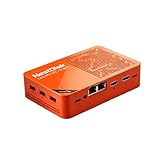
- [Plug and Play Private Cloud Experience] YOUYEETOO Nest Disk NAS Mini PC is a pre-installed with the OpenMediaVault system, requiring no complex configuration. Simply power it on and connect to the network to activate full NAS functionality. It supports multi-language operating systems, including Windows 11, Ubuntu, and Linux. Its plug-and-play capability enables use as private cloud storage, easily transforming into an HTPC (Home Theatre PC) or software-defined router to meet diverse needs for home entertainment, light office work, and network management.
- [Four-Bay NVMe Storage Architecture] YOUYEETOO Nest Disk NAS Mini PC Network Attached Storage NAS Kit supports up to four NVMe SSDs, delivering high-speed, stable and massive storage capacity. It ensures rapid internal network transfers and multi-device access speeds. Users can establish team project repositories, complemented by Wi-Fi 6 and Bluetooth 5.2 wireless connectivity, enabling efficient data sharing and multi-device synchronisation.
- [12GB DDR5 Multitasking Engine] YOUYEETOO Nest Disk Mini PC NAS Kit features 12GB of DDR5 RAM memory, leveraging its high bandwidth and low latency to effortlessly handle multiple concurrent tasks. It not only manages multitasking and virtual machine operations with ease but also supports light gaming and 4K video streaming. Consequently, it fulfils the entertainment and work requirements of home office professionals.
- [Compact All-in-One Office Mini PC] YOUYEETOO Nest Disk NAS mini computer features an ultra-compact design measuring just 146×97.5×32 millimetres, allowing it to be discreetly positioned behind a monitor. Once connected to a keyboard, mouse and display, it transforms into a fully functional office computer—ideal for document editing, online learning and other daily tasks. This makes it the perfect mobile office solution for space-constrained environments.
- [Triple 4K Collaborative Workspace] YOUYEETOO Nest Disk NAS Supports triple 4K 60Hz signal output via dual HDMI & Type-C ports, compatible with 4K monitors for multi-screen productivity and entertainment. Operates as a Theatre Media Centre for seamless playback of high-definition content, catering to financial multi-screen operations, audio-visual editing, and multilingual interface requirements. An efficient assistant for creative professionals and office users alike.
Product prices and availability are accurate as of the date/time indicated and are subject to change. Any price and availability information displayed on Amazon at the time of purchase will apply.




