Do these 3 things before closing this tab:
1Fix the driver behind crashes, sound loss and screen glitches2Repair Windows errors before they cause bigger problems3Scan for outdated or missing drivers - takes under a minuteStandard is enough for teams that need unlimited boards and stronger everyday workflows; Premium is for teams that need additional views, workspace-wide visibility, unlimited automation runs, or added administration and security controls. At the listed annual rates, Premium costs twice as much per user as Standard. The practical difference is whether its extra capabilities solve a real coordination or oversight need for your team.
How much do Trello Standard and Premium cost?
Trello’s pricing page listed these USD prices when checked on October 7, 2026. Rates can change, so confirm the current amount before subscribing. Annual billing is paid in advance, according to Trello’s Premium page.

As an Amazon Associate I earn from qualifying purchases.
| Plan | Billed annually | Billed monthly |
|---|---|---|
| Standard | $5 per user per month | $6 per user per month |
| Premium | $10 per user per month | $12.50 per user per month |
Both plans are priced per user, so estimate the bill using the Workspace’s billable headcount—not just the number of people who create cards. Trello counts Workspace members, including team admins, as billable members on Standard and Premium. A guest who can access more than one board in a Workspace is a Multi-Board Guest and is charged at the same rate as a member. See Trello’s pricing details.
What does Standard include?
Standard includes Free features and adds capabilities for teams that have outgrown the Free plan. It includes unlimited boards, AI features, advanced Planner, advanced checklists, card mirroring, custom fields, list colors, collapsible lists, saved searches, and single-board guests. File storage is capped at 250 MB per file. Standard also includes 1,000 Workspace command runs per month.
#1 Best Overall
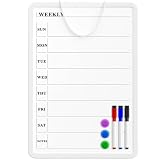
- Weekly Planner on One Side, Blank Whiteboard on the Other: This MaxGear dry erase calendar board features a double-sided design. One side is a weekly planner for scheduling and task tracking, while the other side is a blank whiteboard for notes, reminders, or drawings
- Double-Sided Magnetic Surface: Both sides of the board are magnetic, allowing you to attach notes, paper, or reminders on either the weekly planner side or the blank whiteboard side
- Works with Standard Dry Erase Markers: The smooth writing surface works with standard dry erase markers. The set includes 3 colorful dry erase markers, and you can also use other dry erase markers for clear writing and easy erasing
- Easy to Hang or Stick, Ready to Use: Includes a hanging rope and double-sided adhesive tapes, allowing you to hang the board on walls or doors or stick it to smooth surfaces like refrigerators—no other tools required
- AFTER-SALES SERVICE: 12-Month After-Sales Service. If you have any questions with our product, please feel free to contact us
That means a team does not need Premium simply to create unlimited boards or use custom fields and more capable checklists. For teams whose work is organized board by board, Standard may cover the essential workflow improvements without paying for Premium’s broader views and controls. Trello’s plan comparison lists the current feature sets.
What does Premium add?
Premium includes Standard and adds ways to view and manage work beyond a single board, plus higher automation capacity and administrative features.
Rank #2
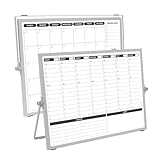
- 【Double Sided】Double-sided board features weekly calendar with time slots on one side and monthly planner with to-do list on the other side
- 【Installation】Compact 16"×12" size perfect for desk or wall use, includes stand for desktop placement and wall mounting capability
- 【For Family】1)For your kid’s nursing care so they can write down the time meds, daily activities, etc. 2)To transmit information to other family members 3)For the aged to remind them about appointments, pills, and idea's for food so that they are constantly reminded when they go in the kitchen to pay attention and check off items
- 【For Office】Perfect for the office schedule, it is a great way to stay on top of appointments and deadlines or as a huddle board to set expectations and goals at work
- 【Visual】This weekly calendar White Board is a solid option for those seeking a visual way to organize your schedule
- More ways to see work: Calendar, Timeline, Table, Dashboard, and Map views.
- Workspace-level views: Table and Calendar views that can surface work across the Workspace.
- More automation capacity: Unlimited Workspace command runs, instead of Standard’s 1,000 monthly runs.
- Administration and collaboration: admin and security features, workspace-level templates, collections, and observers.
- Data access: simple data export.
Premium does not raise the stated 250 MB per-file storage limit; that limit applies to both Standard and Premium. Trello’s pricing page describes the Premium additions.
Which plan fits your team’s work?
Choose Standard when board-level workflows are enough
- Your team mainly needs unlimited boards, custom fields, advanced checklists, Planner, and other workflow improvements.
- You can work without Premium’s Calendar, Timeline, Table, Dashboard, and Map views.
- The Standard allowance of 1,000 Workspace command runs per month is sufficient.
- You do not need the listed Premium administration, security, export, or workspace-level features.
Consider Premium when the added visibility or controls matter
- You need to review or coordinate work using views beyond individual boards, particularly Workspace-level Table or Calendar views.
- Your automation use requires more than 1,000 Workspace command runs per month.
- Your team has a practical need for Premium’s admin and security features, workspace-level templates, collections, observers, or simple data export.
At annual rates, the listed Premium price is $5 more per user per month than Standard; at monthly rates, it is $6.50 more. Multiply that difference by the number of billable users to estimate the plan premium for your Workspace. A small team may find the cost modest if cross-board planning or controls remove significant friction; a larger Workspace should check member and multi-board guest counts before deciding.
Rank #3

- Weekly Calendar Dry Erase Board: Weekly calendar layout, perfect for tracking events, to-do lists to help complete daily tasks, in addition to the to do list board, a hobby column is added for your convenience
- Premium Frame: The dry erase weekly calendar frame is made of high-quality aluminum material to ensure safety and long-term use. The weekly calendar whiteboard will add a touch of quality and luxury to your home and office
- Smooth Writing & Easy to Clean: The weekly wall calendar comes with a smooth and durable writing surface. It's easy to write on and easy to wipe clean without stains. You can ensure long lasting use
- Organizational Planning: This weekly calendar whiteboard(16" x 12") provide a clear and intuitive overview of your work tasks, class schedules, and to-do lists at a glance, helping you plan and prioritize better. Whether you use it for personal or professional use, it is a good choice
- Quality Service:If you have any questions or concerns about our products or services, please contact us and we will be happy to help within 24 hours
What happens if you try Premium and downgrade?
Trello says a Workspace can enroll in a free 14-day Premium trial. Its pricing FAQ says that after downgrading, the Workspace keeps paid features and unlimited boards through the prepaid service period. After that period ends, it becomes a Free Workspace, which can hold up to 10 boards. Check Trello’s current terms before starting a trial or changing plans, especially if the Workspace relies on Premium views or has more than 10 boards. Trello Premium and the pricing FAQ describe the trial and downgrade terms.
Quick Recap
Best Value
Rank #4

- Dry Eraser Whiteboard Kit; The whiteboard kit includes 10 Markers of 8 colors, 6 Magnets, 1 Eraser, 1 Pen Clip. Both surfaces of the desktop dry erase board are made of smooth and durable materials, easily to write on and wipe off without stain. It also has a duty aluminum frame supplying a very good protection for the desktop whiteboard. This dry erase board is very durable and resistant to drops
- Portable Dry Erase Whiteboard with Stand; This magnetic desktop whiteboard is lightweight enough for you to take it anywhere. 360° adjustable knob makes it possible for you to adjust the the placement angle you want. The newly upgrade reinforced gear allows the dry erase board to stand stably at all angles. So you can make it place the way you like,convenient for you to write and hold. You can lay it down as a flat whiteboard, or make it stand on a desk
- The whiteboard is made of high-quality materials with a smooth and clean surface. The writing marks are clearly visible and the colors are bright and beautiful. The writing marks are easy to wipe off to make it white and clean again. It is equipped with a variety of color markers with diverse and bright colors. It is equipped with strong magnets, so you can stick documents and papers on the whiteboard
- Double-Sided Design Dry Erase Board; The desktop whiteboard is double-sided designed,one side is whiteboard and another is weekly planner board. You can do two projects meanwhile with this weekly calander whiteboard. Using weekly whiteboard calendar, you can make your week schedule, work, study, lessons or other to-do lists. The whiteboard is a desk buddy for distance learning, teaching, small group discussion, presentation. It is a good school supplies for Teen’s drawing,arithmetic, writing skills, showing their fantastic ideas
- Suitable for school & office; This whiteboard is suitable for classroom teaching, office meetings, planning presentations, writing drafts, home schedule planning, memo note recording boards. It can be school favors, teaching favor, it can also be given as a gift to teen as a drawing tool or writing practice tool. And you can also use it as a bulletin board to post photos
Product prices and availability are accurate as of the date/time indicated and are subject to change. Any price and availability information displayed on Amazon at the time of purchase will apply.




