A desktop time tracker is an application on your computer that records how long you spend on work. It does this in one of three ways: you start and stop a timer yourself, it builds a timeline of the apps and windows you use for you to review, or it creates entries automatically when a rule you set matches an app or window. Which model suits you depends on whether you need itemised billing records, a review of where your hours actually went, or fewer forgotten timers.
What is a desktop time tracker?
A desktop time tracker is software installed on your computer, on Windows, macOS or Linux depending on the product, that writes time entries against projects, clients or tasks. Most products also sync those entries to an online account so you can report on them from another device. The product details below come from each vendor’s own documentation, not from independent testing. Privacy statements are what the vendors say their software does, not audited conclusions.
As an Amazon Associate I earn from qualifying purchases.
Three ways desktop trackers record time
The word “automatic” covers several different things, so separate them before comparing products.
Do these 3 things before closing this tab:
1Fix the driver behind crashes, sound loss and screen glitches2Repair Windows errors before they cause bigger problems3Scan for outdated or missing drivers - takes under a minuteManual timers
You press start when work begins and stop when it ends, or add an entry after the fact. Clockify’s desktop page describes a manual timer and stopwatch plus a Pomodoro timer. Toggl’s Windows support article describes global keyboard shortcuts for starting and stopping entries. This model produces the cleanest billing records, because every entry is one you chose to make.
#1 Best Overall

- Australia Made & Stock & Customer Support. Automatically tracks and displays the names, altitudes, and flight paths of aircraft around you.
- 2.8-inch Screen. Usually, all data update frequency is around 10-30minutes. Display local time, weather conditions, and 7-day forecasts.
- Simple operation with mobile control for custom displays.
- Ideal desktop accessory for enthusiasts, perfect gift
- Simple setup(Requires only a Wi-Fi connection).Includes Type-C cable, no need for additional purchases.This product is merely a simplified simulation of a radar device; its display quality and accuracy cannot be compared to those of a real, high-end radar system.
Activity timelines that need review
The tool logs which programs and websites you used, and you decide which of that activity becomes billable time. Clockify’s auto tracker works this way: its help page states that recorded activities only appear in the auto tracker window and aren’t automatically added to your timesheet.
Rule-based automatic tracking
You define rules tied to an app, a keyword or a window title. When a rule matches, the tool either prompts you or starts a timer. Toggl’s Windows support article describes configurable Autotracker rules that can do either.
Rank #2

- HIDDEN GPS TRACKER FOR VEHICLES – TRUE PLUG & PLAY INSTALL: The GPS7000 G1 is a mini, undetectable gps tracker for car, truck, trailer, RV and fleet use. A simple 2-wire connection to your vehicle's 9–30V battery gets you tracking in minutes — no OBD port, no apps to pair, no mechanic required. The compact 87 x 40 x 11 mm body plus included Velcro lets you install it as a fully hidden gps tracker for vehicles. Not suitable for vehicles above 30V (e-scooters, e-bikes)
- REAL-TIME GPS TRACKER WITH 24/7 LIVE LOCATION: This real time gps tracker for vehicles delivers live location, speed, route history, geofence alerts, and driving behavior reports straight to your phone or browser. Use it as a car tracker gps, semi truck gps, motorcycle gps, or commercial gps for truck drivers — and view everything on iOS, Android (gps tracker for android), Windows, or Mac via the friendly GPS7000 platform.
- NO SUBSCRIPTION REQUIRED – 24 Months SERVICE INCLUDED: Unlike most car gps trackers, the GPS7000 ships with service already activated. After the included period ends, renewal is 100% optional at just $11.90 monthly per gps tracker, — cancel anytime, no hidden fees, no contracts. A genuine gps tracker no subscription required option for buyers searching gps tracker for vehicles no monthly fee, gps car tracker no subscription, or gps tracker for vehicles without subscription.
- NATIONWIDE 4G LTE COVERAGE – USA, MEXICO & CANADA: Built on a 4G LTE network compatible with all major U.S. carriers, this gps tracking device for cars stays connected across all 50 states plus Mexico and Canada. Perfect as a small gps tracker for personal vehicles, a hidden gps tracker for car theft recovery, or a vehicle gps tracker no monthly fee solution for fleets, rentals, teen drivers, and trailer monitoring.ht.
- IP65 WATERPROOF + GEOFENCE ALARM FOR FLEET-GRADE SECURITY: Rugged IP65 waterproof shell, internal backup battery, and instant geofence enter/exit alerts give you the best hidden gps tracker for car protection on the market. Whether you need a non detectable gps tracker for car, a real-time vehicle gps tracking system for your fleet, or a tracking gps tracker for vehicles to protect a teen driver — the GPS7000 G1 delivers reliable, around-the-clock visibility.
| Approach | How an entry is created | Main strength | Main trade-off |
|---|---|---|---|
| Manual timer | You start and stop it, or add it afterwards | Deliberate entries that suit invoicing | Depends on you remembering to start it |
| Activity timeline with review | Activity is recorded, then you convert the parts you want | Shows where time actually went | Adds a review step and stores more detail about your computer use |
| Rule-based automatic tracking | A matching rule prompts you or starts a timer | Fewer missed starts for workflows that always use the same apps | Only as accurate as the rules you write, and rules need setup |
Who benefits from desktop time tracking
- Solo consultants and freelancers who bill by the hour and need itemised entries for each client.
- Small teams that need project-level records for estimates, status updates or client reporting.
- People reviewing their own computer use, such as those who want to see how much time goes to browsing or messaging.
- Anyone who regularly forgets to start a timer when switching between tasks.
How does automatic time tracking work?
Automatic tracking is where products differ most, so the two examples below show how the same label can mean different things.
Quick wins for a faster PC:
Scan for outdated or missing drivers - takes under a minuteDriver Scan →Clear out junk files and repair common Windows errorsFree Scan →Clockify’s auto tracker
Clockify’s auto tracker help page says the feature records programs and websites used for longer than a threshold. The default threshold is 60 seconds and the minimum you can set is 10 seconds. It captures program and window names, website URLs by default, and an idle-time percentage. Converting activity into time entries is a separate step you carry out yourself.
Rank #3

- True Standalone Operation, Zero Setup Hassle: Get started in minutes with no WiFi or complex software. Easily export all attendance data via the included USB drive, with ready-to-use Excel reports for instant payroll integration—fully independent time tracking.
- Built to Scale With Your Business: Onboard memory supports up to 500 user profiles and 50,000 punch records. Reliably handles shifts for growing teams without constant maintenance, ideal for expanding small businesses.
- Paperless & Cost-Effective Tracking: Ditch wasteful paper cards and printer ribbons. Our digital system delivers precise, instant records while cutting supply costs—combining accuracy with eco-friendly efficiency.
- Secure, Reliable Data Protection: An internal backup system preserves every punch during unexpected power loss. Your employee records and timesheets stay fully secure and retrievable, with no reset hassle.
- Durable, Versatile Design for Any Workplace: Built with industrial-grade materials for daily durability. Its compact design installs anywhere—warehouses, retail counters, offices, schools, and healthcare facilities—for consistent performance.
Toggl’s Autotracker rules
Toggl’s desktop documentation describes rule-based tracking that matches on active app and window titles. A matching rule can prompt you or start an entry automatically. Toggl’s Windows product page also lists idle-time detection, which can help you spot time spent away from the keyboard.
Privacy: what is recorded, where it lives, and how long it stays
A desktop tracker sees more than a timer does, so privacy deserves a direct comparison before you install anything. The table compares what each vendor documents.
Rank #4
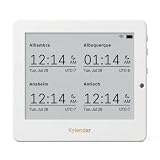
- Crystal-Clear 4.2" E-Paper Display: Features a $400 imes300$ high-resolution electronic ink screen that reflects ambient light instead of emitting glare. It provides a comfortable, eye-friendly, and paper-like reading experience throughout the day, even in bright environments.
- Modular Card-Based Layouts: Easily customize your screen with 6 versatile information categories including TIME, FINANCE, WEATHER, NEWS, CALENDARS, and AGENDAS. Monitor your daily schedule, monthly overview, stock symbols, portfolio summary, or worldwide time zones at a single glance.
- Smart Wi-Fi Sync & Web Setup: Connect seamlessly via 2.4 GHz Wi-Fi to receive automatic, curated updates fetched directly from Kylendar servers. The simple, web-based AP mode configuration portal lets you manage settings, time zones, languages, and cards effortlessly from any phone or computer browser.
- Long-Lasting Rechargeable Battery: Equipped with a built-in 3000 mAh lithium-polymer battery and a convenient USB Type-C charging input. Its ultra-low power consumption and smart partial-refresh technology maximize battery life, making it a reliable and wireless desktop companion.
- Compact & Elegant Desktop Decor: Measuring just 104mm x 90mm x 17mm and weighing only 135g, this sleek, minimalist smart calendar fits perfectly on any office desk, study shelf, or bedside table. Perfect for professionals, investors, and minimalist design enthusiasts.
| Question | Clockify (auto tracker) | Toggl Track (desktop auto-tracking) |
|---|---|---|
| What is recorded | Program and window names, website URLs by default, and idle-time percentage | Active app and window titles, used to match rules |
| Can URL capture be turned off? | Yes, through a setting that disables URL capture, according to the auto tracker help page | Not stated in the Toggl desktop documentation cited here |
| Where it is stored | Locally on your computer. The help page states: “All recorded data is stored locally on your computer.” That statement covers the auto tracker’s activity data described on that page. | Window data is used for matching locally and, per Toggl’s desktop documentation, is not sent to its servers for rule matching. Entries sync to the Toggl Track server once you are online. |
| Who can see unconverted activity | Only the user, according to the help page | Not stated in the cited documentation |
| How long it is kept | Records older than 45 days are automatically and permanently deleted | Not stated in the cited documentation |
Treat these as the vendors’ own descriptions. Neither has been independently audited for these claims. Before you enable automatic tracking, work through a short checklist:
Outdated Drivers Are Slowing You Down
One free scan finds every outdated or missing driver and matches the right update for your exact hardware.Free scan · exact hardware matchWindows Errors? Fix Them Before They Spread
Repair common Windows errors and clear accumulated junk for a smoother, more stable PC - no reinstall needed.Free scan · no reinstall- Check whether window titles could expose client names, document titles or project codenames you are not allowed to share.
- Turn off URL capture if you do not need website records.
- Confirm that a retention window like Clockify’s 45 days suits your billing and record-keeping needs.
- Confirm who on your team can see entries, and whether your account settings give managers access to individual activity.
Platform support and offline behavior
| Product | Desktop platforms stated | Offline behavior | Notes |
|---|---|---|---|
| Toggl Track | Windows 10 or higher, per the Windows product page. macOS and Linux are not stated on the pages cited here. | The Windows app works offline. The support article states: “The desktop app also works offline; it stores data locally and sends it to the Toggl Track server once you’re back online.” | An account is required. Global keyboard shortcuts and Autotracker rules are available. |
| Clockify | Windows, Mac and Linux desktop apps | Not stated for the desktop timer. Auto-tracker activity data is stored locally, per its help page. | Manual timer, Pomodoro timer and billable rates are listed on the desktop page. |
| RescueTime | Not stated in this guide. Check the vendor site. | Not stated in this guide | Focus tracks app and website use; Timesheets handles project tracking and client or manager reporting. |
Pricing and plan limits
- Clockify: its desktop page states that a seat can be free or up to $11.99 per month. The page does not tie that top figure to a named plan in the wording quoted here, so confirm which plan it refers to, whether it is billed monthly or annually, and what the free plan leaves out before you budget.
- Toggl Track: this guide does not list Toggl price figures. The pricing page describes current plans and automation features, so check it for the plan that includes the rules you need.
- RescueTime: plan packaging and pricing are not covered here. Check rescuetime.com directly.
Where a tracker fits beside invoicing and payroll
A desktop tracker often complements a project-management, invoicing or payroll system rather than replacing one. Before you commit, check three things against your own process: whether the tool exports entries in the format your invoicing software accepts, which integrations it offers with your calendar or project tools, and whether your payroll process needs approved timesheets rather than raw tracked time.
Best Value

- Newly Upgraded— Instant Self-Service Attendance: Staff can view their timesheets on their phone—no approval needed. Verify fingerprint, select dates, scan the QR code, and access full work hours, breaks & overtime logs anytime. Eliminates delays, boosts transparency, and cuts admin hassle.
- Remote Access: Unlike Bluetooth rivals with limited range and data loss issues, our Cloud Time Clock lets you view, correct attendance, and set custom rules in real time via the TimeRalo mobile app—no web portal or desktop software needed. Manage attendance anywhere, check real-time/historical records and edit errors effortlessly.
- Easy Setup, No Professional Skills: This employee time clock has a simple 3-step setup—no technical expertise required. Get it running in 3 minutes, skip complexity, and start seamless attendance management.
- Smart Scheduling: Supports fixed, rotating, flexible and night shifts. It easily handles cross-day shifts, department transfers and temporary employee attendance, perfect for 24-hour teams and all business workflows.
- Smart Automatic Calculation: Built-in intelligence calculates working hours, OT1, OT2, weekly overtime, and auto-deducts lunch/break time. Customize 12h/24h format and minute/percentage display to fit payroll rules, ensuring accurate timesheets and time savings.
Which approach fits your work
Intentional project logs: start with a manual timer
If you bill clients from deliberate entries, a manual timer such as Clockify’s or Toggl’s gives you the cleanest record. You accept that you must remember to start it, and the payoff is that every billed minute was a choice you made.
Known app-to-project workflows: use rule-based automation
If most of your work for a client happens in a few specific applications, Toggl’s Autotracker rules can match those apps and either prompt you or start the entry. Start with a small set of rules and check the results before you rely on them, because a rule that matches too broadly will create entries you didn’t intend.
Reconstructing time after the fact: use an activity timeline with review
If you need to work out where your hours went, Clockify’s auto tracker is built for that. Schedule a regular review slot so you convert the activity you want to keep while it is still in the tool, and treat the privacy settings above as part of the setup.
What’s actually slowing this PC down?
Pick the symptom - the matching free tool is one click away.
Managing distractions: consider a focus suite
If your problem is distraction rather than billing, RescueTime’s Focus product is positioned around automatic tracking of app and website use, goals and alerts, and blocking distractions. Its Timesheets product covers project tracking and client or manager reporting. Confirm platform support and pricing with the vendor before you choose it.
Quick Recap
Product prices and availability are accurate as of the date/time indicated and are subject to change. Any price and availability information displayed on Amazon at the time of purchase will apply.




