What’s actually slowing this PC down?
Pick the symptom - the matching free tool is one click away.
spttseng.dll is a Microsoft SAPI 5 text-to-speech component, and a missing spttseng.dll message usually points to an older speech-enabled program. Before repairing Windows, identify which program calls it, when the message appears, and whether that program is 32-bit or 64-bit.
Start with this diagnostic checklist
Write down these details before changing anything:
- The affected program: Is it a game, accessibility utility, Microsoft Agent application, installer, or older business program?
- When the error appears: At Windows startup, when launching one program, or after installing an update?
- The complete message: Note whether it says “not found,” “could not be loaded,” “specified module could not be found,” or “not designed to run on Windows.”
- The file path, if shown: A path inside the application folder points toward an incomplete application installation. A path under a speech-engine directory points toward a legacy SAPI component.
- System architecture: Check Settings > System > About > System type. A 32-bit application may need a 32-bit speech engine even on 64-bit Windows.
- Recent security events: Check whether Microsoft Defender quarantined a file shortly before the problem began.
Do not begin by copying a replacement DLL into C:WindowsSystem32. The indexed spttseng.dll build is a legacy 32-bit SAPI 5 file associated mainly with Windows XP-era installations. It is not a general Windows 10 or Windows 11 runtime, Visual C++ component, DirectX file, driver, or modern speech DLL.
As an Amazon Associate I earn from qualifying purchases.
What spttseng.dll does
The filename identifies a Microsoft Speech API 5 text-to-speech engine component. SAPI is Microsoft’s speech platform for applications that generate spoken output through installed voices and speech engines. Microsoft’s SAPI documentation describes the API and its speech-engine architecture in detail:
Publicly indexed metadata identifies the file as:
| Property | Known information |
|---|---|
| Internal description | SAPI 5 |
| Publisher | Microsoft Corporation |
| Product | Microsoft Windows Operating System |
| Architecture | 32-bit |
| Indexed version | 5.1.4111.0 |
| Indexed size | About 0.74 MB |
| Main role | Text-to-speech engine component |
That metadata does not prove that the exact indexed binary ships with every later Windows release. Its strongest association is with Windows XP-era SAPI 5 installations.
#1 Best Overall

- Digital Stereo Sound: Fine-tuned drivers provide enhanced digital audio for music, calls, meetings and more
- Rotating Noise Canceling Mic: Minimizes unwanted background noise for clear conversations; the rotating boom arm can be tucked out of the way when you’re not using it
- Handy In-line Controls: Simple in-line controls on the headset cable let you adjust the volume or mute calls without disruption
- Plug-and-Play USB Computer Headset: Simply plug the USB-A connector into your computer and you’re ready to talk or listen without the need to install software
- Padded Comfort: Comfortable headphones with adjustable headband features swivel-mounted, leatherette ear cushions for hours of comfort and is easy to clean
This file is also different from nearby SAPI components:
sapi.dllis part of the speech API layer.sapisvr.exeis a speech-related service process used by Windows speech functionality.spcommon.dllis a shared speech component.- Voice packages and third-party engines provide individual voices or speech functionality.
spttseng.dllis the legacy SAPI 5 text-to-speech engine component named in the error.
An older program may depend on several of these pieces. Restoring only the named DLL may leave another dependency missing.
Why Windows 10 or 11 may report it
The most likely explanation on a current PC is not that a current Windows component suddenly lost a standard file. More often, an old application, game, speech package, Microsoft Agent component, accessibility tool, or legacy installer expects an XP-era SAPI engine.
Older software may have been:
- Installed incompletely
- Removed while leaving a startup entry behind
- Updated without its speech files
- Copied from another computer instead of installed
- Designed for a different Windows architecture
- Partially removed by antivirus software
- Left with outdated registry entries after an uninstall
Historical SAPI installations could place the file in a Common Files speech-engine directory, including a path resembling:
C:Program FilesCommon FilesSpeechEnginesMicrosoftTTS1033spttseng.dll
Treat that as a historical example, not a required location on Windows 10 or Windows 11. The correct location depends on the application, language, SAPI package, and installation design.
Fix 1: Repair or reinstall the program named in the error
When one program reports spttseng.dll, repairing that program is the fastest and most probable solution. Windows searches an unpackaged application’s own directory before several system locations, so the correct copy may belong beside the program that needs it. Microsoft documents this behavior in its DLL search order documentation.
Repair a Store or packaged app
On Windows 11:
- Open Start > Settings.
- Select Apps.
- Select Installed apps.
- Find the affected application.
- Select the three-dot menu beside it.
- Choose Advanced options.
- Select Repair.
- Start the program again.
Repair normally preserves the application’s data. If it does not help, return to the same page and choose Reset if available. Resetting can remove locally stored app data, so use it only after repair.
Repair a traditional desktop program
- Press Windows key, type Control Panel, and open it.
- Select Programs > Programs and Features.
- Select the affected program.
- Choose Repair or Change on the toolbar.
- Follow the installer’s prompts.
- Restart Windows if the installer requests it.
- Test the program again.
If there is no repair option, uninstall the program and reinstall it from the original publisher, the original game launcher, or the store where it was purchased. For a game, use the launcher’s Verify, Repair, or Verify integrity function before reinstalling the entire game.
A successful repair usually means the original program opens without the spttseng.dll message. If the same program still fails, uninstall it, restart Windows, and install a version that officially supports your Windows release. Do not copy a DLL from another computer unless the program’s vendor provides that exact recovery procedure.
Rank #2

- Stereo Headset with Microphone for Classroom or Home - The Cyber Acoustics AC-5002 stereo wired headset with microphone delivers clear audio for lessons, calls, and everyday listening. A unidirectional noise-canceling microphone reduces background distractions, making this headset with microphone for PC ideal for K-12 classrooms, online learning, and home use.
- Adjustable Computer Headset with Durable Braided Cable – Designed for all-day comfort, the Cyber Acoustics AC-5002 wired headset with microphone features an adjustable headband, flexible boom mic that can be worn on the left or right, and soft leatherette earpads. The braided TuffCord cable resists tangles and wear, making this computer headset ideal for classrooms, home offices, and daily use.
- Connects to Gaming Console Controllers – Use this wired gaming headset with compatible Xbox and PlayStation controllers using the integrated 3.5mm connector. Enjoy reliable audio and voice chat for PS5, PS4, Xbox Series X|S, and Xbox One gaming.
- Plug-and-Play 3.5mm Headset for PC and Laptop - The Cyber Acoustics AC-5002 computer headset with microphone connects instantly with a standard 3.5mm audio jack, requiring no drivers or installation. This wired headset with mic works easily with PCs, Macs, laptops, tablets, and other devices with a 3.5mm connection.
- Complete Cyber Acoustics Headset Package - Includes the Cyber Acoustics AC-5002 Analog Stereo Headset and User Guide, backed by a 1-year warranty. Designed for classrooms, offices, and home learning, this Cyber Acoustics headset provides dependable audio and long-lasting performance.
Fix 2: Reinstall the program’s speech or accessibility component
Some older installers let you select optional features such as text-to-speech, spoken prompts, Microsoft Agent support, accessibility tools, or language components.
Run the original installer again and look for:
- Modify, Change, or Custom installation.
- A feature named Speech, Text-to-speech, SAPI, Voice, Accessibility, or Microsoft Agent.
- The correct language component.
- A repair or reinstall option.
Enable the required speech feature, complete the installation, restart Windows, and test the calling program.
Do these 3 things before closing this tab:
1Scan for outdated or missing drivers - takes under a minute2Clear out junk files and repair common Windows errors3Fix the driver behind crashes, sound loss and screen glitchesMicrosoft’s Speech SDK 5.1 download contains legacy development files, language packs, redistributable merge modules, and documentation. Microsoft describes it as a developer SDK, not as a guaranteed standalone end-user replacement for spttseng.dll. Do not install it merely because its name includes SAPI unless the application’s documentation specifically requires it.
If the original program came with a separate speech package, use that package from the original vendor. Reinstalling the application or its official legacy component remains the definitive fix when the file belongs to that application.
Fix 3: Check Windows Security before restoring anything
A legitimate speech file may have been quarantined, but malware can also imitate or replace a system DLL. Do not blindly restore a quarantined item.
- Open Start and search for Windows Security.
- Open Virus & threat protection.
- Select Protection history.
- Review detections around the time the error began.
- Open a detection to see its file path, threat name, and action.
- Update Defender under Virus & threat protection updates.
- Run a Full scan.
Restore a quarantined file only when you have confirmed that the detection is a false positive and that the file belongs to a legitimate installation. Microsoft explains how quarantine and restoration work in its Protection History guidance.
Quick wins for a faster PC:
Scan for outdated or missing drivers - takes under a minuteDriver Scan →Repair Windows errors before they cause bigger problemsFix Now →Fix the driver behind crashes, sound loss and screen glitchesFind Drivers →If the file appeared in an unexpected folder, has a suspicious publisher, or was detected as malware, leave it quarantined and remove the program that installed it. After scanning, reinstall the affected application from its official source instead of reusing the suspicious file.
Fix 4: Repair Windows component files with DISM and SFC
Use Windows repair commands when several Windows features are failing, speech stopped working across multiple programs, or the issue followed disk or system corruption. These commands are less likely to fix an application-specific legacy dependency, but they are the correct official path for damaged protected Windows files.
Save your work first, then:
- Open Start.
- Type Command Prompt.
- Right-click Command Prompt.
- Select Run as administrator.
- Approve the User Account Control prompt.
- Run:
DISM.exe /Online /Cleanup-Image /RestoreHealth
- Wait for DISM to finish.
- In the same elevated window, run:
sfc /scannow
- Wait until the verification reaches 100 percent.
- Restart Windows.
- Test the affected program again.
DISM repairs the Windows component store. SFC checks protected Windows files and can replace damaged versions. Microsoft recommends using DISM when necessary and then running SFC:
Rank #3
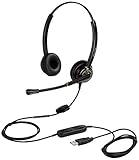
- CRYSTAL CLEAR SOUND QUALITY: This USB computer headset with noise cancelling microphone and HD wideband speaker delivers you and called side crystal clear sound quality, every word can be hear loud and natural. Laptop/PC headset with Digital Signal Processing (DSP) technology which digitally optimizes your voice and music, as well as suppresses echoes. Perfect for working from home, remote work, remote education, call center, office, Skype chat, conference calls, webinar, music and more.
- ULTRA COMFORTABLE and ERGONOMIC DESIGN: USB headphone with bendable and rotatable microphone arm allows you adjust the microphone to any talking position, also place the microphone on either side freely. Big and soft protein leatherette ear cushion provides you all day comfortable wearing, no pressure no pain to your ear. Click stop adjustable steel headband perfect fit for all head sizes. Acoustic Shock Protection(ASP) technology to protect your hearing all the time.
- SUPERB DURABILITY and 2-YEAR WARRANTY: Superb durability computer USB headset with reliable components structure, quality plastics, excellent quality mic and speaker, reinforced USB cord, professional designed for the toughest environment. From raw material to every component we strict control the quality for you from the origin. 2-YEAR manufacturer warranty and 45 days money back guarantee. Any issue pls feel free to contact us, our team will solve for you within 24 hours ASAP.
- WIDE COMPATIBILITY and MULTIPURPOSE: This premium USB Headset is Plug and Play. No installation driver is needed for Computer, PC, Laptop, Mac and other USB compatible devices. As well as work for Skype, Skype for Business/Lync, Microsoft Teams, Cisco, Zoom, 3CX, Avaya, Countpath Bria, and most other well-known softphones or softwares. With convenient in-line controller, easy to adjust this PC headphone volume up/down and microphone mute/un-mute.
- SPEECH RECOGNITION MICROPHONE: This computer USB headset with superior voice recognition microphone ideal choice for students education, such as Language-learning, Dictation, Online Course, Nuance Dragon Speech Recognition Software, Rosetta Stone, ..., and many more.
If SFC reports that it found and repaired corrupt files, restart and test again. If it says it could not repair some files, run DISM again, restart, and repeat SFC once. If the result does not change, inspect the CBS log at:
Crashes, No Sound, or Screen Glitches?
Random freezes, missing sound and display glitches usually trace back to one bad driver. Find and replace yours safely.Free scan · under a minutePC Slower Than It Used to Be?
A free scan shows the junk files, broken settings and background clutter dragging Windows down - then fixes them in one click.Free scan · Windows 10 & 11%windir%LogsCBSCBS.log
Do not repeatedly run the commands without checking what changed. If the missing file belongs to an old application rather than the Windows image, reinstalling that application is still the appropriate repair.
When manually hunting through component versions and repeating SFC or DISM leaves the cause unclear, Outbyte PC Repair can scan for reported Windows issues and show what needs attention; its repair functions require the full version, and it is not required for an application-specific DLL problem.
Fix 5: Use Windows Update and the supported repair reinstall
First install pending Windows updates:
- Open Start > Settings.
- Select Windows Update.
- Choose Check for updates.
- Install available updates.
- Restart when asked.
- Return to Windows Update and check again.
On Windows 11, some systems also provide a repair reinstall:
- Open Start > Settings.
- Select System > Recovery.
- Find Fix problems using Windows Update.
- Select Reinstall now.
- Follow the on-screen instructions.
- Keep the computer connected to power while Windows reinstalls the current version.
Where available, this process reinstalls the current Windows version while preserving apps, files, and settings. It is more suitable for broad Windows damage than for a single old game that bundled its own SAPI files. See Microsoft’s repair reinstall instructions.
The Tool Desk
Outbyte Driver Updater FREEScan for outdated or missing drivers - takes under a minuteDriver Scan →Outbyte PC Repair FREEClear out junk files and repair common Windows errorsFree Scan →Windows 10 may not display the same Recovery option. Use DISM and SFC first, then consult Windows recovery options if the problem affects multiple system components.
Fix 6: Check architecture and missing dependencies
The known indexed spttseng.dll build is 32-bit. A 32-bit application can use 32-bit components on 64-bit Windows, but copying that file into a 64-bit system location does not convert it into a 64-bit DLL.
Check the affected program’s architecture in its documentation or installation details. Then:
- Use the application’s own repair or reinstall package.
- Install the speech component matching the application.
- Do not place the same DLL in both
System32andSysWOW64. - Do not assume that
System32is the correct location for an application dependency. - Do not install Visual C++, DirectX, or .NET merely because the error names a DLL.
“The specified module could not be found” can also mean that a dependency of spttseng.dll is missing. In that case, the named file may be present but unable to load. The application’s installer is the safest way to restore the complete dependency set.
Recommended Free Tools
A message saying the file is “not designed to run on Windows” or “contains an error” usually points toward corruption, wrong architecture, incompatibility, or an altered binary. Replace the complete application or speech package rather than substituting a random file.
Rank #4

- Cancel Everything - Be heard clearly at home or in the office with the noise-canceling electret microphone
- Full range sound brings games and conversations to life 8 foot cord maximizes movement
- Dual 3.5mm Plug
- Headset with electret , noise reduction microphone for hands-free communication from your PC
- Ideal for PC voice applications, interactive gaming, and speech recognition
Fix 7: Review startup items and scheduled tasks
If the message appears every time Windows starts but no visible program uses speech, an old startup entry may still be launching a removed application.
- Press Ctrl + Shift + Esc to open Task Manager.
- Select Startup apps.
- Look for an entry associated with old speech software, an uninstalled game, or an unknown publisher.
- Right-click a clearly identified obsolete entry and choose Disable.
- Restart Windows.
Also check Settings > Apps > Startup for the same type of entry. Do not delete an unknown file just because its name resembles the missing DLL. Identify the parent program first, scan it, and uninstall the obsolete application through Settings > Apps > Installed apps or Control Panel > Programs and Features.
For a recurring boot error with no legitimate speech software, run a full security scan before making deeper changes.
Do not use regsvr32 as a general repair
regsvr32 is for DLLs that are designed to expose a registration entry point, commonly COM or ActiveX components. It is not a universal command for making every missing DLL work.
Do not run commands such as:
regsvr32 spttseng.dll
unless the original installer or Microsoft documentation for that exact component explicitly requires it. A missing dependency, wrong architecture, or incomplete SAPI installation will not be repaired by speculative registration. Manual registry edits can also damage SAPI voice and engine configuration.
Restore speech engines through the application installer or the official Windows repair path instead.
Avoid random DLL download pages
Downloading spttseng.dll from an unofficial DLL repository is risky because:
- The file may contain malware or an unwanted modification.
- It may be the wrong version.
- It may be the wrong architecture.
- Its publisher signature may not match Microsoft.
- It may belong to a different language or SAPI installation.
- The application may actually be missing a dependency.
- Copying it into a system folder can create a second, harder-to-diagnose problem.
There is no verified modern Microsoft standalone download page that promises to restore this specific DLL for Windows 10 or Windows 11. The safe sources are the original application installer, its official repair or verification process, Microsoft’s Windows Update and recovery tools, and Microsoft’s legacy SDK documentation when a developer application explicitly requires it.
Last-resort recovery options
If the problem began immediately after installing software or an update, use System Restore when a suitable restore point exists:
Best Value

- ✅【Outstanding Noise cancelling Microphone】 The headphones with unidirectional boom 270°microphone that only picks up your voice and block out unwanted background noises. Also, you can wear it on the left or right ear as you like.
- ✅【All-Day Comfort for All Head Shape】 Eaglend always designed for all-day comfort using, there will be no restraint pressure, with the adjustable headbend fit adult and kids easily.The soft protein memory foam earpads is made of high-level breathable materials,ROHS certified materials prevent your ears from heat and sweat.
- ✅【Enhanced sound performance & 40mm audio driver】:Corded phone headset with built-in audio sound card, Eaglend sound lab tested thousands of times for your daily conversation/music/movie/gaming, bringing you extra clear and bass for pleasant experience.
- ✅【USB/3.5mm Connection】 The headphone is designed for multiple use, 3.5mm audio cable with USB In-line audio volume control (cord length 5+4 feet),with mic mute &indicators /speaker mute.Compatible with PC/Tablet/Mac/iOS/laptop /Android phone and other devices."
- ✅【Global warranty &multi-purpose】24 months warranty by eaglend. Great ideal for online courses, Skype chat, call center, Webinars Presentations, Office, Business, Rosetta Stone, Dragon Speaking, Conference Calls and more.
- Open Start and search for Create a restore point.
- Open the result.
- Select System Restore.
- Choose a restore point from before the problem began.
- Review the affected programs.
- Complete the restore and restart Windows.
System Restore rolls back system files and settings without removing personal files. It does not replace a missing application installation, so reinstall the calling program afterward if necessary. Microsoft lists System Restore and other recovery choices in its Windows recovery options.
If Windows itself remains damaged after DISM and SFC, the Windows 11 repair reinstall is preferable to manually replacing system DLLs. A clean installation should be considered only after backing up personal data and confirming that application repair and supported recovery options cannot resolve the problem.
Free tools Windows power users keep installed
One-click scans. No signup required.
What to provide when asking for further help
The following information makes the error diagnosable:
- Windows 10 or Windows 11, including its current build if known
- The exact program or game that fails
- The complete error text
- Whether the error appears at startup or only when launching the program
- The file path shown in the message or by the program
- Whether Windows is 32-bit or 64-bit
- Whether the issue began after an update, installation, uninstall, or antivirus detection
- The result of
DISM.exe /Online /Cleanup-Image /RestoreHealth - The result of
sfc /scannow
FAQ
Is spttseng.dll a legitimate Microsoft file?
Yes. It is identified as the Microsoft SAPI 5 text-to-speech engine component. The known public build is a legacy 32-bit file strongly associated with Windows XP-era SAPI installations.
Should I download spttseng.dll manually?
No. Use the affected program’s official repair or reinstall process first. If Windows files are damaged, use DISM and SFC. A manually downloaded DLL may be malicious, incompatible, or unable to resolve a missing dependency.
Where should spttseng.dll be located?
There is no universal current location. Historical SAPI installations used Common Files speech-engine directories, while an application may expect its own installation folder. Let the original installer place it.
Do these 3 things before closing this tab:
1Repair Windows errors before they cause bigger problems2Scan for outdated or missing drivers - takes under a minute3Clear out junk files and repair common Windows errorsWill reinstalling Visual C++ fix this error?
Usually not. spttseng.dll is a SAPI 5 speech-engine component, not a Visual C++ runtime. Install another runtime only when the affected program explicitly identifies it as a missing dependency.
Is this a 32-bit or 64-bit file?
The indexed build is 32-bit. That can matter when a 32-bit application runs on 64-bit Windows. Use the application’s matching installer rather than copying the file into both Windows system folders.
Can regsvr32 fix it?
Usually no. regsvr32 does not repair missing dependencies or reconstruct a SAPI installation. Use it only when the exact component’s official installer specifically requires registration.
What if SFC says it repaired files?
Restart Windows and launch the affected program again. If only that program still reports the error, repair or reinstall the program because its private speech component may be the missing part.
What if the error says the specified module could not be found?
The named DLL may be present while one of its dependencies is missing. Repair the complete application or speech package, and verify the program’s architecture rather than replacing only spttseng.dll.
Quick Recap
Drivers are the other quiet cause. Instead of checking dozens of devices one by one in Device Manager, let Outbyte Driver Updater scan the machine for free and show which drivers are outdated or damaged; the full version installs the correct versions for you.
Product prices and availability are accurate as of the date/time indicated and are subject to change. Any price and availability information displayed on Amazon at the time of purchase will apply.




