What’s actually slowing this PC down?
Pick the symptom - the matching free tool is one click away.
RFU DC OUT is a power connection for a compatible RFU adaptor, not a regular audio/video output. On one documented Sony CCD-TRV model, the special mini-jack is specified as DC 5V. The adaptor lets certain older camcorders send playback to a television’s antenna input; the camera’s separate VIDEO/AUDIO or DV connectors carry the signal for other connection methods.
What RFU DC OUT means
Sony uses the label for “RFU adaptor DC output.” In the CCD-TRV operating instructions, the jack is described as a special mini-jack with a DC 5V specification. That voltage and jack description are specific to the documented model; check your own camcorder’s manual rather than assuming every Sony model has identical electrical or accessory requirements.
As an Amazon Associate I earn from qualifying purchases.
The RFU adaptor is used in a legacy TV connection setup. It takes the camcorder’s playback signal and routes it to a television through the TV’s antenna input. The RFU DC OUT jack supplies power to the adaptor; it is not itself the video or audio signal connection.
How the RFU adaptor connects to a TV
Sony’s CCD-FX420 manual documents an RFU-90UC adaptor for that model’s setup. Sony instructs users to connect the adaptor’s OUT to the television’s antenna input, and, if desired, reconnect the antenna to the adaptor’s ANT jack. The adaptor and television are then set to an unused VHF channel, 3 or 4, as specified in that manual.
#1 Best Overall

- Micro HDMI to HDMI: The cable supports 4K@60Hz, 2K@165Hz Full HD resolution, 3D Technology, 18 Gbps bandwidth and Audio Return Channel, to deliver high-definition video and uncompressed multichannel digital audio
- Bi-Directional Connectivity: Supports both Micro HDMI to HDMI and HDMI to Micro HDMI connections, enabling seamless streaming from various devices to your HDTV or projector
- Wide Compatibility: Works with a range of devices for Raspberry Pi 4/5, Hero 7/6/5/4 Action Camera,A5000/A6500/A6000/A6400, B500, EOS M50 Digital Camera, Miix 700/Miix 2/710/S6000, 10/8/Yoga Tablet and More
- Seamless Data Transfer: With a bandwidth of up to 18Gbps, this connection ensures the smooth and efficient transmission of high-bandwidth content such as HDR video
- Durable and Enhanced Design: Crafted with a nylon braided material and gold-plated connectors, this cable offers a robust 15,000+ bend lifespan and superior shielding for long-lasting performance.Only compatible with devices with micro HDMI interface, please confirm the interface type before purchasing
Those instructions describe the CCD-FX420 and its documented adapter arrangement. They do not establish that the RFU-90UC fits or works with every Sony camcorder. Model suffixes and regional versions can matter, so confirm the exact camcorder model and accessory compatibility in its manual before buying or connecting an adaptor.
Choose the connection that matches your TV or capture setup
| Your goal or equipment | Connection to check | What to know |
|---|---|---|
| Watch playback on a TV with compatible A/V inputs | The camcorder’s separate VIDEO/AUDIO connectors and a model-compatible A/V cable | Use the camera’s A/V output instructions, not RFU DC OUT. Cable fit varies by model. |
| Watch playback on a TV using its antenna input | A compatible RFU adaptor connected as specified in the camcorder manual | The CCD-FX420 manual documents an RFU-90UC setup; this is not a universal compatibility guarantee. |
| Capture tapes on a computer | A compatible A/V or DV output, if present, and capture hardware that matches it | Check the exact camcorder’s output instructions and the capture device’s supported inputs. |
Why you should not plug an arbitrary cable into it
The RFU DC OUT connector is identified as an adaptor power output, while manuals list VIDEO/AUDIO and, on some models, DV as separate connections. A plug that happens to fit is not evidence that a generic power lead, A/V cable, or capture device is electrically or functionally compatible. Use only the connection and accessories specified for the exact camcorder model.
Quick Recap
Rank #3
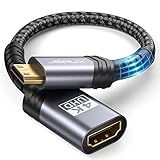
- High Speed: This mini HDMI to HDMI adapter supports 18Gbps 4K@60Hz 4:4:4 HDR, backwards compatible to 4K@30Hz/2K@120Hz/1080P,with Dolby 3D Full HD capabilities, giving you a smooth and clear experience; NOTE: Please make sure your device has mini HDMI port
- Widely Compatible: Compatible with DSLR Camera/Camcorder/Graphics Video Card/Raspberry Pi Zero/Pi Zero W/Laptop/Tablet/HDTV/Pico Projector/NUC barebones desktop/Sony HDR-XR500/Nikon D3200/Nikon D810 and more devices with mini HDMI port
- Extremely Durability: 32AWG copper wire with triple tin shielding reduces the probability of interference with wireless services such as Wi-Fi; High quality nylon braid, tested to be plugged and unplugged 5,000 times; Gold-plated corrosion resistant connectors for guaranteed top tier image and sound
- Compact and Portable: Mini HDMI male to HDMI female adapter cable 8 inch(0.2m), make the adapter close to your output devices; Home, outdoor travel, conference and office can meet your needs
- Brand design: This mini HDMI to HDMI cable adapter is different from other products, adhere to the original design, to achieve a stylish and generous appearance, taking into account the external and practical, to give you a better sense of use experience
Rank #2

- 【Universal Compatibility】This hdmi to micro hdmi cable supports devices such as the Go Pro Hero series (Hero 7 Black, Hero 6, Hero 5, Hero 4 Silver, Hero 3 White, Hero3+, and Hero 2018), So ny A series cameras (A5000, A6500, A6000, A6400, A73, and A7S), Nikon b500, Canon EOS M50, Raspberry Pi 5/4. It also caters to various tablets and ultrabooks including the IdeaPad Miix series (Miix 300 Tablet, Miix 700, Miix 2, Miix 710, and S6000), ThinkPad series (10 and 8), Yoga series (Yoga 2, Yoga 700, Yoga 710, and Yoga 710s), ASUS ZenBook UX305UA, and Transformer Mini T102HA
- 【G8 & G9 OLED Ready】Experience stunning visuals on Samsung G8 OLED and G9 OLED displays with Silkland 8K micro HDMI to HDMI 2.1 cable. Enjoy maximum resolutions of 4K@240Hz/144Hz/120Hz or 2K@240Hz/175Hz for immersive gaming and entertainmen
- 【Important Note: Bi-Direction】This cable is designed for Bi-Directional Micro HDMI to standard HDMI, not Micro USB/Mini HDMI to HDMI. It is not compatible with Samsung devices featuring Micro USB ports. Please ensure your device has a Micro HDMI interface, not Mini HDMI or Micro USB. If unsure, please refer to the product detail images for comparison
- 【Exclusive "E-Braid" Technology】Experience unprecedented durability with our unique double-layer fishnet winding and nylon braiding techniques. Copper cores and ferrite magnetic beads ensure uninterrupted signals, eliminating black screens and flickering
- 【HDMI 2.1-48Gbps Bandwidth】Unlock the full potential of your devices with lightning-fast data transfer rates, boasting a remarkable 48Gbps bandwidth, ensuring seamless connectivity for all your high-definition needs with HDMI 2.1. Experience the advantages of HDMI 2.1, delivering unparalleled performance for silky-smooth streaming, media playback, and live broadcasting experiences
Product prices and availability are accurate as of the date/time indicated and are subject to change. Any price and availability information displayed on Amazon at the time of purchase will apply.




