The Tool Desk
Outbyte PC Repair FREEClear out junk files and repair common Windows errorsFree Scan →Outbyte Driver Updater FREEScan for outdated or missing drivers - takes under a minuteDriver Scan →If your PS5 won’t turn on, it’s usually a power delivery problem, a stuck shutdown state, or (less commonly) a failing internal component. The fixes below are ordered from fastest and safest to deeper interventions.
Work through the steps in order. Stop as soon as you get a response (fan sound, light changes, or boot activity). That single observation helps you pinpoint the cause quickly.
As an Amazon Associate I earn from qualifying purchases.
Applies to PS5, PS5 Digital Edition, and PS5 Slim variants.
What it means when your PS5 won’t turn on
“Won’t turn on” can mean different things: no lights at all, the power light flashes briefly, the system powers then shuts off, or you hear nothing when pressing the power button. Your PS5 can also look “off” if it’s powered but not outputting video.
#1 Best Overall

- Compatible with: Sony PS5 / PS5 Slim / PS5 Pro / PS4 / PS4 Slim / PS3 Slim/ PS3 Super Slim ; Xbox Series S, Xbox Series X, Xbox One S, Xbox One X
- UL Listed / Safety: this power cord are Tested, Approved, and Certified by UL to ensure safety for you and your device. UL testing is authorized by OSHA - US Federal Agency, this certification provides peace of mind that this power cord meets rigorous safety standards for electrical products
- Power Cord Type: Non Polarized 2 Prong C7 Figure 8 Power Cord, 125V 7A, 18 AWG (American wire gauge)
- Durable & Sturdy: built with pure copper wire / heavy-duty flame-retardant cable Jacket, resistant to bending and daily wear for long-lasting use
- Wide Compatibility: works with most Game Consoles, TVs, Printers, Speakers and Other Devices that use the same 2-prong figure-8 power connector
This guide distinguishes those scenarios and gives you the right action for each.
Before you troubleshoot: quick safety and prerequisites
- Unplug and cool down: If the console was recently on, wait 10–15 minutes before handling cables.
- Use a known-good outlet: Prefer a wall outlet, not a power strip you haven’t tested.
- Have basic tools ready: Phillips screwdriver (only if you’re going to remove panels—do that only if you’re comfortable).
- Know your PS5 model: Original PS5, PS5 Digital Edition, or PS5 Slim (the slim model is often labeled on the box or underside).
If your PS5 smells like burning, has visible damage, or sparks, stop and move to the service decision section.
Identify the symptom (LEDs, fan sounds, button behavior)
Before changing anything, do this quick observation. It tells you whether the console is receiving power and attempting to boot.
Quick wins for a faster PC:
Fix the driver behind crashes, sound loss and screen glitchesFind Drivers →Repair Windows errors before they cause bigger problemsFix Now →No lights, no fan, no response
The console likely isn’t getting power (outlet/cable/PSU) or the power button isn’t making contact.
White light appears briefly, then goes off
This often indicates a failing power supply, a short-circuit protection event, or an instability during boot.
Fans spin, but black screen
That can still be a power/boot issue, but HDMI/TV settings are also common culprits. Jump to the “turns on but fails to boot” section if you’re hearing activity.
Beep/beep pattern, then shuts down
Beep patterns can point to internal hardware detection failures. Safe Mode may still respond; try it if the console shows any activity when you power.
Rank #2

- ETL Certified for Peace of Mind: This power cord features a pure copper core for stable power delivery, dependable durability, and safe daily use—ideal for home, office, and outdoor applications
- Wide Compatibility: Compatible with Sony PS5, PS5 Slim, PS4, PS4 Slim, PS3 Slim, and PS3 Super Slim consoles. Also fit for Xbox Original, Xbox One S, Xbox One X, Xbox Series S, Xbox Series X, and other devices with a matching power port, such as TVs, printers, speakers, and monitors
- Please Check Before Purchase: Not compatible with Sony PS1, PS2, original PS3 Fat, PS4 Pro, Xbox One Fat, or Xbox 360 Core/Pro/Elite/Slim/E models
- Power Cord Type: Non-Polarized 2-Prong Figure 8 Power Cord (IEC 60320 C7 to NEMA 1-15P), 18 AWG, rated for 125V AC, 7A Max
- Multiple Length Options: Choose the length that fits your setup. Please check the product images to confirm the connector type before purchase. Contact us with any questions
Step-by-step: basic power troubleshooting
Start with the simplest path: verify power delivery and remove distractions.
- Remove all accessories: Unplug controllers, USB drives, external SSDs, and any USB devices from the PS5.
- Unplug the PS5: Disconnect the power cable from the wall and from the PS5.
- Check the power cable ends: Look for bent pins, looseness, or damage. Reseat firmly on both ends.
- Try a different outlet: Use another wall outlet you trust. Avoid smart outlets that cut power unexpectedly.
- Try a different power cable: If you have a verified compatible cable, test it. Damaged IEC leads are common.
- Remove power strip/surge protector: Plug directly into the wall for the test.
- Wait 60 seconds: Then press the power button on the console (not the controller).
If your PS5 still shows zero signs of life after an outlet and cable swap, proceed to the hard power reset.
Hard power reset (safe and effective)
This clears stuck states and forces the power rails to fully discharge. Do this only after unplugging.
- Unplug the PS5 from power.
- Wait at least 2 minutes. If the console was recently operating, wait 5 minutes.
- Hold the power button for 30 seconds. Keep pressing until you’re sure the button is fully depressed the whole time.
- Release the button.
- Plug the PS5 back in. Use the same confirmed-good outlet.
- Press the power button once. Don’t keep tapping—press firmly and let it boot.
If you see the white light come on and fans spin, you’re past the no-power state. If it still won’t respond, move to Safe Mode (if there’s any light/response) or the power-cause checks.
Free tools Windows power users keep installed
One-click scans. No signup required.
Try the PS5 Safe Mode path
Safe Mode is designed for recovery when normal boot fails. You need the console to show at least some sign of activity when you attempt to enter it.
Connect the right way before entering Safe Mode
- Use HDMI directly to the TV/monitor. Avoid HDMI receivers and capture cards for this test.
- Use a known-good HDMI cable. If possible, test with a cable you trust.
- Pick a straightforward TV input. Use the TV’s HDMI port labeled for standard video input (no ARC/eARC weirdness for the test).
Then proceed with the Safe Mode entry attempt.
- Turn the PS5 off completely. If it’s unresponsive, skip Safe Mode and go to the PSU/service decision.
- Press and hold the power button. Start from fully powered off.
- Keep holding until you hear two beeps. The first beep occurs as you hold; keep holding until the second beep.
- Release the power button.
- Connect the DualSense via USB. Use a data-capable USB cable (charging-only cables often won’t work).
- Select Safe Mode options. You should see the Safe Mode menu on screen if video output is healthy.
Safe Mode option choices
Use the options that match your observed symptom.
- Option 1: Restart PS5 (lowest risk). If it boots normally afterward, you can stop.
- Option 2: Update System Software (use when system files are missing or corrupted). Requires internet.
- Option 3: Reset Settings (use when you suspect video/network settings caused black-screen behavior).
- Option 4: Rebuild Database (use when it boots to the home screen but hangs, crashes, or loops).
- Option 5: Reset PS5 (Reinstall System Software) (highest impact). You’ll likely lose installed games locally unless backed up to cloud or external storage.
If Safe Mode never appears and the console remains dead/black, focus on power delivery and hardware culprits.
Check for common power and hardware culprits
Most “won’t turn on” cases are external power problems or a PSU issue. Still, there are a few other frequent causes.
Rank #3

- FOR 2-PRONG DEVICES: Works with most TVs, monitors, printers, and other devices that require a 2-pin power connector
- PACKAGE INCLUDE: 1 x High Quality 5ft AC 2 Prong Power Cord
- COMPATIBILITY: compatible with PS2, PS3, PS4, PS5, Xbox One S, Xbox One X, Xbox Series S, Xbox Series X, Apple TV, many printer, consumer electronics, and power brick models
- FEATURES: High Quality 2 Prong 5ft AC Power Cord, universal power cable is perfect for bedroom, living room office and home use.
Power cord, outlet, and surge protector issues
Even if the outlet works for other devices, the PS5 may not get enough stable voltage. Test with a lamp, and avoid extension cords and surge protectors for your first proof.
If you have a multimeter, check outlet stability during load—but if you don’t, just do the cable/outlet swap approach.
AC power adapter and PSU warnings
Do not open the PSU unless you’re experienced with electronics. A failing PSU can cause brief white light and shutdown, or no light at all.
Signs that point to internal power failure include: consistent no-response across multiple outlets/cables, brief power LED then off, or the console behaving differently when you slightly adjust the power connector.
Power button, front USB devices, and peripherals
If the power button feels mushy or doesn’t click firmly, try pressing directly on the console button once (not repeatedly). Also remove all USB items, since a shorted external device can trigger protection behavior.
When possible, test with the system sitting on a hard, flat surface—avoid resting it on carpet or a fabric cover.
Overheating or ventilation blocks
Overheat is less common for “won’t turn on,” but it can still cause repeated shutdowns. Ensure vents aren’t blocked, clean dust with a dry microfiber cloth around vents (don’t blow compressed air into the PSU area), and leave clearance around the console.
Rank #4
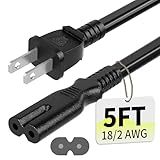
- Specifications: 5 feet tv power cord, non polarized 2 prong figure 8 power Cord (C7 to NEMA 1-15P ), 7A, 18AWG, 125V, NISPT-2, ETL listed
- Compatible: This ac power cable is fit for Sony PS5 / PS4 Slim / PS4/PS3 Slim/ PS3 Super Slim/Microsoft Xbox One S/Xbox One X/ Xbox Series X/Xbox Series S and other electronic devices such as TVs, printers, speakers, monitors, etc
- ETL Listed / Safety: This PS5 power cord is constructed with 100% pure copper and a flexible PVC jacket, providing high conductivity and minimal power loss
- Compatibility Note: To ensure compatibility, please verify that the connector matches your device's power port as illustrated in the product images
- Power Your Devices with the Perfect Reach: Select from multiple lengths to find your ideal match; this cord ensures safe, stable power for your game console, sound bar, speaker system and more
Do not run it inside a closed cabinet for testing.
When it turns on but fails to boot (separate problem)
If you hear fan spin and see a light, but you get no display, treat it as a boot/video issue rather than “no power.”
- Check TV input: Make sure the TV is on the correct HDMI port.
- Try a different HDMI port on the TV.
- Test another HDMI cable. HDMI cable failures are common.
- Power cycle the TV and PS5: Unplug both for 60 seconds, then plug in the TV first, then the PS5.
- Safe Mode → Reset Settings: If Safe Mode loads, use Reset Settings to fix output mismatches.
If Safe Mode loads, you can also choose Rebuild Database if games/system navigation freeze or crash.
Recommended Free Tools
Model-specific notes: PS5, PS5 Digital Edition, and PS5 Slim
The troubleshooting logic is the same, but physical handling and expectations can differ.
| Model | What to watch for | Testing priority |
|---|---|---|
| Original PS5 / PS5 Digital Edition | Power light behavior may indicate PSU protection (brief light then off) | Outlet + cable swap, hard reset, then service if no response |
| PS5 Slim | Video output failures can be mistaken for no boot if you don’t watch the light/fans | Observe fans/light, test HDMI/Reset Settings if Safe Mode shows |
If you’re unsure which model you have, check the label on the underside or the retail packaging.
Test plan if you suspect a failing PSU or motherboard
Use this short, evidence-driven approach. It helps you avoid pointless resets.
- Confirm power delivery: Try a confirmed-good outlet and a confirmed-good power cable.
- Hard reset: Unplug, wait 2–5 minutes, hold power 30 seconds, then power on.
- Observe LED and sound: Do you get any light change at all? Any fan spin?
- Try Safe Mode only if there’s response: Two beeps can mean the console’s power section is alive enough to enter recovery.
- If it remains dead: After consistent successful outlet/cable tests, assume internal power failure and proceed to Sony service.
Repeatedly power-cycling a device with internal failures can worsen heat stress. If you hit the dead state across confirmed-good external power tests, don’t keep looping.
Do these 3 things before closing this tab:
1Clear out junk files and repair common Windows errors2Fix the driver behind crashes, sound loss and screen glitches3Repair Windows errors before they cause bigger problemsHow to decide between DIY steps and Sony service
Use the decision rules below to avoid damaging components or voiding coverage.
Best Value

- [Compatible With] This power cord is compatible with Sony PS3 Slim & Super Slim / PS4 Slim / PS5 ; Microsoft Xbox One S, Xbox One X, Xbox Series S, Xbox Series X. ▶NOTE: NOT Compatible With Original PS3 Fat
- [CompatiIbility] High Quality 18 AWG 2 Slot Figure 8 AC Power Cord (IEC320 C7 to NEMA 1-15P ), Work For: Game Consoles, LED LCD TV, Monitor, Sound Bar, Printers and other devices requiring 2 Slot Power cord.
- Quality Assurance: adopt thickened PVC material, pass 1000+ bending test, the cable has tensile resistance, safety, long service life.
- [materials] Using high quality materials, high quality copper core wire, safe and fast charging your equipment.
- [After-sale] The charging cable is sold under strict quality control. Please rest assured to purchase. If there is any quality problem, please contact us.
- Proceed to service if: The console shows zero response across multiple outlets and a cable swap, or it briefly lights then shuts off repeatedly.
- Consider DIY only if: Safe Mode loads and software-level options resolve the issue (Restart, Rebuild Database, Reset Settings).
- Avoid opening the console if: It’s under warranty or you’re not comfortable with internal electronics. Opening can affect warranty eligibility.
If you’re still under warranty, gather proof of purchase and note the exact symptom (e.g., “no LED even after holding power 30 seconds”). That speeds up diagnostics.
Common mistakes that waste time
- Assuming HDMI is the cause of no lights: If the PS5 has no power indicators and no fan activity, HDMI can’t fix that.
- Using a charging-only USB cable for Safe Mode: Safe Mode needs a data-capable cable.
- Resetting settings repeatedly without checking cable/outlet: Don’t skip the physical power checks.
- Leaving USB devices connected during power tests: Unplug external drives and controllers first.
- Ignoring protective shutdown signs: If it powers briefly and dies, treat it as a power stability issue and move toward service.
Troubleshooting FAQs
Why does my PS5 light up briefly and then turn off?
That pattern often indicates power delivery instability or internal power protection. Test with another outlet and power cable, then do the hard power reset. If it still repeats, it’s usually internal PSU-level failure and needs service.
Can a bad HDMI cable prevent my PS5 from turning on?
No. A bad HDMI cable can cause a black screen, but it won’t typically stop the PS5 from powering on. If you see no lights and no fan sound, focus on power delivery.
Does holding the power button 30 seconds always fix it?
It fixes stuck shutdown states in many cases, especially when the console appears completely dead. If your PS5 still shows zero response after verified outlet/cable tests, it’s unlikely to be a software-only problem.
What if Safe Mode won’t appear?
Safe Mode requires enough power to reach the recovery stage and output video. If the console is truly dead, Safe Mode won’t show. If it powers but shows no video, test HDMI cable/port and use Reset Settings if Safe Mode loads.
Will I lose my games if I reset PS5 (Reinstall System Software)?
Local installs will typically be removed. If you have cloud saves (PlayStation Plus) or backups on external storage, you can often restore progress and reduce downtime. Still, always treat this as a data-impacting step.
Is it safe to clean dust from the PS5 vents?
Yes, as long as you keep it gentle. Use a dry microfiber cloth to remove visible dust around vents. Avoid opening the console or using liquid cleaners.
Outdated Drivers Are Slowing You Down
One free scan finds every outdated or missing driver and matches the right update for your exact hardware.Free scan · exact hardware matchPC Slower Than It Used to Be?
A free scan shows the junk files, broken settings and background clutter dragging Windows down - then fixes them in one click.Free scan · Windows 10 & 11Bottom Line
A PS5 that won’t turn on is most often solved by eliminating power delivery variables: outlet, power cable, surge protectors, and a proper hard reset. Only after you confirm those external factors should you assume internal failure.
If the console stays completely unresponsive across confirmed-good outlet and cable tests, don’t keep cycling it—prepare for Sony service and document the exact symptoms.
Quick Recap
Product prices and availability are accurate as of the date/time indicated and are subject to change. Any price and availability information displayed on Amazon at the time of purchase will apply.




