Quick wins for a faster PC:
Scan for outdated or missing drivers - takes under a minuteDriver Scan →Clear out junk files and repair common Windows errorsFree Scan →Socrative is built for live classroom assessment; Google Forms is a flexible form and quiz builder. Choose Socrative when teacher-paced activities, live student responses and assessment reports are central. Choose Forms when answer-based logic, collaborative editing, broad sharing and analysis in Google Sheets matter more.
How the two tools approach classroom work
Socrative presents itself as a classroom assessment and student-response tool. Teachers can run quizzes, polls, exit tickets and Space Race activities, choose teacher- or student-paced delivery, and view responses as students submit them. Its product page describes live student and class-level performance, automatic grading and assessment reporting (Socrative product features; assessment and evaluation use case).
As an Amazon Associate I earn from qualifying purchases.
Google Forms is a general-purpose form creator that can also be used for quizzes. Its official feature page emphasizes creating questions, sharing a form, collecting responses and analyzing them, rather than a dedicated live classroom activity mode (Google Forms features). This is a difference in documented workflows, not proof that one tool produces better learning outcomes.
Outdated Drivers Are Slowing You Down
One free scan finds every outdated or missing driver and matches the right update for your exact hardware.Free scan · exact hardware matchPC Slower Than It Used to Be?
A free scan shows the junk files, broken settings and background clutter dragging Windows down - then fixes them in one click.Free scan · Windows 10 & 11Feature comparison
| Decision area | Socrative | Google Forms |
|---|---|---|
| Best fit | Classroom assessment and student response, including live activities and automatic grading. | General forms and quizzes, with flexible creation, response collection and analysis. |
| Classroom interaction | Quizzes, polls, exit tickets and Space Race; teacher-paced and student-paced modes; live results. | Share forms by link or email, or embed them on a website. The official feature page describes response collection and summaries, not a dedicated live classroom response mode. |
| Design and logic | Multiple question and activity types; product materials also describe adding images, video and equations, and AI quiz creation or import. | Multiple question types, visual customization, answer-based logic and response validation. |
| Results and analysis | Live results, question insights, automatic grading, class trends and exportable assessment reports. | Response summaries and charts update in real time; open responses in Google Sheets for deeper analysis or automation. |
| Sharing and collaboration | Students join a teacher’s room with a code and do not need an account. Teachers can collaborate through team libraries. | Share through email, links, social media or an embedded website. Collaborators can work together on form creation and analysis. |
| Reports | Excel results, individual student PDFs, a results-summary PDF and an answer-key PDF. Reports can be emailed, downloaded or saved to Google Drive. | Real-time charts and analysis in Google Sheets are the documented route. |
Which tool fits your teaching workflow?
Choose Socrative for live checks and teacher-led assessment
Socrative is the closer fit when you want to run a classroom activity and see student responses while it is happening. Its documented formats include quizzes, polls, exit tickets and Space Race, with both teacher-paced and student-paced delivery. Live results and assessment-focused reports can help teachers review responses and class performance.
#1 Best Overall

- RCRF-02 Programmable Response Card Clicker by Turning Technologies
- New batteries Included
- Credit Card Size
Choose Google Forms for flexible quizzes and broader form collection
Forms fits when the task is to create a form or quiz with answer-dependent paths, validate responses, work with collaborators, or distribute it across a website, email or link. Its response charts provide an at-a-glance summary; Google Sheets is the stated option for working with the underlying response data.
Check the reporting destination
If you need individual student PDFs, answer keys or Excel output, Socrative documents those report types. Its report history on the Free plan is 30 days. Forms instead describes summaries and a direct path to Sheets analysis. Decide which format your recordkeeping or follow-up work requires before choosing.
Rank #2
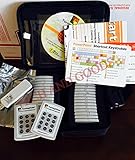
- $2,299 MSRP from Turning Technologies
- 200 foot range (400 ft. coverage) - PowerPoint compatible.
- Deep sleep mode when not in use. Select a channel in less than five seconds, indicating session choice
- Not limited to line-of-sight transmission. The most reliable and scalable offering available.
- Complete with 32 clickers, RRRF-01 USB receiver, quickstart guide, shortcut key, batteries, software
Socrative plans, student limits and report history
Socrative’s pricing page, checked October 7, 2026, lists these plan details. Prices are USD per seat per month with annual billing; confirm current terms and local billing on the Socrative pricing page before purchase.
| Plan | Listed price | Students per activity | Other stated limit |
|---|---|---|---|
| Free | $0 | 50 | 5 quizzes, 1 room; report history: 30 days |
| Essentials | $10 per seat/month, billed annually | 50 | Plan-specific room and report limits apply; check the pricing page for current details. |
| Pro | $16.67 per seat/month, billed annually | 300 | Plan-specific room and report limits apply; check the pricing page for current details. |
| Organization | $14.40 per seat/month, billed annually | 300 | Plan-specific room and report limits apply; check the pricing page for current details. |
The reviewed Google Forms feature page does not establish a standalone Forms price. Check the Google account or Workspace context that applies to your school rather than assuming a particular price or tier.
Rank #3

- 32 Clickers, 1 receiver, carrying bag, software, quickstart guide.
- The Senteo interactive response system provides a direct wireless connection between you and your students. Now you no longer have to wonder if students understand what you’ve taught them. They can tell you with the click of a button.
- To assess student understanding, you can use a variety of question types, including true or false, multiple choice, numeric response and more-than-one-right-answer. Decimals, fractions and negative numbers can also be incorporated into questions and answers.
- tallies student responses, records attendance, posts test results and provides individual feedback.
Do students need an account to use Socrative?
No account is required for students to join a teacher’s Socrative room; they join using a room code, according to Socrative’s FAQ. For Google Forms, sharing options include email, links and embedded forms. Check your school’s Google account and administrative settings for any access requirements that apply to a particular form.
Independent reader supportYour contribution helps us test, update, and keep practical guides available for everyone.Can Google Forms show quiz results in real time?
Yes. Google Workspace says Forms charts update in real time as responses arrive, and responses can be opened in Google Sheets for further analysis (Google Forms features). Socrative also describes live results, but frames them around classroom assessment and student activity.
Quick Recap
Best Value

- RF Clicker, Interactive classroom aid, programmable channel - Select a channel in less than five seconds, indicating session choice - Select a channel anytime - even when a session is underway
- Average battery life is 6 to 12 months
- Two coin cell CR2032 (3.0V) lithium batteries included
- 200 foot range (400 ft. coverage)
Rank #4

- Two AAA batteries included
- 200 feet (400 ft. coverage)
- Battery Life Indicator - Answer Choice - Response Confirmation
- Cell phone style entry
Product prices and availability are accurate as of the date/time indicated and are subject to change. Any price and availability information displayed on Amazon at the time of purchase will apply.




