PC Slower Than It Used to Be?
A free scan shows the junk files, broken settings and background clutter dragging Windows down - then fixes them in one click.Free scan · Windows 10 & 11Crashes, No Sound, or Screen Glitches?
Random freezes, missing sound and display glitches usually trace back to one bad driver. Find and replace yours safely.Free scan · under a minuteA “hard reset” usually means a factory reset: it erases local data and settings and restores the tablet’s software to its default state. Back up important files and photos first if you can still access Android. If you mean restarting the tablet without erasing anything, use the normal power-menu restart instead.
Find your exact Sky Devices tablet model first
Do not guess a hardware-button combination. Sky Devices says detailed instructions vary by device and directs owners to the User Guide for their specific tablet. Check the label on the tablet, its packaging, or paperwork; if Android opens, check Settings for an About tablet or About device section.
As an Amazon Associate I earn from qualifying purchases.
Then find your model’s manual on the Sky Devices downloads page. The page lists multiple tablets, including SKY Vision2, SKY KID, Platinum View2, Elite Octa, Elite OctaMax, Elite OctaPlus, Elite OctaX, Elite T8, Elite T8Plus, and Elite T10; the list may change. The manufacturer’s support FAQ likewise says, “For detailed instructions about a specific device, please check the User Guide.”
Free tools Windows power users keep installed
One-click scans. No signup required.
If Android opens, use its factory-reset option
This route is for a tablet you can unlock and navigate. Menu names and locations vary by model and Android version, so treat these as general directions rather than a guaranteed path:
#1 Best Overall

- Elegant Design: The Elite T10 tablet, Blue back color style, boasts a slim full metal body that exudes elegance and sophistication. Its sleek design and premium build quality make it a perfect companion for any occasion.
- Powerful Performance & Long Battery Life: The Elite T10 tablet is powered by an Octa-Core with a 7,100 mAh battery, keeping you connected all day.
- 8 Core 2.0 GHz processor, providing smooth and responsive performance for all your daily tasks. Whether you're browsing the web, streaming movies, or playing games, the tablet can handle it all with ease.
- Large Storage Capacity: With 64GB of internal storage, you'll have plenty of space to store your favorite movies, music, and photos. And if that's not enough, the tablet also supports expandable storage via a microSD card, allowing you to increase your storage capacity up to 128GB.
- Sharp Display: The Elite T10 tablet features a 10-inch HD screen with a resolution of 800x1280 pixels. The vibrant colors and sharp details make it ideal for watching movies, browsing the web, and reading eBooks.
- Open Settings and look for a System, Reset, or Backup & reset section.
- Choose the factory-reset option, which may be labeled Factory data reset or Reset tablet.
- Read the on-screen warning carefully. Confirm only if you are ready to erase local data and settings.
If you cannot find the option, consult the tablet’s User Guide rather than selecting an unfamiliar setting. A general guide describes this Settings route, but it is not a Sky Devices model-specific procedure: Robots.net’s hard-reset guide.
If Android will not open, follow the manual’s recovery steps
A recovery-menu reset may be an option when the tablet is locked or cannot boot normally, but the hardware-key sequence depends on the model. Use the exact instructions in that tablet’s User Guide. Do not assume that Power plus Volume Up or Power plus Volume Down is correct for every Sky Devices tablet.
Rank #2
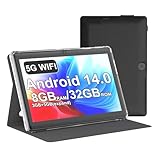
- 【Core Performance & Storage】Equipped with Android 14.0 system, features 8GB RAM (3+5GB extended) and 32GB internal storage, smooth for running daily apps and storing photos, videos and files, and can also be expanded up to 1TB via micro SD card
- 【 HD IPS Display】 7-inch IPS screen delivers natural color reproduction and clear image presentation, ideal for daily video watching, web browsing and casual viewing, The 7 inch tablet is compatible with Widevine L1, which has ensured that you are watching high resolution content
- 【【 Included Protective Case】- Equipped with a 7-inch touch screen with 1024*600 resolution, this tablet can display photos clearly and watch videos smoothly, which is enough to cope with daily needs.
- 【Multifunction Connectivity & Camera】Built-in dual camera for daily casual shooting needs; supports Bluetooth 5.0 and WiFi, enables stable wireless connection and data transmission for daily use
- 【Portable Compact Design】7-inch small and lightweight body, easy to hold with one hand and carry around, suitable for home, on-the-go and daily casual usage scenarios, This tablet is best choice for parents, friends, and children. Such as Father's Day gift, Valentine's Day, Birthday and Christmas
If you cannot find the manual, or the recovery screen does not match its instructions, stop rather than guessing. Contact Sky Devices through its support page, or ask your distributor or service provider for model-specific help. A reset should not be treated as a guaranteed way to remove an account-based activation lock.
Do these 3 things before closing this tab:
1Fix the driver behind crashes, sound loss and screen glitches2Repair Windows errors before they cause bigger problems3Scan for outdated or missing drivers - takes under a minuteIf the tablet will not power on or the problem remains
The troubleshooting appendix in the SKY PAD10 manual reference advises checking that the battery has charge, using the charger designed for that tablet, checking the charger voltage against its indication, and making sure the plug makes good contact. These are SKY PAD10-specific instructions, not confirmed guidance for every model. If the issue persists, the manual says to contact the distributor or service provider.
Quick Recap
Rank #4

- 【Latest Android 15 Tablet】Tablets equipped Latest Android 15 System, all functions have been strengthened than android 14 and has Stronger compatibility, faster responsive speed and smoother operation. Tablet With GMS certification (Google Mobile Service), pre-installed Google Play, Support social apps such as Facebook, Twitter, YouTube, Tiktok etc. Well for watching video, chatting online, reading ebook and more.
- 【High Performance Tablet】This Coopers Tablet equipped with high performance Quad-core CPU, running well for quick APP Launches, multitask etc. Bring you a Smooth experience. Adopt 8GB RAM(3+5GB Expand), 32GB ROM, use SD Card you can expand tablet to 1TB Storage.
- 【Multifunctional Tablets】COOPERS Tablet is a Cost Effective Tablet. It has a preferential price with excellent configuration. Powerful CPU, Large Storage, Back 8.0 HD Camera and Front 2.0MP. Bluetooth 4.2, Built-in GPS, 2.4G WiFi, FM radio, dual-speaker, 3.5mm Headphone jack. Suit for Reading, Photograph, videos, Music etc.
- 【10 inch Tablet HD Screen】This 10 inch Tablet use a 800*1280 IPS display, text is sharp and clear. Larger viewing angle and brighter colors. Ensure you a comfort visual experience when watching video and Browsing web pages. In Addition, tablet use a 6000mWh rechargeable battery for 8-10 hours mixed use, you can work and play throughout the day.
- 【Ideal Gift Choice】This tablet has superior performance. Refined and minimalist appearance, fashionable and high-end. making it be an ideal gift choice for birthday, Christmas, Valentine's Day etc. Package come with 1* 10 inch Android tablet, 1* type C Cable. We provide 365 days warranty. Any issue, please feel free to contact us.
Rank #3

- ✅ 7" HD IPS Eye-Caring Display for Immersive Entertainment: Dive into crisp, vibrant visuals on the 7-inch 1024×600 IPS display. Designed with eye protection technology, it reduces blue light and flicker, making long streaming sessions on Netflix, YouTube, or Hulu comfortable for the whole family. Whether watching movies, reading e-books, or browsing photos, the wide-angle screen delivers vivid colors and sharp details for an immersive viewing experience.
- ✅ Upgraded Android 14 OS with Smooth Multitasking: Powered by the latest Android 14 system, this tablet offers faster app launches, enhanced privacy controls, and longer software support. With 3GB RAM + 5GB expansion (up to 8GB total) and 32GB ROM (expandable to 1TB via microSD), you can easily run multiple apps at once—from Zoom video calls to social media and light gaming—without lag or crashes.
- ✅ Dual-Band 2.4G+5G WiFi for Stable, Fast Connectivity: Enjoy seamless internet access with dual-band WiFi (2.4G for wide coverage, 5G for high-speed streaming). The stronger signal transmission ensures reliable connections even in crowded spaces, so you can download apps, stream HD videos, or video chat without buffering. The advanced WiFi design also optimizes battery efficiency for longer use between charges.
- ✅ 3000mAh Battery & Versatile Dual Camera for Daily Use: The built-in 3000mAh rechargeable battery delivers hours of use on a single charge—perfect for travel, commutes, or daily errands. The front camera supports clear video calls and selfies, while the rear camera lets you capture photos and short videos. Lightweight and portable, this tablet fits easily in your bag for on-the-go productivity and entertainment.
- ✅ Ideal Companion for Work, Study & Casual Use: This compact Android tablet is designed to handle everyday tasks with ease. Whether you’re taking notes for school, managing emails, streaming content, or playing light games, it offers reliable performance at an affordable price. The included protective case adds extra durability, making it a great choice for kids, students, or anyone looking for a versatile secondary device.
Product prices and availability are accurate as of the date/time indicated and are subject to change. Any price and availability information displayed on Amazon at the time of purchase will apply.




