The Tool Desk
Outbyte PC Repair FREEClear out junk files and repair common Windows errorsFree Scan →Outbyte Driver Updater FREEFix the driver behind crashes, sound loss and screen glitchesFind Drivers →Satellite broadband can connect a home beyond the reach of cable, fiber, or fixed wireless, but the result depends on an unobstructed view toward the provider’s satellites, the plan serving your address, local capacity, and time-of-day demand. The Federal Communications Commission’s 2026 performance discussion reports typical user experiences of 45–280 Mbps download and 10–30 Mbps upload; those are broad observed ranges, not a promise for a particular home.
Use the answers below to check whether a site can be installed, understand why speeds vary, and verify current data and fee terms before ordering. Provider-specific installation instructions and the plan disclosure for your exact address take precedence over general figures.
As an Amazon Associate I earn from qualifying purchases.
How is satellite internet installed?
Installation starts with the terminal (often called a dish or antenna) establishing a clear line of sight to the relevant satellites. Buildings, trees, poles, terrain, and other structures can block that path. The FCC identifies these physical obstructions as a central installation challenge in its 2026 satellite broadband performance discussion.
There is no universal compass direction, mounting height, roof design, or do-it-yourself procedure that applies to every satellite network. Orbits, terminal designs, cable requirements, and activation methods differ. Follow the current instructions supplied for the provider and equipment available at your address.
#1 Best Overall

- Starlink provides reliable high-speed, low-latency, internet wherever you live
- Service plan required, activate STARLINK by selecting a service plan that is customized to meet your personal needs
- Select from plans suited for households or travel
- Get online in minutes, set up STARLINK with just 2-steps, plug it in and point at the sky
- STARLINK comes with everything needed to get online including a kickstand, gen 3-router, cables and power supply
What to check before ordering
- Confirm address-level availability. Enter the complete service address in the provider’s availability tool. A provider may serve a region while limiting new activations in a congested cell or high-demand area.
- Survey possible mounting locations. From the proposed roof, pole, wall, balcony, or ground location, look for buildings, mature trees, utility poles, and other objects that could enter the terminal’s view as seasons change. A site that is clear today may be obstructed after foliage grows.
- Read the current installation requirements. Check whether the provider permits self-installation, requires a certified installer, specifies cable lengths, or limits mounting surfaces. The correct mount depends on the terminal, roof or pole, local conditions, and the provider’s hardware.
- Ask about access and safety. Roof work, ladders, electrical clearances, and drilling may require a professional. Do not place equipment where maintenance would require unsafe access or where a falling mount could injure people or damage property.
- Confirm every charge before checkout. Review equipment, shipping, installation, taxes, recurring service, cancellation terms, and any address-specific capacity or demand fee.
Typical installation sequence
- The provider or installer confirms that the address is serviceable and identifies an acceptable view toward the satellites.
- The terminal is attached using a provider-compatible mount. The mount type is site-specific; a roof mount is not automatically suitable for a pole or wall.
- The terminal cable is routed to the indoor networking equipment according to the provider’s instructions, with weather sealing and grounding handled as required by those instructions and local code.
- The indoor unit is connected to power and to the home network. The provider’s app or activation page may be used to register the terminal and select a service plan.
- The system performs an initial connection check. If the check reports obstructions, the terminal may need to be moved rather than simply restarted.
- After activation, test several rooms and times of day. Record whether slowdowns occur only during busy evening hours, because congestion-related variation can point to capacity rather than a faulty installation.
A provider-compatible satellite internet dish kit or terminal is the relevant equipment category when shopping, but compatibility must be verified for the exact service. A generic dish or mount may not work, and this information does not establish any particular model.
When a mount or installer is especially important
- Tree-lined or built-up lots: A higher or differently positioned mount may clear an obstruction, but only a site assessment can show whether that change is sufficient.
- Steep or fragile roofs: Professional installation can reduce the risk of leaks, structural damage, and unsafe access.
- Long cable runs: The provider may limit cable length or require specific accessories; confirm this before choosing a remote mounting point.
- Seasonal obstructions: Plan for leaf growth, snow accumulation, and future construction rather than judging only the current view.
Does weather affect satellite internet?
Weather can be one source of variability, but the available FCC discussion does not provide a current, quantified comparison of rain, snow, ice, or storm-related outages among providers. It therefore cannot support a percentage of outages, a guaranteed recovery time, or a claim that one satellite system is always more weather-resistant than another.
What is established is that satellite performance is not constant: location, time of day, plan type, and network congestion all matter. During a storm, those factors can overlap, making it difficult to attribute a slowdown to weather alone. Keep the provider’s technical-support guidance for its terminal and your local climate available, and check for a service alert before changing hardware.
Rank #2

- Ultra-Portable Design: Measuring just 11.75" x 10.2" and weighing under 2.5 lbs, the Mini is compact enough to fit in a backpack, making it perfect for travelers and outdoor enthusiasts.
- Integrated Wi-Fi Router: Equipped with Wi-Fi 5 (802.11ac) and dual-band 3x3 MU-MIMO, it supports up to 128 devices, ensuring seamless connectivity for all your gadgets.
- High-Speed Connectivity: Experience download speeds over 100 Mbps, suitable for streaming, video calls, and browsing, even in remote locations.
- Low Power Consumption: Operates efficiently with a power draw of 25–40W, and can be powered via 12–48V DC input or USB-C PD battery packs, ideal for off-grid setups.
- Quick & Easy Setup: With the included kickstand and pipe adapter, setting up the Mini is straightforward, allowing you to get online in minutes.
Practical weather precautions
- Install the terminal where the provider allows and where water can drain; do not cover it with an improvised shelter that blocks its view or ventilation.
- Secure the mount for local wind and roof conditions using the provider’s specified hardware and fasteners.
- After heavy snow or ice, follow the provider’s instructions for clearing the terminal. Avoid climbing onto a roof or striking the equipment.
- Document whether the interruption affects only satellite service or also the home’s power and networking equipment.
- If service returns when the weather clears but recurring drops continue, ask support to review obstruction, signal, and congestion data rather than assuming the dish must be replaced.
What speeds can I expect?
The FCC’s 2026 report gives a broad typical-user range of 45–280 Mbps download and 10–30 Mbps upload. These figures describe the range reported in the FCC discussion, not a minimum, maximum, advertised tier, or guarantee at your address. See the FCC report (FCC 26-55, attachment A3) for the source figures and qualifications.
| Measure | FCC 2026 typical range | How to interpret it |
|---|---|---|
| Download | 45–280 Mbps | A broad user-experience range; your plan, location, time, and congestion can produce a result inside or outside a particular point in that range. |
| Upload | 10–30 Mbps | Upload capacity is generally lower than download capacity in the reported range; verify the plan’s address-specific terms. |
| Latency | Not stated in the cited report | Ask the provider for realistic latency information if video calls, cloud gaming, remote desktops, or other interactive workloads are important. |
Why two homes can see different results
- Location: Satellite capacity and network architecture differ by service area.
- Time of day: Evening demand can reduce throughput or reliability when many subscribers share capacity.
- Plan type: Tiers may allocate different capacity or data priority.
- Congestion: The FCC says congestion can reduce both speed and reliability. A speed test taken during a quiet period does not establish an all-day result.
- Installation quality: Obstructions, damaged cabling, or an incorrectly mounted terminal can cause interruptions independent of the plan’s advertised speed.
Match the connection to your household
For ordinary web use, email, standard video streaming, and software updates, the reported download range may be adequate when the connection is stable. Households with several simultaneous 4K streams, frequent large uploads, cloud backups, or many remote workers should focus on sustained performance and upload capacity, not the highest headline download number. Ask for realistic busy-hour behavior and any usage-management policy before switching.
Interactive applications also depend on latency and consistency. Because the cited FCC material does not establish a universal latency figure, obtain provider-specific information and, if possible, test during the hours when your household actually uses the connection.
Rank #3

- Bundle Includes: STARLINK - Mini Kit AC Dual Band Wi-Fi System - White
- FAST SATELLITE INTERNET ANYWHERE: Access high-speed, low-latency internet even in and rural areas using the global Starlink satellite network. Designed by SpaceX, the Starlink Mini Kit provides dependable connectivity without wired infrastructure, making it ideal for travel, camping, work, off-grid cabins, RV setups, and locations with no traditional broadband options.
- COMPACT AND PORTABLE DESIGN: The Starlink Mini is small enough to carry in a backpack yet powerful enough for daily use. Its portable, all-in-one design includes an integrated Wi-Fi router, DC power input, and rugged housing suitable for on-the-go applications. Whether at a campsite, construction site, or temporary location, Starlink Mini offers quick deployment and reliable performance.
- EASY TWO-STEP SETUP: Get online in minutes—simply plug in the Mini, point it at the sky, and connect. The kit includes everything needed for installation, including a kickstand, pipe adapter, power cable, and power supply. Use the Starlink app to find a clear sky view, check obstructions, explore mounting options, and manage your Starlink account and hardware settings.
- BUILT-IN ROUTER WITH WI-FI 5: The Starlink Mini includes an integrated dual-band Wi-Fi 5 router for strong wireless coverage and stable speeds. A built-in ethernet port provides wired connectivity for routers, mesh systems, gaming devices, or network hardware. Average power consumption of 25–40 watts supports efficient operation in off-grid or mobile power setups.
Does satellite internet have data limits?
Data allowances, priority thresholds, throttling rules, and post-allowance fees change by provider and plan. The current material available for this topic does not verify a provider-by-provider set of limits, so historical examples should not be treated as current offers.
Quick wins for a faster PC:
Fix the driver behind crashes, sound loss and screen glitchesFind Drivers →Repair Windows errors before they cause bigger problemsFix Now →Scan for outdated or missing drivers - takes under a minuteDriver Scan →Before signing up, open the provider’s current plan disclosure for your exact service address and look for the following terms:
- Allowance definition: Is the amount monthly, rolling, or otherwise measured?
- What counts: Does all traffic count, including streaming, updates, backups, and tethering?
- After the allowance: Does service continue at a lower priority, a reduced speed, or with an additional charge?
- Reset date: When does the allowance renew, and can the date be changed?
- Notifications: Will the provider warn you at set usage percentages?
- Overage and cancellation: Are extra data, temporary boosts, or early termination charges available, and what do they cost?
Estimate your household’s usage
- Review the last month of usage on your current router or provider account, if available.
- Separate predictable traffic—streaming, work files, game downloads, security-camera video, and cloud backups—from occasional spikes.
- Allow for guests, operating-system updates, and new devices rather than budgeting only for today’s users.
- Compare the estimate with the allowance and with the provider’s stated behavior after the allowance is reached.
- Recheck the policy at checkout; marketing pages and plan disclosures can change independently of older articles.
If a plan uses terms such as “priority data” or “deprioritization,” ask support to explain the practical effect at busy times. Do not assume that an advertised speed will remain unchanged after an allowance is consumed.
Rank #4
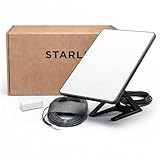
- Mini Kit 4th Generation – Portable Satellite Internet for RV, Camping & Remote Work | Global Unlocked Travel WiFi System with Integrated Antenna | Off-Grid Connectivity Kit
- PERFECT FOR RV, CAMPING & VAN LIFE: Designed for travelers who refuse to sacrifice connectivity. This portable satellite internet kit transforms any remote location into your connected workspace or entertainment hub. Ideal for RV internet on cross-country trips, camping in national parks, or boondocking off-grid. Compact enough to fit in your travel bag, powerful enough to stream, work, and stay connected anywhere.
- POWERFUL SATELLITE INTERNET ANYWHERE: Enjoy fast, reliable speeds up to 200+ Mbps with this portable satellite internet system, even in remote locations where traditional services fail. The low-latency connection supports smooth video calls, streaming, gaming, and remote work. Unlike cellular hotspots, this system keeps you connected even with zero cell coverage—perfect for true off-grid use.
- 5-MINUTE EASY SETUP – NO TECHNICIAN NEEDED: Simply place the mini satellite dish with a clear view of the sky, plug it in, and connect. The integrated antenna automatically locates satellites and optimizes your connection. A user-friendly app guides you through activation. The portable, lightweight design allows for quick setup and easy packing at every new destination—perfect for non-technical users.
- GLOBAL UNLOCKED FOR INTERNATIONAL TRAVEL & BUSINESS – Compatible with Starlink Systems: This unlocked works across multiple countries—perfect for international travelers, remote workers, and mobile business operations. Ideal for construction sites, outdoor events, emergency response teams, film productions, and field research. Professional-grade connectivity with consumer-friendly portability. Backed by our satisfaction guarantee.
What does satellite internet cost to install and operate?
Equipment, mounting, professional labor, shipping, taxes, and monthly service are separate cost categories. The cited FCC report does not establish a universal equipment or installation price. Obtain an itemized checkout total for your address instead of relying on a national average.
The FCC report also describes one-time network demand fees of up to $1,500 in some high-demand areas. This is a reported possibility in specific circumstances, not a typical or universal satellite charge. Confirm whether an address-specific demand fee applies, whether it is refundable, and when it is collected.
Windows Errors? Fix Them Before They Spread
Repair common Windows errors and clear accumulated junk for a smoother, more stable PC - no reinstall needed.Free scan · no reinstallCrashes, No Sound, or Screen Glitches?
Random freezes, missing sound and display glitches usually trace back to one bad driver. Find and replace yours safely.Free scan · under a minuteQuestions to ask about the order
- Is the terminal purchased, rented, or returned when service ends?
- Is standard installation included, optional, or required?
- What happens if the first proposed mounting location has an obstruction?
- Are additional cable, pole, roof, or wall-mount parts billed separately?
- Does a trial or return period cover installation labor and equipment damage?
- Can the provider change the plan, fee, or capacity status before installation?
How should I compare satellite with local alternatives?
Satellite is most compelling where wired or terrestrial choices are unavailable, slow to build, or unreliable. If cable, fiber, fixed wireless, or a usable mobile connection is available, compare actual address-level terms rather than assuming satellite will be faster or cheaper.
Best Value
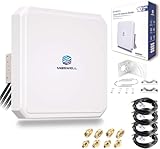
- Ultra-Wide Compatibility: Enhance your signal stability with Maswell’s patented 4x4 MIMO cross-polarization design. Covering an expansive frequency range of 600-8000 MHz, it supports 5G NR, WiFi 6E/7, and global LTE standards. Compatible with all global carriers, including Verizon, AT&T, and T-Mobile, as well as EE, Vodafone, O2, and Deutsche Telekom etc., it is the ultimate signal enhancement solution for hotspots, routers, and industrial gateways
- Versatile Deployment & Pro-Installation Support: Fit for residential homes, RVs, and IoT terminals. For optimal results, we recommend testing RSRP at multiple outdoor locations (avoiding points ≤ -120dBm) and enabling "External Antenna Mode" on your router settings after connection. Each kit includes a full set of robust mounting hardware (brackets and screws) and is backed by Maswell’s professional 24/5 technical support
- High-Gain Performance: This high-performance Maswell 5G panel antenna delivers a powerful 10dBi maximum gain while maintaining a standard 60-80° directional beamwidth. It combines the superior signal strength of a directional antenna with the installation ease of an omni-directional model; simply point it generally toward the signal tower to achieve peak data speeds and reliable connectivity in challenging coverage areas
- Premium Low-Loss Cables & Universal Adapters: Quality defines performance—avoid high-loss RG58 or RG174 cables. This kit includes four 6.5ft (2m) professional-grade, low-loss LMR240-equivalent cables. To ensure a seamless connection with nearly any network device, we provide three interface options (SMA-Male, TS9, and RP-SMA adapters), making it widely compatible with a variety of 4-port cellular and WiFi devices
- IP66 Rated Durability & All-Weather Protection: Engineered for the harshest environments, the housing is crafted from UV-resistant ASA material. Dual-certified to IP66 dustproof and waterproof standards (China & Europe), it ensures stable performance during extreme heat, heavy rain, or snow. Equipped with heavy-duty brackets and weighing a solid 4.4 lbs (2kg), the structure is built to withstand high winds and long-term outdoor exposure
| Comparison axis | What to verify | Why it matters |
|---|---|---|
| Availability and demand status | Serviceability at the exact address and any capacity or demand fee | A regional coverage map may not mean immediate activation. |
| Speed | Advertised download/upload tiers and realistic busy-hour performance | Peak figures do not show congestion-related slowdowns. |
| Reliability | Outage history or support explanation for local conditions | Line-of-sight and capacity issues can affect consistency. |
| Latency | Provider-specific expectations for interactive applications | Throughput alone does not predict video-call or gaming responsiveness. |
| Data policy | Allowance, priority treatment, throttling, overage, and reset terms | A lower-priced plan may become less suitable after its threshold. |
| Installation | Terminal, mount, labor, cable, roof access, and return requirements | Site work can materially change the first-year cost. |
Installation and ordering checklist
- Record the exact service address, including unit or lot details.
- Identify at least two potential mounting sites and note buildings, trees, poles, and seasonal growth.
- Save the provider’s current installation and equipment instructions.
- Capture the checkout page showing recurring charges, one-time fees, equipment status, and cancellation terms.
- Ask specifically about any demand fee and whether capacity is limited in your area.
- Save the plan disclosure that describes data allowances and post-allowance treatment.
- Plan a first-week test during morning, afternoon, and evening periods.
Troubleshooting common problems
There is no connection after installation
Check power, the indoor networking connection, and the activation status shown by the provider’s app or account. If the terminal reports an obstruction or failed view check, contact the provider before moving it; relocation may require a different mount or installer.
Service is slower in the evening
Run tests at the same location and over several days, then compare the results with the plan’s terms. A time-of-day pattern is consistent with shared-capacity congestion, which the FCC identifies as a cause of reduced speed and reliability. Ask support whether the address is capacity-constrained.
Performance drops during a storm
Check the provider’s current outage notices and technical guidance for the terminal and local weather. Do not infer a universal weather percentage from one event. If interruptions continue after conditions improve, request a signal and obstruction check.
The bill is higher than expected
Compare the invoice with the original address-specific checkout summary. Look for installation labor, mounting parts, shipping, taxes, equipment charges, or a high-demand fee. Ask the provider to identify each line item and explain whether it recurs.
Is satellite internet a sensible choice for your home?
It can be a practical broadband path when terrestrial service is absent, but the decision should rest on a confirmed line-of-sight site, address-specific availability, realistic busy-hour performance, and written data and fee terms. The FCC’s 2026 ranges provide useful context, while the provider’s current disclosure determines what you will actually pay and how the connection will be managed.
Quick Recap
Product prices and availability are accurate as of the date/time indicated and are subject to change. Any price and availability information displayed on Amazon at the time of purchase will apply.




