To use Sensor Dry on a Samsung dryer, choose a cycle suited to the fabric, set the Dry Level for the finish you want, and follow garment care labels. Separate lightweight and heavy items when practical. Clean the lint filter after every load; if a cycle ends unusually early or clothes remain damp, clean the moisture sensor bars. If drying takes longer than usual, check airflow through the exhaust vent. Cycle names and controls vary by model, so use your dryer’s manual for exact settings.
How Sensor Dry works
Samsung says Sensor Dry detects when laundry reaches the selected dryness level and then automatically stops the cycle. It is not a fixed-time setting: the result depends on the selected cycle and Dry Level, as well as the load. Samsung’s cycle guide describes the feature, but available cycles and options differ by model. Samsung: Cycles, settings, and features on your Samsung dryer.
As an Amazon Associate I earn from qualifying purchases.
Sensor Dry is useful when you want the dryer to stop at a target dryness rather than run for a set duration. For an unusually small load or one that does not make reliable contact with the sensor, Manual or Time Dry may be more predictable, but you must choose a suitable duration and check the result. Exact cycle names vary, so consult the manual for your model.
The Tool Desk
Outbyte Driver Updater FREEScan for outdated or missing drivers - takes under a minuteDriver Scan →Outbyte PC Repair FREERepair Windows errors before they cause bigger problemsFix Now →How to use Sensor Dry
- Sort and check labels. Group items with similar fabrics and weights when practical, and follow each garment’s care label. Choose a cycle appropriate for the load; not every Samsung dryer offers the same cycles.
- Choose a Dry Level for the intended finish. A higher level may help with a bulky load that otherwise comes out damp. A lower level can suit lightweight items that you plan to hang or lay flat while still slightly damp. Follow the model manual for the available settings.
- Keep very light and heavy items apart when possible. A lightweight item can dry and contact the sensor bars before a towel or other heavy item is dry, causing the cycle to end before the whole mixed load is ready.
- Use a mixed-load alert if your model has one. Damp Alert or Mixed Load Bell can signal at about 80% dry on supported cycles. This is a prompt to pause and remove already-dry pieces; it does not automatically stop the cycle. Let the heavier items continue if needed. Samsung: Dryer stops before clothes are dry.
- Make sure the load is large enough for sensing. Samsung gives about four regular bath towels as an approximate minimum reference for Sensor Dry sensor contact. This is not a universal load-size rule for every fabric or model; check the manual, including whether your dryer has Small Load Care.
- Clean the lint filter after every load. Keep it installed whenever the dryer is running. Samsung says never to operate the dryer without the lint filter in place. Samsung Canada: How to clean and maintain your Samsung dryer.
When to use Eco Dry
Eco Dry can reduce power consumption on supported cycles, but it can extend drying time—by up to three times, depending on load size and temperature, according to Samsung. It is not the faster option. On some models, Eco Dry may be enabled by default on particular cycles; check the display and your manual before assuming a longer or initially unheated cycle indicates a fault. Samsung: Cycles, settings, and features on your Samsung dryer.
#1 Best Overall

- Azdele Heating element for samsung dryer: dc47-00019a samsung heating element wire is 25% longer than other dryer wires, increasing the resistance by 65% and producing stable heating.
- Azdele DC47-00019A heating element replaces dv400ewhdwr/aa heating element, dv40j3000ew/a2 heating element, dv42h5000ew/a3 heating element, dv42h5200ew/a3 heating element,dv42h5200ep/a3 heating element, dv45h7000ew/a2 heating element, dve50r5400v/a3 heating element, Please refer to Figures 5 and 6 for more compatible models .
- The samsung dryer parts easy to install: DIY beginners can complete it with simple tools in 30 minutes. Watching YouTube videos can make installation easier.
- Dryer heating element kit: Azdele samsung dryer heating element kit fix all the heating problems. Thermal fuse DC96-00887A & DC47-00016A repair dryer won't start. The thermostat regulates the temperature to avoid overheating. Thermistor monitors and maintains the temperature.
- Azdele Professional Customer Service: We offer an unconditional 30-day money-back guarantee and a 1-year warranty. If you need any assistance, please contact our 24-hour online service team.Azdele continually provides the warm shopping experience for all customers.
Why a Samsung dryer may stop while clothes are damp
Mixed fabrics reached different dryness levels
Light items can dry before heavier ones and trigger the sensor endpoint. Sort by weight where possible. If the model offers Damp Alert or Mixed Load Bell, use the signal to remove dry pieces and allow the rest to continue.
The load is too small for consistent sensor contact
A tiny load may not touch the sensor bars reliably. Samsung’s approximate reference is about four regular bath towels. For a small or unusual load, check the model manual for a small-load feature or use Manual/Time Dry and check the items before the selected time ends.
Rank #2

- DC61-02627A Moisture Plate Sensor Fits for Samsung Kenmore Dryer.
- DC61-02627A Dryer moisture sensor Replace for part numbers:2069516, AP4578789, PS4206812, EAP4206812, PD00023015.
- Moisture sensor DC61-02627A detects the amount of moisture in the laundry load.This sensor is an essential part of any modern dryer, and it is important to choose a sensor that is durable and accurate.
- Disconnect the power before installing this part. Wear work gloves to protect your hands.
- Any questions not completely satisfied, please contact us, you can have or exchange within 30 days.
Residue is on the sensor bars
Fabric softener or dryer-sheet residue can affect sensing and cause a cycle to end too soon. If cycles are unusually short or laundry remains damp, gently wipe the moisture sensor bars with a soft cloth and mild soap, then dry them thoroughly. Their location and cleaning instructions can vary; consult the manual. Samsung: Dryer stops before clothes are dry.
Quick wins for a faster PC:
Scan for outdated or missing drivers - takes under a minuteDriver Scan →Clear out junk files and repair common Windows errorsFree Scan →Fix the driver behind crashes, sound loss and screen glitchesFind Drivers →The selected Dry Level does not match the load
Try a higher Dry Level if bulky items consistently remain damp, or a lower level when lightweight items should finish slightly damp. Change the setting based on the load and intended finish rather than relying on one setting for every cycle.
Rank #3

- Samsung dryer heating element
- Heating Element for Samsung Dryer: The dryer heating element is compatible with Samsung DV45H7000EW/A2 DVE50R5200W/A3 DV40J3000EW/A2 DV42H5000EW/A3 DVE50M7450W/A3 DV42H5200EW/A3 DV48H7400EW/A2 DVE50R5400V/A3 DV42H5200EP/A3,LG, Maytag,Kenmore,Kitchen-aid and Roper.It can be installed in the DC97-14486A assembly;also suitable for Amana NED7200TW, NFW7200TW dryers.
- Upgrade DC47-00019A Dryer Heating Element: Pulluty DC47-00019A heating elements have excellent heat and abrasion resistance with up to 95% nickel-chromium content. The heating wire is 25% longer than other common dryer replacement parts.Heats more evenly without damaging clothes. Meets OEM manufacturing standards.
- For samsung dryer parts: DC47-00019A Samsung dryer heating element replaces AP4045884, AP4201898, AP4201899, 35001119, 1185561, DC68-03784D-08, ERDC47-00019A; DC47-00016A replaces AP4201894 and PS2038378. DC47 -00018A replaces PS2038383 and 35001092; DC96-00887A replaces PS2038484 and AP4207819; DC32-00007A replaces PS4204984 and AP4201716.( You can check the picture for more models)
- Package includes: 1 x DC47-00019A dryer heating element, 1 x DC47-00018A thermostat, 1 x DC96-00887A thermal fuse, 1 x DC47-00016A thermal fuse, 1 x DC32-00007A thermistor.Please contact us immediately for replacement of any missing parts.
Why drying takes longer than usual
- Clean the lint filter. Do this after every load; do not run the dryer without it installed.
- Check the exhaust vent and airflow. Lint or a restricted vent can slow drying. Samsung’s US guidance recommends cleaning the vent once or twice a year; its Canada guidance advises inspection at least annually and more often with frequent use or performance problems. Treat these as manufacturer guidance, with the model manual and installation conditions taking precedence.
- Check whether Eco Dry is enabled. It can lengthen cycle time on supported cycles.
Samsung recommends professional vent cleaning for thorough and safe results. Its maintenance guidance also lists a vent-cleaning kit with a brush and extension rods for do-it-yourself cleaning; use only tools and procedures appropriate to your installation, and follow the dryer manual and tool directions. Samsung: How to clean your Samsung dryer.
Quick Recap
Best Value

- ❤PREMIUM QUALITY: The upgraded samsung dryer repair kit made of premium quality material. The rollers are strong and wear-resistant, which make the dryer run stably and quietly. It designed with a high-quality rubber overall structure. The 6602-001655 dryer belt 92’’Length X 0.3’’Width. It is thickness is twice as thick as before and it is more durable. The center of the idler has a triangular design, which is more firm and stable. Meets OEM manufacturing requirements.
- ❤PACKAGE INCLUDED: 4 x DC97-16782A upgraded dryer drum rollers, 1 x DC93-00634A idler pulley (1pc x screw), 1 x 6602-001655 upgraded dryer belt , 1 x DC61-01215B. You can refer to the picture display on the details page, which is a physical shot.
- ❤REPLACEMENT PART: DC97-16782A Dryer Roller Replaces DC97-07523A DC97-07523B 2027851 AP5325135 PS4221885 EAP4221885; 6602-001655 Belt Replaces 5PH2337 dryer belt 6602-001314 AP4373659 PS2407938 EAP2407938; DC93-00634A Idler Pulley Replaces DC96-00882B DC96-00882C DC97-07509B 4455850 AP6038887 PS11771601 EAP11771601. You can check out picture 6 and 7 for more models.
- ❤FIX COMMON SYMPTOMS: Dryer is squeaky or noisy; Dryer won’t tumble or spin; Dryer will not start. Easy to install. You can refer to YouTube installation video before installation. Dear friends, use your brain and hands to make your machine work!
- ❤AFTER SALE GUARANTEE: We offer a One-Year Warranty. If you have any questions about the samsung dryer roller replacement kit, please feel free to contact us via email or Q&A, and we will provide a response within 12 hours, Customer satisfaction is our tireless pursuit !
Rank #4
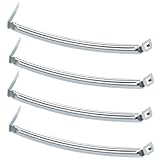
- COMPATIBILITY: The DC61-02627A Samsung Dryer Moisture Sensor is compatible with DV Series Sam-sung Dryers, 402 Series Kenmore Dryers. Size is about 4 4/5in*1 1/8in(4.80in*1.13in). (Note: Please confirm the model number before purchasing.)
- PRODUCT FUNCTION: If your dryer's humidity sensor isn't working or dryer won't shut off while clothes are dry, the sensor may be damaged. Simply replacing the humidity sensor with a new one can resolve these issues: Broken Parts, Potential Damage, Failed Sensing, Non-Functioning, Leaking, Defective.
- PREMIUM MATERIAL: The DC61-02627A dryer moisture sensor parts are made of high-quality stainless steel, making them durable, resistant to wear and chemical corrosion, and rust-resistant, ensuring a long service life.Excellent quality of moisture sensor for samsung dryer parts ensures reliable and accurate maintenance, making it a cost-effective solution.
- HIGH-PRECISION MEASUREMENT OF CLOTHING HUMIDITY: The DC61-02627A sensor is highly accurate and reliably detects moisture levels in laundry,sends a signal to the control board when the clothes are dry. This sensor is a vital component of any modern dryer, so choosing a durable and accurate one is crucial.
- HOW TO USE THE DC61-02627A DRYER MOISTURE SENSOR PLATE BAR: You can search for the installation video on YouTube by entering "#DC61-02627A". The video will guide you through the installation process. Therefore, even if you're unfamiliar with how to install the DC61-02627A dryer humidity sensor plate, you can complete the task in 30 minutes or less.(NOTE:Before installing this part, disconnect the power cord. Wear work gloves to protect your hands. )
Sensor Dry, Manual Dry, and mixed loads
| Choice | How the endpoint works | When it can help | Trade-off |
|---|---|---|---|
| Sensor Dry | Stops when moisture sensing reaches the selected dryness level. | Loads large enough to contact the sensor, with a suitable cycle and Dry Level. | Mixed or very small loads may not give a reliable endpoint. |
| Manual/Time Dry | Runs for the duration you set. | Tiny or unusual loads that may not interact reliably with the sensor. | You must choose a suitable time and check the laundry. |
| Sort a mixed load | Separate lighter and heavier pieces into different loads. | When you want to reduce the chance that light items trigger the endpoint early. | Requires additional sorting and may mean more than one cycle. |
| Damp Alert/Mixed Load Bell | Signals at about 80% dry on supported cycles; it does not stop the cycle. | When you want to remove dry items while heavier ones keep drying. | Only available on some models and cycles; you need to respond to the alert. |
| Eco Dry | Uses an energy-saving behavior on supported cycles. | When lower power use matters more than shorter duration. | Samsung says drying may take up to three times longer, depending on load size and temperature. |
Routine cleaning and safety
- Clean the lint filter after every load and keep it in place during operation.
- If sensing becomes unreliable, clean the sensor bars gently with a soft cloth and mild soap, then dry them thoroughly.
- Inspect and maintain the exhaust vent according to the manual and installation conditions. Samsung recommends professional cleaning for a thorough and safe result.
- Use the owner’s manual for model-specific cycle names, control locations, feature availability, and maintenance procedures.
Product prices and availability are accurate as of the date/time indicated and are subject to change. Any price and availability information displayed on Amazon at the time of purchase will apply.




