What’s actually slowing this PC down?
Pick the symptom - the matching free tool is one click away.
Usually, no separate antivirus app is needed as a first step. A Samsung Galaxy already has Google Play Protect, and Samsung offers security controls such as Auto Blocker and, on supported software, app-safety tools in Device care. Keep those protections on, install apps from trusted stores, and update your phone. Sideloading apps or seeing unexpected behavior calls for extra caution—not an assumption that any phone is invulnerable.
What protection is already on a Samsung Galaxy?
Google Play Protect checks apps
Google Play Protect checks apps before download and periodically scans the device. It can warn you about harmful apps and may disable or remove them. Google recommends leaving it on. These checks are a useful baseline, not a guarantee that a device cannot be compromised. Google Play Protect Help
As an Amazon Associate I earn from qualifying purchases.
Samsung adds installation and device controls
Samsung’s Auto Blocker can block apps from unauthorized sources and restrict other actions. Samsung recommends keeping it enabled. On supported software, Device care also offers app-safety tools; availability and menu labels depend on the model and software version. Samsung guidance on Auto Blocker Samsung guidance on Device care
Quick wins for a faster PC:
Repair Windows errors before they cause bigger problemsFix Now →Scan for outdated or missing drivers - takes under a minuteDriver Scan →Clear out junk files and repair common Windows errorsFree Scan →Is Play Protect enough if you install apps outside the stores?
Sideloading—installing an app from outside Google Play or Galaxy Store—increases the need to scrutinize what you install. Play Protect also checks apps from other sources, but Google may ask to inspect an unfamiliar app. Auto Blocker can prevent installations from unauthorized sources. These controls reduce exposure; they do not make every sideloaded app safe. Check the app’s source and requested permissions, and do not switch off protections merely to get an installation through. Google Play Protect Help Samsung guidance on Auto Blocker
#1 Best Overall

- Compatible With: Only compatible with Samsung Galaxy A16 5g 6.7 inch ,Package inludes 2 Pack Soft PET HD Screen Protector
- 3-layer Protection & Shockproof: for galaxy A16 5g phone case,3-Layer Heavy Duty Full-Body Protector. The case is made of flexible durable TPU and Hard PC material which provide super drop and shock protection for your phone. Shockproof/Drop/Scratch/Dust proof
- Wireless Charging Available: for Samsung galaxy A16 5g phone case,Can do Wireless Charging with the case but not Magnetic if your phone have wireless charging function .no need take off phone case
- Precise Cutouts With Premium Matrial: for galaxy A16 5g case,All buttons and interface user-friendly design to avoid frequent disassembly. Precise cutouts for speakers, camera, and other functional ports allow you to access all ports and controls
- Military-Grade Profile: Four-corner grooved airbags, a unique shock absorption design, and more comprehensive protection of the fragile parts of the smartphone. Raised lips keep the camera lifted to prevent your lens from shock, collision, and scratch. suit for women,men,girls,boys,kids and teen, outdoor and indoor everyday use
How to check the key protections
- Check Play Protect: Open Google Play Store, tap your profile icon, choose Play Protect, then tap Settings. Confirm that Scan apps with Play Protect is on. Google’s instructions
- Check Auto Blocker: Open Settings → Security and privacy → Auto Blocker and enable it if available. Samsung notes that screens and options can vary by model and software version. If the path differs, search Settings for “Auto Blocker.” Samsung’s instructions
- Keep the phone current: Install available software updates through your phone’s Settings. Updated software is part of maintaining device security; the cited support guidance does not promise that updates or scanning eliminate all risk.
Should you turn on Maximum restrictions?
Maximum restrictions are an optional, more restrictive mode—not a necessary default for every owner. Samsung Canada says the feature is available starting with One UI 6.1.1, but availability may vary by device and market. Samsung lists tradeoffs: the mode can block device-admin apps and work profiles, block 2G, stop automatic reconnection to unsecured Wi-Fi, and limit some messaging and Gallery functions. It can also turn on App protection scanning. Consider whether those restrictions fit your needs before enabling it. Samsung Canada: Auto Blocker and Maximum restrictions
What if your phone shows suspicious ads or behavior?
If unexpected ads or abnormal behavior began after installing an app, review recently installed or suspicious apps and remove those you do not trust. Samsung’s Device care diagnostics and removal steps may differ by Android version. Search Settings for “Device care” if the menu path on your phone differs, or consult Samsung support for your model and market. Samsung guidance on Device care
Rank #2

- Compatibility: Samsung Galaxy A15 Case cares for every detail with precise cutouts allow easy access to all ports, speakers, cameras, buttons, and other functions. Won't compatible with any other phone models. Notice: Due to the metal ring on the back, the case will 𝗡𝗢𝗧 𝘄𝗼𝗿𝗸 𝘄𝗶𝘁𝗵 𝗪𝗶𝗿𝗲𝗹𝗲𝘀𝘀 𝗖𝗵𝗮𝗿𝗴𝗶𝗻𝗴 𝗳𝘂𝗻𝗰𝘁𝗶𝗼𝗻
- 𝗜𝗻𝘀𝘁𝗮𝗹𝗹𝗮𝘁𝗶𝗼𝗻 𝗧𝗶𝗽𝘀: This case has a 2-in-1 polycarbonate front cover, frame, and back cover. 𝗖𝗿𝘂𝗰𝗶𝗮𝗹𝗹𝘆, 𝗱𝗲𝘁𝗮𝗰𝗵 𝘁𝗵𝗲 𝗳𝗿𝗼𝗻𝘁 𝗰𝗼𝘃𝗲𝗿 𝗳𝗶𝗿𝘀𝘁. After applying the film, install the front cover onto your phone. 𝗜𝗳 𝘆𝗼𝘂 𝗲𝗻𝗰𝗼𝘂𝗻𝘁𝗲𝗿 𝗱𝗶𝗳𝗳𝗶𝗰𝘂𝗹𝘁𝗶𝗲𝘀 𝗶𝗻𝘀𝘁𝗮𝗹𝗹𝗶𝗻𝗴 𝗶𝘁, 𝗰𝗼𝗻𝘁𝗮𝗰𝘁 𝗰𝘂𝘀𝘁𝗼𝗺𝗲𝗿 𝘀𝗲𝗿𝘃𝗶𝗰𝗲
- Tempered Glass Screen Protector : The Samsung Galaxy A15 phone case presents [2 Packs] advanced HD clarity 9H hardness ultra resistant tempered glass screen protector. The Samsung Galaxy A15 5G phone case front cover provides 360-degree all-round protection for your phone, effectively prevents screen scratches, supports fingerprint recognition, and improved touch-smooth surface for better handheld experience
- Premium Material Construction: Our phone cases are made of high - quality, impact - resistant polycarbonate. This combo offers great durability, withstanding daily bumps, drops, and scratches to protect your phone long - term. The materials are robust, rarely cracking or deforming
- Weather and Chemical Resistance: Our phone cases are built to withstand physical impacts, elements, and common chemicals. They resist sunlight, humidity, and spills of water, coffee, or hand - sanitizer. This protection against environmental factors and chemicals enhances durability and longevity, ensuring optimal performance and year - round phone safety
When might another security app make sense?
Consider an additional app only for a specific function you want that your existing settings do not provide, or if your usage involves greater exposure, such as frequent sideloading. The official Samsung and Google guidance describes built-in protections; it does not provide independent comparative testing of antivirus vendors. There is therefore no basis here to rank third-party apps or claim that one detects threats better. For most owners who use trusted stores and keep the built-in protections active, start with those protections rather than adding an app by default.
Quick Recap
Rank #4
![SPIDERCASE Designed for Samsung Galaxy S26 Case, [10 FT Military Grade Drop Protection], 2 Pack [Tempered Glass Screen Protector+Camera Lens Protector] Heavy Duty Shockproof Case,Black](https://m.media-amazon.com/images/I/41EJms8TyxL._SL160_.jpg)
- 【Perfectly Fit】 SPIDERCASE are committed to providing users with unique tough protection phone cases, special designed for Samsung Galaxy S26 6.3",providing you a brand-new experience of Galaxy S26 case.
- 【Full Body Protection】 This two-in-one combination of military grade tough protection S26 5G Case, Hard PC + Solid inner polycarbonate shell soft cushioning rubber outer S26 Protection cover, Four-corner grooved airbags,unique shock absorption design,more comprehensive protection of the fragile parts for the smartphone.Raised lips keeps camera lifted to prevent your lens from shock,collision and scratch.
- 【Precise Cutout & Wireless Charging Ready】 Fit well Samsung Galaxy S26 phone ,Easy access to touchscreen, camera, buttons, and ports, make your Galaxy S26 cool and attractive.Easy-to-grip and anti-slip design make the phone easy to hold.Wireless-charging compatible case, faster and easier charging.
- 【Non-slip Design】 The frosted surface is made of environment friendly and odorless PC material that gives you a comfortable grip.Soft to touch,and resistant of fingerprints,oil and sweat,making it hard to slide out of your hand.
- 【Best Customer Service】 Please contact our service team timely if you got any defective item. We will solve the problem for you sincerely,Your satisfaction is our goal.
Rank #3
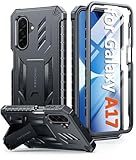
- Compatibility: ONLY Fit Samsung Galaxy A17-5G 6.7 Inch. Not for A15/A14. WON'T fit any other phone models. Please confirm your model before purchasing. NOTE: Before putting on our phone case (with built-in screen protector), remove the tempered glass screen protector from your phone first
- Built-in Screen Protector: Comes with a seamlessly integrated, bubble-free screen protector. It safeguards your Galaxy A17's display from daily scratches, scuffs, and impacts without the hassle of separate installation
- Built-in Kickstand: The built-in kickstand supports both landscape (for videos) and portrait (for reading) viewing angles. When closed, the stand lies completely flat against the back, ensuring a smooth, snag-free profile
- 20FT Military-Grade Drop Tested: Whether it’s slipping from your hand while texting (4-5ft), or an accidental drop during a walk or hike, this Galaxy A17 Case is built to absorb the impact. The 4-corner airbag and shock-absorbing TPU provide 360 cushioning, backed by a rigorous 20ft military-grade test standard
- Comfortable: The A17 Case features a sophisticated, non-slip matte texture that resists fingerprints and provides a secure, comfortable hold. The durable TPU material offers both protection and a pleasing tactility
Product prices and availability are accurate as of the date/time indicated and are subject to change. Any price and availability information displayed on Amazon at the time of purchase will apply.




