Recommended Free Tools
If your Samsung fridge keeps beeping, first check that every door is fully closed and nothing inside is blocking it. Then look at the display: a blinking temperature reading points to a high-temperature warning, while a displayed error code needs its own model-specific troubleshooting. The beep alone does not identify the cause.
Why does my Samsung fridge keep beeping?
A door left ajar or unable to close is a common cause. Samsung says most of its refrigerators have a door alarm that sounds when a door is not shut. A blinking temperature display is a different clue: Samsung says it means the refrigerator temperature is too high. Beeping may also accompany an error indication, so check the panel rather than trying to diagnose the appliance by sound alone.
As an Amazon Associate I earn from qualifying purchases.
How to check the cause safely
-
Confirm the sound is coming from the refrigerator
Listen near the appliance and check whether the sound continues when you move away. Samsung suggests unplugging the refrigerator as one way to determine whether it is the source, but do not leave it unplugged as a troubleshooting step; disconnecting power can affect food storage. If the source is uncertain, use Samsung’s noise troubleshooting guidance.
Windows Errors? Fix Them Before They Spread
Repair common Windows errors and clear accumulated junk for a smoother, more stable PC - no reinstall needed.Free scan · no reinstallOutdated Drivers Are Slowing You Down
One free scan finds every outdated or missing driver and matches the right update for your exact hardware.Free scan · exact hardware matchSpecial offer. See more information about Outbyte and uninstall instructions. Please review EULA and Privacy policy. -
Check each door and its seal
Open and close each door, remove containers or shelves that may obstruct it, and make sure the doors sit fully shut. If your panel has a door-alarm control, check whether the alarm is enabled and consult the manual for your exact model before changing its setting.
#1 Best Overall
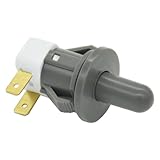 ZNTVW DA34-00066C Refrigerator Door Interlock Switch
- Replaces Part Numbers: 2705488, AP5306252, PS4138763, EAP4138763. It can be used on most Samsung cecilware refrigerator door lights
- Why Need This: The ice maker will know the door is closed so it can dispense ice when the outside button is pressed, that's the switch which can reduce energy and save electricity
- Easy To Install: It only takes a few minutes to install, the important thing is you need to disconnect the power first, and find your switch's location, remove the cover with a screwdriver, then remove the old one and replace it with the new one, simple to use
- Worth Buying: Usually all samsung fridges use the same one so this is a great replacement part fits perfectly save your time and money
- Compatible model: RF263BEAESR/AA-03 RS25H5000SR/AA-00 RF28HDEDBSR/AA-04 RF23HCEDTSR/AA-01 RF26J7500SR/AA-02 etc. if you are not sure whether the model is suitable, please use the "Crtl+F" shortcut to search for the model you need, or contact us to help you check
-
Read the temperature display
If the temperature display is blinking, Samsung says the compartment is above 59°F. A door left open or a recent power outage can cause the temperature to rise. If the refrigerator is otherwise cooling normally, give it time to recover: Samsung says the display may take up to four hours to stop blinking when the refrigerator is working correctly. If cooling is not normal, follow Samsung’s refrigerator cooling guidance or contact support.
-
Note any error code
Write down or photograph the full code before taking further action. Samsung lists codes such as 83E, 85E, 86E, and 88 88 among indications that can follow electrical interruptions or power anomalies. Use Samsung’s refrigerator error-code guide for the displayed code rather than guessing at a repair.
Rank #2
 ForeverPRO DA92-00817A Assy Module Buzzer Pba Rb6000K Standard for Samsung Appliance
- Replacement compatible for Samsung DA92-00817A Assy Module Buzzer Pba Rb6000K Standard
- REPAIR SOLUTIONS: Upgrade your appliance with ForeverPRO, the top choice for DIYers seeking high-quality maintenance. As a Proud USA Based Company, we provide durable OEM-spec parts—from aluminum mesh filters and stainless steel elements to plastic knobs and gaskets. Whether fixing a clogged pump, leaking valve, noisy motor, or broken sensor, our universal compatible components offer a genuine fit for kitchen, laundry, and HVAC units. From circuit boards and heaters to seals, racks, or handles, our parts fix malfunctioning or worn-out systems for a long-life home or commercial repair. Trust ForeverPRO for an efficient DIY install to get your machine working again.
- PRO Grade Premium Assy Module Buzzer Pba Rb6000K Standard - Meets or Exceeds OEM Specifications Quality. Comes Brand New in Original Retail Packaging
- ForeverPRO Appliance Assy Module Buzzer Pba Rb6000K Standard Part Number DA92-00817A replaces 111199
- Check Description for Model Compatibility. Compatible With Most Samsung Appliances including BRF365200AP/AA BRF365200AP/AA BRF365200AP/AA BRF365200AP/AA BRF365200AP/AA BRF365200AP/AA BRF365200AP/AA BRF365200AP/AA BRF365200AP/AA BRF365200AP/AA BRF365200AP/AA BRF365200AP/AA BRF365200AP/AA BRF365200AP/AA BRF425200AP/AA BRF425200AP/AA BRF425200AP/AA BRF425200AP/AA BRF425200A
How to stop the beeping
Fix the condition triggering the alarm first: close the door, clear anything that prevents closure, or allow a temperature rise to recover if cooling is normal. Some models let you switch the door alarm on or off at the control panel, but the control and button sequence vary. Samsung Gulf describes a Door Alarm control and a two-minute open-door threshold; that interval should not be assumed for every refrigerator. Check your exact model’s manual for its controls and alarm behavior.
Free tools Windows power users keep installed
One-click scans. No signup required.
For example, the cited Samsung Dacor manual says its model-family door alarm sounds when a door remains open for more than two minutes and is enabled at the factory. This is specific to that unit, not a universal Samsung setting. The manual is available through Samsung’s Dacor model support page. Samsung Gulf’s instructions are at its door-alarm support page.
Rank #3

- 𝑺𝒖𝒑𝒆𝒓𝒊𝒐𝒓 𝑺𝒐𝒖𝒏𝒅 𝑸𝒖𝒂𝒍𝒊𝒕𝒚: Designed specifically for Samsung Galaxy A54 5G A546, this Loud Speaker Ringer Ringtone Buzzer delivers exceptional audio performance.
- 𝑷𝒆𝒓𝒇𝒆𝒄𝒕 𝑹𝒆𝒑𝒍𝒂𝒄𝒆𝒎𝒆𝒏𝒕 𝑷𝒂𝒓𝒕: If your Samsung Galaxy A54 5G A546 is experiencing issues with its speaker or ringtone buzzer, choosing our brand’s replacement part will quickly resolve the problem. It is fully compatible with the Samsung Galaxy A54 A546, ensuring the same reliability and performance as the original component.
- 𝑽𝒆𝒓𝒔𝒂𝒕𝒊𝒍𝒆 𝑫𝒆𝒔𝒊𝒈𝒏: In addition to serving as a replacement for the speaker and ringtone buzzer, it is also well-suited for repairs or DIY projects. Whether you’re an enthusiast or a professional repairer, this replacement part will meet your needs.
- 𝑯𝒊𝒈𝒉-𝑸𝒖𝒂𝒍𝒊𝒕𝒚 𝑴𝒂𝒕𝒆𝒓𝒊𝒂𝒍𝒔: Each Loud Speaker Ringer Ringtone Buzzer we manufacture uses premium materials. Rigorously tested and certified, it guarantees durability and reliability while maintaining excellent performance throughout extended use.
- 𝑬𝒂𝒔𝒚 𝑰𝒏𝒔𝒕𝒂𝒍𝒍𝒂𝒕𝒊𝒐𝒏 𝒂𝒏𝒅 𝑶𝒑𝒆𝒓𝒂𝒕𝒊𝒐𝒏: The plug-and-play design makes installation quick and effortless. No additional tools are required to complete the replacement process, restoring your device’s functionality in no time. User-friendly operation ensures hassle-free installation for every customer.
When to contact Samsung Support
- The refrigerator is not cooling normally, or the temperature warning does not clear after the stated recovery period.
- An error code returns after following the code-specific guidance, or you cannot identify what the code means.
- The beeping continues after you have checked door closure and the display.
Have the model number, displayed code, and a photo of the panel ready when contacting support. Alarm sounds and repair procedures differ by model and region; the sound alone is not evidence that a particular sensor or control board has failed.
Independent reader supportYour contribution helps us test, update, and keep practical guides available for everyone.Would a refrigerator thermometer help?
A refrigerator thermometer can help you check whether the compartment is actually cold when the display is blinking or you suspect a temperature problem. It can provide a temperature reading, but it will not identify or repair the alarm’s cause.
Quick Recap
Best Value

- Fits With Various Samsung Brand Models
- Spring Fits Samsung Refrigerator Part # DA81-01345B
- Quality Ensurance By The Third Party Factory, Tested Before Shipping
- Compatible Models: RF267AFWP, RF267HERS, RF268ABBP, RF268ABPN, RF268ABRS, RF268ABWP, RF26VABWP, RF26XAEBP, RF26XAERS, RF26XAEWP, RF4267HABP, RF4267HARS, RF4267HAWP, RF4287AARS, RF4287HABP, RF4287HAPN, RF4287HARS, RF4287HAWP, RF4289HARS, RF4289HBRS, RFG237AABP, RFG237AAPN, RFG237AARS, RFG237AAWP, RFG237ACRS, RFG238AABP, RFG238AAPN, RFG238AARS, RFG238AAWP, RFG28MESL, RFG293HABP, RFG293HAPN, RFG293HARS, RFG293HAWP, RFG295AABP, RFG295AAPN, RFG295AARS, RFG295AAWP, RF197ACRS
- Compatible Models: RFG296HDBP, RFG296HDPN, RFG296HDRS, RFG296HDWP, RFG297AABP, RFG297AAPN, RFG297AARS, RFG297AAWP, RFG297ACBP, RFG297ACRS, RFG297ACWP, RFG297HDBP, RFG297HDPN, RFG297HDRS, RFG297HDWP, RFG298AABP, RFG298AAPN, RFG298AARS, RFG298AAWP, RFG298HDBP, RFG298HDPN, RFG298HDRS, RFG298HDWP, RFG299AARS, RFG29PHDBP, RFG29PHDRS, RFG29PHDWP, RFG29THDRS,RF266, RF197ACPN/XAA
Rank #4

- Designed specifically for Samsung Galaxy A36,this Loud Speaker Ringer Ringtone Buzzer delivers exceptional audio performance.
- If your Samsung Galaxy A36 is experiencing issues with its speaker or ringtone buzzer,choosing our brand’s replacement part will quickly resolve the problem.It is fully compatible with the Samsung Galaxy A36,ensuring the same reliability and performance as the original component.
- In addition to serving as a replacement for the speaker and ringtone buzzer, it is also well-suited for repairs or DIY projects. Whether you’re an enthusiast or a professional repairer, this replacement part will meet your needs.
- Each Loud Speaker Ringer Ringtone Buzzer we manufacture uses premium materials. Rigorously tested and certified, it guarantees durability and reliability while maintaining excellent performance throughout extended use.
- The plug-and-play design makes installation quick and effortless. No additional tools are required to complete the replacement process, restoring your device’s functionality in no time. User-friendly operation ensures hassle-free installation for every customer.
Product prices and availability are accurate as of the date/time indicated and are subject to change. Any price and availability information displayed on Amazon at the time of purchase will apply.




