What’s actually slowing this PC down?
Pick the symptom - the matching free tool is one click away.
If your Samsung phone is not recognizing your fingerprint, first check the sensor area, your finger, and any screen protector or case. Then try again without wireless charging, re-register the print if needed, and run Samsung Members diagnostics. Keep your PIN, password, or pattern available: menus and fingerprint features vary by Galaxy model and software version.
Check the reader and the conditions around it
Start with reversible checks. The sensor may be under the display or elsewhere on the phone, depending on the model, so focus on the actual reader location.
As an Amazon Associate I earn from qualifying purchases.
- If the sensor is under the display, inspect the protector. Dirt, scratches, thickness, texture, material, or a poor fit can reduce recognition. Samsung recommends genuine protective films and says it does not guarantee compatibility with third-party protectors. If you replace a film, choose one explicitly suited to your exact Galaxy model and sensor type; no third-party brand is established as universally compatible. Samsung’s fingerprint troubleshooting guidance explains protector-related issues.
- Remove anything obstructing the reader. Temporarily take off a case if it touches or blocks the sensor. Clean the sensor area and your finger, then retry with a finger that is neither very wet nor very dry.
- Pause wireless charging and retry. Samsung lists charging as a possible factor. Also let the phone return to a moderate temperature if it is extremely hot or cold.
These checks are most relevant when the failure began after changing a protector, adding a case, or using the phone in unusual conditions. Samsung’s advice on physical conditions is available in its Galaxy fingerprint recognition support page.
Recommended Free Tools
Make sure biometric unlock is enabled
Fingerprint unlock may be unavailable because of a setting or security policy rather than a faulty sensor. Use your PIN, password, or pattern to unlock the phone, then check the fingerprint and lock-screen settings. Menu names and paths differ by model and software.
#1 Best Overall

- 【Perfect Fit for Multiple Models】Specifically designed for Samsung Galaxy S23/S24/S25/S26 Series (including Ultra/Plus variants). This universal kit ensures seamless compatibility with most waterproof phone cases, eliminating the need for model-specific purchases
- 【Complete Replacement Kit】Each package includes 6 fingerprint films (2 sets of 3), 6 dust stickers , 1 scraper card , and detailed instructions . The extra films allow for repeated replacements, while the dust stickers and scraper ensure a bubble-free, clean installation every time
- 【Step-by-Step Installation Guide】To ensure optimal fingerprint recognition:Remove the old film and clean the area with the included dust stickers.Align the new film with the phone’s fingerprint sensor (using the phone’s screen as a guide).Use the scraper card to eliminate air bubbles and peel off the protective layer.Reinstall the phone case and re-register your fingerprint for best results
- 【Critical Usage Note】Re-register your fingerprint after installation! This step is often overlooked but is essential for the sensor to function correctly. If you remove and reattach the phone case, repeat the fingerprint registration process to maintain accuracy
- 【Solve Common Issues】This kit addresses the 1 complaint with Samsung waterproof cases: fingerprint sensor failure . By replacing worn or misaligned films, you restore quick and reliable unlock functionality. The high-quality adhesive ensures long-lasting use, even with frequent case removals
Samsung notes that Lockdown mode can disable biometric unlock, and a company-managed phone may have restrictions set by its administrator. Its biometric unlock guidance describes these possibilities. If this is a work-managed device, ask the administrator whether fingerprint access is allowed.
Re-register the fingerprint
If the issue persists, or you have replaced the screen protector, remove the old fingerprint and register it again in the phone’s fingerprint settings. Follow the prompts while holding the phone as you normally use it. Cover the sensor and shift your finger slightly between scans so the phone records different parts of the print. Exact settings labels vary.
Rank #2

- [Compatiable Model] a32 Fingerprint Sensor Replacement Parts for Samsung Galaxy a32 (5G) A326u A326 6.5 Inches (Black)
- [Attention] not fit for Galaxy A32 4G Version,you can find you phone version from you phone-setting.-about phone
- [No Install Guild Paper] Galaxy a32 Home Button Flex Cable not Include a Assemble Guild,Recommand watch a few Assemble Video from youtube before dicide DIY work
- [Need to know] Include a Universal Free Repair Tools and suggest restart the phone after success install.
- [Quality] Home Button Replacement Parts produce from a third party factory,and check the connect with a real phone before pack
Samsung documents an additional Improve accuracy option for devices running Android 16 with One UI 8.5 or higher: select the registered fingerprint and scan the same finger 10 times. This feature is not established as available on earlier software or every Galaxy model. See Samsung’s version-specific fingerprint instructions.
Run Samsung Members diagnostics, then seek service if needed
On supported devices, open the Samsung Members app, go to Phone diagnostics, and choose the fingerprint recognition check. Availability and labels may vary. If the screen or sensor area is physically damaged, or the problem remains after the checks and re-registration, contact Samsung or an authorized service provider. The cause and cost of an individual repair cannot be determined from these symptoms alone.
Rank #3
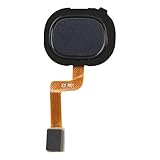
- Compatibility: The fingerprint sensor flex cable replacement is compatible for Samsung Model: A217M/DS. Please verify your phone model before buying. Check it under: Settings -> About Phone -> Model name/Model number.
- Unmatched Craftsmanship: The replacement part for Samsung Galaxy A21s Black fingerprint sensor flex cable is designed with excellent, malleable material. Once it's set up, the button will work with the suitable quantity of flexibility.
- Conquer Device Faults: These backup parts are intended to mend issues with the fingerprint sensor flex cable, involving loose, ruptured, or rigid cables, and dysfunctional sensors.
- Hassle-Free Fixing: The fingerprint sensor flex cable for Samsung Galaxy A21s Black possesses a direct configuration, ensuring an easy swap-out process. It's suggested to review online step-by-step instructions before you begin.
- There for You: Our goods are put through a stringent double quality assurance process. Facing trouble with installation? Contact us and we'll be there to assist.
A factory reset is not a sensible first step. Samsung cautions that resetting may not provide a lasting fix if an app issue is later addressed by an update. Try the lower-risk checks and diagnostics first.
Quick Recap
Best Value

- Tips : NOT fits for Samsung Galaxy A16 4G A165 Series Models .
- Compatible with : Samsung Galaxy A16 5G 2024 6.7" : SM-A166B, SM-A166W, SM-A166U, SM-A166U1 .
- You can search the keyword " Samsung Galaxy A16 5G A166U Fingerprint Sensor Flex Cable Replacement " from internet .
- Please scan carefully before ordering ; It is very important , make sure what your device is again . During the process of replacing the parts, any damage caused by yourself will NOT be covered by our liability .
- Package Content : 1 x Samsung Galaxy A16 5G A166U Fingerprint Sensor Flex Cable , 1 x Universal Tool ( like picture shows that ) .
Rank #4

- Brand New Replacement Part
- Please note installation can be difficult so we DO NOT recommend purchase if you are not a technician.
- Replacement for Samsung Galaxy S20 FE 5G G781 Fingerprint Sensor Flex Cable
Product prices and availability are accurate as of the date/time indicated and are subject to change. Any price and availability information displayed on Amazon at the time of purchase will apply.




