Recommended Free Tools
A wall sensor is generally better at preventing baseboard contact because it can help a robot track along a wall before hitting it. A bumper responds after contact, helping the vacuum change direction rather than guaranteeing the wall stays untouched. Neither feature promises zero contact: Xiaomi says light contact can be normal on its S40 Pro during edge cleaning. There is no controlled head-to-head test establishing which feature causes less baseboard damage.
What bumpers and wall sensors actually do
Bumpers react to contact
iRobot describes Roomba’s bumper as a way to identify walls and other obstacles. The robot may gently touch an obstacle with the bumper before changing direction. That makes the bumper a contact-response feature: useful for detecting an impact, but not by itself a way to keep the vacuum from touching the baseboard.
As an Amazon Associate I earn from qualifying purchases.
Wall sensors guide edge cleaning
A wall sensor can monitor proximity and help a robot maintain clearance as it follows a wall. Roborock describes that role for the S5 in a 2021 explainer; it is a model-specific example, not a specification for every robot vacuum. The sensor’s practical aim may include leaving room for the side brush to clean along the edge, so following a wall does not necessarily mean avoiding all contact.
The Tool Desk
Outbyte Driver Updater FREEScan for outdated or missing drivers - takes under a minuteDriver Scan →Outbyte PC Repair FREERepair Windows errors before they cause bigger problemsFix Now →Why a sensor-equipped vacuum may still touch a baseboard
- Edge-following can include light contact. Xiaomi says the S40 Pro may lightly bump a baseboard or dark wall while cleaning edges, and describes this as normal behavior for that model.
- Surface and object characteristics matter. iRobot notes that extremely dark surfaces and objects narrower than 2 in (50 mm) can make sensing or slowing less effective. That threshold is an iRobot support note, not a universal wall-sensor specification.
- A dirty sensor can affect navigation. Roborock advises that dirt on the wall sensor can contribute to missed areas or abnormal cleaning paths.
- Features differ by model. A bumper, wall sensor, or more advanced obstacle-recognition system can behave differently across products. Do not infer baseboard performance from a feature name alone.
How to compare two specific robot vacuums
Check the manufacturer’s guidance for the exact models you are considering. Useful questions include:
#1 Best Overall

- Compatibility: The soft bumper guard is compatible with iRobot Roomba i7, i3, s9, 500, 600, 700 and 800 series, as well as compatible with iRobot 675 and Neato robotic vacuum cleaners.
- Protection for furniture and vacuum: The bumper guard prevents the robot from damaging itself, protects furniture and reduces noise when the robot bumps into things.
- Dimensions and specifications: The bumper guard is 21 inches long, 0.8 inches wide and 0.2 inches thick. It is made of high-quality rubber that is both elastic and pressure-resistant. This means that it can be cut to any size to meet specific needs.
- Easy installation: The robot replacement parts are made of high-quality rubber, making them easy to install and replace as part of routine maintenance.
- How to use: The film of the robot vacuum blocker can be peeled off and applied directly, making it a convenient option for daily use and long-term applications.
- What does the manufacturer say happens at contact? Look for descriptions of bumper contact, slowing, or edge-cleaning behavior.
- Does the robot have a wall-proximity sensor? Check what the manufacturer says that sensor does; its presence alone does not establish that it will keep the baseboard untouched.
- What limitations and maintenance are documented? Check guidance about dark surfaces, narrow obstacles, and keeping sensors clean.
- Does it use additional obstacle recognition? Roborock says the S8 MaxV Ultra’s Reactive AI 2.0 combines 3D structured light and an RGB camera to recognize and avoid obstacles. This describes that model’s feature set, not proven superior baseboard protection in a comparative test.
- Can you restrict access to a vulnerable spot? Check whether a boundary accessory works with the exact robot model.
What to do if the robot is hitting the wall too hard
- Inspect and clean the bumper and relevant sensors following the manufacturer’s instructions. iRobot recommends cleaning bumper sensors when a robot is not registering obstacles or slows when none are present.
- Check wall-sensor upkeep and navigation symptoms. Roborock recommends wiping its wall sensor with a damp cloth when the robot misses areas or follows abnormal paths. Follow the instructions for your own model rather than assuming the same cleaning method applies to every vacuum.
- Use a compatible boundary device for a delicate area. iRobot’s Virtual Wall can block an area or keep compatible Roombas away from delicate items. Compatibility varies across Roomba families, so verify support for your model before relying on it.
Cleaning may address a sensor or bumper problem, but it cannot guarantee that a robot will never touch a baseboard; some models treat light contact during edge cleaning as normal.
Quick Recap
Best Value

- Prevent Robot Vacuums from Getting Stuck – Designed to raise your vacuum by 2 inches, these bumper extenders keep your robot from sliding under low furniture, beds, and couches where it can get trapped or stuck
- Compatible with Most Robot Vacuums – Fits most major robotic vacuum models with a flat outer shell. Perfect for daily cleaning use and especially useful for iRobot, Shark, Eufy, and other common brands
- Easy to Install & Customize – Simply attach the bumpers using strong double-sided adhesive (not included). For best results, use a heavy-duty mounting tape or similar nano adhesive for a firm hold
- Durable & Lightweight Material – Made from lightweight but sturdy plastic that won’t add weight to your vacuum or interfere with its performance. Designed to stay securely in place through regular use
- Smart Solution for Daily Hassles – Helps reduce cleaning interruptions and manual rescue efforts. Customers report improved cleaning efficiency and fewer jams under furniture after installation
Rank #4
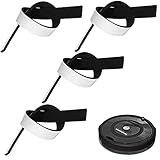
- Practical Combination Set: you will receive 4 pieces of sweeping robot bumpers that measure about 54 x 2x 0.5 cm/ 21.2 x 0.8 x 0.2 inches, which can meet your various placement demands, and of course, you can cut it into any sizes you want, satisfying your various use demands
- Sturdy Material: our robot vacuum bumper guard adopts quality EVA material with good elasticity, and effective cushioning of robot collision forces, no deformation pressure, high pressure-bearing capacity, can be a good accessory for your floor sweepers
- Practical functions: it is designed for the round hoovers on the market, which keeps the robot from breaking itself and to protect the furniture and reduce the noise when the robot collides, serving you a lot of convenience, which can be an ideal accessory for your home
- Nice Accessory for You: the robot vacuum bumper mitigates the noise when it hitting somethings, baseboards and so on, and doesn't interfere with functionality at all, which can assure you a quiet living environment
- Steps for usages: those black bumpers are easy to remove and replace as part of routine maintenance; You can simply peel off the film and apply it directly, easy and convenient for your daily applications, serving you for a long-term applications
Rank #3

- Compatibility: Bumper compatible with Shark AV2610WA, AV2610WACA, RV2400WD, RV2410WD, RV2600WA, RV2600WD, RV2610WA, RV2610WACA, RV2610WD, RV2610WDCA, RV2620WD, UR2450WD, RV2620WFUS Robot Vacuum Cleaner.
- Please Check Your Vacuum Model Before Placing Order.
- What In Box: 1x Front Bumper + Screws.
- Quality Satisfaction: Your satisfaction is our greatest wish. We will provide you with the best quality products and services. If you are not satisfied, please feel free to contact us
Rank #2

- COMPATIBILITY: Compatible replacement for Shark AV2610WA, AV2610WACA, RV2400WD, RV2410WD, RV2600WA, RV2600WD, RV2610WA, RV2610WACA, RV2610WD, RV2610WDCA, RV2620WD, UR2450WD, RV2620WFUS models robot vacuum cleaners
- DURABLE CONSTRUCTION: Made from high-quality black material designed to protect your robot vacuum during operation and maintain cleaning performance
- ESSENTIAL PROTECTION: Guards your robot vacuum against impacts and collisions with furniture and walls during automated cleaning cycles
- EASY INSTALLATION: Simple replacement process allows you to quickly swap out your worn bumper guard to maintain optimal vacuum performance
- WHAT IN BOX: 1x Front bumper
Product prices and availability are accurate as of the date/time indicated and are subject to change. Any price and availability information displayed on Amazon at the time of purchase will apply.
Independent reader supportYour contribution helps us test, update, and keep practical guides available for everyone.



