The sixth edition of the Raspberry Pi Official Beginner’s Guide is an updated, step-by-step introduction to setting up a Raspberry Pi, learning Scratch and Python, and building projects with electronic components. Published on 5 December 2025, it updates the guide for Raspberry Pi 500 and 500+ and Raspberry Pi OS Trixie, and finishes with chapters on the Camera Module and Raspberry Pi Pico 2.
What does the sixth edition cover?
The book is organized as a progression: it starts with getting a Raspberry Pi running, moves into programming, and then applies those skills to hardware projects. Raspberry Pi’s announcement of the sixth edition describes the chapter sequence; the publisher’s book page summarizes the learning outcomes.


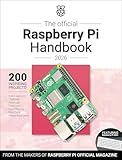
As an Amazon Associate I earn from qualifying purchases.
Setup and desktop basics
Early chapters introduce Raspberry Pi hardware, setup and first boot, the desktop environment, and installing software. This gives a newcomer a foundation before the book turns to programming.
Do these 3 things before closing this tab:
1Scan for outdated or missing drivers - takes under a minute2Repair Windows errors before they cause bigger problems3Fix the driver behind crashes, sound loss and screen glitchesScratch and Python
Chapters 4 through 7 introduce Scratch and Python. The progression begins with programs that do not need additional hardware, then moves to physical computing: using inputs such as push buttons and outputs such as LEDs.
#1 Best Overall
Sense HAT, camera, and Pico 2
Later material uses the Sense HAT’s sensors and LED matrix, then covers taking photographs with a Raspberry Pi Camera Module. The final chapter introduces Raspberry Pi Pico 2 and builds on the earlier Python and physical-computing material. Appendices provide reference information.
Pico 2 is a separate microcontroller board, not a keyboard-integrated or standard desktop Raspberry Pi. Its chapter extends the book’s programming and electronics path to a different kind of board.
Rank #2
What changed in the sixth edition?
Raspberry Pi says the fifth edition featured Raspberry Pi 5 and Raspberry Pi OS Bookworm; the sixth updates the guide for Raspberry Pi 500, Raspberry Pi 500+, and Raspberry Pi OS Trixie, along with improvements, clarifications, and corrections. That is the publisher’s summary of the edition update, not a complete technical change log. In the announcement, author Brian Jepson wrote: “The 6th edition is available now, featuring Raspberry Pi 500 and 500+, and Raspberry Pi OS Trixie.”
What’s actually slowing this PC down?
Pick the symptom - the matching free tool is one click away.
Is it right for your Raspberry Pi?
The publisher presents the guide for newcomers using a standard Raspberry Pi board, a compact Raspberry Pi Zero, or a keyboard-integrated Raspberry Pi. Choose it if your aim is to learn setup and introductory coding, then progress toward electronics, camera, or microcontroller projects.
Some later activities involve optional hardware, including a Sense HAT, LEDs and buttons, a Camera Module, or Pico 2. The publisher’s pages do not give a project-by-project compatibility chart, so do not assume every exercise works unchanged with every board. Before buying optional components, check that they fit your particular Raspberry Pi model, connectors, and cable requirements.
Independent reader supportYour contribution helps us test, update, and keep practical guides available for everyone.Print, PDF, and ePUB availability
The 5 December 2025 launch announcement said the print edition was available through the Raspberry Pi store and retailers including Amazon in the US and UK; it also listed PDF and ePUB editions. It stated a launch price of £19.99 for print. That is the price announced at launch, not a confirmation of today’s price or stock. The publisher’s page identifies the December 2025 edition and says contributors can get a free e-book; check the current publisher page for applicable conditions and availability.
Quick Recap
Best Value
How to decide whether to get it
- Choose it for a guided first start: the book covers setup, first boot, desktop use, and software installation before coding.
- Choose it to learn by making: Scratch and Python lead into physical-computing exercises and projects with sensors, LEDs, and a camera.
- Check your hardware first: the guide spans several Raspberry Pi types, but optional accessories and individual project compatibility can vary.
- Pick the format that suits you: the publisher announced print, PDF, and ePUB options; current listings and terms may change.
Product prices and availability are accurate as of the date/time indicated and are subject to change. Any price and availability information displayed on Amazon at the time of purchase will apply.
Recommended Free Tools




