PC Slower Than It Used to Be?
A free scan shows the junk files, broken settings and background clutter dragging Windows down - then fixes them in one click.Free scan · Windows 10 & 11Crashes, No Sound, or Screen Glitches?
Random freezes, missing sound and display glitches usually trace back to one bad driver. Find and replace yours safely.Free scan · under a minuteThe Radeon RX 6600 and GeForce GTX 1080 Ti sit in very different GPU generations, but they often compete for the same buyers in the used and budget gaming market. AMD’s RX 6600 is newer, more efficient, and built around modern 1080p gaming, while Nvidia’s GTX 1080 Ti was once a flagship card with far more raw memory bandwidth and 11GB of VRAM.
Choosing between them depends on more than average FPS. Power consumption, driver support, game compatibility, VRAM demands, pricing, and the condition of used cards all matter, especially if you are upgrading an older system or targeting 1080p and 1440p gameplay on a tight budget.
As an Amazon Associate I earn from qualifying purchases.
Key Specifications and Architecture Differences
The Radeon RX 6600 and GeForce GTX 1080 Ti come from very different GPU eras, so their specifications do not tell the whole story unless they are viewed in context. AMD’s RX 6600 is based on the RDNA 2 architecture and launched as a modern, efficient 1080p gaming card. Nvidia’s GTX 1080 Ti is based on Pascal and launched as a high-end flagship-class GPU, originally aimed at enthusiast 1440p and 4K gaming. On paper, the GTX 1080 Ti looks much larger and more powerful, while the RX 6600 relies on newer design choices, better efficiency, and more current feature support.
The RX 6600 uses the Navi 23 GPU with 28 compute units, 1,792 stream processors, 8GB of GDDR6 memory, and a 128-bit memory bus. It also includes 32MB of Infinity Cache, which helps offset the narrower memory interface in many gaming workloads. The GTX 1080 Ti uses the GP102 GPU with 3,584 CUDA cores, 11GB of GDDR5X memory, and a much wider 352-bit memory bus. That gives it significantly higher raw memory bandwidth, which can still matter at 1440p, in older APIs, and in games with heavy texture or bandwidth demands.
#1 Best Overall

- Not compatible with all built-in computers or systems
- AMD Radeon RX 6600 GPU: Built on RDNA 2 architecture, delivering excellent 1080p gaming performance with high efficiency.
- 8GB GDDR6 Memory: Provides smooth gameplay and multitasking with fast data transfer rates.
- Challenger D Cooling: Features a dual-fan design for effective heat dissipation and quiet operation.
- PCIe 4.0 Support: Ensures high bandwidth for improved gaming and productivity performance.
| Specification | Radeon RX 6600 | GeForce GTX 1080 Ti |
|---|---|---|
| Architecture | AMD RDNA 2 | Nvidia Pascal |
| GPU Class at Launch | Mainstream 1080p | Enthusiast flagship |
| Shader Units | 1,792 stream processors | 3,584 CUDA cores |
| VRAM | 8GB GDDR6 | 11GB GDDR5X |
| Memory Bus | 128-bit | 352-bit |
| Typical Board Power | Around 132W | Around 250W |
| PCIe Interface | PCIe 4.0 x8 | PCIe 3.0 x16 |
| Hardware Ray Tracing | Yes, first-generation AMD RT accelerators | No dedicated RT cores |
Architecturally, the RX 6600 benefits from newer rendering features and lower latency cache behavior, along with hardware support for DirectX 12 Ultimate features such as ray tracing and variable rate shading. Its ray tracing performance is limited compared with newer midrange cards, but the hardware support still gives it access to effects and compatibility paths that the GTX 1080 Ti lacks. The GTX 1080 Ti can run many ray-traced titles through fallback modes only when supported, but without dedicated RT hardware it is not a practical choice for ray tracing.
The PCIe configuration is another difference worth noting. The RX 6600 uses a PCIe 4.0 x8 link, which performs well on PCIe 4.0 systems but can lose a small amount of performance on older PCIe 3.0 platforms in bandwidth-sensitive games. The GTX 1080 Ti uses PCIe 3.0 x16, making it a natural fit for older high-end systems from its own era. In most gaming scenarios this will not decide the comparison by itself, but it can matter for users upgrading an older Ryzen or Intel platform without PCIe 4.0 support.
In simple terms, the GTX 1080 Ti is the bigger chip with more memory capacity and far more raw bandwidth, while the RX 6600 is the newer, cooler, and more efficient design with modern API features. That split shapes the rest of the comparison: the GTX 1080 Ti can still show impressive strength in traditional rasterized games, especially at 1440p, while the RX 6600 is easier to power, better suited to compact systems, and more aligned with current driver and feature expectations.
Recommended Free Tools
Gaming Performance at 1080p and 1440p
In traditional rasterized gaming, the GeForce GTX 1080 Ti is generally the faster card, especially once resolution or visual settings push beyond mainstream 1080p workloads. Its larger GPU, wider memory bus, and higher raw throughput allow it to stay ahead in many older and moderately demanding titles. The Radeon RX 6600, however, is not far behind in lighter esports games and modern titles tuned well for RDNA 2, and it often delivers excellent 1080p results while using much less power.
At 1080p, both GPUs are capable gaming options, but they suit slightly different expectations. The RX 6600 is best viewed as a high-quality 1080p card for medium to ultra settings depending on the game. In titles such as Fortnite, Apex Legends, Rainbow Six Siege, Valorant, and Counter-Strike 2, it can produce high frame rates suitable for 120Hz and 144Hz monitors, often with settings adjusted for competitive play. The GTX 1080 Ti can also push high-refresh 1080p very well and may lead in GPU-heavy games, but at this resolution it is more likely to run into CPU limits in fast-paced games, reducing the practical gap between the two cards.
In demanding single-player games at 1080p, the GTX 1080 Ti more consistently has the performance headroom for ultra presets, particularly in older DirectX 11 titles and games that favor its strong memory bandwidth. The RX 6600 usually performs best when paired with high rather than maximum settings, where visual quality remains strong and frame rates stay smooth. In newer games with heavy ray tracing effects, neither card is ideal: the GTX 1080 Ti lacks dedicated RT hardware, while the RX 6600 has entry-level ray tracing capability that often requires reduced settings or upscaling to remain playable.
Expected gaming behavior by resolution
| Resolution | Radeon RX 6600 | GeForce GTX 1080 Ti |
|---|---|---|
| 1080p esports | Excellent; high-refresh gaming is realistic in many titles | Excellent; often faster, but CPU limits can narrow the difference |
| 1080p AAA | Strong at high settings; ultra may require compromises in newer games | Very strong; better suited to ultra settings in many rasterized games |
| 1440p esports | Good with optimized settings | Very good; more headroom for high refresh rates |
| 1440p AAA | Playable with medium-to-high settings and upscaling where available | Generally stronger; better for high settings without aggressive compromises |
At 1440p, the GTX 1080 Ti’s advantage becomes more noticeable. Its 11GB of VRAM and wide 352-bit memory interface help it handle higher-resolution textures and heavier anti-aliasing more comfortably. For players targeting 1440p at 60 FPS in rasterized games, the GTX 1080 Ti is usually the better performer, particularly in titles from the late 2010s and early 2020s. The RX 6600 can still manage 1440p, but it is better suited to medium settings, FSR upscaling, or less demanding games rather than consistently maxed-out AAA experiences.
What’s actually slowing this PC down?
Pick the symptom - the matching free tool is one click away.
For a modern 1080p build, the RX 6600 often feels smoother than its raw performance numbers suggest because it is efficient, cool, and well matched to budget CPUs and power supplies. For a 1440p-focused setup, the GTX 1080 Ti remains attractive if found at the right used price and in good condition. The practical split is straightforward: choose the RX 6600 for efficient 1080p gaming with newer platform features, and choose the GTX 1080 Ti if rasterized 1440p performance is the priority and higher power draw is acceptable.
Rank #2

- System Compatibility Note: 2.5‑slot card measuring 303 mm (L) x 131 mm (W) x 45 mm (H); requires a single 8‑pin power connector and a recommended 550W power supply. Please verify chassis clearance and power supply capacity before purchase.
- Dedicated Support: Please contact us directly through Amazon for any product questions or assistance you may require.
- AMD RDNA 3 Architecture with AI & Ray Tracing Acceleration: Powered by 32 RDNA 3 Compute Units featuring 3rd Gen Ray Tracing Accelerators and 2nd Gen AI Accelerators, delivering lifelike lighting, shadows, and superior machine learning performance for enhanced gaming and content creation.
- Powerful 1080p & 1440p Gaming Engine: Features a max boost clock of up to 2695 MHz, a game clock of 2280 MHz, and 2048 stream processors, ensuring outstanding frame rates in the latest titles.
- 8GB High‑Speed GDDR6 Memory: Equipped with 8GB of GDDR6 memory on a 128‑bit interface running at 18 Gbps, delivering up to 288 GB/s bandwidth for high‑resolution textures and demanding game workloads.
VRAM, Memory Bandwidth, and Long-Term Usability
The Radeon RX 6600 and GeForce GTX 1080 Ti take very different approaches to memory, and that difference matters when looking beyond average frame rates. The RX 6600 has 8GB of GDDR6 on a 128-bit bus, while the GTX 1080 Ti has 11GB of GDDR5X on a much wider 352-bit bus. On paper, the older Nvidia card has the clear advantage in raw capacity and bandwidth, which can help in memory-heavy games, high-resolution texture packs, and some 1440p scenarios.
The GTX 1080 Ti offers around 484GB/s of memory bandwidth, far above the RX 6600’s roughly 224GB/s. AMD offsets some of this with a 32MB Infinity Cache, which improves effective bandwidth in many 1080p gaming workloads. This design works well when the game fits within cache-friendly access patterns, but it is less of a substitute at higher resolutions or in titles that stream large assets aggressively. As a result, the RX 6600 can feel efficient and responsive at 1080p, while the GTX 1080 Ti has more headroom when memory bandwidth becomes a bottleneck.
| GPU | VRAM | Memory Type | Bus Width | Bandwidth | Cache |
|---|---|---|---|---|---|
| Radeon RX 6600 | 8GB | GDDR6 | 128-bit | About 224GB/s | 32MB Infinity Cache |
| GeForce GTX 1080 Ti | 11GB | GDDR5X | 352-bit | About 484GB/s | No modern equivalent |
For 1080p gaming, 8GB is still workable in most games, especially with sensible texture settings. The RX 6600 is generally comfortable at this resolution, and its memory system is well matched to its performance target. Problems are more likely to appear in newer AAA games when using ultra textures, heavy ray tracing options, or poorly optimized ports. In those cases, reducing texture quality from ultra to high can prevent stutter without dramatically changing image quality.
At 1440p, the GTX 1080 Ti’s 11GB frame buffer becomes more valuable. Extra VRAM does not automatically make a GPU faster, but it can reduce hitching and texture pop-in when games exceed 8GB. This is especially relevant for open-world titles, large mullayer maps, and games with high-resolution asset packs. The GTX 1080 Ti’s wider bus also helps when pushing larger frame buffers, although its older architecture can still fall behind in newer engines that favor modern scheduling, cache behavior, or DirectX 12 optimizations.
Long-term usability is not only about VRAM size. The RX 6600 supports newer display and media features, including HDMI 2.1 output on many models, AV1 decode support, and better efficiency for modern systems. It also benefits from a newer architecture and a longer expected runway for driver tuning. The GTX 1080 Ti has the stronger memory configuration for older-style rasterized workloads, but it lacks newer hardware features such as mesh shader support and dedicated ray tracing acceleration, which may matter more as new games continue to move toward modern rendering pipelines.
For buyers focused on memory longevity alone, the GTX 1080 Ti’s 11GB looks attractive, particularly for 1440p texture-heavy games. For a balanced modern 1080p build, the RX 6600’s 8GB is usually enough, and its newer platform advantages make it easier to live with day to day. The practical choice depends on whether you value raw VRAM and bandwidth for used-market 1440p gaming, or a newer, more efficient card that is better aligned with current 1080p systems.
Power Consumption, Thermals, and PSU Requirements
Power draw is one of the clearest differences between the Radeon RX 6600 and the GeForce GTX 1080 Ti. The RX 6600 is a much newer, efficiency-focused GPU with a typical board power of around 132W, while the GTX 1080 Ti is a former high-end flagship with a rated board power of around 250W. In real gaming systems, that gap is easy to feel: the RX 6600 usually runs cooler, quieter, and places less stress on the power supply, while the GTX 1080 Ti needs more airflow and a stronger PSU to stay comfortable under sustained load.
For 1080p gaming, the RX 6600’s efficiency is a major advantage. It can deliver strong frame rates while consuming roughly half the power of the GTX 1080 Ti in many games. That means less heat dumped into the case, lower fan speeds, and better suitability for compact builds or budget systems with modest cooling. Many RX 6600 cards use a single 8-pin PCIe power connector, and some lower-power models may be tuned conservatively enough to remain very quiet during normal gameplay.
Rank #3

- Axial-tech fans now feature a smaller fan hub that facilitates longer blades and a barrier ring that increases downward air pressure
- 2.5-slot design allows for greater build compatibility while maintaining cooling performance
- 0dB technology lets you enjoy light gaming in relative silence
- Dual BIOS switch lets you toggle between Quiet and Performance BIOS profiles
- Dual ball fan bearings last up to twice as long as sleeve bearing designs
The GTX 1080 Ti, by contrast, was designed as an enthusiast-class card and behaves like one. Custom models often use one 8-pin plus one 6-pin connector, or dual 8-pin connectors, depending on the board design. Under heavy gaming loads, especially at 1440p where the GPU is more fully utilized, it can produce significantly more heat than the RX 6600. Cooler quality matters a lot on used GTX 1080 Ti cards: a triple-fan aftermarket model may still perform well, while an aging blower-style card can run hot and loud unless it has been cleaned, repasted, or given an aggressive fan curve.
| Category | Radeon RX 6600 | GeForce GTX 1080 Ti |
|---|---|---|
| Typical board power | About 132W | About 250W |
| Common power connector | 1x 8-pin | 1x 8-pin + 1x 6-pin or 2x 8-pin |
| Recommended PSU | 450W-500W quality unit | 600W-650W quality unit |
| Heat output | Low to moderate | High |
| Best fit | Efficient 1080p builds | Higher-power 1440p-capable systems |
PSU requirements should be judged by the whole system, not just the graphics card. For an RX 6600 paired with a mainstream Ryzen 5 or Core i5 processor, a good 450W or 500W power supply is usually enough, provided it is from a reputable brand and has the proper PCIe connector. This makes the RX 6600 attractive for prebuilt upgrades, older office-tower conversions, and budget gaming PCs where replacing the PSU would add extra cost.
For the GTX 1080 Ti, a quality 600W to 650W unit is the safer target, especially with higher-end CPUs, mulle drives, or factory-overclocked card designs. Age is also a factor: many GTX 1080 Ti cards on the used market have spent years under gaming, rendering, or mining workloads. Buyers should inspect fan noise, temperatures, hotspot behavior where available, and whether the card throttles during extended gaming sessions. If your case has limited airflow or your PSU is basic, the RX 6600 is the easier and safer choice. If your system already has strong cooling and a reliable PSU, the GTX 1080 Ti’s higher power demand may be acceptable in exchange for its stronger raw performance in some 1440p scenarios.
The Tool Desk
Outbyte PC Repair FREERepair Windows errors before they cause bigger problemsFix Now →Outbyte Driver Updater FREEFix the driver behind crashes, sound loss and screen glitchesFind Drivers →Driver Support, Features, and Modern API Compatibility
Driver support is one of the clearest practical differences between the Radeon RX 6600 and GeForce GTX 1080 Ti. The RX 6600 is based on AMD’s newer RDNA 2 architecture, while the GTX 1080 Ti uses Nvidia’s older Pascal architecture from 2017. Both cards can still run modern games, but the RX 6600 sits in a more current software stack and is more likely to receive optimizations aimed at newer game engines, DirectX 12 titles, Vulkan updates, and ongoing Radeon feature development.
The GTX 1080 Ti continues to benefit from Nvidia’s mature drivers, and its Pascal architecture has historically been very stable across a wide range of games. For older DirectX 11 titles, esports games, and many legacy PC releases, it remains a strong performer. However, newer Nvidia features are increasingly centered on RTX-class GPUs, meaning the GTX 1080 Ti misses out on hardware ray tracing, DLSS, RTX Video features, and newer AI-assisted technologies. It can still use features like Nvidia Reflex in supported games, where available, but its feature set is no longer as complete as Nvidia’s newer cards.
The RX 6600 has a more modern feature baseline. It supports DirectX 12 Ultimate, hardware-accelerated ray tracing, Smart Access Memory when paired with compatible platforms, AMD Radeon Anti-Lag, Radeon Boost, Radeon Super Resolution, and FidelityFX Super Resolution. Its ray tracing performance is modest and should not be a primary reason to buy the card, but having hardware support can matter in games that require or heavily integrate modern rendering paths. FSR support is also valuable because it works across a wide range of GPUs and can help the RX 6600 stretch performance at 1440p or in demanding 1080p games.
| Feature | Radeon RX 6600 | GeForce GTX 1080 Ti |
|---|---|---|
| Architecture generation | RDNA 2 | Pascal |
| DirectX 12 Ultimate | Supported | Not fully supported |
| Hardware ray tracing | Yes, entry-level | No |
| Upscaling support | FSR, RSR | FSR, no DLSS |
| Vendor driver focus | Current mainstream support | Legacy but still maintained |
Modern API compatibility also favors the RX 6600 in newer DirectX 12 and Vulkan games. RDNA 2 was designed for current console-era rendering techniques, so it often handles newer engines more gracefully despite having a narrower memory bus and less raw high-end pedigree than the GTX 1080 Ti. The GTX 1080 Ti can still produce excellent frame rates through sheer shader power and bandwidth, but some newer games are less optimized for Pascal than they are for newer AMD and Nvidia architectures.
For streaming and media features, neither card is perfect by current standards. The GTX 1080 Ti includes Nvidia’s older NVENC encoder, which is still useful for recording and streaming, though it is not as capable as the Turing, Ampere, or Ada versions. The RX 6600 has AMD’s improved media engine compared with older Radeon cards, but Nvidia’s encoder ecosystem is often preferred by streamers using OBS and similar tools. For pure gaming, the RX 6600’s newer feature support generally matters more; for users who rely on CUDA-based applications or older Nvidia-specific workflows, the GTX 1080 Ti may still have an advantage.
Rank #4
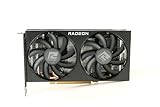
- Video Memory: 8GB GDDR6
- Current processor: 1792
- Game Clock: 2044MHz
- Boost Clock: 2491 MHz
- Memory Clock: 14Gbps
Overall, the RX 6600 is the safer choice for modern API support and forward-looking gaming features, especially for players buying a GPU to use for several more years. The GTX 1080 Ti remains capable and well-supported for traditional rasterized gaming, but its missing RTX-era features and older Pascal driver priority make it less appealing if compatibility with future engines and feature updates is a major concern.
Price, Availability, and Used-Market Value
Pricing is where the Radeon RX 6600 often becomes the more practical choice, especially for buyers looking at budget 1080p gaming. The RX 6600 launched as a midrange card and is still commonly found through retailers, remaining stock, refurbished listings, and a large used supply. Because it is newer, less power-hungry, and widely available in compact dual-fan designs, it tends to offer predictable value for systems built around modest power supplies and mainstream cases.
The GeForce GTX 1080 Ti is different: it was a high-end flagship, but it is now only available used in most markets. Its original performance class still makes it attractive, particularly for 1440p gaming and games that benefit from its 11GB of VRAM. However, used-market pricing can be inconsistent. Some sellers price it based on nostalgia or its former flagship status, while others price it closer to modern entry-level and midrange cards. At the right price, it can be a strong performer; at inflated prices, it quickly loses appeal against newer GPUs with better efficiency, warranty coverage, and feature support.
Quick wins for a faster PC:
Clear out junk files and repair common Windows errorsFree Scan →Fix the driver behind crashes, sound loss and screen glitchesFind Drivers →Repair Windows errors before they cause bigger problemsFix Now →| Buying factor | Radeon RX 6600 | GeForce GTX 1080 Ti |
|---|---|---|
| Typical availability | New, refurbished, and used | Used only in most cases |
| Warranty prospects | Better chance of remaining retail or refurb warranty | Usually expired or seller-limited |
| Power-related costs | Lower PSU and cooling demands | May require stronger PSU and better airflow |
| Value sweet spot | Budget 1080p builds | Discounted 1440p used-market buy |
For used purchases, condition matters as much as raw benchmark performance. A GTX 1080 Ti may have spent years in a gaming rig, workstation, or mining setup, and many models are old enough to need fresh thermal paste, replacement fans, or closer inspection for coil whine and display output issues. Its higher power draw also means it has typically endured more heat over its lifetime than an RX 6600. A used RX 6600 can also have wear, but the card’s newer age and lower power consumption generally reduce the risk profile.
As a value guideline, the RX 6600 makes the most sense when it is priced near the lower end of the modern used or clearance market and you mainly play at 1080p. It is efficient, easy to install, and safer for buyers who want a low-maintenance upgrade. The GTX 1080 Ti becomes appealing only when it is clearly cheaper than newer GPUs that approach its raster performance, or when its 11GB VRAM is especially useful for your games at 1440p. If the two cards are close in price, the RX 6600 is usually the safer buy; if the GTX 1080 Ti is heavily discounted and confirmed to be in excellent condition, it can still be a compelling used-market option.
Independent reader supportYour contribution helps us test, update, and keep practical guides available for everyone.Which GPU Should You Choose?
For most buyers choosing between the Radeon RX 6600 and the GeForce GTX 1080 Ti today, the better pick depends less on raw benchmark averages and more on the system you are building around it. The RX 6600 is the safer, more practical card for a modern 1080p gaming PC: it is newer, far more efficient, easier to cool, and usually less risky to buy on the used market. The GTX 1080 Ti still has strong rasterization performance, especially at 1440p, but its age, power draw, and lack of newer hardware features make it a more situational purchase.
Choose the Radeon RX 6600 if you want a balanced 1080p card
The RX 6600 makes the most sense for gamers targeting 1080p high settings in esports titles, older AAA games, and many current releases with sensible settings adjustments. Its 8GB of VRAM is not ideal for every new game at ultra textures, but it is still workable at 1080p, and the card’s low power consumption makes it easy to drop into budget prebuilt systems or compact mid-towers. A quality 450W to 550W PSU is typically enough, and many models run cool and quiet without needing aggressive fan curves.
- Best for: 1080p gaming, efficient builds, lower electricity use, quieter systems, and newer driver support.
- Less ideal for: users who want maximum 1440p raster performance or higher VRAM capacity for texture-heavy games.
Choose the GeForce GTX 1080 Ti if you find a clean card at the right price
The GTX 1080 Ti is still appealing when 1440p performance is the priority and the card is available at a noticeably lower price than faster modern alternatives. Its 11GB of VRAM gives it breathing room in some games where the RX 6600’s 8GB buffer can become limiting, and its wide memory bus helps in bandwidth-heavy workloads. However, it is an older high-end GPU, so condition matters a lot. A used GTX 1080 Ti may have years of heat cycles, worn fans, dried thermal paste, or previous mining use. It also lacks hardware ray tracing, DLSS, HDMI 2.1, AV1 decode, and newer efficiency improvements.
Best Value

- AMD RDNA 2 architecture is the foundation of the upcoming revolution in PC gaming graphics, console, and cloud gaming, AMD RNDA 2 is a breakthrough architecture elevating and unifying visuals and gameplay across multi-gaming platforms in a way like no other graphics architecture before.
- The AMD Radeon RX 6000 Series graphics cards feature PCIe 4.0, with a throughput of 16 GT/s which enables two times the bandwidth compared to PCIe 3.0.
- The AMD Radeon RX 6000 Serie graphics cards enable connectivity and supports the newest bleeding edge displays. HDMI 2.1 VRR expands tear free gaming experiences to all HDMI 2.1 VRR enabled displays delivering fluid gaming for all AMD Radeon RX 6000 graphics card users. Get the bandwidth needed to power up to 8K HDR experiences.
- The ultimate PC platform is only complete with the ultimate display ecosystem. Take full advantage of the AMD Radeon RX 6000 Series graphics cards by pairing with a certified AMD FreeSync technology-enabled monitor to enable an exceptional stutter and tear-free gaming experience with high refresh rates, low latency, and stunning HDR.
- Takes games to a new level of realism with support for features such as DirectX Raytracing (DXR) and variable rate shading (VRS).
- Best for: budget 1440p raster gaming, users with a strong PSU, and buyers comfortable inspecting used hardware.
- Less ideal for: compact builds, low-power systems, ray tracing, modern media features, and buyers wanting warranty coverage.
| Use Case | Better Choice |
|---|---|
| 1080p high settings with low power draw | Radeon RX 6600 |
| 1440p raster performance on a tight used-market budget | GeForce GTX 1080 Ti |
| Small form factor or basic PSU upgrade | Radeon RX 6600 |
| Texture-heavy games needing more than 8GB VRAM | GeForce GTX 1080 Ti |
| Lowest ownership risk and newer feature set | Radeon RX 6600 |
If pricing is close, the RX 6600 is generally the smarter recommendation because it is newer, more efficient, and less demanding on the rest of the PC. The GTX 1080 Ti only becomes the more attractive option when it is substantially cheaper, confirmed to be in good condition, and paired with a suitable power supply and airflow. For a straightforward 1080p upgrade, pick the RX 6600. For a carefully vetted used 1440p card where raw raster performance and 11GB of VRAM matter more than efficiency and modern features, the GTX 1080 Ti can still be worthwhile.
Frequently Asked Questions
Is the RX 6600 faster than the GTX 1080 Ti for gaming?
In most traditional rasterized games, the GTX 1080 Ti is usually faster than the RX 6600, especially at 1440p where its wider memory bus and higher bandwidth help. At 1080p, the gap can be smaller, and the RX 6600 still delivers strong performance in modern titles. If raw frame rates are the priority, the GTX 1080 Ti generally wins.
Which GPU is better for 1080p gaming, the RX 6600 or GTX 1080 Ti?
The RX 6600 is often the more sensible 1080p choice because it is efficient, newer, and usually easier to run with a modest power supply. It can handle high settings in many games while using far less power than the GTX 1080 Ti. The GTX 1080 Ti may produce higher FPS, but it also runs hotter and draws significantly more power.
Do these 3 things before closing this tab:
1Clear out junk files and repair common Windows errors2Fix the driver behind crashes, sound loss and screen glitches3Repair Windows errors before they cause bigger problemsIs the GTX 1080 Ti still worth buying used?
The GTX 1080 Ti can still be worth buying if the price is low and the card is in good condition, but it is riskier because all units are several years old. Buyers should check for fan noise, overheating, artifacting, warranty status, and signs of heavy mining or poor maintenance. If the used price is close to an RX 6600 or newer GPU, the newer card is usually the safer purchase.
Does the GTX 1080 Ti’s 11GB of VRAM make it better than the RX 6600’s 8GB?
The GTX 1080 Ti’s 11GB of VRAM is useful in some high-resolution texture packs, older demanding titles, and certain 1440p scenarios. However, VRAM capacity is not the only factor; the RX 6600 has a newer architecture, better efficiency, and more modern media and driver support. For 1080p gaming, 8GB on the RX 6600 is still generally workable, though newer games may require adjusted texture settings.
Which card needs a bigger power supply?
The GTX 1080 Ti needs the larger power supply because it typically draws around 250W and often requires stronger PCIe power connectors. A quality 600W to 650W PSU is commonly recommended for systems using a GTX 1080 Ti. The RX 6600 is much lighter on power, often around 130W, and can usually run comfortably with a good 450W to 500W PSU.
Bottom Line
The Radeon RX 6600 is the smarter pick for most 1080p gamers who want lower power draw, newer driver support, and solid value without needing a large PSU. It is especially appealing if you are buying new or want a quieter, more efficient card for esports and modern AAA gaming at sensible settings.
Free tools Windows power users keep installed
One-click scans. No signup required.
The GeForce GTX 1080 Ti still has the muscle for 1440p rasterized gaming and can be a strong used-market buy if priced well, but its age, higher power use, and lack of modern features make it more of a situational choice. If the prices are close, choose the RX 6600 for efficiency and longevity; choose the GTX 1080 Ti only if you need its extra raw performance and are comfortable buying used.
Quick Recap
Product prices and availability are accurate as of the date/time indicated and are subject to change. Any price and availability information displayed on Amazon at the time of purchase will apply.




