For most players loading ordinary Quake custom maps, start with QuakeSpasm. It documents support for the BSP2 and 2PSB map formats. If a demanding map makes rendering speed your priority, try Ironwail; its project describes a focus on high performance rather than maximum compatibility. Use the engine named by a map or mod author when one is specified: custom content can depend on formats, QuakeC extensions, or assets that a general ranking cannot account for.
Which Quake source port should you use?
A source port is the game engine that runs Quake and its community content. For a straightforward custom-map session, QuakeSpasm is a sensible starting point. Choose a different port when the content calls for it or when you have a specific renderer or performance preference.
| # | Preview | Product | Price | |
|---|---|---|---|---|
| 1 |

|
Quake II Limited Run Games #207 - Nintendo Switch | $55.50 | Buy on Amazon |
| 2 |

|
Quake (Limited Run #419) - PlayStation 4 | $55.98 | Buy on Amazon |
| 3 |
|
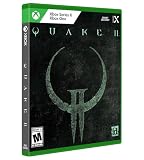
Quake II Limited Run Games #10 - Xbox One/Xbox Series X | $60.53 | Buy on Amazon |
| 4 |

|
Quake II Limited Run Games #76 - Playstation 5 | $59.99 | Buy on Amazon |
| 5 |
![Quake: Standard - Nintendo Switch [Digital Code]](https://m.media-amazon.com/images/I/41C8x-61tGL._SL160_.jpg)
|
Quake: Standard - Nintendo Switch [Digital Code] | $9.99 | Buy on Amazon |
As an Amazon Associate I earn from qualifying purchases.
- Ordinary custom maps: Start with QuakeSpasm, a FitzQuake-based port whose README lists BSP2 and 2PSB support.
- Demanding maps or rendering performance: Consider Ironwail, whose stated priority is high performance rather than maximum compatibility.
- Vulkan rendering: Consider vkQuake, a QuakeSpasm-based port that uses Vulkan.
- Specific mod or multiplayer extensions: Follow the author’s recommendation; Quakespasm-Spiked and FTE offer extension-oriented features that some content may need.
There is no established universal compatibility winner. Check the map or mod’s readme before choosing, especially if it mentions a particular engine, map format, or QuakeC feature.
Recommended Free Tools
How the ports differ
| Port | What distinguishes it | When to consider it |
|---|---|---|
| QuakeSpasm | FitzQuake-based; its project README lists BSP2 and 2PSB map-format support. Project README | A practical first choice for conventional custom-map play, while still checking map-specific requirements. |
| Ironwail | A QuakeSpasm fork focused on high performance rather than maximum compatibility. Its README describes GPU-based culling and lightmap work and newer OpenGL features for demanding maps. Project README | Try it when rendering performance on a complex map matters more than seeking the broadest compatibility. |
| vkQuake | QuakeSpasm-based and uses Vulkan rendering. Quake Engines and Sourceports index | Consider it if Vulkan suits your setup and the map or mod supports it; check current project requirements. |
| Quakespasm-Spiked | The engine index describes expanded networking, QuakeC extensions, higher limits, and newer modding capabilities. Quake Engines and Sourceports index | Use it when the content or multiplayer setup calls for those extensions; they are not necessary for every map. |
| FTE | The index describes it as modding-oriented, with NetQuake support, QuakeC built-in extensions, and support for maps and models from several games. Quake Engines and Sourceports index | A strong candidate when a mod or multiplayer setup specifically wants FTE features; otherwise it may add complexity without helping a simple map. |
| DarkPlaces and Mark V | A recommendation in the progs_dump manual search-result excerpt does not apply to all Quake content. progs_dump 3.00 manual | Do not treat one mod’s recommendation as a general compatibility verdict. |
What to check before launching a map
Find the map format and engine requirement
Look in the download’s readme or installation notes for the required engine and map format. BSP2 and 2PSB are examples of formats that matter when a map exceeds classic limits; QuakeSpasm explicitly lists support for both in its project README. Do not assume every port has the same limits.
#1 Best Overall
- Experience the Military Sci-fi FPS, Enhanced
- Get the Original Mission Packs: The Reckoning and Ground Zero
- Play the All-New Expansion “Call of the Machine”
- Get Quake II 64 for Free
- Enjoy Online & Local Multiplayer/CO-OP
Check whether the map depends on a mod
A map may be distributed alongside gameplay code or custom assets. If its instructions name a mod, engine, QuakeC extension, or asset directory, those requirements can determine whether it behaves correctly even if the map file itself opens. Use the author’s stated engine recommendation rather than choosing only by graphics API or performance.
Match the renderer to your setup
vkQuake uses Vulkan, while Ironwail’s project describes newer OpenGL features and performance-oriented rendering work. These distinctions can guide a choice, but the available project descriptions do not establish a current cross-port operating-system or hardware requirements matrix. Check each project’s current release documentation for your platform.
Rank #2
- Developed by the award-winning id Software, Quake is the ground-breaking, original dark fantasy first-person shooter that inspires today’s retro-style FPS games.
- Now, experience the authentic, updated and visually enhanced version of the original.
- Experience the original game, enhanced
- Original & new expansion packs
- Multiplayer and co-op with crossplay
Keep the editor separate from the engine
TrenchBroom is a level editor for brush-based engines, including Quake; it is not a source port that runs maps. Its reference manual documents standard and Valve 220 Quake map formats, as well as launching external compilers and game engines. Your selected game configuration and format affect which files and resources the editing workflow uses.
In TrenchBroom, a mod is represented by a subdirectory containing loose files or archives. Custom entities also need suitable entity definitions and model paths in the editor. Editing a map and running it are separate jobs: the editor configuration does not replace the game-side mod or engine requirements.
Rank #3
- Experience the Military Sci-fi FPS, Enhanced
- Get the Original Mission Packs: The Reckoning and Ground Zero
- Play the All-New Expansion “Call of the Machine”
- Get Quake II 64 for Free
- Enjoy Online & Local Multiplayer/CO-OP
One mod example: progs_dump
The progs_dump 3.00 manual search-result excerpt names Quakespasm, Ironwail 0.6.0 and later, and FTEQW revision 6282 and later as recommended ports. It says DarkPlaces and Mark V are no longer recommended for progs_dump, while noting that many features still work. Treat those recommendations as specific to progs_dump, not as a verdict about unrelated maps or mods. Check the current manual and the mod author’s instructions for applicable requirements.
Quick Recap
Best Value
- Enjoy the original, authentic version of Quake, now with up to 1080p* and widescreen resolution support, enhanced models, dynamic and colored lighting, anti-aliasing, depth of field, the original, atmospheric soundtrack and theme song by Trent Reznor, and more. There’s never been a better time to play Quake.
- You are Ranger, a warrior armed with a powerful arsenal of weapons. Fight corrupted knights, deformed ogres and an army of twisted creatures across four dark dimensions of infested military bases, ancient medieval castles, lava-filled dungeons and gothic cathedrals in search of the four magic runes. Only after you have collected the runes will you hold the power to defeat the ancient evil that threatens all of humanity.
- Expand your experience with free, curated, fan-made and official mods and missions such as Quake 64, which is available to download and play now. More fan-made and official mods and missions coming soon.
- Play the campaign and all expansion packs cooperatively or go toe-to-toe in multiplayer matches with your friends regardless of platform! Crossplay is supported among PC (controller-enabled), Xbox One, Xbox Series X/S, PS4, PS5 and Nintendo Switch.
- Improve your gunplay with an option that allows you to aim using gyro controls. The option can be used in conjunction with the control stick for the perfect blend of immersion and accuracy.
Rank #4
- Experience the Military Sci-fi FPS, Enhanced
- Get the Original Mission Packs: The Reckoning and Ground Zero
- Play the All-New Expansion “Call of the Machine”
- Get Quake II 64 for Free
- Enjoy Online & Local Multiplayer/CO-OP
A quick decision path
- Read the map or mod’s instructions and note any named engine, map format, QuakeC extension, or asset requirement.
- If no special requirement is given, try QuakeSpasm for ordinary custom-map play.
- If a complex map makes rendering performance your main concern, try Ironwail; if Vulkan is a better fit for your setup, consider vkQuake.
- Use Quakespasm-Spiked or FTE when the content specifically calls for their extensions or networking features.
- If the map does not load or behaves incorrectly, recheck its readme, mod files, map format, and required engine before assuming the map is incompatible.
Product prices and availability are accurate as of the date/time indicated and are subject to change. Any price and availability information displayed on Amazon at the time of purchase will apply.




