Do these 3 things before closing this tab:
1Repair Windows errors before they cause bigger problems2Scan for outdated or missing drivers - takes under a minute3Clear out junk files and repair common Windows errorsA programmable logic controller (PLC) is an industrial control system with programmable memory. It reads signals from sensors and switches, runs a user-written control program, and commands connected equipment through outputs. PLCs are designed to control machines and processes, from individual production equipment to parts of larger automation systems.
What does “programmable logic controller” mean?
NIST’s glossary, drawing on NIST SP 800-82 Rev. 2, defines a PLC as a solid-state control system whose user-programmable memory stores instructions for functions such as input/output control, logic, timing, counting, PID control, communication, arithmetic, and data processing.


As an Amazon Associate I earn from qualifying purchases.
In practical terms, a PLC is an industrial computer built to control equipment. It is more than a relay panel: the control rules are stored as a program that can be changed, and the controller uses signals from connected devices to decide what its outputs should do. NIST also describes PLCs as having evolved from handling relay-like logic to controlling complex processes. They can act as primary controllers in smaller systems or be used within SCADA and distributed control system (DCS) environments.
How does a PLC work?
A common way to explain PLC operation is as a repeating scan cycle. The controller reads input states, executes its program, updates outputs, and handles or schedules housekeeping tasks such as communications and diagnostics. AMCI’s PLC overview and Schneider Electric’s explanation describe this general pattern.
#1 Best Overall
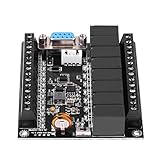
- FX1N-20mr
- Wide Power Supply Voltage: 10-28VDC
- Size: Approx. 86 x 73 x 20mm / 3.4 x 2.9 x 0.7inch
- This module is programmable control, can achieve thousands of functions, stable and reliable working performance, built-in watchdog timer circuit, to ensure that the module for a long .
- EASY TO USE: Programmable logic controller is reusable, The PLC baud rate is 9600.
- Read inputs: The PLC checks signals from connected devices, such as a pushbutton or a sensor.
- Run the program: The CPU evaluates the current input information against the control instructions.
- Update outputs: The controller sends commands to connected equipment, such as a motor starter or valve.
- Handle other tasks: Depending on the controller, it performs or schedules communications, diagnostics, and other housekeeping before continuing.
This is an introductory model, not a guarantee that every PLC samples every signal or schedules tasks identically. A3 notes that scan duration depends on factors such as program length, the number of I/O points, and processor speed; timing is specific to the controller and application. Do not assume a particular scan time without checking the selected model’s documentation. See A3’s PLC overview for more on the scan model.
What are the main parts of a PLC system?
A typical PLC system includes a CPU, input and output modules, a power supply, and a device or software tool for programming. The exact arrangement varies by controller; some systems also support expansion modules and communications hardware.
Rank #2

- Software Simulation for Easy Testing:The RX-03 PLC controller features a software simulation mode, allowing s to test programs without hardware. This innovative functionality helps s visualize program execution, quickly identify issues, and save time and resources during development.
- Versatile Sensor Compatibility:Supports a wide range of sensors and devices, including NPN proximity switches, position switches, and magnetic switches. The controller's outputs can control relays, solenoid valves, and motors, making it adaptable to various industrial automation needs.
- Industrial Automation Application:Ideal for industrial control applications, the RX-03 is widely used in industries like printing, chemicals, plastics, construction materials, furniture, packaging, textiles, food, and metallurgy. Its flexibility ensures seamless integration into production processes for efficient control.
- Multi-Platform Programming Support:Compatible with Windows 7 and Windows 10 systems for easy programming and testing. Programs can be downloaded via USB cable, and additional accessories like OTG adapters (for Android devices) can be purchased separately. Apple devices are not supported.
- Reliable Power Design:Powered by a 12-24V DC stabilized power supply, the RX-03 ensures stable and safe operation. Its power design includes electrical isolation protection, reducing the risk of faults and ensuring long-term reliability in demanding industrial environments.
- CPU: Executes the control program and coordinates controller operations.
- Input modules: Receive signals from sensors and switches. Depending on the module, these signals may be digital or analog.
- Output modules: Send control signals to equipment. Output type and electrical ratings must match the connected device.
- Power supply: Provides power to the controller system.
- Programming device: Used to create, load, monitor, or troubleshoot the control program.
What devices can a PLC control?
Inputs tell the PLC about a machine or process; outputs let it act on that information. Common inputs include pushbuttons, limit switches, photoelectric or proximity sensors, encoders, and pressure, level, temperature, or float switches. Outputs can command valves, motor starters, solenoids, actuators, pumps, fans, horns, and stack lights. These examples are described in AMCI’s PLC basics guide.
Quick wins for a faster PC:
Scan for outdated or missing drivers - takes under a minuteDriver Scan →Repair Windows errors before they cause bigger problemsFix Now →Fix the driver behind crashes, sound loss and screen glitchesFind Drivers →Compatibility is essential: check the selected modules’ voltage, current, signal range, isolation, and suitability for the application against the manufacturer’s documentation. A module that cannot safely or correctly handle a device’s signal is not interchangeable just because it fits the same general role.
Rank #3
Where are PLCs used?
PLCs are used in machine control and industrial automation, including manufacturing and process applications. Examples include material handling, robotic assembly lines, water treatment, and traffic signals. NIST also notes their use in SCADA and DCS contexts. These are examples rather than a claim that every industrial process uses a PLC; the controller architecture depends on the scale and requirements of the system.
Which programming methods are commonly used?
PLC programs are commonly written using methods such as Ladder Diagram (LD), Function Block Diagram (FBD), Structured Text (ST), and Sequential Function Chart (SFC). In broad terms, Ladder Diagram resembles relay schematics, Function Block Diagram represents functions and connections, Structured Text uses a textual programming style, and Sequential Function Chart organizes a process into steps and transitions.
Some PLC material also lists Instruction List (IL), but the exact language set associated with IEC 61131-3 depends on the edition being discussed. Do not treat older lists as proof of the current standard’s language count; verify the official edition if you need a standards-specific answer.
What should you consider when choosing a PLC?
Start with the machine or process requirements rather than a controller brand or a headline specification. Compare the needs of the application against the controller and its compatible modules.
Quick Recap
Best Value
- I/O: Determine the number and type of digital, analog, and specialty signals, and confirm their electrical compatibility.
- Control and timing: Match the processing capacity and task timing to the process requirements. Consult the specific controller documentation rather than relying on generic scan-time claims.
- Installation environment: Check that the controller is suitable for the expected temperature, dust, moisture, and mounting conditions.
- Expansion and communications: Consider future I/O, required network connections, and compatibility with the programming and monitoring tools already in use.
- System architecture: Decide whether the application calls for a PLC, an industrial PC, or a larger distributed arrangement. There is no universal best choice; the appropriate system depends on the task.
PLC at a glance
| Question | Answer |
|---|---|
| What is it? | An industrial controller with user-programmable memory that processes inputs and controls outputs. |
| What does it control? | Machines and processes through connected devices such as sensors, valves, and motor starters. |
| How does it operate? | Typically by repeatedly reading inputs, executing program logic, updating outputs, and handling other tasks. |
| Where is it used? | Manufacturing, machine automation, process control, and some SCADA or DCS arrangements. |
Product prices and availability are accurate as of the date/time indicated and are subject to change. Any price and availability information displayed on Amazon at the time of purchase will apply.




