Windows Errors? Fix Them Before They Spread
Repair common Windows errors and clear accumulated junk for a smoother, more stable PC - no reinstall needed.Free scan · no reinstallCrashes, No Sound, or Screen Glitches?
Random freezes, missing sound and display glitches usually trace back to one bad driver. Find and replace yours safely.Free scan · under a minuteMoving RAG from a pilot to production is less about choosing a vector database and more about building a reliable data and serving system. You need to manage the full path from authoritative documents through metadata, chunks, embeddings and indexes to permission-aware retrieval, application responses and ongoing evaluation. Agentic systems can add separate needs for conversation state and longer-term memory.
What changes when RAG moves beyond a pilot?
A pilot can make retrieval look like a single operation: put content in an index, search it, and send the results to a model. Production separates that work into an ingestion path and a serving path. Ingestion makes source data searchable; serving retrieves the right authorized material for each request and returns it to the application.
As an Amazon Associate I earn from qualifying purchases.
That distinction affects storage choices. Original files, metadata, embeddings, indexes, request logs and evaluation results may live in different systems. A production design has to account for how each is created, updated, secured and operated—not just where vectors are stored.
How does production RAG move data from a source to an answer?
- Keep authoritative source data. Documents begin in approved enterprise sources or a staging location. Preserve the source and its identity so retrieved material can be traced back to it.
- Extract and describe content. Processing turns source files into usable text and metadata. Metadata can carry attributes needed for filtering and access decisions.
- Chunk and embed. The content is divided into retrieval units, and an embedding model converts those units into vectors. In Google’s AlloyDB reference design, query embeddings must use the same model and parameters as the embeddings created during ingestion.
- Build and maintain searchable indexes. The system stores or indexes the chunks, embeddings and metadata in a managed datastore, a relational database with a vector extension, or a modular search deployment.
- Retrieve for each request. The serving layer embeds or otherwise processes the query, applies relevant filters, retrieves candidate material and passes useful context to the model. Filters should reflect both the request and the caller’s permissions.
- Measure and improve. Logs and evaluation help teams assess response quality and system behavior, then adjust content processing, retrieval and serving.
This flow is visible in Google’s managed Gemini Enterprise/Agent Platform architecture: source files are staged in Cloud Storage, processing produces metadata JSONL in a separate bucket, and a managed datastore parses and chunks content, generates embeddings and maintains a searchable vector index. A backend can construct filters before invoking the RAG flow. The architecture page was last reviewed on November 10, 2025.
#1 Best Overall
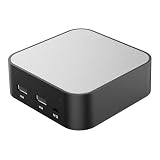
- LOCAL LLM DEPLOYMENT: Powered by RK3566/H618 ARM processor, enabling fully offline private AI computing without relying on cloud services.
- ULTRA-LOW POWER CONSUMPTION: Runs at just 5W, keeping energy usage minimal while staying online 24/7 as a home lab or personal web server.
- WHISPER-QUIET OPERATION: Fanless design operates at an ultra-silent 25dB, making it ideal for home or office environments without disruptive noise.
- PRIVATE DATA STORAGE: Keeps all AI workloads and data stored locally on-device, ensuring complete privacy with no data sent to external servers.
- VERSATILE CONNECTIVITY: Features dual USB ports and a TF card slot, supporting WeChat Claw-Bot integration and self-hosted AI assistant deployments.
Which storage patterns do the documented architectures support?
These are workable reference designs, not a universal ranking. Each places operational responsibility and data in different parts of the stack.
| Pattern | Where data and search live | Documented operational features |
|---|---|---|
| Managed datastore with object-storage staging | Google’s Gemini Enterprise/Agent Platform design stages source files and generated metadata in Cloud Storage; a managed datastore processes content and maintains the searchable vector index. | The backend can construct retrieval filters. The reference design separates ingestion from serving. (Google architecture, reviewed November 10, 2025.) |
| Relational database with a vector extension | Google’s AlloyDB design uploads source files to Cloud Storage, processes and chunks them, creates embeddings, and stores them in AlloyDB for PostgreSQL with pgvector. | Query and source embeddings use the same model and parameters. The design includes serving logs and an evaluation subsystem for factual accuracy and relevance. (Google AlloyDB architecture.) |
| Modular deployment with pluggable vector search | NVIDIA’s blueprint uses S3-compatible object storage, with SeaweedFS as its default, and names Elasticsearch as the default vector database and Milvus as an optional backend. | The blueprint includes hybrid dense and sparse retrieval, metadata filters, reranking, authorization, observability and RAGAS evaluation scripts. NVIDIA’s enterprise guide describes a Kubernetes deployment with separate RAG, extraction, embedding, vector database, agent, model and monitoring/tracing components. |
These sources document supported components and designs, but do not establish neutral rankings for cost, speed, retrieval quality or total cost of ownership. The right pattern depends on your existing platform, governance requirements, expected workload and tolerance for operating infrastructure.
Rank #2

- Beginner-Friendly Home NAS and Private Cloud: Install compatible drives, connect the Zero1 Pro, and follow the mobile app's guided steps to register, sign in, and get started. First-time users and families can store phone photos, videos, and household files in one shared home NAS, then use remote access while away from home. Included Yxk storage, remote access, and supported transfer speeds require no monthly subscription, with no subscription-based storage or speed tiers.
- Intel N100 Performance for Home and Office: Powered by an Intel N100 x86 processor and 8GB DDR4 RAM, the Zero1 Pro handles everyday network attached storage for family backups, home-office file sharing, and personal NAS server projects. The Intel N100 has a rated processor base power of 6 W, making it well suited for an always-on home NAS.
- Up to 144TB 4-Bay NAS Storage with RAID: Four SATA 3.0 bays support up to 4 x 32TB HDDs and RAID 0, 1, or 5. Choose RAID 0 for maximum media-library capacity, RAID 1 for mirrored family files, or RAID 5 to balance usable capacity and single-drive fault tolerance for small-office storage. Two M.2 NVMe slots support up to 2 x 8TB SSDs; 144TB is combined raw capacity before formatting and RAID; drives sold separately.
- Dual 2.5GbE Home Media Server with 4K HDMI: Two 2.5GbE ports support link aggregation with compatible network equipment, helping multiple household members access shared files, videos, and a home media library. Connect the 4K HDMI output to a compatible TV or monitor for a home theater setup; playback quality depends on the media format, software, and network.
- AI Photo Album for Family Memories: The photo tools recognize faces, scenes, and objects to organize vacation photos, children's milestones, and everyday snapshots into smart albums. Search by keyword to locate an image, then review duplicate or similar photos and remove them with one click to reclaim space in your NAS photo library.
What does agentic AI add to the storage design?
Enterprise knowledge retrieval is only one kind of data an agent may use. AWS’s enterprise agent architecture describes agents accessing knowledge sources while storing conversations and insights in short- and long-term memory. It identifies vector stores and graph storage as possible knowledge-base mechanisms and includes role-based access control.
Quick wins for a faster PC:
Repair Windows errors before they cause bigger problemsFix Now →Scan for outdated or missing drivers - takes under a minuteDriver Scan →Keep these responsibilities distinct in the design:
Rank #3

- Choose the Right Impact Threshold – Available in 5G, 10G, 15G, and 25G sensitivities to match your equipment, packaging, and shipping environment. Select the appropriate impact threshold for servers, networking equipment, storage systems, UPS equipment, and other mission-critical assets.
- Instantly identify potentially damaging impacts during moving, shipping, storage, or delivery. Each indicator permanently changes color when exposed to impacts exceeding its calibrated threshold.
- Designed for Critical IT Equipment – Ideal for rack servers, blade servers, AI infrastructure, GPU servers, storage arrays, routers, switches, firewalls, telecommunications equipment, and edge computing hardware.
- Improve Receiving Inspections & Accountability – Visible impact indicators encourage careful handling, support receiving inspections, and provide documentation that may assist with freight damage investigations.
- Apply directly to cartons, crates, storage containers, cases, or shipping boxes. The bright indicator provides a visible reminder that the package is being monitored for excessive impact.
- Knowledge retrieval: Search approved enterprise information and return source-grounded context.
- Conversation state: Retain the context needed to continue an interaction.
- Longer-term memory: Store selected insights that may be useful across interactions, subject to application policy.
- Tool context: Provide agents with the information and permissions needed to invoke tools safely.
The AWS architecture does not prescribe a particular memory database, retention interval or memory policy. Those are application and governance decisions; define what an agent may retain, for how long, and who can access it before choosing a storage mechanism.
Independent reader supportYour contribution helps us test, update, and keep practical guides available for everyone.How should access control, provenance and quality work?
Semantic relevance is not authorization. A highly similar passage must not be returned merely because it matches the question: retrieval needs to respect the caller’s permissions and the source’s governance rules. AWS Prescriptive Guidance identifies data exfiltration, poisoned data sources, unauthorized access, sensitive output disclosure and missing provenance as RAG risks. It recommends layered controls that include metadata filtering, access control and redaction.
Rank #4

- ATX MID TOWER DESIGN: Spacious mid tower layout accommodates ATX motherboards and supports BTF motherboard compatibility.
- MASSIVE STORAGE CAPACITY: Supports up to 11 x 3.5" HDDs, making it ideal for DIY NAS builds, media servers, or small business use.
- SUPERIOR AIRFLOW: Mesh panel front and 4 x 140mm PWM fans provide excellent cooling performance and airflow throughout the case.
- MODERN CONNECTIVITY: Features a USB 3.2 Type-C front panel port for fast and convenient device connections.
- SLEEK BLACK FINISH: Clean, all-black exterior design offers a professional look suitable for home, office, or server environments.
- Filter before content reaches the model. Apply caller-aware permissions and relevant metadata filters in the retrieval path, rather than treating similarity as an access decision.
- Preserve provenance and freshness. Retain source identity and enough information to trace retrieved content, and establish how changed or withdrawn source material updates the searchable representation.
- Protect inputs and outputs. Consider poisoned source content and sensitive disclosures in generated responses; use redaction and other controls appropriate to the data.
- Observe and evaluate the system. Track serving behavior and evaluate response factual accuracy and relevance. Google’s AlloyDB design includes logs and an evaluation subsystem; NVIDIA’s blueprint includes observability and RAGAS evaluation scripts.
Separating enterprise data from model parameters does not make a RAG system automatically safe. The retrieval, application and data layers still need explicit security and governance controls.
Do these 3 things before closing this tab:
1Clear out junk files and repair common Windows errors2Scan for outdated or missing drivers - takes under a minute3Repair Windows errors before they cause bigger problemsHow should you size the stack?
Size each workload component from its own requirements; embedding count alone is not enough to estimate storage or capacity. NVIDIA’s Enterprise RAG Deployment Guide gives a configuration example of one million embeddings at 2048 dimensions in FP32, with a MinIO object store using 500 GB of disk and separate data/index and query nodes. Those are figures from that guide’s deployment setup, not a general storage-per-million-vectors rule.
Before selecting capacity or deployment topology, estimate:
- Source corpus size, formats, growth and update frequency.
- Embedding dimensions and model versions, including the effects of re-embedding when a model or configuration changes.
- Metadata volume, index method, replica policy and retention requirements.
- Ingestion and update rates, concurrent retrieval requests and latency targets.
- Logging and evaluation data volume, retention and access requirements.
- Operational needs such as separate scaling of ingestion, query and supporting components.
NVIDIA’s guide says components may need separate deployment and fine-tuning to scale in large clusters, and treats sizing as dependent on workload and use case. The reviewed vendor architectures do not provide cross-vendor benchmark results for these variables, so capacity and performance should be validated against your own workload rather than inferred from one vendor’s example.
Quick Recap
How do you choose a production pattern?
- Start with governance. Identify data residency, authorization, provenance, retention and redaction requirements.
- Map the data lifecycle. Decide where source files, generated metadata, chunks, embeddings, indexes, logs and evaluation outputs belong, and how updates propagate.
- Match operations to your team. Compare a managed datastore with a relational vector extension or a modular deployment based on what your organization can operate and integrate.
- Validate workload assumptions. Measure ingestion and retrieval behavior using representative content, permissions, concurrency and latency targets.
- Plan agent memory separately. Define conversation and longer-term memory policies independently from enterprise knowledge indexing.
Product prices and availability are accurate as of the date/time indicated and are subject to change. Any price and availability information displayed on Amazon at the time of purchase will apply.




