What’s actually slowing this PC down?
Pick the symptom - the matching free tool is one click away.
Precision machining lets cooling designers specify copper or aluminum heatsinks and liquid cold plates with custom shapes, channels, and carefully finished contact faces. That flexibility can solve design and fit requirements, but machining alone does not establish lower CPU temperatures, quieter operation, or longer life. Those outcomes depend on the complete cooler and system: geometry, thermal interface, airflow or coolant flow, assembly, and operating conditions.
Where precision machining matters in PC cooling
A heatsink or cold plate has to move heat from a component into air or circulating liquid. Machining gives a designer control over the part’s shape and dimensions, including features that may be difficult to produce with other methods. Ginwate describes CNC machining as useful when a design needs fin geometry or contact-base flatness beyond what extrusion can provide. That is a manufacturing capability statement, not proof that a machined part will outperform an extruded one in a given PC.
As an Amazon Associate I earn from qualifying purchases.
For a cooling designer, the useful question is not simply “Was it machined?” but whether the resulting geometry and finished surfaces suit the component, interface, and cooling system. A well-made contact face can help meet a design’s interface requirements, while custom fin or channel geometry can make a particular layout possible. The effect on temperatures still depends on the whole assembly.
Do these 3 things before closing this tab:
1Clear out junk files and repair common Windows errors2Scan for outdated or missing drivers - takes under a minute3Repair Windows errors before they cause bigger problemsHow a liquid cold plate moves heat
A cold plate is a heat exchanger mounted to a heat-generating component. Heat passes from the component through the plate into coolant circulating through it. Its performance and reliability depend on more than the plate’s manufacturing process: channel layout, material, joints or other joining methods, sealing, coolant compatibility, and validation all matter.
#1 Best Overall
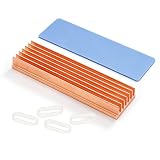
- 【M.2 2280 Nvme SSD Heatsinks 】Copper Fin Heat sink kit— The heat sink is specially designed for M.2 2280mm SSD, which is very suitable for desktop computers/Playstation 5, etc. Such as for Samsung 850 EVO, 860 EVO, 960 EVO, 970 EVO, 990 EVO, 950 PRO, 960 PRO, 970 PRO, etc
- 【Size】:70x20x8 mm/2.75x 0.78x 0.32 Inch (L*W*H):Weight: 1.6 ounces
- 【10-30°C Cooling Effect】- Designed for the desktop PC,Base board thickness:2 mm,Rated cooling power 5W-10W ,And M.2 power is generally 5W , So it with 10-30°C cooling effect (Varies depending on the environments)
- 【Materials and Workmanship】-100% Red copper ,CNC fine workmanship, Surface oxidation treatment ,Thermal conductivity 397 W/m.K
- 【Package】: copper m.2 Heatsink x1; Rubber Band x2; Thermal Silicone Pad x1. Only applicable to desk computer, for kinds of M.2 SSD. Minimum installation height requirement: 12mm.
Eaton lists CNC machining alongside other cold-plate manufacturing options, including friction-stir welding, stamping, and brazing. It also describes machined, stamped, round-tube, and flat-tube designs, with aluminum, copper, and stainless steel among the material options. These are design and manufacturing alternatives, not evidence that one process or material is universally best.
Copper and aluminum are design tradeoffs, not a universal ranking
Ginwate describes copper as an option for designs prioritizing conductivity, with greater mass and cost, while aluminum is lighter and less expensive to machine. Those are material-level tradeoffs, not a ranking of complete coolers. Base thickness, fin or channel geometry, interface quality, airflow or coolant flow, and the rest of the assembly also shape results.
Rank #2

- ✅ High-Purity Copper: 99.9% pure copper for ultra-fast heat dissipation, keeping your Pi 5 cool even during 4K/60Hz workloads.
- ✅ Precisely Fitted Design: Laser-cut to perfectly match Pi 5's CPU, RAM, and USB-C ports—no cutting or adjustments needed.
- ✅ Strong Thermal Adhesive: Includes premium heat-conductive glue (15W/m·K) for instant bonding and long-lasting hold.
- ✅ Size: 17x17x5mm, 15x10x5mm, 13x12x5mm, 6x6x5mm, 5x5x5mm
- ✅ NOTE: Raspberry Pi 5 Board is NOT Included!
For liquid cooling, compatibility between materials is a reliability issue. Eaton warns that combining copper and aluminum can cause galvanic corrosion, which can reduce system performance and service life. Follow the cooling-system manufacturer’s guidance on materials and coolant rather than mixing metals casually.
What machining does—and does not—tell you about temperatures
Intel explains that a CPU converts electrical energy into heat during operation. A cooler must transfer that heat away while the system operates within its thermal and design limits. Intel says the maximum junction temperature varies by processor; its general guidance puts Tjunction maximum for Intel processors usually between 100°C and 110°C, but directs users to the specific processor’s product specifications. That range is broad guidance, not a limit to assume for every CPU.
Rank #3

- The heatsinks are made of high-quality pure copper, sturdy and durable, with strong thermal conductivity and heat dissipation.
- Perfectly compatible with Raspberry Pi 5 and Raspberry Pi 4 Model B 1GB 2GB 4GB 8GB.
- These cooling heatsinks for Raspberry Pi can be conveniently installed, with thermal conductive adhesive tape, simply peel off it and attach it to the required device.
- The heatsink fins offer a solution to down the component's temperatures. This type of heatsink is suitable for chip, IC chipset cooling, etc.
- Unlike cooling fans, these heatsinks operate silently, ensuring a noise-free computing experience.
As a processor approaches its temperature limit, thermal controls can reduce power and frequency. When assessing cooling, check the exact CPU specification and consider the workload, case airflow, cooler fit, coolant loop where applicable, and other system constraints. A manufacturing label or material choice cannot substitute for those checks.
What a retail cold-plate example can show
CORSAIR describes its Hydro X Series XC7 RGB PRO as a CPU water block with a precision-machined, nickel-plated copper cold plate and more than 110 micro-cooling fins. The product page lists compatibility with Intel LGA 1700 and 1200, and AMD AM5 and AM4. Those details illustrate one commercial implementation of a copper cold plate; they do not make it a universal recommendation or establish a general benefit from CNC machining.
Rank #4

- Compatible with Raspberry Pi 5 and Raspberry Pi 4 Model B.
- Pure Copper Material; with Thermal Conductive Adhesive Tape; with Strong Thermal Conductivity and Heat Dissipation.
- Please tear off the thermal tape before sticking it.
- NOTE: Raspberry Pi 5 Board is NOT Included!
CORSAIR also claims the XC7 RGB PRO is up to 4°C lower than the previous-generation XC7 RGB. That is a manufacturer comparison claim, and the product page’s test conditions have not been independently reviewed here; it should not be read as an expected temperature reduction for other blocks or as proof of machining’s effect. Check the current product page for socket support and loop requirements before choosing a block.
The Tool Desk
Outbyte Driver Updater FREEScan for outdated or missing drivers - takes under a minuteDriver Scan →Outbyte PC Repair FREEClear out junk files and repair common Windows errorsFree Scan →What about an aluminum chassis?
An aluminum chassis is part of the system’s structural and airflow-enclosure design. Whether a particular case helps cooling depends on its layout and the complete system, including airflow paths and installed components. The available product-specific evidence here does not establish that machining a chassis improves thermal performance, so a machined aluminum case should not be assumed to cool better merely because it is machined.
A practical way to evaluate a machined cooling part
- Start with the component. Identify the exact CPU or other heat source, its specifications, and the workload you need to support.
- Check the fit and interface. Confirm socket or device compatibility, mounting requirements, contact-face needs, and available space.
- Match the geometry to the cooling method. For an air cooler, consider fin layout and airflow. For a liquid plate, consider channel design, sealing, joining, coolant flow, and material compatibility.
- Evaluate the complete system. Account for airflow or coolant circulation, assembly, thermal interface, noise goals, and operating conditions rather than treating the manufacturing process as a performance guarantee.
- Use manufacturer guidance for compatibility. For liquid loops in particular, verify material and coolant recommendations and avoid unapproved combinations.
Intel’s CPU cooling guidance discusses the tradeoffs between liquid and air cooling, while emphasizing that cooling needs depend on the processor and system. No controlled, independent comparison cited here establishes a general temperature advantage for CNC-machined parts over extruded or otherwise manufactured PC cooling components.
Quick Recap
Product prices and availability are accurate as of the date/time indicated and are subject to change. Any price and availability information displayed on Amazon at the time of purchase will apply.




