For a reproducible digital ASIC experiment, start with OpenROAD-flow-scripts (ORFS): Yosys handles logic synthesis, and OpenROAD carries the design through physical implementation. Add AI to a bounded task—such as proposing an RTL change, finding a documented command, or suggesting a flow setting—and let simulation and the EDA reports, not the AI’s confidence, determine whether it helped.
Which open-source tools cover synthesis and place and route?
These projects cover different parts of the design process; they are not interchangeable. OpenROAD is the physical-design engine, while ORFS supplies a reference RTL-to-GDSII flow built around it. Yosys is the synthesis tool in that flow. The flow still needs a design, constraints, platform files and a compatible process design kit (PDK).


| Tool or flow | Role in an experiment | Best fit |
|---|---|---|
| OpenROAD | Physical-design engine with Tcl and Python control and a GUI. It is an extensible foundation, not an AI chip designer by itself. | Controlling or extending physical-design work. |
| OpenROAD-flow-scripts (ORFS) | Reference flow spanning Yosys synthesis, floorplanning, placement, clock-tree synthesis, routing, finishing, GDS generation and DRC/LVS checks. Tcl and Python APIs allow manual intervention. | A reproducible digital RTL-to-GDSII experiment. |
| Yosys | Logic synthesis: transforms RTL into a gate-level netlist. It does not perform physical place and route. | Inspecting or experimenting with the synthesis stage. |
| OpenLane | Automated RTL-to-GDSII flow combining OpenROAD, Yosys, Magic, Netgen, KLayout and other components. | Reproducing existing OpenLane projects or documented shuttle flows. Its repository says the original flow is in maintenance mode and recommends LibreLane for new designs. |
| LibreLane | Named by the OpenLane repository as its successor. | New work based on that flow family; check LibreLane’s own current documentation for release, installation and PDK details. |
| Google XLS | High-level synthesis toolchain for producing synthesizable designs from higher-level descriptions. | Experiments that begin above RTL; it does not replace physical design. |
| Bazel Rules HDL | Build rules for Verilog, VHDL, Chisel, nMigen and related HDLs using open tools including Yosys, Verilator and OpenROAD. | Reproducible builds across hardware-description languages, rather than implementation on its own. |
Google’s Silicon project overview describes XLS and Bazel Rules HDL. Choose tools by flow scope: synthesis-only, physical-design engine, or an integrated flow. For a new project in the OpenLane family, follow the successor guidance rather than treating the original OpenLane as the default.
Where can AI help—and what should remain under tool control?
AI can contribute at several distinct points without replacing the EDA flow: drafting or revising RTL, retrieving tool documentation, proposing a configuration or optimization change, or exploring design choices against measured objectives. OpenROAD describes Python APIs, strategic design-space exploration, ML-friendly formats such as CircuitOps, reinforcement learning in the EDA loop and LLM-guided multi-objective optimization as areas its infrastructure can support. These are capabilities and directions, not a guarantee that an LLM will produce correct RTL or improve a given chip. OpenROAD’s project page presents that positioning.
What’s actually slowing this PC down?
Pick the symptom - the matching free tool is one click away.
#1 Best Overall
Two research examples, with different jobs
- MCP4EDA, a 2025 preprint, describes an MCP server through which LLMs can orchestrate Yosys synthesis, Icarus Verilog simulation, OpenLane place and route, GTKWave analysis and KLayout visualization. Its authors report 15–30% timing-closure improvement and 10–20% area reduction versus default synthesis flows for their experimental evaluation on representative digital designs. Those figures describe the paper’s tested designs and methodology, not an expected improvement for other designs, tools or models.
- ORAssistant, a 2024 preprint, describes a retrieval-augmented conversational assistant over OpenROAD and related tool documentation. Its focus is helping users with setup, commands, flow configuration and execution—not demonstrating autonomous delivery of signoff-ready silicon.
The distinction matters: a documentation assistant can help a user operate tools, while a flow-orchestration system can invoke them. Neither makes ordinary simulation, synthesis and physical-design checks optional.
How to run a useful AI-assisted experiment
Keep the AI’s contribution narrow enough to evaluate. A changed RTL fragment or flow setting should be tested against the same design objective and baseline, rather than judged by how plausible the proposed explanation sounds.
Rank #2
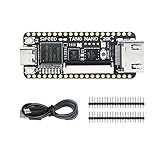
- Package: Tang Nano 20K*1 + Pin Headers*2 + Type-C Cabble*1
- Define the design and objective. Choose a small digital design and state what you want to improve or learn. Decide which correctness and physical metrics will count before asking for a change.
- Establish a baseline. Run the design through simulation and the ordinary flow. Save the inputs and reports so later results have a real comparison point.
- Ask for one bounded proposal. Have the AI suggest a specific RTL edit, documentation answer or configuration change. Keep the change identifiable instead of accepting a broad rewrite that is hard to diagnose.
- Run the tools and check correctness. Simulate the changed design and run the relevant synthesis and physical-design stages. Treat tool failures and changed behavior as results to investigate, not as evidence that the AI’s explanation was correct.
- Compare and preserve the experiment. Compare the reports against the baseline and retain the scripts, constraints, tool versions, PDK/platform details and AI-generated change. Without those inputs, a reported improvement is difficult to reproduce.
This experimental loop is grounded in the stages exposed by ORFS and the tool orchestration described by MCP4EDA; it is a practical evaluation method, not a claim that every project or AI integration has been tested with it.
Independent reader supportYour contribution helps us test, update, and keep practical guides available for everyone.Can OpenROAD use an open PDK?
The OpenROAD repository describes the application as PDK-independent, but says validation is through flow controllers and specific PDKs. Its listed ORFS platform options distinguish public open PDKs from predictive research platforms and proprietary configurations. The list below reflects repository statements accessed on 2026-10-04; platform availability and project support can change.
| Platform listed by OpenROAD | Repository description | Qualification |
|---|---|---|
| SKY130 | 130 nm | Open PDK option listed for ORFS; OpenLane also lists support. |
| GF180 | 180 nm | Open PDK option listed for ORFS; OpenLane also lists support. |
| Nangate45 | 45 nm | Listed as an ORFS open platform option. |
| ASAP7 | 7 nm | Listed as a predictive platform, not a foundry production PDK. |
| GF12, Intel22, Intel16, TSMC65 and other proprietary configurations | Proprietary platforms | The repository says platform files and kits cannot be provided because of NDA restrictions. |
Tool support for a platform does not mean a reader can obtain its process kit. Before choosing a flow, check that the PDK and platform files you can actually access are compatible with the project and intended experiment. See the OpenROAD repository and the OpenLane repository for their respective platform statements.
What should you check before installing?
Prefer current project documentation over copying old setup advice. The OpenROAD repository identifies Bazel as its supported build system and says CMake is deprecated. The OpenLane repository’s quick-install section includes older environment guidance such as Ubuntu 20.04 and Python 3.6+; do not treat those figures as current requirements without checking the linked installation documentation. The repository’s maintenance notice also points new designs toward LibreLane, whose current release and compatibility details should be verified in its own documentation.
What do project adoption figures establish?
OpenROAD’s project pages report substantial use, but the counts describe different measures and are not dated on the cited pages. The homepage reports “1000+ runs and completed chip designs” across technology nodes from 180 nm down to 12 nm, and “500+ peer-reviewed research publications and conference papers” referencing or using OpenROAD; it does not state a year for those counts. Separately, the repository reports “over 600 silicon-ready tapeouts” or “over 600 tapeouts” in SKY130 and GF180 through Google-sponsored Efabless MPW and ChipIgnite programs, also without a stated year. These are project-reported impact figures, not a guarantee of a particular design’s outcome.
Further learning
For a structured introduction, the DTU text Introduction to Chip Design Using Open-Source Tools is a relevant learning reference. Its availability as a PDF does not establish whether a print edition is currently sold by any retailer.
Free tools Windows power users keep installed
One-click scans. No signup required.
Quick Recap
Product prices and availability are accurate as of the date/time indicated and are subject to change. Any price and availability information displayed on Amazon at the time of purchase will apply.




