Free tools Windows power users keep installed
One-click scans. No signup required.
To connect a Nintendo 64 to a smart TV, use the console’s Stereo AV cable if your TV has compatible composite AV inputs. If the TV has HDMI but no analog AV input, connect the N64 to a composite-to-HDMI scaler, then connect the scaler to the TV. Check the ports on your exact TV model first: being a smart TV does not guarantee it has AV jacks.
Check which inputs your TV has
Look on the back or side of the TV for composite AV inputs, usually labeled for video and audio. If the labels are unclear, check the manual for your exact TV model. Some TVs accept analog video through a special AV adapter input, so confirm which adapter and connection the manufacturer specifies.
As an Amazon Associate I earn from qualifying purchases.
Nintendo notes that image retention precautions vary by TV and recommends checking the TV manual or contacting the manufacturer before connecting a game system. Nintendo Support’s TV image-retention guidance explains that precaution.
Connect the N64 directly if the TV supports composite AV
- Turn off the TV and Nintendo 64.
- Connect the N64 Stereo Audio/Video cable to the console.
- Match the cable’s video and audio plugs to the corresponding labeled inputs on the TV, following the TV’s instructions if it uses an AV adapter.
- Turn on the console and TV, then select the TV’s AV input.
The original hookup uses the N64 Stereo Audio/Video cable, as shown in this N64 manual excerpt.
#1 Best Overall

- 【Clear and Smooth Picture Quality】For legacy systems to run on newer tvs,better gaming experience.
- 【HDMI Cable Included】N64/ Game Cube/SNES to HDMI converter,Support 16:9 Convert on HDTV.
- 【Easy to Use】Plug and play with HDMI adapter,no screen lag.No additional power supply required.
- 【Note】No sound or blue screen appears, please check if the connection is successful.
- 【Customer Service】Support 30 days return and refund,1 year replacement.If you encounter any problems after placing an order, you can contact us, and we will solve it for you as soon as possible.
Use a scaler if the TV has HDMI but no AV input
A scaler converts the N64’s analog video and audio connection into an HDMI output the TV can accept. It is an extra device between the console and TV; it does not turn the N64 into a console with native HDMI.
- Choose a scaler that accepts composite video and stereo audio and outputs HDMI. Check its power requirements and current compatibility instructions.
- Connect the N64’s Stereo AV cable to the scaler’s composite video and audio inputs.
- Connect the scaler’s HDMI output to an HDMI input on the TV.
- Power the scaler as its manufacturer instructs, then turn on the N64 and TV.
- Select the HDMI input used by the scaler.
RetroTINK describes the 2X MINI as a retro-console option with composite or S-Video input and HDMI output, including use with N64. That is a manufacturer-documented example, not a guarantee that every TV and console combination will work.
Rank #2
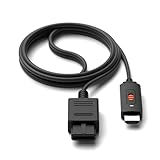
- ※Convert N64 Video signal to HDMI signal, make it easy to connect the Game console to TV.
- ※Plug and play with HDMI adapter,no screen lag.No additional power supply required.
- ※N64 HDMI Adapter Support 16:9/ 4:3 Switchover.
- ※N64 to HDMI Adapter Provide advanced signal processing with great precision, colors, resolutions and details.
- ※Note: N64/ Game Cube/SNES to HDMI converter,Support 16:9 Convert on HDTV.
Consider S-Video only after checking compatibility
S-Video is an optional input path, not a requirement for connecting the N64. The console, cable, and scaler must all support it. RetroTINK’s 2X Pro guidance says its N64 S-Video cable option is for NTSC consoles; PAL consoles need a compatible special cable and S-Video-capable output. The 2X MINI guidance separately describes support for PAL N64 consoles that support S-Video. Check your console’s region and model, the exact cable, and the selected scaler’s current instructions before choosing this route.
The Tool Desk
Outbyte PC Repair FREERepair Windows errors before they cause bigger problemsFix Now →Outbyte Driver Updater FREEScan for outdated or missing drivers - takes under a minuteDriver Scan →Troubleshoot a blank screen or missing audio
- No picture: Confirm the TV is set to the AV or HDMI input you actually used. Check that the scaler is powered and that each plug is fully seated.
- No sound: Check the audio connections at both ends and make sure the TV is on the matching source.
- Still not working: Confirm that the console and AV cable work and that the console, cable, and scaler support the chosen connection. RetroTINK’s product guidance recommends checking that the console and AV cable are in working order; it does not guarantee compatibility with every setup.
Choose the connection that matches your setup
| Connection | When it fits | What to check |
|---|---|---|
| Direct composite AV | The TV has compatible composite AV inputs. | Use the correct AV input and follow any TV-specific adapter instructions. |
| Composite-to-HDMI scaler | The TV lacks analog AV input but has HDMI. | Confirm composite input, stereo audio handling, HDMI output, power needs, and compatibility guidance. |
| S-Video to scaler | The console, cable, and scaler all support S-Video. | Verify console region/model and exact cable compatibility, especially for PAL systems. |
These are connection options, not a universal picture-quality ranking. The available manufacturer guidance does not establish how every combination of N64, scaler, and TV will look.
Quick Recap
Rank #4

- Composite to HDMI Converter: Converts analog AV composite (Yellow, White, Red) input to HDMI 720P/1080P (60HZ) output, displayed on smart TV, Projector or HD Display, which bring back your old and cherish memories.
- Plug to Play: This HDMI Converter no extra drivers need, just plug and play,easy to use. Please hook up the USB Power Cable (included) to 5V power source during use. Note: The Video Converters only support converts AV to HDMI, can't converts HDMI to AV.
- Widely Used: This composite to hdmi adapter is widely applied to PS1, PS2, PS3, Xbox, N64, Wii, STB, VHS, VCR, DVD Players and other devices with standard composite AV input. Note: It can only be used when PS2 is set to RGB output.
- Wide Compatibility: This Video Audio Converter Adapter supports source formats of PAL, NTSC3.58, NTSC4.43, SECAM, PAL/M, PAL/N standard TV. Provide advanced signal processing with great precision, colors, resolutions, and details. Important Note: This converter can't improve video quality!
- Attention & Package: Please ensure to connect this av hdmi converter to power source to make it work. Package include: 1*AV to HDMI Adaptor, 1*USB Power Cable(adapter not included), 1*User Manual.
Rank #3
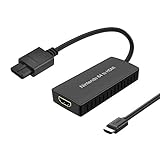
- Convert Nintendo 64/GameCube/ Super NES / SFC signal to HDMI signal, the game console is connected to a new HDMI TV.
- N64 to hdmi do not need to install drivers, portable, flexible, plug and play.
- Nintendo 64 to HDMI Converter Support 4:3 and 16:9 with a toggle switch
- This Best video and audio Signal out of N64 and NGC with this highest quality fully shielded cable.
- If you have any questions, please contact us for your after-sales service.
Product prices and availability are accurate as of the date/time indicated and are subject to change. Any price and availability information displayed on Amazon at the time of purchase will apply.




