Quick wins for a faster PC:
Fix the driver behind crashes, sound loss and screen glitchesFind Drivers →Repair Windows errors before they cause bigger problemsFix Now →To create a music visualization, first decide whether you need a finished, edited video or a visual that responds interactively in real time. Adobe After Effects documents audio-reactive spectrum and waveform effects suited to a composed video workflow; TouchDesigner documents a spectrum-analysis node for input channels, which can support a node-based exploration. Choose a short section of music, decide what sound feature the visual should express, and build a restrained first version before adding complexity.
Decide what the visual should communicate
Listen to the track and pick a small number of audible features to represent. You might respond to overall loudness, sharp transient hits, movement in a selected frequency range, a recurring motif, or a transition. These are creative choices, not technical requirements.
As an Amazon Associate I earn from qualifying purchases.
Start with one clear mapping: for example, make a single visual element respond to a frequency range or to the broader movement of the track. Preview it against quiet and loud passages. If several elements react at once, the result can become difficult to read; add another response only when it contributes something distinct.
Choose a rendered video or a real-time workflow
| Decision | After Effects | TouchDesigner |
|---|---|---|
| Documented audio analysis | Audio Spectrum and Audio Waveform effects. Spectrum offers configurable frequency range, path, bands, and display options; Waveform represents audio samples. (Adobe documentation.) | Audio Spectrum CHOP calculates and displays the frequency spectrum of input channels. (Derivative documentation.) |
| Likely workflow fit | A deliberately composed, edited video with a render and export step. This is an inference from Adobe’s effect and Render Queue documentation, not a performance comparison. | A node-based exploration when live or interactive control is wanted. This is an inference from the documented spectrum node, not a claim that it is universally preferable. |
| Delivery evidence | Adobe documents Render Queue controls for duration, format, codec, destination, and rendering. | The documentation cited here establishes spectrum analysis; a detailed export workflow is not established here. |
| Useful question | Do you want a highly composed finished video, and are you already comfortable working in After Effects? | Do you want a live interactive visual, and are you comfortable with node-based tools? |
The choice is about the deliverable and the workflow you want. The cited documentation does not establish a current licensing or price comparison, or a comparative performance benchmark for the two tools.
#1 Best Overall
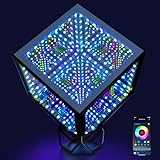
- Novelty Infinity Cube Light: Transform your space with dynamic colored lights and create an immersive sci-fi or cyberpunk vibes. It is an ultimate decorative lighting for streamers, gamers, and themed parties
- Support APP & Manual Remote: Customize multi lighting effects with adjustable color palette, brightness and speed. Featured variety music sync, dynamic lighting, scenes modes and timers, craft own immersive unique cool ambience
- Surprise Music Visualization: The smart RGBW LED desk lamp reacts to music, movie & game beats with dynamic movement for an immersive audio-visual experience. Perfect for gaming, parties, home theaters & music lovers
- Portable Design: 6.2-inch (192 LEDs) & 4.2-inch (120 LEDs). Come with USB port and stand, works with computers and power banks. Easy to light on for travel, camping or picnics
- Widely Scenario & Gift Application: Ideal for bedroom, living room, game room, bar, hotel, KTV, music festival, or party. It is a modern stylish night light, also serves as a unique gift for Christmas, birthdays, and more
Build a first pass in After Effects
- Add the audio to the composition. Put the audio layer in the composition you plan to render.
- Apply an audio effect to a video layer. Use Audio Spectrum for a frequency display or Audio Waveform for a representation of the audio samples.
- Set the spectrum’s source and geometry. Choose the audio layer. Define the display path or its start and end points. A straight path creates a linear display; a mask path can shape it, and a polar path can create a radial graph.
- Set the response range and scale. For Audio Spectrum, choose the frequency range in hertz, the number of frequency bands, and maximum height. These settings determine which part of the sound is represented and how prominent the response can become.
- Shape the appearance. Adjust thickness, softness, color, display style, and duration averaging. The documented display styles are Digital, Analog Lines, and Analog Dots. Audio Waveform can also follow a path.
- Preview and refine. Check quiet sections, loud sections, and transitions. If the display is visually busy, reduce its height or prominence; if its motion is hard to see, adjust the mapping and preview again. Duration averaging is an available control for reducing randomness in displayed frequencies.
These effects read the source footage without time-remapping, effects, stretch, or levels. If changes of that kind need to affect the visualization, Adobe advises precomposing the audio layer and using the precomposition as the source.
Explore audio analysis in TouchDesigner
Derivative’s Audio Spectrum CHOP calculates and displays the frequency spectrum of input channels. For a first exploration, route audio into that node and use its spectrum output to drive a visual element. The documented node also has a mode for converting between signal and spectrum representations.
Rank #2

- Novelty Infinity Cube Light: Transform your space with dynamic colored lights and create an immersive sci-fi or cyberpunk vibes. It is an ultimate decorative lighting for streamers, gamers, and themed parties
- Support APP & Manual Remote: Customize multi lighting effects with adjustable color palette, brightness and speed. Featured variety music sync, dynamic lighting, scenes modes and timers, craft own immersive unique cool ambience
- Surprise Music Visualization: The smart RGBW LED desk lamp reacts to music, movie & game beats with dynamic movement for an immersive audio-visual experience. Perfect for gaming, parties, home theaters & music lovers
- Portable Design: 6.2-inch (192 LEDs) & 4.2-inch (120 LEDs). Come with USB port and stand, works with computers and power banks. Easy to light on for travel, camping or picnics
- Widely Scenario & Gift Application: Ideal for bedroom, living room, game room, bar, hotel, KTV, music festival, or party. It is a modern stylish night light, also serves as a unique gift for Christmas, birthdays, and more
The documentation cited here establishes the node’s role, but not a complete project recipe or current settings for a particular build. Treat the precise node graph and visual mapping as something to develop for your intended setup rather than relying on unverified step-by-step settings.
Prepare the render for its destination
Before exporting a composed video, confirm the composition’s duration, frame dimensions and orientation, intended destination, and whether you need transparency or a high-quality intermediate. Those requirements affect format and codec selection; Adobe’s broadcast-export tutorial is an example, not a universal social-media preset.
Rank #3
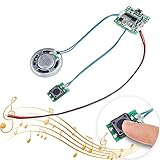
- 【CREATIVE PRESENT】Sound Module is ideal to make a DIY music box, surprise as a birthday present,musical greeting cards, photo frames, album, present box and the other creative presents for Mother's Day, Father's Day and Valentine’s Day,perfect for memorabilia.【Please note: Be sure to download the user manual from Amazon Product guides and documents】
- 【8M MEMORY】When connected to a computer via a micro USB data cable, Sound Module is recognized as a USB drive, just like an MP3 player. With 8MB of internal storage, you can add any MP3 audio files to it.
- 【PUSH BUTTON CONTROL】Installed in your project/present, simply press the button to play the music you input once, and Sound Module will automatically stop when the song is over.
- 【PROGRAMMABLE SOUND MODULE】The programmable sound module provides more possibilities to develop a module that fits your own project perfectly. Different trigger modes (button/TTL) can be selected by connecting different solder pads.
- 【VOLUME CONTROL】The volume is adjustable, and the power supply voltage is 4.5-5V. We recommend using a 3.7V lithium battery (battery not included) with an output power of 0.5-1W. Please connect to a computer with USB 2.0 port (black or white port), otherwise, the module will not be recognized. Connect the red and black wires to the battery to play music
- Set the time span. In the Render Queue workflow, set the work-area or composition duration to the portion you intend to render.
- Choose a format and codec for the receiving workflow. Adobe’s example uses QuickTime and shows options including Apple ProRes 422 and DNxHR/DNxHD. It identifies ProRes 4444 as an example for graphics that need an alpha channel. These are tutorial examples, not the only suitable choices.
- Choose the output destination and render. Confirm the file destination before rendering, then check the resulting file in the context where it will be used.
Platform-specific encoding settings are not established here, so check the current requirements of the platform or production pipeline receiving the file.
Keep the music and visual assets cleared for distribution
Before publishing, confirm that you have the necessary rights to use the music and any visual assets for your intended distribution. The applicable rules depend on the circumstances and jurisdiction. Credit, noncommercial use, or using a short excerpt should not be treated as an automatic guarantee that a use is permitted; consult authoritative local guidance where needed.
Rank #4
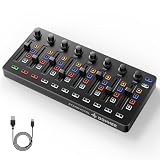
- Wireless Connectivity: Compared with traditional MIDI controllers, Donner STARRYCTRL built-in rechargeable 780mAh high-capacity lithium battery and low-latency wireless technology. A single USB Type-C cable provides fast recharging. The true wireless design keeps your creative workspace cleaner and more flexible
- Smart LED Anti-jump Indicator: This MIDI controller mixer has 8 faders and 8 knobs that are used to control volume and pan. The LED indicator flashes when the fader position does not match the track volume. This indicates that the device supports Soft Takeover or visual alignment, helping prevent sudden value jumps
- Supports Mackie Control Universal (MCU): No need to learn complex software mapping. One-click support for Mackie Control mapping reduces the learning curve. Complete Solo (S), Mute (M), Record (R), and Select button groups
- Fully Customizable: Donner STARRYCTRL MIDI computer recording controller for DAW has 43 assignable keys. Deeply customize CC mapping, Note messages, channel information, aftertouch information, and more through MidiSuite
- Grade Control for Music Creation & Live Performance: Built for professional music producers and semi-pro enthusiasts creating in home studios, outdoors, or on stage. Customizable multi-channel controls and global buttons speed up production and live mixing. DJs tweak filters, delay, and EQ in real time via knobs and pads—wireless mode cuts stage cable clutter. MIDI mapping also triggers visuals, lights, or OBS scenes for synced VJ and multimedia performances
What one small study does—and does not—show
A 2021 study by Max Graf, Harold Chijioke Opara, and Mathieu Barthet evaluated one audio-driven real-time music-visualization system. Its first stage involved 34 participants; the authors reported that the system’s visualizations complemented the music significantly better than a baseline visualization. Nine participants took part in the second stage, where the reported Creativity Support Index was 68.1 and the System Usability Scale index was 58.6.
What’s actually slowing this PC down?
Pick the symptom - the matching free tool is one click away.
Those results describe that system and those study participants. They are not a general measure of audience response, a comparison of After Effects and TouchDesigner, or evidence that any particular visualization will work well for a given track.
Quick Recap
Best Value

- Ultra-Portable Controller: The Donner STARRYPAD MINI measures only 4.53 x 5.71 inches. This ultra-thin touchpad easily fits into your pocket or any bag, capturing your musical inspiration and allowing you to create music anytime, anywhere.
- 16 Responsive Beat Pads: The beat maker has 16 RGB velocity-sensitive pads with polyphonic aftertouch, Note Repeat function and customizable velocity curves. It's ideal for everyday composition, live performances, and studio music production, meeting the needs of music production enthusiasts.
- Powerful Compatibility: The beat maker for music production are currently compatible with Android, iOS, Mac, and windows; The midi Pad drum machine needs DAW software to sound, it doesn't sound alone; The color of the pads can be set like the main picture through software.
- Multiple Connectivity Options for Easy Setup: Wireless MIDI controller, no physical connection required, experience wireless creation, release inspiration anytime, anywhere. Also supports USB-C connection, no complicated settings required, plug and play.
- Focused Creation: Soft backlit silicone pads ensure quiet, comfortable touch. The built-in rechargeable battery guarantees up to 10 hours of battery life and supports charging and connection modes—stay immersed in musical inspiration without distractions.
Product prices and availability are accurate as of the date/time indicated and are subject to change. Any price and availability information displayed on Amazon at the time of purchase will apply.




