The Tool Desk
Outbyte PC Repair FREERepair Windows errors before they cause bigger problemsFix Now →Outbyte Driver Updater FREEFix the driver behind crashes, sound loss and screen glitchesFind Drivers →A Layer 3 switch combines Ethernet switching with IP routing: it forwards frames within a local Layer 2 network and can route packets between different IP subnets, including VLANs. That lets it handle some traffic between network segments without sending every such packet to a separate router.
What a Layer 3 switch does
“Layer 3” refers to the network layer, where IP addresses and routes determine how packets travel between networks. A Layer 3 switch performs that routing as well as the Layer 2 switching used to move Ethernet frames within a local network. Inter-VLAN routing is a common use on a local-area network.
As an Amazon Associate I earn from qualifying purchases.
Cisco describes Layer 3 switching as routing at switching speed. That describes the design goal, not a universal performance guarantee: forwarding capacity and supported features depend on the specific switch model and software.
Do these 3 things before closing this tab:
1Clear out junk files and repair common Windows errors2Scan for outdated or missing drivers - takes under a minute3Repair Windows errors before they cause bigger problemsHow it forwards traffic
Traffic within the same subnet
When a destination is on the same local subnet, the switch forwards the Ethernet frame using MAC addresses. This is ordinary Layer 2 switching.
#1 Best Overall
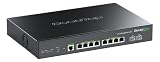
- 【Future-Proof 10G Uplink & 2.5G Ports】 Equipped with 2 x 10G SFP+ slots and 8 x 2.5G RJ45 ports. Seamlessly connect your high-speed NAS, 2.5G servers, and power-hungry devices without bandwidth bottlenecks. Delivering a massive 80Gbps switching capacity, this switch ensures lightning-fast data transfers and ultra-low latency for studios, tech enthusiasts, and power users.
- 【90W PoE++ Next-Gen Power Delivery】 Ports 1-4 support IEEE 802.3bt PoE++ standard, delivering up to 90W per port—perfect for power-heavy devices like Wi-Fi 7/6E Access Points, PTZ cameras, and smart lighting. Ports 5-8 deliver up to 30W per port. With a robust 275W total PoE budget and PoE Watchdog, your network devices remain reliably powered and automatically reboot if they freeze.
- 【Layer 3 Management with Console】 Unlock enterprise-grade control with Static Routing (IPv4/IPv6), OSPF v2, DHCP Server, and VLAN management. Features a physical Console port alongside standard CLI, SSH, and a user-friendly Web UI, giving IT professionals and home lab geeks precise, granular control over network traffic, segmentation, and security.
- 【Rugged Metal Housing & Pro-Cooling】 Built with a premium, full-metal casing that offers superior heat dissipation and structural durability. Featuring an enterprise-grade cooling fan, it provides efficient, continuous active airflow to ensure the switch stays cool and performs at its peak under heavy, full-load operations.
- 【Flexible Installation & Reliable Support】 Supports both desktop and standard 1U rack-mount installation with the included rack-mount ears. Features 4KV lightning protection to safeguard your network investment. Backed by professional technical support, giving you peace of mind for your business or home network.
Traffic to another subnet
When a destination is on a different IP subnet, the packet needs a routing decision. The switch uses routing information, such as the destination network and next hop, to select where to send it. It can then forward the packet between subnets itself, often in hardware. In the case described in Cisco’s documentation, the switch updates the Layer 2 frame fields for the next hop while preserving the packet’s Layer 3 source and destination addresses. Cisco explains the packet-forwarding process.
Layer 2 switch, Layer 3 switch, and router
| Device | Typical role | How it forwards |
|---|---|---|
| Layer 2 switch | Connects devices within a Layer 2 network or VLAN. | Uses MAC addresses to forward Ethernet frames. |
| Layer 3 switch | Switches local Ethernet traffic and routes between IP subnets, often between VLANs. | Uses MAC addresses for local switching and routing information for inter-subnet forwarding. |
| Router | Routes traffic between IP networks. | Uses Layer 3 routing information; some routers also provide switching functions. |
These are overlapping capabilities, not mutually exclusive device types. A Layer 3 switch can route, while a router may also offer switching features. Whether a Layer 3 switch can take the place of a router at a particular network boundary depends on the required functions and the device’s capabilities.
Rank #2

- 𝗙𝗶𝘃𝗲 𝟮.𝟱 𝗚𝗯𝗽𝘀 𝗣𝗼𝗿𝘁𝘀 𝗳𝗼𝗿 𝗦𝘂𝗽𝗲𝗿-𝗙𝗮𝘀𝘁 𝗖𝗼𝗻𝗻𝗲𝗰𝘁𝗶𝗼𝗻𝘀: 5× 2.5-Gigabit ports unlock the highest performance of your Multi-Gig bandwidth and devices, and provide up to 25 Gbps of switching capacity.
- 𝗔𝘂𝘁𝗼-𝗡𝗲𝗴𝗼𝘁𝗶𝗮𝘁𝗶𝗼𝗻: Auto-negotiation intelligently senses the link speeds and adjusts between 3-speeds (100Mb/1G/2.5G) for compatibility and optimal performance for all your devices, including 2.5G WiFi 6 AP, 2.5G NAS, 2.5G PCIe Adapter, 2.5G Server, gaming computer, 4K video, and more.
- 𝗜𝗱𝗲𝗮𝗹 𝗳𝗼𝗿 𝗩𝗮𝗿𝗶𝗼𝘂𝘀 𝗦𝗰𝗲𝗻𝗮𝗿𝗶𝗼𝘀: Built for LAN parties, home entertainment, small and home offices, and instant transfer for workstations.
- 𝗛𝗮𝘀𝘀𝗹𝗲-𝗙𝗿𝗲𝗲 𝗖𝗮𝗯𝗹𝗶𝗻𝗴: Instantly upgrade to 2.5 Gbps without the need to upgrade to Cat6 wiring, reducing wiring costs and hassle. *
- 𝗦𝗶𝗹𝗲𝗻𝘁 𝗢𝗽𝗲𝗿𝗮𝘁𝗶𝗼𝗻: Industry-leading fanless design ensures silent operation, ideal for any home or business.
What “hardware routing” does—and does not—mean
Many Layer 3 switches can forward eligible routed traffic in hardware. This can make them useful for routing between LAN subnets, but it does not mean every packet or feature is handled at the same speed. Cisco’s Catalyst 6500 documentation notes that hardware Layer 3 switching does not replace routing protocols configured on the route processor; traffic that cannot be hardware-switched may instead be routed by that processor. Those details describe a specific product family and software release, so consult the documentation for the exact model and release you are considering.
When a Layer 3 switch is useful
A Layer 3 switch is worth considering when a network needs to route traffic between subnets or VLANs within the LAN. Before choosing one, check:
Rank #3
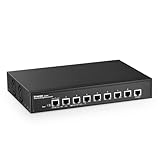
- 10G Ports: The network switch has 8 x 10Gbps ethernet ports, every port support auto-adaptive 10G/5G/2.5G/1000M/100M data rate, supports auto-flip and wire-speed forwarding
- Web/CLI L3 Managed: Support device/port config and query. Layer 3 Route: IPV4/IPV6 Management, IPV4/IPv6 Routes,ARP,Loopback Interface. Layer 2 Switching: such as VLAN, ACL, QoS, Jumbo frame,DHCP,security, multicast, MAC address table, diagnosis, Statistics, MSTP/ RSTP/STPetc. More powerful than unmanaged switch
- Security/Diagnosis Management: AAA/802.1X/MAC-Based authentication, DoS anti-attack, dynamic ARP inspection, DHCP Snooping, IP Source Guard, Port Security, Protected Ports, storm control. Console/ RAM/Flash Logs, Port Mirroring, Ping, Traceroute, Port Tests, UDLD Protocol. Better protection of your equipment and fault localization
- Easy to Maintain:Power and port led indicator light, clearly display the running status and port rate status, support Telnet/SSH/SNMP,Firmware Upgrade,ConfigurationFile Download/Upload, installation and maintenance are very simple
- Widely Used: Metal case, desktop/wall-mounting design, industrial grade fan for good heat dissipation, well-suited for various high performance environments, such as Access, core, and aggregation networks, home HD entertainment, enterprise transport, etc.
- Whether inter-VLAN or other inter-subnet routing is required.
- Which routing features and protocols the exact model supports.
- Port count and media, forwarding capacity, and the switch’s intended place in the network, such as access, distribution, or core.
- Whether its management and security features meet the deployment’s requirements.
Do not assume that every managed switch supports Layer 3 routing, or that every Layer 3 switch supports the same protocols and features. Verify the vendor’s documentation for the model and software release.
Quick Recap
Best Value

- 8 Gigabit Ethernet Ports: Expand your network with 8 high-speed ethernet ports for enhanced connectivity and performance
- Easy Smart Management: Manage and configure your network effortlessly via a web interface or free software
- Support VLAN: Segment traffic with up to 32 VLANs simultaneously out of 4K VLAN IDs for better security
- Network Monitoring: Monitor your network effectively with port mirroring, loop prevention, and cable diagnostics
- IGMP Snooping: Enhances multicast application performance for improved network efficiency
Rank #4

- ULTRA FAST 10G CONNECTIVITY: This 10Gb ethernet switch features 8 ports of 10G SFP+ with 160Gbps capacity. You can handle 4K/8K video editing and massive NAS backups without bottlenecks, transferring your largest files in just seconds for you
- ADVANCED LAYER 3 MANAGEMENT: As a professional 10Gb network switch, it supports VLAN, QoS, LACP, ACL, OSPF, RIP, and BGP. The intuitive Web UI lets you optimize traffic and manage computer networking switches without needing any CLI expertise
- VERSATILE MULTI-GIGABIT SUPPORT: This 2.5GbE ethernet switch is backward compatible with 1G and 2.5G modules. It acts as a flexible 2.5Gb network switch, allowing you to utilize existing hardware while you upgrade to a 10G switch setup easily(Not include SFP+ modules)
- ROBUST NETWORK SECURITY CONTROL: This 10 gigabit ethernet switch features port isolation and ACL to help secure your business or lab environment by reducing broadcast interference and lateral propagation
- ACTIVE COOLING STABILITY SYSTEM: Built with a durable metal case and active fan cooling, this 10G ethernet switch supports 24/7 operation. The thermal design prevents overheating, maintaining a stable internet switch connection for your work
Product prices and availability are accurate as of the date/time indicated and are subject to change. Any price and availability information displayed on Amazon at the time of purchase will apply.




