Quick wins for a faster PC:
Fix the driver behind crashes, sound loss and screen glitchesFind Drivers →Clear out junk files and repair common Windows errorsFree Scan →The KYY X90G turns a laptop into a four-screen workstation by attaching three 15.6-inch displays around it. That can be useful at a temporary desk, but the setup is large, needs enough power, and gives you 1080p panels rather than high-resolution workspaces. It makes the most sense for people who stay put for days at a time—not commuters who want a light travel monitor.
What the KYY X90G is—and what “four screens” means
The X90G is a folding monitor attachment, not a self-contained four-display computer: three panels connect to the laptop, whose built-in screen is the fourth display. One added screen opens on each side, and a third opens above the laptop. The upper panel can swivel to face someone across a table, which may help with presentations. WIRED describes the panels as non-touch LCDs with no audio capability. WIRED’s review
As an Amazon Associate I earn from qualifying purchases.
KYY lists three 15.6-inch IPS panels at 1920 × 1080, 60 Hz, 400 nits, 16.7 million colors and 80% NTSC. Those are manufacturer-listed specifications, not independent lab measurements. The 1080p resolution is the key practical constraint: WIRED’s reviewer found it limiting for dense knowledge work, where more content per panel matters, and felt 1920 × 1200 would be a more useful minimum for that purpose. KYY’s X90G specifications
Recommended Free Tools
How portable is it?
There is a material disagreement about the X90G’s weight. WIRED reports 6.4 pounds; ServeTheHome reports about 1.6 kg, or just over 3.5 pounds. Neither figure should be treated as settled in light of that conflict. Both reviews describe a bulky assembly rather than an easy everyday carry, and WIRED measured an opened span of nearly 46 inches wide by 18 inches tall. ServeTheHome says it packed the device in a carry-on rather than a briefcase. WIRED · ServeTheHome
#1 Best Overall
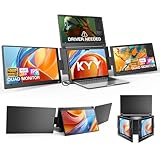
- Quad Monitor for Laptop Productivity - Triple screen laptop extender allows programmers, financial analysts, and sellers to manage manage multiple applications and workflows for code, spreadsheets, and data analysis, charts, dashboards, and communication at once. Wide Compatibility Portable Monitor for modern 12–17.3” laptops running macOS, Windows, Linux(ONLY ubuntu), or Android (driver needed), ideal for cross-platform work professionals.
- Clean, Professional Desk Anywhere - ONE USBC-C cable connect 4Screens, create a full multi-screen workstation at home, in the office, or while traveling, without external monitor stands or complex setups. Supports extended and mirrored display modes, allowing flexible screen layouts for development, financial analysis, or cross-border operations.
- Auto Screen Smart Rotation - TOP screen auto-rotates when folded backward, while adjustable screens up to 360° improve face-to-face viewing across multiple tasks, allowing simultaneous viewing of multiple applications, documents, or data streams—no manual configuration needed.
- Stable Laptop Screen Extender with Alloy Setup - Unlike clip-on designs, the built-in integrated aluminum alloy stand avoids hanging weight on laptop screens, laptop screen stress of screen damage, and improves structural stability while offering a more solid working base. Providing a more secure and reliable alternative to clip-on extenders.
- Eye Comfort Laptop Monitor Extender - Low blue light technology and high 400 nits brightness help reduce eye strain with clear, comfortable viewing multiple tools, dashboards, office, trading environments and documents simultaneously for long sessions of professional work.
That footprint affects where the X90G works: plan on a broad, stable surface, not a small café table or cramped tray. WIRED preferred angling the side screens toward the user instead of leaving them flat, which puts them diagonally across the desk. ServeTheHome cautions that the large panels can make the assembly tip if it is set up carelessly. Each screen has its own controls and on-screen menu, so expect to adjust them individually rather than through one shared control panel.
Does one USB-C cable power all three screens?
Sometimes, depending on the host laptop and brightness—but do not assume it will. KYY advertises one-cable USB-C operation, includes a USB-A adapter, and lists a separate USB-C power port. WIRED reports that its laptop initially seemed to power the screens, but they flickered and failed when brightness was raised; the included adapter resolved the problem. The reviewer reports power draw up to 30 watts. ServeTheHome also found that a single cable did not work reliably in its setup. These are reviewers’ setups, not proof that every laptop will fail or succeed; host power output and brightness matter. KYY product details · WIRED · ServeTheHome
Rank #2

- Triple Screen Productivity Boost: Transform your laptop into a quad-screen workstation with this triple laptop monitor extender. Perfect for programmers, financial analysts, traders, and remote professionals who need multiple windows for coding, spreadsheets, dashboards, meetings, and data analysis at the same time.
- One USB-C Connection for 4 Screens: With just one USB-C cable, you can connect the entire triple monitor setup. Easily expand your workspace anywhere—home office, workspace, or travel—without complex setup or external monitor stands.
- Smart Auto-Rotation Top Display: The top screen automatically rotates when folded backward, providing flexible viewing angles. Adjustable side screens rotate up to 360°, allowing easy screen sharing, multitasking, or face-to-face collaboration.
- Stable Aluminum Alloy Stand Design: Unlike clip-on extenders that stress your laptop screen, this monitor extender features a built-in aluminum alloy stand for improved stability and durability. It protects your laptop while providing a secure and professional workstation setup.
- 15.6'' FHD IPS Display for Eye Comfort: Each 15.6'' 1080P IPS portable monitor delivers sharp text, clear charts, and accurate colors at 60Hz refresh rate. With 400 nits brightness and low blue light technology, it reduces eye strain during long working sessions.
What setup and compatibility should you expect?
KYY advertises compatibility with Windows, macOS, Linux and Android, and says the X90G fits laptops from 12 to 17.3 inches. Operating-system compatibility alone does not establish that it will work with every individual computer. Check the model-specific guidance for your host before relying on it for a trip or presentation.
- Windows: KYY says a driver is required and provides Windows 10/11 instructions and downloads on its Windows X90G support page.
- macOS: KYY provides a driver for the macOS releases listed on its macOS support page. The system may request screen-recording or video-input permission for USB display functionality. ServeTheHome says it used a Silicon Motion utility to connect all three screens to its MacBook.
- Android: KYY’s Android support page says the X90G needs a driver and links a download for Android 8.0 and above.
- Linux: KYY includes Linux in its compatibility claims, but the supplied model-specific support details do not establish setup steps for every Linux distribution or computer.
What reviewers found useful—and what remains unproven
The extra screens can make a remote workstation feel more like a fixed desk, especially when you want separate places for documents, communication and active work. WIRED’s reviewer found the top panel useful for bringing important work closer to eye level and said the added displays became natural after setup. Those are personal impressions, not measured ergonomic outcomes or evidence of quantified productivity gains.
Rank #3

- [ FHD 1080P PORTABLE MONITOR ]: KYY using a 15.6''(8.8"x14.2") advanced IPS screen with 178° wide viewing angle, Delivers 1920*1080 breathtaking viewing quality and HDR technology, KYY portable gaming monitor has excellent color rendering ability, provide you the clearer, smooth, excellent performance in gaming/multimedia. It can effectively reduce blue light radiation damage, no flickering, eye-care, and make it easier to watch for a long time
- [ WIDE COMPATIBILITY ]: KYY portable monitor for laptop equipped with 2 Full Function Type-C ports and Mini-HDMI port, easy access to your favorite devices with 1 cable solution as long as your device support Thunderbolt 3 or 3.1 USB-Type-C, compatible with most laptop, smartphone, PC, PS4, XBOX and more.
- [ ULTRA-SLIM PORTABLE DISPLAY ]: KYY USB C portable monitor features a 0.3inch ultra-slim profile(1.7lb), it is easy to slides into your bag, allows you to carry it everywhere, ideal for a simple on-the-go dual-monitor setup or extend your phone screen for movies or games. No driver needed and equipped with 3.5mm audio inputs and 2 built-in stereo speakers to enhance entertainment experience
- [ DURABLE SMART COVER ]: Comes with a scratch-proof smart cover made of durable PU leather exterior, doubles as a stand, provides comprehensive protection and frameless magnetic design for this portable computer monitor. There are two grooves in the cover base to give at least some choice of viewing angle for your comfort for less cumbersome installation
- [ LIGHTWEIGHT BUT POWERFUL ]: KYY portable external monitor can work in both landscape and portrait mode, can be used as a gaming monitor, screen extender for laptop or phone. It has a unique designed Premium gray metal appearance, 2 built-in speakers to play audio, a friendly menu control wheel for setting, and 24/7 professional support team
The tradeoff is clearest if you travel frequently or need high information density on each display: the bulk and 1080p resolution work against those priorities. For a semi-stationary remote setup with plenty of desk space and accessible power, the three attached panels may be worth the setup. There is no published productivity statistic in the cited reviews to establish how much faster users work.
Independent reader supportYour contribution helps us test, update, and keep practical guides available for everyone.What to compare before choosing an alternative
KYY’s catalog also includes the triple-monitor X90D and X90E, as well as standalone portable displays, including a 4K model. The available information does not provide a reliable, like-for-like comparison of those products with the X90G, so check current specifications rather than assuming a model is lighter or better suited to your laptop. KYY’s product catalog
Quick Recap
Best Value

- [ ONE Cable Get TWO Portable Monitors(Driver Needed)]: Say goodbye to multi-cables connection and messy workbench, KYY Triple Laptop Screen Extender is easy access to your devices with ONLY ONE cable. Make sure your laptop comes with 1 Type-C or 1 USB-A port that support video output to get your laptop extended monitor started quickly and eliminate complicated operation steps. With its own triple screen, you can easily increase the efficiency and share the screen with your colleagues & friends
- [ Larger 15.6" Laptop Screen Extender ] KYY triple monitor for laptop maximized visible viewing experience. With updated Larger 15.6" screen, 16:9 aspect ratio, 0.2" bezel and 0.2" thicknesses with 96% screen-to-body ratio, the X90D triple monitor applicable for 12"-17" laptops, delivere an expansive canvas that invites you to explore, create, and indulge in a world of breathtaking detail (Screen Size: 15.6" diagonal, 13.6" length, 7.7" width)
- [ Space Aluminum Alloy Dual Monitor ] Compare with plastic shell, KYY X90D triple portable monitor designed with robust high-quality CNC aluminum alloy shell, provide stronger and more resilient protection against wear and tear, resisting damage from knocks and drops better, given the triple screen extender an 0.2" ultra-thin sturdy body with build quality, cooling efficiency, visual appeal, and environmental sustainability
- [ Versatile Foldable Portable Screen for Laptop ] With 360° rotatable screens and 1080P FHD IPS screens, this triple portable monitor for laptop allows 178° visual wide viewing angle, you can easily adjust your laptop screen for a perfect multi-screen display experience. The 90° adjustable kickstand ensure a secure and stable viewing experience, and secure and won't wobble during use
- [ Widely Compatible Portable Monitor ]: X90D portable monitor compatible with Windows, macOS and Android systems ( driver needed ). OSD settings allow you to customize parameters for each screen to suit your preferences such as brightness, contrast, color temp, etc. 15.6" Dual portable monitor offers multi-screen synchronization and multi-screen differential display with extended / mirror / portrait / single 2nd screen/ pre mode. The triple monitor is the best choice for tech lovers and frequent laptop users
Rank #4

- [ Quad-Screen Productivity ]: Adds three portable monitor to your laptop, creating a 4-screen workstation. Ideal for programmers, analysts, traders, and remote teams running code, spreadsheets, dashboards, and communications side-by-side. Supports extended and mirrored modes for flexible layouts.
- [ One USB-C Cable ]: One full‑function USB‑C cable transmits video and power to all three laptop screen extender at the same time. Eliminate bulky docking stations and messy tangled cords. Simply plug into your laptop’s USB‑C port, and you get a ready‑to‑use 4‑screen workstation in seconds.
- [ Auto-Rotation + 360° Adjustable Screens ]: Fold the top screen backward and it rotates automatically—no manual settings. Side screens rotate 360° for collaboration, portrait coding, or document reading. The built-in kickstand locks firmly, keeping your triple laptop screen extender stable on any flat surface.
- [ All-Aluminum Stand ]: Unlike clip-on designs that stress your laptop hinge and screen, the X90G triple monitor for laptop features an integrated aluminum alloy stand that supports the entire setup independently. Protects your laptop while providing a rock-solid base.
- [ Wide Compatibility – Works with Your Devices ]: Compatible with macOS, Windows, Linux (Ubuntu), and Android—fits 12"–17" laptops. Please note: driver installation is required for each operating system before first use.
- How many additional panels you need, and whether three attached screens justify the size.
- Panel resolution and size, alongside how much content you need visible at once.
- Weight and folded and open dimensions, confirmed for the exact model.
- Your laptop’s compatibility, driver requirements and available USB-C power.
- Whether the included power adapter suits your setup, and the current total price.
Product prices and availability are accurate as of the date/time indicated and are subject to change. Any price and availability information displayed on Amazon at the time of purchase will apply.
Free tools Windows power users keep installed
One-click scans. No signup required.




