Do these 3 things before closing this tab:
1Fix the driver behind crashes, sound loss and screen glitches2Clear out junk files and repair common Windows errors3Scan for outdated or missing drivers - takes under a minuteThe AmpliFi Alien is a tri-band Wi-Fi 6 router with a touchscreen, four Gigabit LAN ports, app and web management, and an optional matching mesh point. It is best suited to buyers who value straightforward controls and the option to expand coverage within AmpliFi’s ecosystem. It is not a Wi-Fi 6E or Wi-Fi 7 router, and its headline capacity and coverage figures are manufacturer specifications—not promises of the speed or reach you will get in your home.
What the AmpliFi Alien is—and what it is not
Alien is a tri-band Wi-Fi 6 router. Its radios comprise a 2.4 GHz Wi-Fi 6 band, a low-band 5 GHz Wi-Fi 6 radio, and a separate high-band 5 GHz Wi-Fi 5 radio. It does not provide 6 GHz Wi-Fi, so it is not Wi-Fi 6E or Wi-Fi 7. That distinction matters if you are buying specifically for newer wireless standards or 6 GHz devices.
As an Amazon Associate I earn from qualifying purchases.
AmpliFi lists a total wireless capacity of 7,685 Mbps: up to 1,148 Mbps on 2.4 GHz, 1,733 Mbps on low-band 5 GHz, and 4,804 Mbps on high-band 5 GHz. These are vendor capacity figures across the router’s radios, not the expected speed for one device. A client’s Wi-Fi capabilities, distance, interference, home construction, and internet plan all affect its actual connection. The specifications also list 16 spatial streams and 20, 40, 80, and 160 MHz channel bandwidths on 5 GHz. AmpliFi’s Alien product page and Alien datasheet provide the manufacturer’s specifications.
Ports, design, and hardware
The standalone router has one 1 Gbps WAN port and four 1 Gbps LAN ports. That is enough for several wired devices, but the ports are Gigabit rather than multi-gigabit; buyers with faster-than-Gigabit wired service or a multi-gigabit local network should factor that limit into their choice. The Alien MeshPoint has its own Ethernet port, and AmpliFi describes Ethernet backhaul as an option for the MeshPoint. AmpliFi’s port guide confirms the Alien’s four LAN and one WAN ports.
#1 Best Overall

- Advanced WiFi 6 with up to 4800 Mbps speed.
- MU-MIMO and OFDMA for efficient device handling.
- 4.7" touchscreen for intuitive management.
- Supports guest traffic isolation and VLAN settings.
The router is a vertical enclosure measuring 110 × 110 × 250 mm and weighing 1.2 kg, with a 4.7-inch color touchscreen. AmpliFi lists a 2.2 GHz quad-core processor and WPA2 wireless security. The screen is a distinctive way to see network information and access controls, but the practical question is whether its visible controls and companion software suit your setup—not whether it changes the router’s wireless standard or port speeds.
Coverage and mesh expansion
AmpliFi estimates up to 3,000 square feet for one Alien router and up to 6,000 square feet for a router paired with an Alien MeshPoint. The manufacturer presents these as example coverage estimates and notes that layout and construction affect signal. Treat them as planning guidance, not independently measured coverage or a guarantee: walls, interference, client hardware, and placement can change results. AmpliFi also advertises support for up to 120 clients; that is a product specification, not a claim that every home can run that many active devices at full speed.
Rank #2
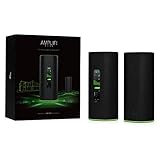
- WiFi 6 performance
- Router with 4-Port Gigabit Ethernet switch
- MeshPoint with (1) Gigabit Ethernet port
If one router does not reach every room, the matching MeshPoint provides a route to expand the system. AmpliFi also says Alien can add a standalone AmpliFi HD router or MeshPoint in third-party extender mode. Be careful with second-hand and separately listed mesh devices: AmpliFi warns that devices bundled in a kit may be hard-coded to work together and may not pair with other units. Before buying an expansion device, confirm its exact model and whether it is standalone or kit-bound, and check the seller’s return policy. AmpliFi’s extender guidance and its model-selection guidance describe these options.
Controls, features, and the two management interfaces
AmpliFi advertises app-based setup, network statistics, guest access, family profiles, port forwarding, an extra SSID, UPnP, IPv6 support, and a built-in speed test. It also offers Teleport, a service and app intended to give travelers remote access to their home network. The product has both app and web management, but RTINGS notes that some settings are available only in one interface or the other. If you expect every setting to be in a single dashboard, plan on using both surfaces. RTINGS’ Alien review, updated September 11, 2026 to Test Bench 0.10, discusses the split between the web interface and companion app.
Rank #3

- DUAL-BAND WIFI 6 ROUTER: Wi-Fi 6(802.11ax) technology achieves faster speeds, greater capacity and reduced network congestion compared to the previous gen. All WiFi routers require a separate modem. Dual-Band WiFi routers do not support the 6 GHz band.
- AX1800: Enjoy smoother and more stable streaming, gaming, downloading with 1.8 Gbps total bandwidth (up to 1200 Mbps on 5 GHz and up to 574 Mbps on 2.4 GHz). Performance varies by conditions, distance to devices, and obstacles such as walls.
- CONNECT MORE DEVICES: Wi-Fi 6 technology communicates more data to more devices simultaneously using revolutionary OFDMA technology
- EXTENSIVE COVERAGE: Achieve the strong, reliable WiFi coverage with Archer AX1800 as it focuses signal strength to your devices far away using Beamforming technology, 4 high-gain antennas and an advanced front-end module (FEM) chipset
- OUR CYBERSECURITY COMMITMENT: TP-Link is a signatory of the U.S. Cybersecurity and Infrastructure Security Agency’s (CISA) Secure-by-Design pledge. This device is designed, built, and maintained, with advanced security as a core requirement.
For connected-device separation, AmpliFi documents an IoT isolation option under which isolated devices can communicate with each other and the internet. That description should not be read as a promise of full enterprise VLAN or firewall functionality. Check the current interface and documentation if a specific network-segmentation policy is essential.
Firmware and support: what the published record establishes
AmpliFi’s release-note page lists Alien firmware 4.0.6 dated January 2, 2025, with an updated third-party client library, security improvements, and minor improvements and fixes. A release history is useful evidence of past updates, but it does not guarantee future updates. The published table gives a UK PSTI support period of “Until 1/31/26” for UK variants AFi-ALN-UK and AFi-ALN-R-UK. That date is specifically for those UK variants; it does not establish a global end-of-support date or the lifecycle status of every regional version. The available documentation does not establish a post-period update commitment. Check the support status for the exact regional model you own or plan to buy. AmpliFi’s firmware release notes and support-period information are the relevant manufacturer records.
Rank #4

- Next-Gen Gigabit Wi-Fi 6 Speeds: 2402 Mbps on 5 GHz and 574 Mbps on 2.4 GHz bands ensure smoother streaming and faster downloads; support VPN server and VPN client¹
- A More Responsive Experience: Enjoy smooth gaming, video streaming, and live feeds simultaneously. OFDMA makes your Wi-Fi stronger by allowing multiple clients to share one band at the same time, cutting latency and jitter.²
- Expanded Wi-Fi Coverage: 4 high-gain external antennas and Beamforming technology combine to extend strong, reliable, Wi-Fi throughout your home.
- Improved Battery Life: Target Wake Time helps your devices to communicate efficiently while consuming less power.
- Improved Cooling Design: No heat ups, no throttles. A larger heat sink and redefined case design cools the WiFi 6 system and enables your network to stay at top speeds in more versatile environments.
To check for an update, select the Alien in the AmpliFi app, open About to view its version, then use Update to check for newer firmware. AmpliFi says Alien does not support downgrading to an older firmware version. If an update causes a problem, do not assume you can roll back; consult current support guidance before changing network settings. AmpliFi’s update and rollback instructions explain the process and limitation.
Who should buy the AmpliFi Alien?
- Consider it if you want a Wi-Fi 6 router with a touchscreen, a mix of app and web controls, four Gigabit LAN ports, and a manufacturer-supported path to matching mesh expansion.
- Look elsewhere if you specifically need Wi-Fi 6E or Wi-Fi 7, 6 GHz access, multi-gigabit Ethernet, or a clearly documented support commitment for your region that the available manufacturer information does not establish.
- Compare carefully if choosing among similarly priced routers: look at wireless generation and bands, WAN/LAN speed and count, wired-backhaul options, coverage needs, where settings live, support commitments, and the total cost of any mesh nodes. RTINGS places Alien in a comparison context with Wi-Fi 6E and Wi-Fi 7 routers, but the available review information does not support a specific performance ranking or benchmark claim.
The Alien remains listed as a manufacturer-store product, but displayed prices and bundle contents can vary between pages and over time. Check the current listing for the exact standalone router or router-and-MeshPoint configuration rather than relying on an older price. If you are buying a MeshPoint separately, verify compatibility with the specific router and kit before ordering.
Quick Recap
Best Value

- A GIGABIT SPEED ROUTER, FOR LESS - Supports wifi speeds up to a gigabit, without the premium price tag. eero 6+ is our most affordable gigabit router ever.
- WI-FI 6 GETS A BOOST - eero 6+ supports additional wifi bandwidth on the 160 MHz radio channel (that’s just wifi talk for faster connectivity). With the eero 6+, you’ll get enough wifi for the whole family to work, stream, and video chat—all at the same time.
- EXPERIENCE THE EERO TRUEMESH DIFFERENCE - eero’s patented TrueMesh technology intelligently routes traffic to reduce drop-offs and dead spots.
- SET UP IN MINUTES - The eero app guides you through setup and allows you to manage your network from anywhere.
- EASILY EXPAND YOUR SYSTEM - Use any single eero as a gateway to replace your current router, or add it to your existing eero network to extend wifi coverage.
Product prices and availability are accurate as of the date/time indicated and are subject to change. Any price and availability information displayed on Amazon at the time of purchase will apply.




