Neither IR nor Wi-Fi is universally better for a phone remote. Use a phone’s IR blaster when it has the hardware, the appliance accepts infrared commands, and you can aim at its receiver. Use Wi-Fi when the appliance supports a compatible app or network-control platform. If your phone lacks IR but the appliance uses it, a Wi-Fi IR hub can bridge the two.
How phone IR control works
An IR blaster sends infrared pulses from the phone toward the appliance’s receiver. It can work with compatible TVs, air conditioners, and set-top boxes, but the phone needs an emitter and an app or code set that supports the appliance. The emitter also needs a workable path to the receiver: TCL advises pointing the back of the phone toward the device and adjusting the angle if needed. HONOR’s Smart Remote setup likewise asks users to choose an appliance type and brand, then aim the phone’s emitter at the appliance. TCL support and HONOR support describe these steps.
As an Amazon Associate I earn from qualifying purchases.
How Wi-Fi control works
A Wi-Fi remote uses an app to communicate with a device or platform that supports network control. It avoids aiming the phone at an infrared receiver, but both the appliance and the app must support the same control method.
Do these 3 things before closing this tab:
1Scan for outdated or missing drivers - takes under a minute2Repair Windows errors before they cause bigger problems3Fix the driver behind crashes, sound loss and screen glitchesExample: Google TV and Android TV
Google’s documented Google TV app remote can navigate menus, control playback, turn the TV on or off, adjust volume, activate Google Assistant, and enter text. In the setup Google describes, the phone and TV must be connected to the same Wi-Fi network. These capabilities and requirements apply to that documented Google TV/Android TV setup; they do not establish that every smart TV or appliance can be controlled by the same app. Google’s setup instructions explain the supported connection.
#1 Best Overall

- Compatible with more devices: Effortlessly control TVs, Set Top Boxes, Air Conditioners, Projectors, Ott-Boxes, DVDs, Amplifiers, SLRs, Fans, IR Switches, Water Hoters, Electric Heaters, Air Cleaners, Robot Vacuums and Blinds with OCRUSTAR All in One Remote Control.
- Compatible with more brands: OCRUSTAR Universal Remote Control Adapter compatible with Samsung, Vizio, Roku, Sony, Sharp, Samsung, Panasonic, TCL, RCA, Hisense, Toshiba, Fhilips, LG and more.
- OCRUSTAR IR Remote Control Convenience: ✅The type-c plug compatible with IOS and Android system✅, Manage your home devices from your smartphone with the Ocrustar Remote App, bringing ease and efficiency to your fingertips.
- Portable & Stylish: On-the-go control in style! The OCRUSTAR mobile phone universal remote control featuring a key ring and silicone case, universal remote control can be placed in a silicone case for portability and protection.
- What you'll get: 1* universal remote adapter, 1* user's guider, 1* key ring, 1* silicone case
When a Wi-Fi IR hub makes sense
A Wi-Fi IR hub receives commands from a phone app over the network, then sends infrared commands toward the appliance. It can add app-based control for an IR appliance when the phone itself has no IR emitter. The hub still needs to reach the appliance’s IR receiver, and it must support the appliance’s brand or model and the functions you want.
Protocol matters: SwitchBot says its Hub Mini controls appliances through IR and cannot control appliances whose remotes use RF or Bluetooth. An IR hub does not convert an RF- or Bluetooth-controlled appliance into an IR device. SwitchBot’s protocol guide explains the distinction.
Rank #2

- This smart IR remote controller has stable and reliable IR signal, pairing to your household appliance easily. Steady transmission distance as long as 10m.
- Wide Compatible: with this device and smart phone APP, your phone will become a powerful remote control, great choice for Samsung, Vizio, Lg, Sony, Sharp, Roku, Apple TV and more
- Tiny and Convenient: Anti-Lost design, with key chain and silicone case, you could carry it anywhere do not worry it will be lost.Lightning work with Apple device, Type-C work with Android device
- Plug-and-play the smart IR remote controller to your mobile, scan and download App "uniTV Remote" to control. Your smartphone rightly change to a All-in-One Smart Home Control Hub. You get control of all your home applicance by a touch on App.
Choose by appliance, phone, and connection
| Your situation | Best starting point | What to check |
|---|---|---|
| Your phone has an IR emitter, the appliance uses IR, and you can aim at its receiver. | Phone IR | Confirm the app supports the appliance’s brand or model and aim the emitter toward the receiver. TCL |
| The appliance supports a compatible Wi-Fi remote app or network platform. | Wi-Fi app | Check the required app, device support, and network setup. Google’s documented TV remote requires the phone and TV to be on the same Wi-Fi network. Google |
| Your phone lacks IR, but the appliance uses IR. | Wi-Fi IR hub | Verify the hub supports the appliance and the controls you need; the hub must still send IR toward the appliance. SwitchBot |
| The appliance uses RF or Bluetooth rather than IR. | Compatible RF/Bluetooth remote or manufacturer app | An IR-only phone emitter or IR hub cannot send those different control signals. One For All |
What to check before setting up a remote
- Appliance protocol: Find out whether its remote uses IR, RF, Bluetooth, or an app-based network connection. These are not interchangeable methods. One For All’s guide distinguishes IR from RF and Bluetooth.
- Phone hardware: Check the phone’s specifications for an IR emitter. Installing an IR remote app alone cannot add that hardware.
- Compatibility: Confirm that the app, phone, or hub supports the appliance’s brand, model, and required functions. Support varies by manufacturer and model.
- Aiming: For direct IR control, point the emitter toward the appliance’s IR receiver. One For All describes IR control as requiring line of sight. One For All
- Network requirements: Check the app’s setup instructions. Google’s cited TV remote setup requires the phone and TV to share a Wi-Fi network; that requirement should not be generalized to every Wi-Fi remote.
Speed and reliability: no universal winner
The available manufacturer guidance describes how these methods connect and what they support, but does not provide a reliable head-to-head measurement of speed, latency, or reliability. Practical performance depends on the phone, appliance, app, and—where applicable—the network, so choosing by protocol compatibility and setup requirements is more defensible than assuming one method is always faster or more dependable.
PC Slower Than It Used to Be?
A free scan shows the junk files, broken settings and background clutter dragging Windows down - then fixes them in one click.Free scan · Windows 10 & 11Outdated Drivers Are Slowing You Down
One free scan finds every outdated or missing driver and matches the right update for your exact hardware.Free scan · exact hardware matchQuick Recap
Best Value

- STABLE CONTROL: Type C IR remote control provides stable control with remarkable anti interference performance and distance up to 15m.
- Performance: This Smartphone IR Remote Controller offers a stable and infrared that seamlessly pairs with your home appliances. Control your devices with ease and straight from your phone, improving your home's overall convenience and smart functionality.
- PLUG AND PLAY: Smartphone remote controller is plug and play, your smartphone will become an all in one smart home control center.
- STABLE CONTROL: Type C IR remote control provides stable control with remarkable anti interference performance and distance up to 15m.
- STABLE CONTROL: Type C Smartphone IR remote control provides stable control with remarkable anti interference performance and distance up to 15m.
Rank #4

- Crafted from aluminum, this pocket sized features a high performances IR module and detachable chain for on the go convenience
- Small and small size appearance makes it portable. Can hanging on your chain and take it away
- Transforms your Type C smartphone into a universally remote controller, seamlessly controlling TVs, air conditioners, and appliances via a powerful app with 8-15m signals penetration through wall and glass
- Ideal for technology enthusiasts needing a small size, platform to replace remote controls for devices across home theaters, smarthomes, and office setups
- operate appliances from any corner of your living room, bedroom, or workspaces while maintaining precise temperature adjustments, channel switching, and device synchronization capabilities
Rank #3
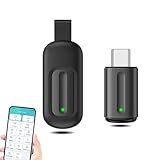
- EXQUISITE AND COMPACT: Phone IR remote control is 20% smaller in size than its predecessor, with a refined and compact appearance and CNC on the for a silky slippy and more comfortable touch.
- 30 DEGREE REMOTE CONTROL: Mini smartphone IR remote controller adopts the new fifth generation chip, which is faster without Bluetooth connection, allowing a longer transmitting distance and larger angle.
- EASY REMOTE CONTROL: IR phone controller adapter is an easy remote control for air conditioners, TV set top boxes, and projectors. You only need to download one APP on your cell phone and plug in the universal remote control.
- PREVENT LOSS: Smart IR remote control comes with a silicone cover and hanging to prevent loss, so you can use it anytime and anywhere in your living room, bedroom, office, conference room, etc. without looking for a remote control.
- ONE CONTROL: Mini smartphone IR remote control is compatible with mainstream infrared appliances on the market, such as TV boxes, fans, TVs, etc. can be controlled with a single click.
Product prices and availability are accurate as of the date/time indicated and are subject to change. Any price and availability information displayed on Amazon at the time of purchase will apply.




