Outdated Drivers Are Slowing You Down
One free scan finds every outdated or missing driver and matches the right update for your exact hardware.Free scan · exact hardware matchPC Slower Than It Used to Be?
A free scan shows the junk files, broken settings and background clutter dragging Windows down - then fixes them in one click.Free scan · Windows 10 & 11To control the touch keyboard’s handwriting panel with Intune, configure the Windows TextInput policy TouchKeyboardHandwritingModeAvailability. Set it to 1 to keep the panel available, 2 to disable it, or 0 to let Windows decide. The documented setting is device-scoped and uses an integer value.
Choose what the policy should do
| Value | Effect | When to choose it |
|---|---|---|
0 |
Windows determines when handwriting mode is available. This is the documented default. | Choose this to defer to the operating system; it does not explicitly turn handwriting on or off. |
1 |
The handwriting input panel is always available. | Choose this when users should be able to use handwriting input. |
2 |
The handwriting input panel is always disabled. | Choose this to disable handwriting input through the touch keyboard. |
Microsoft documents the policy for Windows 10, version 1803 (build 17134), and later, on Pro, Enterprise, Education, and IoT Enterprise editions, including IoT Enterprise LTSC. It is device-scoped rather than user-scoped. See Microsoft’s TextInput Policy CSP for the supported editions, scope, and values.
As an Amazon Associate I earn from qualifying purchases.
Configure the policy in Intune
-
In the Intune admin center, create a Windows device configuration profile. Search the Settings Catalog or device restriction settings for the touch keyboard handwriting availability setting.
Recommended Free Tools
Special offer. See more information about Outbyte and uninstall instructions. Please review EULA and Privacy policy. -
If the setting is available in your tenant, select the desired state and assign the profile to the intended device group.
#1 Best Overall
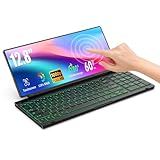 12.8" Touchscreen Portable Monitor with Keyboard for Laptop Desktop PC
- 【Single-Cable Solution for Any PC/Mac】Enables one-cable connection to all laptops and desktops via USB-C or USB-A, fully compatible with Windows and macOS. MUST NOTE: If the screen shows “No Signal,” please check driver installation as instructed in the manual.
- 【Customizable RGB Backlight & CNC Aluminum Build】Enhance productivity in any lighting condition. The keyboard offers breath/7-color/rainbow light mode (controlled via FN+Q/W/E). Housed in a premium CNC aluminum body, this small portable monitor is as durable as it is sleek, offering a professional look and feel.
- 【10-Point Touch Interactive Display】Go beyond typing with the responsive 10-point touch screen. This touch screen keyboard combo allows for intuitive control, whether scrolling through documents, zooming into designs, or using touch-enabled apps, making your portable monitor extender for laptop vastly more interactive.
- 【Whisper-Quiet Office Keyboard】Designed for focused work environments, our portable monitor with keyboard features a precise scissor-switch mechanism. With typing noise below 30dB, it provides a stable, laptop-like typing experience that is significantly quieter and more durable than standard membrane keyboards, making it the ideal portable monitor for laptop extensions in libraries, offices, or coffee shops.
- 【180° Flexibility & Ultra-Portable Design】 This 12.8" portable monitor is engineered for adaptability. The 180° hinge allows you to lay it flat or find the perfect viewing angle. Its all-in-one design with a integrated keyboard and high-quality CNC aluminum construction makes it the ultimate durable and portable workstation.
-
If you cannot find a built-in setting, create a Windows custom configuration profile. Add the following case-sensitive OMA-URI:
./Device/Vendor/MSFT/Policy/Config/TextInput/TouchKeyboardHandwritingModeAvailabilityRank #2
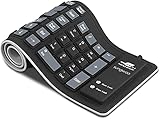 Foldable Silicone Keyboard, USB Wired Rollup Keyboard for PC, Laptop
- Multiple Function: Flexible, Soft, Foldable, Roll-up, Silent, Waterproof, Dustproof, Lightweight, Portable and easy to store. Multiple function make it an extraordinary computer keyboard!
- Soft silicone material: Made of high intensity and high elasticity silicone gel, non-toxic and odorless. Flexible material allow you to fold it or roll up freely, very handy and convenient to take with notebook, laptop and mac.
- Waterproof and dustproof: No additional keyboard cover skin required, food crumbs or dust can be easily cleaned thoroughly. Clean the silicone keyboard with water, alcohol, or alcohol based disinfectant.
- Silent Click: Soft material allows discreet silent typing experience. No typing sound design makes you have a quiet working environment and avoid disturbing others. At night, it can keep your family have a good sleep and also keep you do work seriously.
- Warm Tips: To protect the keyboard and extend service life, pls do not damage the item as following actions: stretch and twist keyboard; place heavy objscts on keyboard; spill liquid on keyboard; press on rolled up keyboard.
-
Set the data type to Integer, enter
0,1, or2according to the table above, and assign the profile to the intended device group.Free tools Windows power users keep installed
One-click scans. No signup required.
Special offer. See more information about Outbyte and uninstall instructions. Please review EULA and Privacy policy.
Microsoft’s Intune guidance for custom Windows settings explains the OMA-URI profile route and recommends checking built-in settings first. The reviewed documentation does not establish that this specific entry is available in every tenant’s catalog, so use the custom profile route if it is absent.
Rank #3

- 【Single-Cable Solution for Any PC/Mac】Enables one-cable connection to all laptops and desktops via USB-C or USB-A, fully compatible with Windows10/11 and macOS. MUST NOTE: If the screen shows “No Signal,” please check driver installation as instructed in the manual.
- 【Mechanical Keyboard & Touchscreen Combo】Experience a new workflow paradigm with our integrated 12.8-inch laminated touchscreen and mechanical keyboard. Interact intuitively by touch while enjoying superior typing precision.
- 【Fully Customizable with Premium Linear Feel】A hot-swappable keyboard for effortless personalization, powered by our Clicky Tactile Switches that deliver a undeniable feedback with every keystroke, turning typing into a precise and rhythmic ritual.
- 【Customizable RGB Backlight & CNC Aluminum Build】Customize your setup with 108 RGB Lighting Combinations (controlled via FN+DEL mode, FN+HOME color, FN+PGUP switch). This portable monitor for laptop gaming sessions lets you create the perfect ambiance with customizable backlighting options. Housed in a premium CNC aluminum body, this small portable monitor is as durable as it is sleek, offering a professional look and feel.
- 【180° Flexibility & Ultra-Portable Design】This 12.8" portable monitor is engineered for adaptability. The 180° hinge allows you to lay it flat or find the perfect viewing angle. Its all-in-one design with a integrated keyboard and high-quality CNC aluminum construction makes it the ultimate durable and portable workstation.
What this setting does—and does not do
This policy controls availability of the touch keyboard handwriting input panel. It does not control whether the touch keyboard opens automatically when someone taps a text field. Windows documents automatic invocation separately as EnableTouchKeyboardAutoInvokeInDesktopMode; changing handwriting availability should not be treated as a way to change that behavior.
Use the documented ./Device/ OMA-URI for this device policy. Do not substitute a ./User/ path: Microsoft documents this setting as device-scoped. For background on touch keyboard text entry, see Microsoft Support’s touch keyboard overview.
Quick Recap
Best Value

- Media-Friendly: The K400 Plus wireless touch TV keyboard gives you integrated, comfortable control of your PC-to-TV entertainment, eliminating the clutter of a separate keyboard and mouse
- Plug-and-Play: Simply plug the Unifying receiver into a USB port and the wireless touchpad keyboard is ready to go; adjust controls using the Logitech Options Software to save preferred settings
- Power-Packed: Built with laid-back control in mind, this wireless TV keyboard has a reliable and long battery life of up to 18 months (2), including an on/off button to help it go even longer
- Wireless Freedom: Designed for seamless comfort and control, this HTPC keyboard boasts a range of up to 33 ft (1) wireless connectivity, with quiet keys and a large touchpad for easy navigation
- Broad Compatibility: Designed for use with Windows 7, Windows 8, Windows 10 and later, Android 7 or later, and Chrome OS
Rank #4

- Magnetic Modular Flexibility: Effortlessly reconfigure your workspace with three magnetic modes—split for ergonomic comfort, attached with central screen for control, or stacked for compact portability and storage
- 8“ Touchscreen Command Hub: Manage workflows efficiently using the bright 8-inch display to monitor apps, access shortcuts, and control media without interrupting your main screen's focus
- Tailored Shortcuts & Macros: Program the intuitive software to assign personalized commands, application launches, and macros to any key, streamlining your unique tasks and boosting output
- Optimized for Comfort & Posture: The split layout allows natural shoulder-width hand positioning to minimize ulnar deviation and strain, promoting comfort during extended typing or gaming sessions
- Ultimate On-the-Go Productivity: Unplug and work anywhere with reliable Bluetooth 5.0, a long-lasting battery, and a travel-friendly design that quickly stows away in its included protective pouch
Product prices and availability are accurate as of the date/time indicated and are subject to change. Any price and availability information displayed on Amazon at the time of purchase will apply.
What’s actually slowing this PC down?
Pick the symptom - the matching free tool is one click away.




