The HP RDX Removable Disk Backup System is built for organizations that still need a physical, rugged, and easily rotated backup target without the complexity of traditional tape. It combines the familiar behavior of a removable disk with cartridge-based handling, giving small businesses and IT teams a practical way to create local backups, move copies offsite, and restore data quickly when systems fail.
Its appeal is strongest in environments where cloud-only backup is too slow, too costly at scale, or not acceptable as the sole recovery option. Compared with ordinary USB hard drives, RDX cartridges are designed for repeated handling and safer transport; compared with tape, they are simpler to use and faster to access, though they may not match tape’s lowest long-term archival cost.

As an Amazon Associate I earn from qualifying purchases.
This review looks at how the HP RDX system performs in real backup workflows, including build quality, setup, compatibility, restore speed, reliability, security considerations, and overall value for offices that need dependable removable media without adding unnecessary administrative burden.
PC Slower Than It Used to Be?
A free scan shows the junk files, broken settings and background clutter dragging Windows down - then fixes them in one click.Free scan · Windows 10 & 11Outdated Drivers Are Slowing You Down
One free scan finds every outdated or missing driver and matches the right update for your exact hardware.Free scan · exact hardware matchWhat the HP RDX Backup System Is
The HP RDX Removable Disk Backup System is a cartridge-based backup platform that combines the convenience of an external hard drive with the physical handling model of tape. Instead of inserting magnetic tape into a tape drive, you insert a rugged RDX disk cartridge into an internal or external docking unit. The cartridge contains a 2.5-inch hard drive or, in some newer implementations, solid-state media, enclosed in a durable shell designed for repeated insertion, removal, transport, and offsite storage.
#1 Best Overall

- Handles and operates like traditional tape media, with all the performance advantages of Disk backup
- Quick and Easy, Plug and play Installation
- Fast backup, archive and restore for maximum application availability and staff productivity
For the operating system, an RDX cartridge typically appears as a removable disk. That makes it straightforward to use with common backup software, file copy jobs, Windows Server Backup, Linux backup tools, and many small-business disaster recovery workflows. HP-branded RDX units have commonly been sold in USB external dock formats and internal SATA or USB bay-mounted versions, depending on server or workstation requirements. The idea is simple: keep the dock connected to the server, rotate cartridges on a schedule, and store one or more cartridges away from the main site.
Core components
- RDX dock: The fixed drive unit that connects to a server, NAS appliance, or workstation through USB, SATA, or another supported interface depending on the model.
- RDX cartridges: Removable rugged disk media available in different capacities, commonly ranging from hundreds of gigabytes to multiple terabytes.
- Backup software: The system can be used with HP utilities, native operating system tools, or third-party backup applications that support removable disk targets.
- Rotation workflow: Businesses can use daily, weekly, or grandfather-father-son media rotation patterns similar to tape operations.
The main appeal is that RDX gives small offices and IT teams a physical backup target that is faster and easier to browse than many tape solutions, while being more purpose-built for rotation than ordinary portable USB hard drives. A user can eject a completed backup cartridge, label it, place it in a protective case, and take it offsite. If a restore is needed, the cartridge can be inserted back into the dock and accessed like a disk, often allowing individual files to be restored without waiting through sequential tape operations.
HP RDX is not meant to replace every type of backup. It is best understood as a local and removable backup layer for servers, branch offices, point-of-sale systems, engineering workstations, and small environments where cloud-only backup may be too slow, too expensive at restore time, or difficult due to bandwidth constraints. It can also complement cloud backup by providing a fast local recovery copy while cloud storage handles geographic redundancy. Compared with a loose external hard drive, the RDX format offers a more controlled cartridge ecosystem with tougher media handling and a dock that remains installed. Compared with tape, it usually offers simpler operation and random access, though tape may still win for very large archives and lowest long-term cost per terabyte.
Design, Build Quality, and Cartridge Handling
The HP RDX Removable Disk Backup System is built around a simple idea: give small offices the physical handling experience of tape, but with the random-access speed and familiarity of a hard drive. The drive unit is available in internal and external versions, with the external model typically connecting over USB and the internal version fitting into a standard 5.25-inch bay. In both cases, the hardware feels more appliance-like than a consumer USB hard drive. The front-loading design, eject button, and cartridge bay make it easy for non-specialist staff to rotate media without needing to unplug cables or handle bare portable drives.
The cartridges are the strongest part of the design. Each RDX cartridge contains a 2.5-inch hard disk or SSD mechanism inside a ruggedized shell, so the actual storage media is better protected than a typical external portable drive. The casing is designed to absorb everyday knocks, drops, and transport wear, which matters when cartridges are being carried home, stored in a safe, or rotated between branch offices. Compared with loose USB drives, the cartridge format reduces cable strain, connector damage, and accidental use for unrelated file transfers.
Physical handling and daily operation
Cartridge handling is straightforward. Insert the cartridge into the dock until it seats, wait for the system to recognize it, run the backup job, then eject it through the operating system or backup software before pressing the physical eject button. The process is closer to using a tape cartridge than managing a pile of external drives, but it is faster to mount and easier to browse. Labels can be applied to the cartridge face, making media rotation schemes such as “Monday to Friday,” “Week 1 to Week 4,” or “Monthly archive” practical for small IT teams.
- Rugged cartridge shell: better suited to transport and offsite rotation than standard bare portable disks.
- Dock-based design: avoids repeatedly plugging and unplugging USB storage cables.
- Clear media rotation: cartridges are easy to label, store, and assign to backup schedules.
- Internal or external options: useful for both tower servers and small office systems without spare bays.
Build quality is generally business-oriented rather than flashy. The dock is compact, the front mechanism feels purposeful, and the cartridge insertion process is simple enough for routine use by office staff. That said, it is still a disk-based system, not magic. Cartridges should not be treated as indestructible, and they should be ejected cleanly before removal. For long-term retention, they also need sensible storage conditions: dry, stable temperatures, and protection from physical shock during transport.
What’s actually slowing this PC down?
Pick the symptom - the matching free tool is one click away.
There are a few practical drawbacks. RDX cartridges are bulkier and more expensive than ordinary USB portable drives, and the dock is required to read them conveniently. If a business needs to recover data at a site without an RDX unit, it may need to keep a spare dock available. Capacity also depends on the cartridge generation, so older deployments may feel constrained compared with modern high-capacity external hard drives. Even so, the design succeeds where it matters most: it makes removable backup media more disciplined, durable, and office-friendly than ad hoc USB drive rotation.
Setup, Software, and Compatibility
Setting up an HP RDX removable disk system is generally straightforward, especially for IT teams already familiar with USB storage or internal SATA devices. External RDX docks typically connect over USB, while internal models fit into a standard drive bay and attach through SATA or USB headers, depending on the version. Once connected, the inserted cartridge appears to the operating system much like a removable hard disk, which keeps the learning curve low compared with tape libraries or more specialized backup appliances.
On Windows systems, the drive is usually recognized without complicated driver work, and basic file copy, scheduled backup jobs, or imaging tasks can begin quickly. HP and RDX ecosystem vendors have offered utilities and backup software bundles over the years, but many small businesses will pair the dock with familiar tools such as Windows Server Backup, Veeam, BackupAssist, Acronis, or other software that can target removable disk volumes. The main setup detail is to make sure the backup application understands cartridge rotation, media eject behavior, and retention rules, rather than treating every cartridge as a permanently attached USB disk.
Rank #2

- Simply and Securely Store Backups Off-site for Complete Data Protection
- Reduces Total Cost of Protecting Your Business Data
- The Simple Way to Protect your Business Data
- Flexibility to Suit Most Small Business Environments
Practical setup considerations
- Drive format: NTFS is common for Windows environments, while Linux deployments may use ext4 or another native filesystem depending on backup software requirements.
- Media labeling: Each cartridge should be clearly named in both the backup application and physically labeled for daily, weekly, or monthly rotation.
- Safe removal: Jobs should be configured to finish cleanly before ejecting media, reducing the risk of incomplete backups or filesystem errors.
- Capacity planning: Cartridge size should allow room for growth, not just the current full backup set.
Compatibility is one of the stronger parts of the RDX design. Because the system presents itself as disk-based storage, it avoids many of the driver and media management issues associated with traditional tape drives. It can work with physical servers, desktop workstations, NAS-adjacent workflows, and many virtualization backup products, provided the software supports removable disk targets. For Linux environments, support is also typically practical because the device behaves like standard block storage, though administrators should test mount, eject, and restore processes before relying on it in production.
The simplicity does come with a few caveats. Some backup applications are optimized for always-connected repositories and may not handle rotating cartridges elegantly without extra configuration. Cloud-first backup tools may also expect continuous connectivity, deduplication repositories, or object storage rather than removable media. In addition, older RDX docks may be limited by USB 2.0 or earlier interface speeds, while newer USB 3.x models are a better match for larger modern datasets. Firmware, operating system support, and cartridge capacity recognition should be checked when mixing older docks with newer high-capacity media.
For small businesses, the overall setup experience is much less intimidating than tape and more structured than a pile of consumer external hard drives. The best results come from treating RDX as part of a managed backup process: scheduled jobs, verified restores, documented cartridge rotation, and at least one cartridge stored offsite. In that role, compatibility is broad enough for most SMB environments, while the removable cartridge format gives administrators a cleaner operational model than ordinary USB disks.
Backup Performance and Restore Experience
In day-to-day use, the HP RDX Removable Disk Backup System behaves much more like a rugged external hard drive than a tape device. Backup speed depends heavily on the cartridge generation, the dock interface, the server’s storage subsystem, and whether the job is moving a few large files or thousands of small ones. With USB 3.0 or SATA-connected RDX docks, small business file server backups are typically fast enough for overnight windows, especially for incremental jobs after the first full backup. The first full backup is where expectations should be set carefully: copying several terabytes can still take hours, just as it would with any single removable disk target.
The main performance advantage over tape is random access. Files can be browsed and restored directly from the cartridge without waiting for a tape to seek through a long sequence. This makes the RDX format particularly practical for common restore requests such as recovering a deleted folder, pulling back a previous version of an accounting database, or restoring a user directory after a workstation failure. For IT teams that handle frequent small restores, this can save noticeable time compared with entry-level LTO workflows.
Free tools Windows power users keep installed
One-click scans. No signup required.
Backup software support also affects the experience. When used with Windows Server Backup, Veeam, Backup Exec, or similar tools that can target removable disk, RDX cartridges can be rotated like media sets while still presenting as disk volumes. Some environments use them for full weekly backups with daily incrementals, while others dedicate cartridges to specific servers or retention periods. The best results usually come from formatting and labeling cartridges consistently, assigning clear rotation schedules, and avoiding ad hoc drag-and-drop backups except for simple file copy tasks.
Practical performance characteristics
- Large sequential backups: Well suited to server images, virtual machine exports, database dumps, and archive sets where data is written in long continuous streams.
- Small file workloads: Slower than headline transfer rates suggest, because filesystem overhead and antivirus scanning can reduce throughput.
- Incremental jobs: Often the strongest use case, since only changed data is written and nightly backup windows remain manageable.
- Restores: Generally straightforward, with faster file-level access than tape and less dependency on cloud bandwidth.
Restore testing is where the HP RDX system tends to feel reassuring. A cartridge can be inserted, mounted, and read by a compatible dock without the complexity of a tape library or the uncertainty of waiting for a large cloud restore. For bare-metal recovery, the experience depends on the backup application and recovery media, but the RDX device is usually recognized as a local or removable disk target. For file-level recovery, administrators can often browse backup sets directly through their software and restore to the original path or an alternate location.
There are still practical limitations. RDX is not as fast as a modern NVMe-based external SSD, and it does not scale like a tape autoloader for very large retention archives. Cartridge capacity must be planned carefully, because outgrowing the media can make rotations messy or force backups to span mulle cartridges. Encryption and verification should be enabled in the backup software where available, and restores should be tested periodically rather than assumed. Within those boundaries, the performance profile is well matched to small offices, branch locations, and IT teams that need predictable local backup and fast, simple recovery from removable media.
Reliability, Security, and Offsite Storage Use
Reliability is where the HP RDX system makes the most sense compared with ordinary portable USB hard drives. The cartridge is still disk-based storage, so it is not immune to mechanical failure, but the ruggedized shell, protected connector, and controlled dock mechanism reduce many of the everyday risks that small offices run into with loose external drives. Cartridges are designed to be inserted, removed, labeled, transported, and stored repeatedly, which makes them better suited to a formal backup rotation than a consumer drive sitting on a shelf or being passed between staff.
For IT teams, the practical benefit is predictability. A cartridge-based rotation can be organized by day, week, month, or project, and each cartridge can be physically separated from the backup host after the job completes. That separation matters for ransomware resilience: once the media is ejected and stored offline, it is no longer directly exposed to malware, accidental deletion, or a compromised backup server. This does not replace good endpoint protection or immutable cloud storage, but it gives small businesses a simple air-gap option without moving to tape infrastructure.
Rank #3
Security depends heavily on the backup software and operating procedures used with the RDX dock. The media itself provides removable storage rather than built-in enterprise key management, so encryption should be enabled at the software level when cartridges leave the building. Windows BitLocker, backup application encryption, or third-party encryption tools can protect the contents if a cartridge is lost in transit. Strong labeling practices are also necessary: labels should identify rotation position or asset number, not expose customer names, payroll data, or other sensitive details.
Offsite rotation in practice
- Daily rotation: Useful for small offices that want one cartridge taken offsite at the end of each business day.
- Weekly full backup set: A practical fit for file servers, accounting systems, and line-of-business applications with moderate data growth.
- Monthly archive: Suitable for longer retention, compliance snapshots, or year-end financial records.
- Disaster recovery copy: A cartridge can be stored at an owner’s home, branch office, safe, or records facility for faster local recovery than downloading large datasets from the cloud.
The main reliability concern is that RDX should not be treated as a single-copy archive. Cartridges need periodic verification, test restores, and replacement planning just like any other backup medium. A dropped cartridge is more likely to survive than a bare portable hard drive, but it should still be handled as business-critical media. Environmental storage also matters: avoid excessive heat, moisture, dust, magnetic exposure, and long periods in vehicles. For long retention periods, tape may still have advantages, but for short- to medium-term removable backup, RDX is easier for non-specialists to manage.
In day-to-day use, the strongest security and reliability profile comes from combining RDX with a 3-2-1 backup strategy: primary production data, a local backup copy on RDX, and a second copy either on another cartridge stored offsite or in a cloud backup service. Used this way, HP RDX provides a rugged offline layer that fills the gap between fragile USB drives and more complex tape libraries, especially for small businesses that need physical control over backup media without adding significant operational overhead.
Quick wins for a faster PC:
Scan for outdated or missing drivers - takes under a minuteDriver Scan →Repair Windows errors before they cause bigger problemsFix Now →HP RDX vs Tape, USB Drives, and Cloud Backup
HP RDX sits in an interesting middle ground between traditional tape, ordinary USB external hard drives, and cloud backup. It is not the cheapest option per terabyte, and it does not offer the deep archival economics of LTO tape at larger capacities. Its strength is that it gives small businesses a rugged, removable, disk-based backup target that behaves much like a local drive while still supporting cartridge rotation, offsite storage, and fast restores.
Compared with tape
Tape remains strong for long-term retention, very large backup sets, and environments that need low-cost media stored for years. LTO cartridges can scale to much higher capacities than many RDX cartridges, and tape libraries support automation that RDX cannot match. For larger IT teams with strict archival policies, tape can still make sense.
RDX is simpler to operate. There is no tape threading, no cleaning cartridge routine in the same sense, and no need to manage tape drive generations as carefully for everyday small-office use. Random access is also a major advantage: restoring a handful of files from an RDX cartridge generally feels closer to restoring from a hard drive than searching sequentially through tape. For a small business that wants staff to swap media daily without specialized backup knowledge, RDX is usually easier to live with.
Compared with USB external hard drives
Standard USB hard drives are cheaper and widely available, but they are not designed as a managed removable backup system. A portable USB disk can work well for ad hoc copies, but it is more vulnerable to connector wear, drops, inconsistent labeling, and accidental reuse. RDX cartridges are built for repeated handling, with a more protective enclosure and a docking workflow that encourages disciplined media rotation.
Recommended Free Tools
The downside is cost and flexibility. A regular USB drive offers more capacity for the money, and replacement drives can be purchased almost anywhere. RDX media is more specialized, so businesses should plan cartridge availability, capacity needs, and future expansion before standardizing on it. For teams that simply need a low-cost secondary copy, USB drives may be enough. For teams that want a sturdier process with removable cartridges and a fixed dock at the server, RDX feels more professional.
Compared with cloud backup
Cloud backup offers offsite protection without physically carrying media, and it can be excellent for ransomware recovery, disaster recovery, and distributed workforces. It also removes the human step of remembering to take a cartridge offsite. However, cloud backup depends on bandwidth, subscription costs, provider retention policies, and restore logistics. Pulling back several terabytes after a server failure can be slow or expensive unless the provider offers seeded recovery drives.
RDX gives businesses immediate local control. A restore can begin as soon as the cartridge is inserted, with no internet dependency and no waiting for a cloud download. It also supports offline storage, which is valuable against certain ransomware scenarios because a removed cartridge cannot be encrypted by malware running on the network. The trade-off is that someone must manage rotation, transport, and secure storage. In many small-business environments, the strongest approach is not RDX or cloud alone, but RDX for fast local recovery plus cloud backup for geographic redundancy.
Rank #4
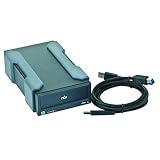
- Number of Total Expansion Bays: 1
- Host Interface: USB 3.0
- Product Color: Black
- Form Factor: External
- Height: 3.6"
| Option | Best fit | Main drawback |
|---|---|---|
| HP RDX | Rugged removable local backups and fast restores | Higher media cost than basic USB drives |
| LTO tape | Large archives and long retention windows | More complexity and less convenient random restores |
| USB hard drives | Low-cost simple backup copies | Less durable workflow and weaker media management |
| Cloud backup | Automated offsite protection | Bandwidth, subscription, and restore-time limits |
Pricing, Use Cases, and Final Verdict
Pricing for the HP RDX Removable Disk Backup System depends on whether you are buying an internal or external dock, the capacity of the removable cartridges, and whether the unit is bundled with backup software. The dock itself is usually the smaller part of the investment; the ongoing cost comes from building a rotation of cartridges for daily, weekly, and offsite backups. Per gigabyte, RDX media typically costs more than standard USB hard drives and cloud archive storage, but it buys a sturdier cartridge format, cleaner handling, and a more controlled backup workflow.
The Tool Desk
Outbyte PC Repair FREEClear out junk files and repair common Windows errorsFree Scan →Outbyte Driver Updater FREEFix the driver behind crashes, sound loss and screen glitchesFind Drivers →For small businesses, the value is strongest when the backup process needs to be physical, simple, and repeatable. A common setup might use five weekday cartridges, one or more weekly cartridges, and a monthly cartridge stored offsite. That gives an office manager or junior IT technician a straightforward routine: insert the correct cartridge, confirm the backup job completed, eject it, and place it in a safe or take it offsite. Compared with loose portable drives, RDX cartridges are easier to label, stack, protect, and rotate without treating them like fragile consumer accessories.
Best-fit use cases
- Small offices with one or two servers: RDX works well for file servers, accounting systems, point-of-sale data, and local application servers where restores may need to happen quickly.
- Businesses with limited internet bandwidth: Companies that cannot push large nightly backups to the cloud can use RDX for local full backups and reserve cloud storage for critical files or longer-term retention.
- Branch offices: A branch location without dedicated IT staff can follow a cartridge rotation plan while central IT monitors backup results remotely.
- Compliance-driven offsite retention: The removable cartridge format makes it practical to keep dated copies in a fire safe, bank box, or secondary office.
The main drawbacks are cost and capacity planning. If your data set grows quickly, replacing cartridges or expanding the media pool can become expensive. RDX also lacks the very high native capacities and mature archival economics of LTO tape, so it is not the best match for large media archives, multi-terabyte data warehouses, or long retention policies spanning many years. On the other hand, tape can be overkill for smaller organizations because of drive cost, software complexity, cleaning requirements, and the slower random-access restore experience.
Against ordinary external hard drives, HP RDX feels more businesslike and durable. The dock-and-cartridge model encourages disciplined media rotation, and the cartridges are better suited to repeated handling than bare USB drives tossed into drawers or laptop bags. Against cloud backup, RDX offers faster local restores and predictable ownership costs, but it does not provide automatic geographic redundancy unless someone physically moves cartridges offsite. For many teams, the best approach is hybrid: RDX for fast local recovery and air-gapped offline copies, with cloud backup for disaster recovery and selected long-term retention.
The final verdict is that the HP RDX Removable Disk Backup System remains a practical backup appliance for small businesses and IT teams that want rugged removable media without adopting tape. It is not the cheapest storage option and not the most scalable archival platform, but it is dependable, easy to explain to non-specialists, and well suited to repeatable backup rotations. If your priority is a straightforward local backup target with removable, portable cartridges that can be stored offline, HP RDX is still a strong and sensible choice.
Frequently Asked Questions
Is HP RDX better than using regular external USB hard drives for backups?
HP RDX is usually more robust for business backup rotation because the cartridges are designed for frequent handling, labeling, storage, and offsite transport. Regular USB drives can be cheaper, but they are easier to damage, misplace, or mix up, and they typically do not offer the same dock-and-cartridge workflow. For a small office with scheduled backups and media rotation, RDX is more organized and durable.
Can HP RDX replace tape backup for a small business?
For many small businesses, yes, especially where backup sets are measured in hundreds of gigabytes or a few terabytes rather than very large archives. RDX is faster to restore from, easier to manage, and does not require the same tape-handling knowledge. Tape still has advantages for very high-capacity, long-term archival storage and lower cost per terabyte at scale.
How easy is it to restore files from an HP RDX cartridge?
Restores are typically straightforward because the RDX cartridge appears like a removable disk to the operating system or backup software. In many setups, you can browse the cartridge and recover individual files much like you would from an external drive. The exact restore process depends on whether you used simple file copy, Windows Backup, or dedicated backup software.
Is HP RDX suitable for offsite backup rotation?
Yes, offsite rotation is one of the main reasons to use RDX. The cartridges are compact, rugged, and easier to transport than bare external drives, making them practical for daily or weekly swaps. For sensitive data, businesses should still use encryption so a lost cartridge does not expose customer records, financial files, or internal documents.
Do these 3 things before closing this tab:
1Fix the driver behind crashes, sound loss and screen glitches2Clear out junk files and repair common Windows errors3Scan for outdated or missing drivers - takes under a minuteShould I choose HP RDX or cloud backup?
HP RDX is a strong choice when you need fast local restores, physical control of backup media, or backups for systems with slow internet connections. Cloud backup is better for automated offsite protection without someone carrying cartridges, but large restores can be slow and ongoing subscription costs add up. Many small IT teams use both: RDX for quick local recovery and cloud backup for disaster protection.
Bottom Line
The HP RDX Removable Disk Backup System is a strong fit for small businesses and IT teams that want rugged, easy-to-rotate local backups without the complexity of tape or the fragility of standard external hard drives. It offers dependable performance, simple operation, broad compatibility, and a practical path for off-site media rotation.
It is not the cheapest option per terabyte, and it does not replace cloud backup for remote access or disaster recovery, but it fills an gap for fast restores and durable offline storage. If your priority is a straightforward, removable backup workflow that staff can manage reliably, HP RDX remains a sensible choice.
Quick Recap
Product prices and availability are accurate as of the date/time indicated and are subject to change. Any price and availability information displayed on Amazon at the time of purchase will apply.




