The HP EX900 500GB is an entry-level M.2 2280 NVMe SSD rated for sequential speeds up to 2,100 MB/s read and 1,500 MB/s write. Those manufacturer figures make it a potential upgrade for a compatible PCIe/NVMe system, but they are not a guarantee of real-world performance: Tom’s Hardware’s 2018 review found weak mixed-workload performance and treated the drive as worthwhile only at the right price. Check your computer’s exact requirements and the warranty for the unit you are buying before choosing it.
HP EX900 500GB specifications
| Specification | HP Storage/Biwin current materials (accessed 2026) | Tom’s Hardware review sample (2018) |
|---|---|---|
| Form factor | M.2 2280 | M.2 2280 S3 |
| Interface and protocol | PCIe 3.0 x4, NVMe 1.4 | PCIe 3.0 x4, NVMe 1.3 |
| Sequential read / write | 2,100 / 1,500 MB/s (manufacturer rating) | 2,100 / 1,500 MB/s (listed specification) |
| Maximum random read / write | 120K / 108K IOPS (manufacturer rating) | 120K / 108K IOPS (listed specification) |
| Endurance | 200 TBW | 200 TBW |
| Warranty | Five years limited | Three years, as reported in the 2018 review |
| Controller, NAND and cache design | Not stated in the current product materials | SMI SM2263XT controller, Micron 64-layer TLC NAND, no onboard DRAM; uses Host Memory Buffer (HMB) |
HP Storage/Biwin lists the 500GB model’s ratings and physical dimensions of 80 × 22 × 2.4 mm on its EX900 product page and in its specification PDF. The PDF notes that specifications can vary with system configuration and that not all products are sold in every region. The NVMe version differs between those current materials and Tom’s Hardware’s older review, so treat NVMe 1.4 and NVMe 1.3 as claims attached to their respective sources rather than as a verified universal revision detail.
As an Amazon Associate I earn from qualifying purchases.
What the performance ratings mean
The 2,100 MB/s read and 1,500 MB/s write figures are sequential maximum ratings published by HP Storage/Biwin, not results guaranteed for every computer or workload. The same materials list maximum random performance of 120K read and 108K write IOPS. Actual transfer rates depend on the host system, workload, drive condition and other configuration factors.
Tom’s Hardware’s 2018 review describes the EX900 as a DRAM-less SSD that uses HMB, a feature that lets an NVMe drive use a small amount of host-system memory for mapping information. The review judged the drive solid for a DRAM-less design but identified low mixed-workload performance as a weakness. That historical assessment is useful context, not a current comparison against all drives now available or a guarantee that every production revision behaves identically.
#1 Best Overall

- 10Gbps NVMe Enclosure: With the latest USB 3.2 Gen2, this M.2 enclosure can achieve a data transfer rate of 10Gbps. Backward compatible with USB 3.1 and USB 3.0. Note: 10G speeds need to be matched with a USB C 3.2 GEN2 data cable
- Tool-free SSD Enclosure: Tool-free NVMe SSD enclosure for quick and easy installation. Plug and play, no drivers required. The buckle design of the M.2 SSD enclosure can ensure stable and fast transfer
- Broad Compatibility: The UGREEN M.2 NVMe SSD enclosure is specially designed to support NMVe protocol M/B&M keys and for 2230/ 2242/ 2260/2280 size SSDs up to 8TB. The M.2 NVMe enclosure is applicable for Windows, Mac OS (Mac Mini M4/M5 Pro/M6), Linux, Android, IOS systems.(Does not support SATA NGFF SSD or mSATA SSD)
- Security & Stability: USB C NVMe enclosure adopts advanced RTL9210 chip with short-circuit, over-current and multi-protection to ensure the safety of your SSD and valuable data, and supports UASP/ Trim with high transfer speed
- Compact & Portable: This ultra-slim aluminium external NVMe enclosure with extra silicone case is portable yet durable, and much easier to carry with this M.2 to USB adapter, making it ideal for travelling
Does the HP EX900 have DRAM?
The specific 500GB sample tested by Tom’s Hardware in 2018 had no onboard DRAM and used HMB. HP Storage/Biwin’s current EX900 materials do not specify the controller, NAND or cache design, so the review’s component details should not automatically be applied to every later unit or revision.
Is the HP EX900 compatible with my laptop or desktop?
It requires more than an M.2-shaped socket: the computer must support an M.2 2280 PCIe/NVMe SSD. M.2 describes the module’s physical format, while SATA and PCIe/NVMe are different interfaces; a SATA-only M.2 slot will not support this PCIe NVMe drive.
Rank #2

- Flip-Open Tool-Free Design: Open the cover, insert your NVMe SSD, lock it in place, and close—no screws or tools required. Fast and simple for upgrades, cloning, troubleshooting, and portable tech work.
- Cooler 10Gbps Performance: The aluminum enclosure presses the thermal pad directly against your SSD for better heat transfer and more stable 10Gbps speeds than slide-in enclosures. Ideal for long transfers and heavy workloads.
- NVMe Only for Maximum Speed: Supports M.2 NVMe SSDs in sizes 2230, 2242, 2260, and 2280 up to at least 8TB. Not compatible with M.2 SATA SSDs.
- USB C Plug-and-Play: Connect with USB C for up to 10Gbps using USB 3.2 Gen 2. No drivers or external power needed. Works with laptops, desktops, gaming handhelds, and USB C devices.
- Portable and Durable Aluminum Build: Reinforced ABS frame with an aluminum alloy top keeps your SSD protected and cool. Slim, lightweight, and perfect for creators, gamers, and anyone needing fast portable storage.
- Find the exact model number of your laptop or motherboard and open its official manual or storage specifications.
- Confirm that an M.2 2280 slot supports PCIe/NVMe, not only M.2 SATA.
- Check any stated capacity, boot-drive or lane-sharing limits, and whether an existing slot or component affects use of the connector.
- For an HP computer, confirm that its documentation supports NVMe storage; the 2018 review’s compatibility assurance applies to supported NVMe-capable HP systems, not every HP product.
HP Storage/Biwin describes the drive as broadly suitable for mainstream devices, but that does not establish compatibility with every laptop or desktop. The exact system documentation is the deciding reference.
Recommended Free Tools
How long is the HP EX900 warranty?
HP Storage/Biwin’s current product information lists a five-year limited warranty and 200 TBW endurance for the 500GB tier. Tom’s Hardware reported a three-year warranty and the same 200 TBW rating for the version it reviewed in 2018. The difference is unresolved for a particular region or product revision; check the packaging and the terms provided by the seller or manufacturer for the exact unit. TBW is the stated total amount of data written for endurance rating, not a prediction of the drive’s precise lifespan.
Rank #3

- ENCLOSURE ONLY, SSD NOT INCLUDED: This is the case you put your own M.2 SSD into, not a drive with storage inside. 100% tool-free, so the SSD installs and comes out in seconds with no screwdriver.
- FITS M.2 NVMe AND SATA: Works with both M.2 PCIe NVMe and M.2 SATA SSDs in 2242, 2260 and 2280 lengths. Bare drives only, no room for a drive with a pre-installed heatsink. It does NOT take 2.5in SATA drives or mSATA.
- 10GBPS USB 3.2 TYPE-C: Up to 10Gbps, and up to 1000MB/s in real transfers. Backward compatible with USB 3.1 and USB 3.0 at their own speed limits. Bus powered, no drivers and no external power supply.
- SLIM ALUMINUM BUILD: Ultra-slim aluminum case with an ABS frame, with a thermal pad to move heat off the drive. Light enough to live in a laptop bag, solid enough to survive it.
- IN THE BOX: Enclosure, 8in Type-C to Type-C cable and user manual. Works with Windows 7 or later, macOS 10.5 or later and Linux. Register on the manufacturer's website for extended warranty service.
Is the HP EX900 500GB worth it?
It can make sense as a budget NVMe upgrade if your system supports it and the live price is compelling. Tom’s Hardware’s 2018 verdict called it a possible entry-level upgrade if priced appropriately while noting its weak mixed-workload performance. Its launch-era price is not a useful guide to today’s value, and current price, stock and seller were not established here. Compare the current cost with alternatives on capacity, workload performance, endurance, warranty and verified compatibility rather than relying on the EX900’s headline sequential rating alone.
Quick Recap
Best Value
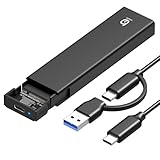
- 【10Gbps High-Speed Transfer】Equipped with the latest USB 3.2 Gen 2 interface, this m.2 enclosure delivers blazing-fast data transfer speeds of up to 10Gbps. It is also backward compatible with USB 3.1, USB 3.0, and USB 2.0, ensuring wide device compatibility and stable performance across various systems.📌 NOTE: Transfer speed depends on SSD performance, USB port, system specs, and NVMe type.
- 【Xiaobi SSD Enclosure M.2 NVMe】Compatible with M.2 NVMe SSDs using M-Key or B+M Key interfaces. Supports standard sizes including 2230, 2242, 2260, and 2280 — one ssd enclosure for multiple SSD formats. 📌 NOTE: Not compatible with SATA (NGFF) or mSATA SSDs. 📌 Note: M.2 SSD with heatsink is not supported.
- 【No Tools, No Hassle – Just Plug and Play】Enjoy hassle-free installation with this tool-free nvme to usb adapter. Simply plug and play—no drivers or software needed. Designed with a secure buckle mechanism, the nvme external enclosure ensures a stable connection and reliable high-speed data transfer at all times.📌 NOTE: Remove the transparent film from the USB-C NVMe enclosure before use.📌📌 𝐓𝐨 𝐨𝐩𝐞𝐧 𝐭𝐡𝐞 𝐍𝐕𝐌𝐄 𝐒𝐒𝐃 𝐞𝐧𝐜𝐥𝐨𝐬𝐮𝐫𝐞, 𝐩𝐫𝐞𝐬𝐬 𝐭𝐡𝐞 𝐎𝐏𝐄𝐍 𝐛𝐮𝐭𝐭𝐨𝐧𝐬 𝐨𝐧 𝐛𝐨𝐭𝐡 𝐬𝐢𝐝𝐞𝐬 𝐚𝐭 𝐭𝐡𝐞 𝐬𝐚𝐦𝐞 𝐭𝐢𝐦𝐞 𝐮𝐬𝐢𝐧𝐠 𝐲𝐨𝐮𝐫 𝐟𝐢𝐧𝐠𝐞𝐫𝐬.
- 【Stay Cool, Transfer Faster 】The pcie nvme adapter features a premium aluminum alloy housing combined with a high-efficiency silicone thermal pad, enabling excellent heat dissipation.This design ensures stable performance even during high-speed data transfers by effectively reducing thermal buildup and protecting your SSD from overheating.
- 【Compatible System】The Xiaobi ssd case is widely compatible with Windows, macOS, and Linux. Whether you're using a Windows PC or a Mac, this NVMe adapter offers seamless plug-and-play performance across all major operating systems.
Rank #4

- Applicable SSD: This M.2 SSD Enclosure is for NVMe PCIE & SATA M-Key / B+M connectors M.2 SSD. Applicable to sizes 2242 / 2260 / 2280 solid state drivers. This SATA/ NVMe Enclosure does not support M.2 PCIe AHCI SSDs, M.2 PCIe devices such as WiFi and capture cards, mSATA SSDs, and non-M.2 form factor SSDs. Note: NVMe and SATA SSD are not included in M.2 SSD Enclosure
- Type C interface: M.2 SSD Enclosure Both side can be inserted; M.2 NVME recommends USB-C Gen 2 10Gbps or Thunderbolt 3 for extreme speed performance. One HD movie transfer only takes 2 seconds; Backward compatible with USB 3.1 Gen1 and USB 3.0 up to 5Gbps
- Aluminum Alloy Shell: SSK M.2 enclosure adopts aluminum alloy shell, slim design, excellent heat dissipation, be portable and easy to carry. Package includes 2 x Thermal Pad,both USB Type-C and USB 3.0 (Type-A) cables, and a Screw Driver
- Blue Indicator: Blue Indicator shows NVMe enclosure transfer status, easy and clear; As with all SSDs, new media must be formatted before use. SSD file system must be supported on host operating system to be accessible
- Improved RTL9210B Chip: Adopts high performance controller IC Chipset, Complies with UASP and Trim which can effectively improve SSD enclosure speed and exteend the longevity of SSD. M.2 enclosure Compatible Multi OS, Windows 7/ 8/ 8.1/ 10/ Linux/ MAC. Plug-and-play, no additional drivers required. Bus powered, does not need an external power supply
Product prices and availability are accurate as of the date/time indicated and are subject to change. Any price and availability information displayed on Amazon at the time of purchase will apply.




