Free tools Windows power users keep installed
One-click scans. No signup required.
You can use a script to wake a computer by sending a Wake-on-LAN (WoL) magic packet to its wired network adapter. The script is the simple part: the computer must support WoL, its firmware and adapter must be configured to listen while asleep, and the packet must reach the correct network. Start with a test on the same local network; waking a machine over the internet also requires a router or always-on gateway configured for that network.
What Wake-on-LAN can—and cannot—do
WoL lets a compatible network adapter detect a specially constructed packet and signal the computer to wake. It does not let a sleeping computer run a script to wake itself, and the packet does not provide remote login or control. A sender on the local network, a router with a WoL feature, or an always-on gateway can send the packet on the target machine’s behalf.
As an Amazon Associate I earn from qualifying purchases.
For the basic setup, the target needs WoL-capable firmware and a wired Ethernet adapter that remains able to detect the packet in the intended power state. The exact supported states and settings depend on the computer, adapter, driver, and operating system. Intel’s Remote Wake up Basics for Intel Ethernet Products and TP-Link’s WoL setup guide describe vendor-specific prerequisites.
What’s actually slowing this PC down?
Pick the symptom - the matching free tool is one click away.
Check that the target can be woken
1. Find the firmware setting
In the computer’s BIOS or UEFI, look for a setting named “Wake on LAN,” “Wake on PME,” “Resume by PCI/PCIe,” or a similar power-management option. Names and behavior differ by manufacturer. Confirm in the computer or motherboard documentation that the setting applies to the network adapter and power state you intend to use.
#1 Best Overall
![[Upgrade] PCIe Ethernet Card Nic 10/100/1000Mbps Gigabit PCI-Express Network Card (WIN10/11 Driver-Free) RJ45 Network LAN Card Wake On LAN Adapter Internal Computer Desktop PC for Win/Linux/Mac 1 PCS](https://m.media-amazon.com/images/I/41Pg9xidVZL._SL160_.jpg)
- This pcie network card, compatible with PCI-Express X1,X4,X8,X16. Cannot support PCI slot.
- [Features]PCI-Express 10/100/1000Mbps network card for pc Support PXE function an Wake on LAN,Transmission is more efficient and takes up less memory,Support Wake On LAN,Achieve remote control of all computers and reduce the trouble of frequent operations.Applied in internal computer Gigabit NIC network cards
- [Compatible systems]Widely used in industrial computer, embedded computer, single board computer, digital multimedia and other network equipment. Compatible with various operating systems DOS/MAC OS/ ROS/Linux/2016/2012/2008/Sever 2003/Vista /Win11/ Win10 / Win8/XP, Win7/2000/ME/98SE,If your system is not the latest, please scan the QR code on the product to download the driver. (win10/win11 driver-free).
- [About the old equipment upgrade]We suggest to insert PCI3.0 motherboard slot or pcie16x slot, because pcie1x some old motherboards can't reach gigabit. And your router and fiber optic cat should also be replaced with gigabit cable, use our complimentary cat6 cable, sometimes the rate is not reached because your device itself does not support gigabit hardware.
- [Accessories]Gigabit PCI-E network card*1 pcs,12cm chassis bezel *1 pcs (applicable to conventional chassis),8cm chassis bezel *1 pcs (applicable to 2U chassis), Special screwdriver for NIC *1 pcs(Easy to replace the network card).cat6 ethernet cable 3 ft *1 pcs(The measured rate can pass 1000Mbps).
Adapter capability can also vary by model and port. For example, Intel documents that WoL is available only on port A on most of its multiport adapters and that its Ethernet 10-gigabit adapters do not support WoL. Those are Intel product-specific limits, not general rules for all network adapters.
2. Enable the adapter’s wake options
On Windows, open Device Manager, find the Ethernet adapter, and inspect its Properties. When the driver exposes them, check the Advanced and Power Management tabs for settings such as “Wake on Magic Packet,” “Shutdown Wake Up,” and “Allow this device to wake the computer.” Labels and available controls vary by driver and computer manufacturer. Intel notes that some controls may be unavailable on Modern Standby systems.
Rank #2

- Ultra-Fast: 10/100/1000Mbps PCIe Adapter upgrade your Ethernet speed to Gigabit
- Automation: Wake-on-LAN supporting Auto-Negotiation and Auto MDI/MDIX
- Supports: IEEE802.3x Flow Control for Full-duplex Mode and backpressure for Half-duplex Mode; 4k Bytes Port: 1x 10/100/1000Mbps RJ45 Network Media
- Compatibility: Windows 11, 10, 8.1, 8, 7, Vista, XP
- Dual Bracket: Low profile and standard profile bracket inside works with both mini and standard size PCs.
Use Ethernet as the baseline. TP-Link’s stated prerequisites call for a wired adapter and a supported mainboard; wireless wake behavior is not established by these instructions, so check the specific computer and adapter documentation before relying on it.
3. Choose a supported power state
Test from sleep first. Do not assume that a machine which wakes from sleep will also wake from hibernate or a full shutdown. Microsoft’s Windows Ethernet documentation describes WoL from Sleep (S3) or Hibernate (S4), and says wake from Hybrid Shutdown (S4) or Classic Shutdown (S5) is unsupported in the Windows behavior it documents. Because the page uses S4 in describing both hibernate and Hybrid Shutdown, check the current documentation for the exact Windows version and device rather than applying those labels universally.
Rank #3

- ⭐【Super-fast 2.5Gbps Networking】High up to 2.5x-speed with Realtek RTL8125B chip, much faster data-transfer speeds for gaming, living broadcasts and downloads in bandwidth-demanding tasks.
- ⭐【Complete Compatibility】Seamless backward compatibility for 2.5Gbps/1Gbps/100Mbps, Support Windows11/10/8.1/8/7, MAC OS and Linux, no dirver needed on Windows10, easily download the driver in Realtek official website for other OS.
- ⭐【PCIe to 2.5G RJ45】 This 2.5GBASE-T PCIe Network Adater convers a PCIe slot(X1/X4/X8/16) into a 2.5G RJ45 Ethernet Port. Note: Only work with PCIe slot, not for PCI slot.
- ⭐【Widely Use with Heat Sink】Comes with standard bracket and low-profile-bracket to meet the needs of different cases such as desktop, workstation, server, mini tower computer and so on. Excellent heat dissipation can reduce the temperature quickly and maintain the stability of network transmission.
- ⭐【Customer Service】Each GigaPlus 2.5G NIC has been rigorously tested for reliability, quality, and performance. We provide lifetime technical support for the entire product.
Send a magic packet on the local network
Record the correct MAC address
A magic packet identifies the target network adapter by its MAC address. Record the address for the Ethernet adapter connected to the network, not an unrelated Wi-Fi adapter or a different Ethernet port. If the machine has multiple adapters, label the address with the computer and port so the sender targets the intended interface.
Choose where the sender runs
The sender can be another computer on the same LAN, a router with a WoL tool, or an always-on gateway inside the target network. The packet must reach the target LAN and be addressed to the right adapter. A script cannot make an unreachable sleeping machine’s own network stack forward a request.
Rank #4
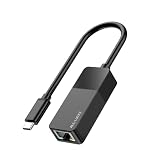
- Faster & More Stable Wired Network: Full 10/100/1000Mbps gigabit Ethernet performance. Backward compatible with USB 2.0/1.1 (actual speed limited by USB port version; USB 3.0 gives near gigabit). Suitable for gaming, HD streaming, and large file transfers
- Plug and Play – No Driver Hassle: Connect the USB C end to your device and the RJ45 port to your router or modem. Driver-free operation on Windows 11/10/8/7, macOS, iPadOS, iOS, Chrome OS, and most Linux distributions. (For Windows XP/Vista and older Linux, a one-time driver download may be required.)
- Wide Device Compatibility: Works with iPhone 15/16/17, iPad USB-C models, MacBook/Pro/Air, and most USB-C smartphones (Android phones require USB OTG and Ethernet support)
- Stable & Reliable Connection: Provides a constant wired connection without Wi-Fi interference, signal drops, or lag. The chipset supports Wake-on-LAN (WoL) and Auto MDIX – helpful for remote work, online gaming, and video calls
- Compact & Durable ABS Housing: Lightweight ABS plastic shell designed for daily use. Portable, suitable for travel, home office, or dorm room. USB bus powered – no external power supply needed
For example, MikroTik RouterOS provides /tool wol, which sends a UDP magic packet to a broadcast address using the target MAC and an interface. This is RouterOS-specific syntax, not a portable command for Windows, macOS, Linux, or other routers. Use the sender’s own documentation for its command or interface; the packet-sending method depends on that environment and the LAN layout.
Test before adding remote access
- Put the target in a known supported low-power state, starting with sleep.
- From a sender on the same local network, send a WoL packet for the target’s wired-adapter MAC address.
- Confirm that the target wakes. If it does not, work through the checks below before changing router settings.
- Once local waking works, decide whether you actually need access from outside the LAN.
Wake a computer from outside your network
A packet sent from the public internet does not automatically reach a sleeping machine behind a router. The router or an always-on device inside the target LAN must provide a documented path to originate or relay the wake packet. Options include the router’s own WoL feature, an always-on gateway, or a router-specific forwarding configuration.
Best Value

- Fast 1300Mbps USB WiFi Adapter - Nineplus wifi adapter provides long-range and stable wifi connections,Upgrade your desktop or laptop wifi Technology with our AC1300Mbps usb wireless Adapter. Whether your desktop pc's wifi usb is malfunctioning or you’re looking to upgrade to faster dual-band 5GHz and 2.4GHz speeds, this pc wifi adapter is the ideal choice. It’s a budget-friendly way to extend your device’s life and experience the benefits of modern WiFi technology
- Dual-band 5.8GHz and 2.4GHz Bands - 5.8Ghz wifi Connection speed up to 867Mbps,2.4GHz 400Mbps,With these upgraded speeds, web surfing, gaming, and streaming online meeting is much more enjoyable without buffering or interruptions,Experience the High Wi-Fi speed of our AC1300Mbps wifi dongle delivers faster internet speeds and stronger, more reliable signal penetration over long distances. It's a high-speed dual-band wifi usb adapter for pc and easy for the modern user.
- Two 5dBi High Gain Wifi Antenna – The high gain antenna of the desktop wifi adapter greatly enhances the reception and transmission of WiFi signal strengths.Equipped with dual high-gain pc wifi antenna, our wifi dongle for desktop pc ensures accurate capture of WiFi signals, providing a stable and strong connection even at greater distances, ideal for overcoming poor signal issues in bedrooms. This computer wifi adapter, wifi card, and usb wifi antenna extend your coverage.
- Super Speed USB 3.0 - wifi adapter for desktop pc Connect speeds Up to 10x faster than USB 2.0 USB, Super USB3.0 delivers faster data transfer, a more reliable network connection, and improved compatibility for wifi adapter for pc. It fully supports the high-speed demands of AC1300 wireless adapter, ensuring peak performance. Plus, it's backward compatible with standard USB 2.0 ports for added flexibility.usb wifi adapter for desktop pc 3.0
- Compatibility Systems: This Wi-Fi usb adapter is compatible with Windows11/10/8.1/8/7/XP,not supports Mac OS or Chromebook or Linux. Most Windows 11/10 systems will automatically detect and install the drivers. If the system does not detect the driver, you will need to download it from our website. For Windows 7, you will need to manually install the driver for this wifi card.or you go to the website online-setup support,we do online-setup for you.
Router setup is model-specific. TP-Link’s guide describes one vendor example involving firmware and adapter configuration, binding the target’s IP and MAC address, reserving its address, and configuring port forwarding. It also suggests DDNS for a changing WAN address. Do not copy those steps to a different router unless its own documentation supports the same method.
WoL is a wake mechanism, not an authenticated remote-control service. MikroTik says its documented RouterOS WoL tool does not support secure WoL. Do not treat exposed packet forwarding as secure by default; follow current guidance from your router or network vendor, and consider using a trusted VPN or an on-network gateway for remote administration.
Quick Recap
Troubleshoot in this order
- Verify the power state. Test sleep before hibernate or shutdown. Operating-system and device support differ; Microsoft’s Windows Ethernet guidance documents specific state limitations for Windows.
- Check firmware configuration. Confirm that WoL, PME, or the relevant PCI/PCIe wake option is enabled, and check whether a power-saving setting removes standby power from the adapter.
- Check adapter permissions and driver options. Verify magic-packet and wake permissions where the driver provides them. Modern Standby can change which controls are available.
- Confirm the adapter and physical port. Use the MAC address for the connected Ethernet adapter and check the specific model’s WoL capability; multiport behavior can differ.
- Check the packet’s network path. Ensure the sender can deliver to the target LAN and is using the correct MAC. Intel’s Killer guidance warns that subnet separation or more than one router between devices can prevent WoL in the situations it describes.
- Investigate the router only after local testing. If local WoL succeeds but remote WoL fails, focus on the router or gateway’s supported relay or wake method. Vendor instructions are not interchangeable.
What determines the right implementation
| Choice | What it means | Key consideration |
|---|---|---|
| Sender location | Same-LAN computer, router WoL feature, or always-on gateway | The sender must be able to deliver the packet to the target LAN. |
| Network boundary | Local subnet or a remote network that must reach the home LAN | Remote waking needs a documented router or gateway path. |
| Target power state | Sleep, hibernate, or shutdown | Support depends on the exact operating system, hardware, and adapter configuration. |
| Security setup | Local packet sending, router forwarding, or VPN/gateway access | WoL itself is not authenticated remote control; assess the network exposure separately. |
| Hardware compatibility | Firmware, wired NIC, physical port, driver, and standby power | Confirm the particular machine and adapter support the intended wake state. |
Product prices and availability are accurate as of the date/time indicated and are subject to change. Any price and availability information displayed on Amazon at the time of purchase will apply.
Quick wins for a faster PC:
Fix the driver behind crashes, sound loss and screen glitchesFind Drivers →Clear out junk files and repair common Windows errorsFree Scan →Scan for outdated or missing drivers - takes under a minuteDriver Scan →



