What’s actually slowing this PC down?
Pick the symptom - the matching free tool is one click away.
An AI toothbrush camera can help you see whether the brush is reaching each tooth surface, but it works as a viewing and coaching aid—not as a dental diagnostic device. Start the model’s companion-app session, hold the brush head horizontally against your teeth, move slowly, and use the live image or coverage map to revisit areas the app indicates. Keep the fundamentals unchanged: brush gently for two minutes twice a day with fluoride toothpaste and cover the inner, outer, and chewing surfaces.
What an AI toothbrush camera actually checks
A camera-equipped brush can put a live view of the brush head and nearby teeth on a companion app. On Dyson’s CameraJet, the manufacturer describes live footage in the MyDyson app, real-time guidance, coverage mapping, and brushing insights. Those functions belong to that specific product and app; the term “AI toothbrush” does not mean that every connected brush contains a camera.

As an Amazon Associate I earn from qualifying purchases.
The camera is most useful for answering a practical question during a session: “Which surfaces have I just cleaned, and which still need attention?” It can help you orient the head, slow down, and notice gaps in coverage. It cannot establish that teeth or gums are healthy, rule out decay, or replace an examination and personalised instructions from a dental professional.
Before your first camera-guided session
Confirm the exact brush and app
Camera and guidance features are model-specific. Identify the precise brush model, install its official companion app, and follow the manufacturer’s connection and setup instructions. Do not assume that pairing steps, camera controls, or coverage screens from one brand will appear on another model. For CameraJet, the relevant viewing and guidance environment is the MyDyson app.
#1 Best Overall
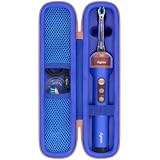
- Compatible Toothbrush Storage — Designed for the Dyson CameraJet electric toothbrush with flosser, this fitted carrying case keeps your brushing device and selected essentials together between uses. The slim layout provides a dedicated enclosure for the Dyson CameraJet toothbrush with flosser and makes it easier to pack one kit. Whether you call it a Dyson camera jet electric toothbrush or Dyson camera jet toothbrush, check the model and shape on this listing to confirm the correct fit.
- Organized Interior — A molded compartment follows the shape of your Dyson toothbrush with camera, while an elastic band helps hold the handle in place. Soft velvet lining reduces rubbing against stored surfaces. Two lid mesh pockets separate a cable, spare brush head, or small accessories from the main unit. This arrangement keeps a Dyson electric toothbrush with camera and its essentials easy to locate, so your CameraJet toothbrush is ready to unpack without sorting through loose pieces.
- Protective Exterior — A textured nylon outer layer covers the firm EVA shell, helping shield your Dyson smart toothbrush from routine bumps, scratches, dust, and light splashes. Rounded corners provide a streamlined profile, and the wraparound zipper with two pulls opens widely for access. The attached carry handle offers a convenient grip for moving a Dyson ai toothbrush between locations. Choose the blue or pink option shown on the listing to coordinate your Dyson camera toothbrush storage.
- For Home and Travel — Pack your Dyson smart electric toothbrush for business trips, flights, train journeys, road trips, hotel stays, cruises, camping, RV weekends, gym visits, college dorms, overnight stays, and family vacations. At home, keep your Dyson ai electric toothbrush gathered in a bathroom cabinet or vanity drawer. The compact case slips into luggage, backpacks, and larger toiletry bags, giving a camera jet electric toothbrush a familiar storage place wherever your routine takes you.
- Case Only — Package includes one hard carrying case with its molded interior, elastic band, mesh pockets, zipper, and handle. The Dyson toothbrush with flosser, brush heads, charging cable, charger, and other accessories are not included. This accessory stores a Dyson electric toothbrush with flosser; it does not charge, sanitize, or operate the device. Before ordering for your Dyson toothbrush flosser, compare the model and measurements with the listing and allow items to dry before packing.
Prepare a clear view
- Charge the brush and open the app before applying toothpaste so you are not rushing through setup.
- Use a mirror and enough light to position the head comfortably, even though the camera supplies its own view.
- Apply fluoride toothpaste as usual. During the session, spit out excess toothpaste slurry regularly; a heavy coating can obscure the camera’s view and make gaps harder to detect.
- If you wear removable dental appliances, follow your dentist’s instructions about whether to remove them before brushing.
Step-by-step: checking your technique with the camera
- Connect the brush according to its manual. Open the manufacturer’s app, select the exact brush when prompted, and start the camera or guided-brushing mode offered for that model. There is no universal pairing path.
- Start the live view. Use the image to identify the brush head, the tooth surfaces in frame, and the direction in which you are moving. The first few seconds are for orientation, not fast scrubbing.
- Place the head horizontally. Dyson’s support guidance for CameraJet says to position the brush head horizontally to the teeth. Keep the head in gentle contact rather than pressing hard to force a closer image.
- Move slowly from one zone to the next. Work in a repeatable order—such as upper outer surfaces, upper inner surfaces, upper chewing surfaces, then the equivalent lower zones—so a missed area has a predictable place in your routine. Follow any zone order shown by the app.
- Keep the lens view usable. Spit out toothpaste slurry regularly, as Dyson recommends, whenever foam or liquid blocks the image. A clear view is more useful than continuing while the camera is obscured.
- Respond to coverage prompts. If the app highlights a tooth zone or shows incomplete coverage, pause, reposition the head, and make deliberate short strokes over that surface. Check the inner, outer, and chewing surfaces rather than repeatedly polishing one visible area.
- Finish the complete routine. Camera feedback does not replace the recommended brushing time, fluoride toothpaste, gentle pressure, or any additional cleaning your dentist has prescribed. End the session only after the app’s routine is complete and you have covered every surface.
How to read the live image and coverage map
Use the image to orient the head
A live view is valuable when you are unsure whether the bristles are facing the cheek side, tongue side, or a chewing surface. Make small adjustments until the intended surface is clearly in view, then hold that orientation while moving along the dental arch. Do not chase a moving image by making large, rapid strokes.
Treat a highlighted gap as a revisit instruction
Coverage displays are feedback about where the device believes you brushed, not a clinical map of disease. If a zone remains unfilled, return to it slowly and check that the bristles are touching the intended surface. A gap may reflect speed, angle, obstruction from slurry, or the limitations of the model’s tracking rather than a problem with the tooth itself.
Check all three surface groups
- Outer surfaces: the sides facing the lips and cheeks.
- Inner surfaces: the sides facing the tongue or palate.
- Chewing surfaces: the grooved tops of back teeth.
The American Dental Association (ADA) also describes short, gentle strokes at the gumline and a vertical brush position for the inside surfaces of the front teeth. Use the camera to verify that each of these areas enters the view; do not limit the session to the easiest outer surfaces.
Recommended Free Tools
The brushing technique to use while the camera watches
The ADA recommends brushing twice a day for two minutes with a fluoride toothpaste. Its Toothbrushes guidance says a soft-bristled brush and gentle pressure can reduce the risk of gingival injury. Place the bristles at about a 45-degree angle to the gumline and move in gentle, short strokes. Individual dental conditions may require a different approach, so a dentist’s instructions take priority.
Use the camera to check execution of that technique:
- Keep pressure light enough that the bristles are not being forced flat against the teeth or gums.
- Use short, controlled movements instead of fast horizontal scrubbing.
- Pause at the gumline and around the back molars, where hurried routines often leave surfaces unvisited.
- Turn the head vertically for the inside surfaces of the front teeth, as the ADA describes.
- Continue until the full two-minute routine is finished, even if the app’s map appears complete early.
“The American Dental Association recommends brushing teeth twice a day for two minutes using a fluoride toothpaste.”
Rank #2
 co2CREA Hard Travel Case for Dyson CameraJet Electric Toothbrush, Blue
- Designed for the Original Travel Box — Compatible with the Dyson CameraJet electric toothbrush with flosser, this outer carrying case accommodates the original transparent travel box shown in the product images. Keep your Dyson CameraJet toothbrush with flosser stored inside its existing box, then place the box in this protective enclosure. The format gives your Dyson camera jet electric toothbrush or Dyson camera jet toothbrush a single packed unit for convenient storage between uses.
- Soft Interior Protection — Velvet lining covers the base, walls, and lid, providing a gentle contact surface around the original travel box for your Dyson toothbrush with camera. The open rectangular compartment allows the box to be placed inside and lifted out easily, without separate slots to arrange. This layout helps reduce rubbing against the box and keeps a Dyson electric toothbrush with camera enclosed as one set, making your CameraJet toothbrush setup easy to unpack after arrival.
- Durable Exterior — A textured nylon outer layer covers the structured EVA shell to help shield your Dyson smart toothbrush setup from everyday bumps, scratches, dust, and light splashes. Rounded corners create a neat profile, while the wraparound zipper and two easy-grip pulls provide wide access for loading the travel box. The attached woven handle gives you a convenient grip when moving a Dyson ai toothbrush. The blue exterior adds a distinct look to your Dyson camera toothbrush storage.
- For Home and Away — Bring your Dyson smart electric toothbrush on business trips, flights, train journeys, road trips, cruises, hotel stays, weekend getaways, camping trips, RV vacations, gym visits, and overnight stays with family. At home, keep a Dyson ai electric toothbrush setup together in a bathroom cabinet, vanity drawer, or guest room. The rectangular case packs alongside clothing and toiletries, giving your camera jet electric toothbrush a consistent storage place wherever you go.
- Outer Case Only — Package includes one hard carrying case with velvet lining, dual zipper pulls, and a handle. The Dyson toothbrush with flosser, original transparent travel box, brush heads, charging cable, charger, and other displayed accessories are not included. This case stores a Dyson electric toothbrush with flosser setup and does not charge or operate the device. Before ordering for a Dyson toothbrush flosser, compare your model and original box measurements with the listed inner size.
— American Dental Association, Toothbrushes guidance
Free tools Windows power users keep installed
One-click scans. No signup required.
Special offer. See more information about Outbyte and uninstall instructions. Please review EULA and Privacy policy.
How to tell whether you missed a tooth
Look for two kinds of evidence together: the physical view and the app’s coverage feedback. First, identify the tooth or zone currently in front of the lens. Then check whether the bristles actually reached the outer, inner, and chewing surfaces. If the map or prompt marks that zone as incomplete, clean it again slowly after clearing the slurry from your mouth.
Move through the mouth in sections instead of jumping between isolated teeth. A consistent route makes it easier to notice a skipped molar or an unvisited tongue-side surface. If the image repeatedly disappears, do not interpret the blank area as proof that the tooth was missed; improve visibility, reposition the head, and repeat the pass.
After brushing, the camera cannot tell you whether plaque has caused a cavity, whether gum tissue is infected, or whether a sore area is harmless. Persistent bleeding, pain, swelling, a visible lesion, or a question about an individual tooth warrants professional dental advice.
Camera view versus sensor-based app tracking
Connected brushes do not all track the same way. The following distinctions are important when you are deciding what an app’s feedback means.
Quick wins for a faster PC:
Scan for outdated or missing drivers - takes under a minuteDriver Scan →Repair Windows errors before they cause bigger problemsFix Now →| Device or app example | What the cited manufacturer information establishes | What that means for your session |
|---|---|---|
| Dyson CameraJet with MyDyson | Integrated camera, live footage, real-time guidance, coverage mapping, and brushing insights are described by Dyson. | You can use an on-screen image to orient the head and revisit coverage gaps; the camera feature is specific to this model and its app. |
| Philips connected-brush guidance | Philips says its app follows a brushing pattern because the app cannot locate the brush position. | Pattern guidance should not be treated as a live intraoral camera view. |
| Philips premium-device privacy notice, October 2025 | For the described devices, AI and machine-learning features infer coverage, pressure, and scrubbing from IMU sensor data, with processing occurring locally in the app or device rather than in the cloud. | Those inferences come from motion sensors; the notice does not establish a camera for other Philips models. |
| Oral-B app-connected brushes | Oral-B describes AI recognition and 3D tracking. | These are recognition and motion-tracking features; the cited information does not establish a built-in camera. |
When comparing any model, ask five separate questions: Does it provide a live intraoral image or only sensor feedback? Are prompts shown during brushing or only in a later summary? Which zones and technique measures are displayed? Which phone, operating system, app, and exact brush model are supported? What does the maker say about storage and processing of app data?
Privacy and data boundaries
Camera imagery and app records deserve the same care as other personal data. Review the privacy notice for the exact brush, app version, and region before enabling optional analytics, account synchronisation, or sharing. Dyson’s feature description covers live view and brushing insights but does not, in the cited material, provide detailed image-retention terms, so do not assume that camera images are automatically deleted or that they are never transmitted.
Philips’ October 2025 notice is a product-specific example of why model-level wording matters: it describes local AI/ML processing for certain premium devices using IMU sensor data. That statement should not be generalised to a camera toothbrush made by another manufacturer. If privacy is a deciding factor, look for explicit statements about what is collected, where processing occurs, retention periods, account deletion, and whether a session can run without cloud synchronisation.
Troubleshooting common camera-session problems
The view is cloudy or blocked
Spit out toothpaste slurry, rinse your mouth if needed, and resume with the head horizontal. Slowing down is preferable to brushing through an unreadable image. Reapply only enough toothpaste for a normal session; excess foam makes visual feedback less reliable.
Windows Errors? Fix Them Before They Spread
Repair common Windows errors and clear accumulated junk for a smoother, more stable PC - no reinstall needed.Free scan · no reinstallOutdated Drivers Are Slowing You Down
One free scan finds every outdated or missing driver and matches the right update for your exact hardware.Free scan · exact hardware matchThe app shows a gap where you just brushed
Check whether the head was actually facing that surface and whether slurry hid the lens. Repeat the area with short, gentle strokes. If the same zone remains unrecognised, record the limitation rather than increasing pressure or scrubbing aggressively.
The camera or guided mode is missing
Verify that the brush model supports a camera, that the current app is the manufacturer’s official app, and that the brush is connected under the correct model name. A connected brush may provide timing, motion, or pattern guidance without having any camera hardware.
You are tempted to press harder
Do not use pressure to compensate for tracking uncertainty. The ADA’s guidance favours gentle pressure with soft bristles. Reposition, slow down, clear the view, or consult the model’s support instructions instead.
Rank #4

- Designed for the Original Travel Box — Compatible with the Dyson CameraJet electric toothbrush with flosser, this outer carrying case accommodates the original transparent travel box shown in the product images. Keep your Dyson CameraJet toothbrush with flosser stored inside its existing box, then place the box in this protective enclosure. The format gives your Dyson camera jet electric toothbrush or Dyson camera jet toothbrush a single packed unit for convenient storage between uses.
- Soft Interior Protection — Velvet lining covers the base, walls, and lid, providing a gentle contact surface around the original travel box for your Dyson toothbrush with camera. The open rectangular compartment allows the box to be placed inside and lifted out easily, without separate slots to arrange. This layout helps reduce rubbing against the box and keeps a Dyson electric toothbrush with camera enclosed as one set, making your CameraJet toothbrush setup easy to unpack after arrival.
- Durable Exterior — A textured nylon outer layer covers the structured EVA shell to help shield your Dyson smart toothbrush setup from everyday bumps, scratches, dust, and light splashes. Rounded corners create a neat profile, while the wraparound zipper and two easy-grip pulls provide wide access for loading the travel box. The attached woven handle gives you a convenient grip when moving a Dyson ai toothbrush. The pink exterior adds a distinct look to your Dyson camera toothbrush storage.
- For Home and Away — Bring your Dyson smart electric toothbrush on business trips, flights, train journeys, road trips, cruises, hotel stays, weekend getaways, camping trips, RV vacations, gym visits, and overnight stays with family. At home, keep a Dyson ai electric toothbrush setup together in a bathroom cabinet, vanity drawer, or guest room. The rectangular case packs alongside clothing and toiletries, giving your camera jet electric toothbrush a consistent storage place wherever you go.
- Outer Case Only — Package includes one hard carrying case with velvet lining, dual zipper pulls, and a handle. The Dyson toothbrush with flosser, original transparent travel box, brush heads, charging cable, charger, and other displayed accessories are not included. This case stores a Dyson electric toothbrush with flosser setup and does not charge or operate the device. Before ordering for a Dyson toothbrush flosser, compare your model and original box measurements with the listed inner size.
How to make a repeatable coverage routine
Consistency matters more than chasing a perfect score. Divide the mouth into six practical zones: upper right, upper front, upper left, lower left, lower front, and lower right. In each zone, visit the cheek-facing surfaces, tongue- or palate-facing surfaces, and chewing surfaces of the back teeth. This sequence gives every area a place in the routine and makes it easier to notice when an app prompt conflicts with what you can see.
Keep the brush head still enough for the camera or sensors to register its position, then advance one or two teeth at a time. Avoid repeatedly returning to the first teeth because they are easiest to see. If your device offers a timer, let it run for the full two minutes. A complete map obtained in less time is not evidence that the teeth received the ADA-recommended brushing duration.
For a useful self-check, compare several ordinary sessions rather than judging one score. Note whether the same inner molars, gumline, or front-tooth surfaces are repeatedly flagged. That pattern can help you change your route or ask a hygienist for instruction, but it still does not measure plaque, enamel damage, or gum health directly.
Independent reader supportYour contribution helps us test, update, and keep practical guides available for everyone.What the camera cannot reliably show
Camera angle, saliva, foam, cheek movement, braces, crowded teeth, and limited lighting can all reduce what appears on screen. A tooth may be partly hidden even when the brush is touching it, and a tracking system can mistake a rapid movement for complete coverage. Treat uncertainty as a reason to slow down and use a familiar brushing sequence, not as a reason to apply more force.
Interdental spaces are another boundary. A camera view of the bristles does not prove that floss, interdental brushes, or another dentist-recommended aid has cleaned between teeth. Continue those additional steps when they are part of your care plan. Likewise, a coverage score cannot evaluate a filling margin, orthodontic bracket, implant, crown, or gum pocket.
Do these 3 things before closing this tab:
1Fix the driver behind crashes, sound loss and screen glitches2Repair Windows errors before they cause bigger problems3Scan for outdated or missing drivers - takes under a minuteAfter the session: maintenance and follow-up
Rinse the brush head and handle as directed by the manufacturer and let the head dry between uses. Replace a toothbrush or brush head every three to four months, or sooner when bristles are visibly matted or frayed, following the ADA’s guidance. Check replacement-head compatibility for the exact CameraJet or other model before ordering; compatibility for a specific CameraJet replacement head is not established by the cited information.
Best Value

- Compatible Toothbrush Storage — Designed for the Dyson CameraJet electric toothbrush with flosser, this fitted carrying case keeps your brushing device and selected essentials together between uses. The slim layout provides a dedicated enclosure for the Dyson CameraJet toothbrush with flosser and makes it easier to pack one kit. Whether you call it a Dyson camera jet electric toothbrush or Dyson camera jet toothbrush, check the model and shape on this listing to confirm the correct fit.
- Organized Interior — A molded compartment follows the shape of your Dyson toothbrush with camera, while an elastic band helps hold the handle in place. Soft velvet lining reduces rubbing against stored surfaces. Two lid mesh pockets separate a cable, spare brush head, or small accessories from the main unit. This arrangement keeps a Dyson electric toothbrush with camera and its essentials easy to locate, so your CameraJet toothbrush is ready to unpack without sorting through loose pieces.
- Protective Exterior — A textured nylon outer layer covers the firm EVA shell, helping shield your Dyson smart toothbrush from routine bumps, scratches, dust, and light splashes. Rounded corners provide a streamlined profile, and the wraparound zipper with two pulls opens widely for access. The attached carry handle offers a convenient grip for moving a Dyson ai toothbrush between locations. Choose the blue or pink option shown on the listing to coordinate your Dyson camera toothbrush storage.
- For Home and Travel — Pack your Dyson smart electric toothbrush for business trips, flights, train journeys, road trips, hotel stays, cruises, camping, RV weekends, gym visits, college dorms, overnight stays, and family vacations. At home, keep your Dyson ai electric toothbrush gathered in a bathroom cabinet or vanity drawer. The compact case slips into luggage, backpacks, and larger toiletry bags, giving a camera jet electric toothbrush a familiar storage place wherever your routine takes you.
- Case Only — Package includes one hard carrying case with its molded interior, elastic band, mesh pockets, zipper, and handle. The Dyson toothbrush with flosser, brush heads, charging cable, charger, and other accessories are not included. This accessory stores a Dyson electric toothbrush with flosser; it does not charge, sanitize, or operate the device. Before ordering for your Dyson toothbrush flosser, compare the model and measurements with the listing and allow items to dry before packing.
Use the app’s history to notice habits such as repeatedly rushing one side of the mouth, but do not treat a high coverage score as a clean bill of health. If a dentist has asked you to use a special technique, cleaning aid, or schedule, follow that plan even when the app suggests your routine is complete.
When a dental professional should take over
- Bleeding that persists or worsens despite gentle technique.
- Toothache, sensitivity, swelling, loose teeth, or pain when biting.
- A visible spot, ulcer, broken filling, or other lesion.
- Uncertainty about brushing around braces, implants, crowns, gum disease, or recent dental treatment.
- Repeated camera feedback that you cannot interpret or reconcile with your dentist’s instructions.
A camera can show where the brush appears to have travelled. Only an appropriately qualified dental professional can examine symptoms, assess risk, and tailor care.
Practical checklist
- Use the exact model’s companion app and start its camera or guided session.
- Hold the head horizontally and move slowly.
- Spit out slurry whenever it blocks the view.
- Cover outer, inner, and chewing surfaces, including the gumline and the inside of front teeth.
- Use gentle pressure, a soft-bristled head, fluoride toothpaste, and a two-minute routine twice daily.
- Revisit app-highlighted zones without scrubbing harder.
- Use visual feedback for technique and coverage, never as a diagnosis.
- Replace the head every three to four months or sooner if bristles are matted or frayed.
Frequently Asked Questions
Does an AI toothbrush camera show every tooth I missed?
It can identify areas the device believes received incomplete coverage, but visibility and tracking can be affected by foam, saliva, angle, speed, braces, and crowded teeth. Recheck a flagged area slowly; do not assume an unflagged area is clinically healthy.
The Tool Desk
Outbyte PC Repair FREERepair Windows errors before they cause bigger problemsFix Now →Outbyte Driver Updater FREEScan for outdated or missing drivers - takes under a minuteDriver Scan →Do all smart or AI toothbrushes have cameras?
No. Dyson describes CameraJet as having an integrated camera and live MyDyson footage. Philips and Oral-B describe pattern, motion, AI-recognition, or 3D-tracking features in the cited information, but that does not establish a built-in camera for those products.
How long should I brush when using the camera?
Complete the full two-minute routine twice a day with fluoride toothpaste. A coverage map that appears complete early does not replace the ADA-recommended duration.
Why does the app still show a gap after I brushed there?
The head may have been angled incorrectly, moved too quickly, or hidden by toothpaste slurry. Clear your mouth, hold the head horizontally, reposition it, and repeat with short gentle strokes. Do not press harder to force recognition.
Can the camera diagnose cavities or gum disease?
No. The camera and app provide viewing and technique feedback, not a diagnosis. Pain, persistent bleeding, swelling, visible lesions, or other concerns require a dental professional.
What should I check before buying a camera-equipped toothbrush?
Confirm the exact model and compatible app, whether feedback is live or post-session, which surfaces and technique measures are tracked, supported phones and operating systems, and the manufacturer’s data-storage and processing terms. Verify replacement-head compatibility independently.
The Bottom Line
Use an AI toothbrush camera as a slow, systematic coverage check—not as a substitute for dental care. Connect the exact model’s app, keep the head horizontal, clear toothpaste slurry from the view, cover inner, outer, and chewing surfaces with gentle short strokes, and finish two minutes twice daily with fluoride toothpaste. Treat every score or prompt as coaching, and ask a dentist about symptoms or individualized technique.
Quick Recap
Product prices and availability are accurate as of the date/time indicated and are subject to change. Any price and availability information displayed on Amazon at the time of purchase will apply.




