Do these 3 things before closing this tab:
1Repair Windows errors before they cause bigger problems2Fix the driver behind crashes, sound loss and screen glitches3Clear out junk files and repair common Windows errorsYou can turn WhatsApp voice notes into spreadsheet rows with a business-platform workflow: receive an audio-message notification, download its media, transcribe it with Whisper, extract defined fields with a schema-constrained model response, validate the result, and append the row to Google Sheets. This is an API integration for WhatsApp Business Platform—not a method for automatically reading arbitrary personal WhatsApp chats.
How the workflow fits together
Think of this as a series of separate steps rather than a single “ChatGPT reads WhatsApp” feature:
As an Amazon Associate I earn from qualifying purchases.
- Receive: A WhatsApp Business Platform webhook reports an incoming message and its media ID.
- Retrieve: Use the media ID to obtain the media URL, then download the audio file.
- Transcribe: Upload the recording to OpenAI’s audio transcription endpoint and request a transcript.
- Extract: Give the transcript to a model with a defined output schema for the fields you want in Sheets.
- Validate and write: Check the proposed values, flag uncertain entries, and append one row.
Meta’s WhatsApp Business Platform collection documents the media endpoints and webhook-based media flow. The collection says media operations require the whatsapp_business_messaging permission. Account setup and platform requirements can change, so confirm the current requirements in Meta’s developer materials before implementation.
Recommended Free Tools
What to decide before building it
Choose fields that can be supported by the recording
Start with the row you actually need. For a task tracker, an illustrative schema could include received_at, sender, task, due_date, priority, location, source_message_id, transcript, and review_status. These fields are examples, not a required format.
#1 Best Overall

- 64GB Large Storage Capacity :The digital voice recorders have a built-in 64GB storage capacity that can store up to 750 hours of recording files.This portable usb voice recorder can be fully charged about 2 hours,it is featured with a low battery auto-save feature.Once the battery level is low,the activated voice recorder will automatically save your recordings,which prevent you from losing important files.
- Easy to Use & Modern Design:This usb recorder device is very simple to operate.Quickly start recording with one-click,push the button to the "ON",the record will begin!Whether you're a beginner or a seasoned professional,allowing you to start recording with ease and confidence.The voice recorder boasts a modern and elegant design that is both stylish and functional.The high-quality materials ensure durability and longevity,making it a durable tool for capturing audio.
- High Quality Clear Recording:The digital voice recorder can achieve HD Recordingwhich is euqipped with upgraded noise-canceling microphone and a professional recording chip.So the voice can be 360°all round pickup and ultra-clear without the worry of missing any distant sound.It is the best choice for people who record and store lectures, meetings,classes and interviews etc.
- A Perfect Gift & Lightweight:Looking for a memorable gift for your loved ones,the digital voice recorder is a good choice for you.Whether your loved ones are pursuing their education,their career,or their passion,this digital voice recorder is an essential tool that will help them achieve their goals.High-end technology equipped in a lightweight model,within 15 grams,so that they can take it anywhere.
- Pre-use Instructions:Prior to usage,we kindly advise reviewing the product manual meticulously to ensure familiarity with its optimal operation.We support 12 months warranty and 24 hours consulting service,If you encounter any issues,please contact our after-sales customer service.We're dedicated to resolving all your concerns,we are always here to help you.
Specify the expected type and what to return when a detail is absent. For example, require a date in a consistent format, allow a null or empty value for an unstated due date, and prohibit guessing a sender’s name from context. Keep message identifiers and timestamps so a row can be traced to its source and duplicate events can be recognized.
Choose transcription output for your use case
OpenAI documents whisper-1 as one option for POST /v1/audio/transcriptions. The API reference describes the endpoint as one that “Transcribes audio into the input language.” That describes the endpoint’s purpose, not a guarantee that every word in a particular recording will be recognized correctly.
Whisper is not the only documented option. OpenAI’s current Speech-to-text guide recommends other models for some recorded-speech use cases and identifies specialized needs such as speaker labels, word timestamps, subtitle formats, and translation. Compare model capabilities and supported output formats in the transcription API reference before selecting one; capabilities may change. If following this article’s Whisper premise, check that your requested output format is supported by whisper-1.
Quick wins for a faster PC:
Fix the driver behind crashes, sound loss and screen glitchesFind Drivers →Repair Windows errors before they cause bigger problemsFix Now →Pick a Sheets writing method
The Google Sheets REST API is suitable when your integration already calls Google APIs: spreadsheets.values.append takes a spreadsheet ID, range, and value input option, then appends after a table detected within the supplied range. For a script associated with or authorized to access a spreadsheet, Apps Script provides Sheet.appendRow. Neither method is universally best; choose based on where the workflow runs and how you want to handle authorization and operations.
Rank #2

- 64GB Memory Capacity: This USB voice recorder is equipped with 64GB TF car that can store up to 750 hours of recording files (512kbps) or 20000 songs. Support system: Windows 2000/XP/Vista/7/8/10 and Mac. 160mAh rechargeable battery can be charged about 2 hours and supports up to continuous recording 14 hours. When the battery is low, it can automatically save files, which prevent you from losing important files
- Voice Activated Recording: The recording devices discrete is equipped with latest dynamic recording system to automatically detect the decibel level of the current sound when it is turned on, when it captures sound at 45 dB and above, the recording device will automatically starts recording and pauses when the decibel level is below 45 dB, it only catch the speaking words and eliminating silent gaps to in your recording to save storage space and your listening time
- Premium Clear Sound: This pocket recorder is equipped with upgraded sensitive chip to automatically adjust to 360-degree accept sound waves to filter the surrounding noise and makes sure not to miss any important sounds. Combined with a dynamic high-sensitivity noise-canceling microphone to effectively improve sound quality and catch clear audio, providing you the best sound experience
- Easy to Operate: This digital voice recorder is super easy one step recording,quickly start recording with one-click, push the "ON/Rec" position button, it is powered on and begin to record, push the "OFF/Save" to turn off the device and meanwhile save the recorder. There is no LED flashing when recording, no complicated steps, you can record important content immediately
- Tiny but Mighty: This mini recorder device is made of high quality ABS Material, durable to use, ultra compact and practical, portable,weighing just 0.52 oz, It can be hung or easily put into a pocket or bag, which is convenient for daily travel and perfect for business trips and daily office use. Great for students, lawyers, business people, teachers, etc. Ideal for recording meetings, memos, lectures, interviews, classes, taking notes, recording personal memos, etc
Retrieve and check the WhatsApp audio
When an audio message arrives, use the media ID in its notification to request the media URL and download the recording through the documented endpoint. Keep relevant event metadata alongside the file or job record so you can connect later processing to the original message.
Check the actual downloaded file’s extension, MIME type, encoding, and size before sending it for transcription. The Meta collection lists audio media up to 16 MB and identifies audio/aac, audio/mp4, audio/mpeg, audio/amr, and audio/ogg with the Opus codec; it specifies Opus rather than base audio/ogg. OpenAI’s transcription guide states a 25 MB upload limit and lists its accepted formats. For this route, the WhatsApp limit is the smaller stated size limit, but the two services’ format labels do not necessarily map one-to-one. Convert a file only if its actual format is incompatible, and verify the converted file before uploading.
Transcribe first, then extract fields
Keep transcription distinct from extraction. First obtain the text from the audio; then pass that transcript to a model with instructions and a schema describing the spreadsheet fields. This makes it easier to inspect whether a problem began with speech recognition or with interpreting the transcript.
OpenAI’s Structured Outputs guide describes schema-constrained responses. A schema can constrain the response’s shape and types, but it cannot establish that the model heard the recording correctly or interpreted a phrase accurately. Treat extracted values as proposed data, not verified facts.
Rank #3
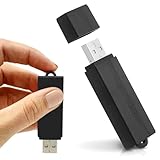
- Simple Recording. No Apps. No Complications. The USB Audio Recorder is designed for fast, reliable recording without apps, accounts, or setup. Just slide the switch and start recording instantly.
- Always Ready When You Need It Up to 24 hours of continuous recording and up to 25 days of standby time on a single charge. Ideal for work, school, and everyday use.
- Record More, Worry Less Store up to 288 hours of audio in HQ mode. Choose between PCM, XHQ, or HQ depending on your needs — higher quality or longer recording time.
- Smart Recording That Saves Space Sound detection ensures the device records only when audio is present, skipping silent gaps to maximize storage and battery efficiency.
- One-Switch Control. Instant Operation. Start and stop recording with a simple slide. No menus, no setup, no confusion — just quick, easy control.
Define missing and ambiguous values explicitly
Tell the extraction step to use only information stated in the transcript, distinguish an explicit statement from a missing detail, and return the required fields in the expected types. Do not let it invent a due date, priority, name, or location to fill an empty cell.
Validate required fields and permitted values before writing. If the transcript is uncertain, contradictory, or missing a required detail, preserve that uncertainty with a review status and route the row for human correction rather than silently supplying a guess. Where auditability matters, retain the transcript or a reviewable reference to it with the extraction result.
Independent reader supportYour contribution helps us test, update, and keep practical guides available for everyone.Append validated values to Google Sheets
For an API integration, use the spreadsheets.values.append method. Supply the spreadsheet ID, a range covering the target table, the values, and the valueInputOption. For Apps Script, use Sheet.appendRow with the validated row values.
What’s actually slowing this PC down?
Pick the symptom - the matching free tool is one click away.
Choose input handling deliberately. Google documents that the Sheets API’s RAW option stores values without parsing them, while USER_ENTERED parses values as if they were typed into the Sheets interface. Apps Script’s appendRow interprets cell content beginning with = as a formula. For transcript-derived text, consider how untrusted content should be treated so it is not unintentionally interpreted as a formula or as a date or number.
Rank #4

- 【Simple Operation】- switch on your voice recorder, one button for recording. press the "REC", start the recording, press "STOP", end the recording, press “PLAY”, listen what you just recorded, and then Press A-B, select your important section to repeat. Easy to playback with inner powerful speaker, support external sound speaker playback, let you enjoy superior recording quality.
- 【Clear Voice Record】- high quality recording with noise redution, you will get super clear recorded voice, the sensitive microphone help you to catch speaker's words in an interview, lectures, meetings.
- 【Voice Activated Recording】- automatic voice reduction function, it starts recording when sound is detected or turn to standby state, saving recording time and reduce power consumption.
- 【 Player Function】- this voice recorder can be used as an music player, you could enjoy the music after your tired study, meeting and so on. Also can function as a detachable data storage device.you can take along your favorite pictures and documents whenever you go.Simply cut-and-paste or drag-and -drop files to or from it via USB connection, the player will appear as a removeable drive in Windows.
- 【High quality and long time】 uses DSP noise reduction technology to filter out environmental noise, has high-quality recording, 【1536kbps】to restore the real scene. It can continuously record for more than 30 hours and play for 7 hours.
Make failures and duplicate messages manageable
A production workflow needs operational handling beyond the successful path. Plan for webhook verification, retries, duplicate events, temporary-file cleanup, API key handling, failure logging, and a manual correction path. Keep a stable message identifier with each processing job so your own integration can detect repeats before creating duplicate rows.
The exact retry behavior, deployment architecture, and retention settings depend on the services and implementation you choose; the cited API documentation does not establish one universal design. Log enough to diagnose failures without retaining audio or transcript content longer than your use case requires.
Privacy: this is not WhatsApp’s built-in transcription
WhatsApp’s built-in voice-message transcription is a separate feature. Its Help Center says that feature processes transcription on-device and that outsiders, including WhatsApp, cannot access the transcript content. Those assurances do not describe this API workflow.
Free tools Windows power users keep installed
One-click scans. No signup required.
Here, the audio is retrieved from a business-platform flow and sent to external transcription and extraction services; extracted data is then stored in a Google Sheet. Decide who can access the audio, transcript, API credentials, and spreadsheet; explain the data path to affected users; and review the applicable service retention settings and rules for your location and industry. The relevant legal requirements cannot be determined universally from the technical documentation.
Quick Recap
Product prices and availability are accurate as of the date/time indicated and are subject to change. Any price and availability information displayed on Amazon at the time of purchase will apply.




