What’s actually slowing this PC down?
Pick the symptom - the matching free tool is one click away.
To switch a Samsung Smart TV to a cable or satellite box, connect the box’s HDMI OUT port to a free HDMI IN port on the TV, note the port number, and select that HDMI input on the TV. Channel changes then happen on the box’s remote, or on the Samsung remote if you have set it up to control the box.
“Cable” can mean two different setups. The first, and the one most viewers use, is a cable or satellite set-top box connected by HDMI. The second is a coaxial antenna or wall line that feeds channels directly to the TV’s own tuner. The steps below cover the box first, and the antenna case is covered in its own section.
As an Amazon Associate I earn from qualifying purchases.
Confirm which kind of cable setup you have
- Cable or satellite box with HDMI: the standard case. The box is connected to a TV HDMI port, and you select that port as the source.
- Box with component outputs only: an older connection type. It needs a component input on the TV or an adapter, covered below.
- Coaxial antenna or cable line plugged into the TV: the TV’s own tuner receives the channels. This path does not use a set-top box and may need a channel scan.
Connect the cable box to the TV with HDMI
Samsung’s U.S. support guide on connecting cable boxes says: “Most cable and satellite boxes today can be connected with HDMI, and that’s a good thing, because HDMI offers the best picture and sound.”
The Tool Desk
Outbyte Driver Updater FREEScan for outdated or missing drivers - takes under a minuteDriver Scan →Outbyte PC Repair FREEClear out junk files and repair common Windows errorsFree Scan →- Find the HDMI OUT port on the cable box and a free HDMI IN port on the TV. Note which HDMI number the TV port carries, such as HDMI 1 or HDMI 2.
- With both devices powered off, connect an HDMI cable from the box’s HDMI OUT to the TV’s HDMI IN. A standard HDMI cable is the only item this step may require; if you already have one connected, you can skip this step.
- Turn on the TV and the cable box. Samsung says automatic switching to the source and source naming apply only to HDMI connections, so the TV may switch to the box on its own.
- If the picture does not appear, select the HDMI input manually using the steps in the next section.
- Samsung’s guide also recommends remembering the port number, since you will need it if the TV does not switch automatically.
Select the HDMI input on your Samsung TV
The menu route depends on the TV’s model year, the remote, and the country. Samsung’s own guides give different routes for different generations, so use the row that matches your TV, and check your model’s manual if your screen looks different.
#1 Best Overall

- Universal Compatibility & Pro-Grade Accessories: Nixsto RG6 coaxial cable works seamlessly with smart TVs, HDTV, CATV, cable boxes, wifi modems, satellite receivers, AM/FM radios, digital antenna, set top box, coax splitter and streaming devices,etc.. Conveniently, the coaxial cable connectors set includes one coax cable and one brass Female-to-Female extender, which can helps you expand your connections more easily
- Weatherproof Design& Durable Construction: Nixsto RG6 coax cable adapted Gold-plated F-connectors with built-in O-ring seals to prevent moisture damage. And the round water-resistant black PVC jacket protects against rain, and humidity. Ideal for indoor or outdoor antennas, basement setups, satellite dish connections, or coastal areas
- 75 Ohm Copper Core for 4K/HD Signal Integrity: The 75 Ohm copper-plated conductor of the professional RG6 coax cable wire ensures minimal signal loss for 4K/HDTV quality. Meanwhile, gold-plated contacts reduce interference and maintain stable internet/TV signalsand. And, it supports high-speed internet (5Gbps), 4K HDR video, and Dolby Digital audio
- Flexible Length Options: Multiple sizes--1.5ft 3ft 6ft 10ft 15ft 20ft 30ft 40ft 50ft 60ft 75ft 100ft are available to optimize cable management behind TV stands or wall setups; and the round black PVC design blends discreetly with home theater systems. Besides, tangle-resistant construction for neat routing around furniture and electronics
- Outstanding Service: There is any problem when in the use of the coax cable, please seek help from us, we will solve your question in time.
| TV or remote type | Route to the input | Source and notes |
|---|---|---|
| 2022 and later models | Home, press left, Connected Devices, then choose the connected input | Samsung Colombia support (updated September 15, 2026). Samsung India support (updated July 10, 2026) gives the same Smart Remote route and says function can vary by model and country. |
| 2016 to 2021 models | Home, then Source | Samsung Colombia support (updated September 15, 2026) |
| 2015 and older models | Physical Source button on the TV or remote | Samsung Colombia support (updated September 15, 2026) |
| Remotes with a Source button | Press Source, then choose the HDMI port | Samsung U.S. support describes using Source on the remote or the on-screen source menu. Model years not stated for this route. |
Connected Devices lists the external devices the TV recognizes. Selecting a device there switches the TV to it. The list may show the HDMI number or a device name you have changed, so look for the port you used, not just the name.
Boxes connected through a One Connect Box
On models that use a One Connect Box, plug the cable box into the ports on that box rather than the TV’s back panel. Samsung Malaysia support (updated December 23, 2024) states that One Connect Box models use the box’s own ports. Select the input that corresponds to the port you used.
Rank #2
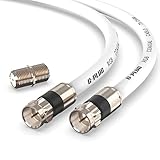
- RG6 Coaxial Cable & Coax Cable Cord for TV Cable, Internet & Digital Signals: This 75 Ohm coax cable wire delivers stable 4K/HD picture quality and high-speed internet connections, ideal as a coaxial cable extension for modems, routers, and TV setups.
- Works with Major US Providers: This coax cable is compatible with cable modems, routers, DVRs, TVs, antennas, coax splitters, and satellite receivers. Supports Xfinity, Spectrum, DirecTV, Dish Network, and other cable & internet providers.
- Triple Shielded RG6 Coax Cable for Reliable Signal: Solid shielding and durable compression F-type connectors on this coaxial cable reduce interference and signal loss, keeping your TV, internet, and satellite connection stable.
- F81 Coupler Included - Extend Your Coax Cable Length: This coaxial cable connector set includes a female-to-female coaxial coupler, so you can connect multiple RG6 cables together to reach the exact length your TV, router, or antenna setup needs.
- Flexible & Durable for Indoor or Outdoor Use: The flexible PVC jacket on this coax cable cord withstands everyday handling and protected outdoor installations, making it a versatile coaxial cable for home theater, office, or antenna setups.
When the cable box does not appear
- Power: confirm the cable box is on and showing its own menu or channel guide.
- Cable seating: unplug and reseat the HDMI cable at both the box and the TV.
- Port selection: confirm the TV is set to the same numbered HDMI port where the cable is plugged in.
- Other port or cable: move the cable to another HDMI port and select that port in the source menu. If the picture still fails, try a different HDMI cable.
- AV receiver in the path: if the box feeds a receiver or home-theater device that feeds the TV, check that the receiver is powered on and that its input for the box is selected, and that the receiver-to-TV connection is also selected.
- Wrong source: if you selected TV or Antenna expecting cable-box programming, switch to the HDMI input instead. Those sources refer to the TV’s own tuner.
Boxes with component outputs only
Some older boxes provide only component video outputs. Samsung advises asking your cable provider whether an upgraded box with HDMI is available. Samsung’s U.S. support guide says component connections can deliver up to 1080p.
Do these 3 things before closing this tab:
1Repair Windows errors before they cause bigger problems2Fix the driver behind crashes, sound loss and screen glitches3Clear out junk files and repair common Windows errorsIf the TV has no component input, you will need a component-to-HDMI adapter. Before buying one, confirm the exact output ports on the box and the input ports on the TV, since not every combination works with the same adapter.
Rank #3
- Universal Compatibility & Pro-Grade Accessories: Nixsto RG6 coaxial cable works seamlessly with smart TVs, HDTV, CATV, cable boxes, wifi modems, satellite receivers, AM/FM radios, digital antenna, set top box, coax splitter and streaming devices,etc.. Conveniently, the coaxial cable connectors set includes one coax cable and one brass Female-to-Female extender, which can helps you expand your connections more easily
- Weatherproof Design& Durable Construction: Nixsto RG6 coax cable adapted Gold-plated F-connectors with built-in O-ring seals to prevent moisture damage. And the round water-resistant black PVC jacket protects against rain, and humidity. Ideal for indoor or outdoor antennas, basement setups, satellite dish connections, or coastal areas
- 75 Ohm Copper Core for 4K/HD Signal Integrity: The 75 Ohm copper-plated conductor of the professional RG6 coax cable wire ensures minimal signal loss for 4K/HDTV quality. Meanwhile, gold-plated contacts reduce interference and maintain stable internet/TV signalsand. And, it supports high-speed internet (5Gbps), 4K HDR video, and Dolby Digital audio
- Flexible Length Options: Multiple sizes--1.5ft 3ft 6ft 10ft 15ft 20ft 30ft 40ft 50ft 60ft 75ft 100ft are available to optimize cable management behind TV stands or wall setups; and the round black PVC design blends discreetly with home theater systems. Besides, tangle-resistant construction for neat routing around furniture and electronics
- Outstanding Service: There is any problem when in the use of the coax cable, please seek help from us, we will solve your question in time.
Antenna and coaxial channels
Antenna channels do not use a cable box or an HDMI input. They are received by the TV’s tuner. Samsung says a channel scan may be required before channels appear. Run the scan from the TV’s antenna or broadcast settings; the menu name varies by model and region, so check your manual if you cannot find it.
Independent reader supportYour contribution helps us test, update, and keep practical guides available for everyone.Optional: control the cable box with the Samsung remote
Selecting the HDMI input and changing channels are separate tasks. Once the input is selected, you can keep using the box’s own remote. If you want the Samsung remote to control the box, Samsung’s U.S. universal-remote guide describes setup for a box connected directly to the TV:
Rank #4

- 【3FT RG6 Coaxial Cable In Pure Black】Strong RG6 patch cable with F Pin provides ample length (3 feet) for flexible setups with Caravan TV, Antenna, Cable TV, Satellite, DVR, VCR, Cable Box, Sat Cable Extension, BROADBAND & high-speed Internet and more
- 【75 Ohm Impedance Design】Engineered with 75-ohm impedance for minimal signal loss, delivering crisp video and clear audio for cable TV, satellite, and internet connections; And, it supports 4K HDR video, Dolby Digital audio, and high-speed internet (5Gbps)
- 【Durable Construction & Weatherproof Design】Solid compression F-type connectors provide a snug, vibration-proof connection; Features rubber O-rings at connector joints to block moisture, dust, and corrosion, enhancing durability for indoor or outdoor use
- 【Triple-Layer Shielding】features high shielding effectiveness with triple-layer shielding (foil shielding + braided shield + foil shielding) to block RFI/EMI and mobile signal interference, ensuring clear, uninterrupted TV viewing
- 【Secure F-Connectors】Includes a female to female coaxial coupler, allowing you to extend your cable length by connecting multiple RG6 cables; The coupler is pre-attached to the cable and shipped together with the product
- Press Home, then choose Source.
- Choose Universal Remote, then New Device.
- Choose Cable/Satellite Box, then TV directly.
- When prompted, enter your ZIP code and service provider.
- Choose the HDMI port the box uses.
- Test Channel Up and Channel Down, then finish setup.
Samsung gives a separate setup route for boxes connected through a home-theater system. Availability and steps depend on both the TV model and the set-top-box model, so treat this as an optional feature rather than a required step.
Quick wins for a faster PC:
Fix the driver behind crashes, sound loss and screen glitchesFind Drivers →Repair Windows errors before they cause bigger problemsFix Now →Quick Recap
Best Value

- Quad-shielded RG6 video cable with two layers of copper braid and two layers of aluminum foil shielding
- 75 ohm impedance
- CL2 rated for safe use inside the walls of residential buildings
- Molded connector heads and strain relief boots
- Gold Plated Male F-type connectors
Product prices and availability are accurate as of the date/time indicated and are subject to change. Any price and availability information displayed on Amazon at the time of purchase will apply.




