You can use a GitHub Copilot app automation to summarize and route Dependabot pull requests, but treat it as a triage assistant—not as an automatic security reviewer. Start with a pull request event trigger and a prompt that extracts the dependency details, reports what the PR does and does not establish, and recommends a next step without changing repository state. GitHub documents general pull request event automations; it does not describe a special Dependabot-only triage template.
What the automation can—and cannot—do
GitHub describes Copilot app automations as saved agent tasks that can run on a schedule or on demand, without manual intervention. Automations can also be configured to respond to repository events, including pull request events. See GitHub’s automation setup documentation for the available setup surfaces and trigger concepts.

As an Amazon Associate I earn from qualifying purchases.
For Dependabot triage, the useful first job is to organize information already visible in a pull request: which package changed, its ecosystem, the previous and proposed versions, and any evidence that the update is security-related. Copilot can summarize and recommend; its output is not proof that a dependency is safe, vulnerable, or exploitable. Check its claims against the pull request, dependency metadata, and your repository’s security process.
Free tools Windows power users keep installed
One-click scans. No signup required.
Choose a safe trigger and scope
Decide which repositories and pull request events should start the task. An event trigger can bring attention to new or updated pull requests; a schedule can batch recurring work, while on-demand runs let a person initiate a review when needed. GitHub documents these as general automation modes, not as a Dependabot-specific workflow.
#1 Best Overall

- Mechanical Switch Advantage - Experience the tactile and audible satisfaction with our keyboard’s blue mechanical switches. Feel the difference with each keystroke, ensuring a responsive and comfortable typing experience that lasts with a 50 million keystroke lifecycle.
- 2X Size Large Print Keys - Our keyboard’s large print keys are not only easy on the eyes but also provide excellent contrast, making it ideal for those who struggle with traditional small print. The 2X size ensures greater visibility and ease of use.
- Multi OS Layout - Versatility at its best! Our keyboard’s multi-OS layout feature allows seamless switching between operating systems. Whether you’re on Windows, macOS, or Linux, this keyboard adapts to your needs without missing a beat.
- Multimedia and Windows Hotkeys - Boost your productivity with built-in hotkeys. Access multimedia controls and essential Windows functions with just a simple click. From playing music to launching your calculator, these hotkeys simplify your workflow.
- Copilot Ai Hotkey - Unleash the power of advanced AI at your fingertips. The Copilot AI hotkey on our keyboard provides instant access to an AI assistant, ready to generate code, offer creative suggestions, or assist with language tasks efficiently.
For a first setup, restrict the automation to the repositories and pull request events relevant to your team. Begin with recommendations only. Avoid having the task merge or close pull requests, dismiss alerts, edit files, or apply labels until you have deliberately decided which actions are permitted and how a person will review them.
Check repository eligibility, approval, and usage
Before configuring the task, confirm that Copilot app automations are available for your account and repository under the current GitHub plan, organization policies, and settings. GitHub’s automation overview says private or internal repositories are eligible. It also states that a user with write access must approve workflows on a pull request before they run. Availability and controls can change, so check the live documentation and repository settings rather than assuming every repository can run the same automation.
Rank #2

- Durable and Washable Construction: Designed with a sealed silicone exterior, this keyboard is fully waterproof and resistant to dust, oil, and spills, allowing for thorough cleaning with soap and water or liquid cleaners to maintain hygiene in demanding environments such as medical facilities, industrial settings, or shared workspaces.
- Integrated Touchpad and Keypad: Features a built-in touchpad that eliminates the need for a separate mouse, saving valuable desk space and providing all-in-one cursor control alongside a standard 104-key US layout that includes a full numeric keypad for efficient data entry and navigation tasks.
- Dedicated CoPilot AI Hotkey: Equipped with a specialized hotkey that provides instant access to AI assistance, enabling users to quickly generate code, receive creative suggestions, or complete language-related tasks directly from the keyboard without navigating through software menus.
- Multimedia and Internet Controls: Includes 12 specialized hotkeys for enhanced productivity, featuring 5 internet keys for browser navigation (Home, Email, Back, Forward, Search) and 7 media keys (Play/Pause, Stop, Track Control, Volume Control, Mute) to streamline daily computer operations.
- Plug and Play Connectivity: connects easily to devices via a standard USB cable without requiring specific driver installation, drawing power directly from the PC, and offering broad compatibility with systems equipped with a USB port for immediate use right out of the box.
- Confirm that Copilot app access and automation settings are enabled for the account or organization.
- Check the repository’s visibility and applicable organization policies.
- Ensure someone with write access can approve the relevant workflow runs when required.
- Account for usage: GitHub says each automation run starts a Copilot cloud agent session and consumes GitHub Actions minutes and GitHub AI Credits. The amount depends on usage; no price or fixed cost is stated here.
Reuse Dependabot’s existing labels
Dependabot pull requests already receive a dependencies label and a label for the package ecosystem, such as npm, java, or github-actions. These are useful context for the prompt and can support routing without creating redundant categories. GitHub explains the defaults and customization options in its guide to customizing Dependabot pull requests.
The Tool Desk
Outbyte Driver Updater FREEScan for outdated or missing drivers - takes under a minuteDriver Scan →Outbyte PC Repair FREERepair Windows errors before they cause bigger problemsFix Now →If the defaults do not match your workflow, the repository’s dependabot.yml can configure custom labels per ecosystem. Labels can also trigger workflows, so they may help downstream automation filter or route pull requests. Keep deterministic routing rules separate from Copilot’s judgment: a label can identify an ecosystem, but it does not by itself establish whether an update is exploitable or urgent.
Rank #3
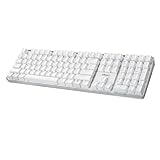
- Full-Size Mechanical Keyboard - Enjoy a complete typing experience with the EasyTouch 680’s full 104-key US layout. Its mechanical “brown” switches ensure quiet, tactile feedback and durability for up to 50 million keystrokes, perfect for both work and play.
- Copilot AI Integration - Streamline your productivity with the dedicated Copilot AI hotkey, granting instant access to Microsoft’s advanced AI assistant. This unique feature is designed to enhance your workflow and provide support whenever you need it.
- Adjustable LED Illumination - Customize your typing environment with adjustable brightness levels, making the EasyTouch 680 ideal for any lighting condition. Its elegant white design with transparent accents adds a touch of sophistication to your desk setup.
- Multimedia Control - Take command of your entertainment with the EasyTouch 680’s built-in multimedia hotkeys. Control your media effortlessly with keys for volume, pause/play, and more, ensuring a seamless user experience.
- Multi-OS Compatibility - The EasyTouch 680 is ready to perform in any computing environment with its enhanced compatibility4. It features modifiers and control keys for Windows, macOS, Linux, and Android, making it a versatile choice for any user.
Create a recommendation-only task
In the Copilot app automation surface, choose a pull request event trigger, enter a focused task prompt, and select only the tools the task needs. GitHub documents the prompt, triggers, model, and tools as configuration elements in its overview of Copilot automations. A prompt should ask the agent to separate facts visible in the PR from inferences, and to say when information is missing.
The following is an untested starting point, not a validated configuration:
Rank #4
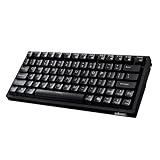
- Smooth Typing Experience - Enjoy premium typing tactility with the "blue" mechanical switches of the EasyTouch 610, which offer a clicky, tactile feel and are built to last over 50 million keystrokes.
- Quick Access with Copilot Key - Harness the power of MicroSoft Copilot Ai swiftly with the dedicated Copilot key, designed to save time and enhance productivity without navigating with a mouse.
- Enhanced Visibility and Accuracy - Each key on the EasyTouch 610 features larger prints for improved visibility, aiding in accuracy, faster typing, and catering to accessibility requirements.
- Multi-OS Compatibility - Seamlessly switch between Windows, macOS, and Linux devices with OS-specific modifiers and command keys, ensuring a consistent typing experience across different systems.
- Compact and Portable Design—Measuring under 12 inches in width, the AKB-610UB is ideal for on-the-go use and compact spaces. It offers high-performance typing with multimedia and system shortcut keys for enhanced control.
Review this Dependabot pull request for triage. Summarize the dependency, ecosystem, current and proposed versions, and the evidence shown in the PR about whether this is a security update. Note uncertainty explicitly. Recommend a next step and the appropriate team or existing repository label. Do not merge, close the PR, dismiss an alert, edit files, or change labels.
Recommended Free Tools
Special offer. See more information about Outbyte and uninstall instructions. Please review EULA and Privacy policy.
Keep the prompt aligned with the repository’s actual practices. If the PR does not include enough evidence to establish the update’s security context, instruct the agent to say so rather than infer it. Ask for review or test considerations only when they are relevant to the project’s policy.
Independent reader supportYour contribution helps us test, update, and keep practical guides available for everyone.Keep permissions proportional to the task
A summary-only task should not need permission to change security-alert state. GitHub’s GitHub App permissions reference maps reading Dependabot alerts to read permission and updating alerts to write permission. Grant write access only when the automation is explicitly intended to modify alert state or take another action that needs it; a recommendation-only triage task should remain narrow.
If you later permit a change such as applying a label, spell out that exact action in the task configuration, grant only the required permission, and retain human review. Do not broaden access simply because a tool offers it.
Verify the output before using it in security triage
- Run the automation on a representative Dependabot pull request in a repository where you can inspect the source information.
- Compare the reported package, ecosystem, and version changes with the PR title, diff, and dependency metadata.
- Check every statement about security context against evidence visible in the PR or the relevant repository records; correct or reject unsupported conclusions.
- Review the recommended next step and any proposed team or label against repository policy before acting.
- Record misclassifications or missing context and refine the prompt. Keep the automation recommendation-only unless the team has separately approved a specific, limited write action.
GitHub also documents using the Copilot app to manage issues and pull requests; see Managing issues and pull requests with the GitHub Copilot app for related app capabilities. Those capabilities do not remove the need to check an agent’s output before making it part of a security decision.
What’s actually slowing this PC down?
Pick the symptom - the matching free tool is one click away.
Frequently Asked Questions
Can GitHub Copilot automatically review Dependabot PRs?
It can run an automation that summarizes a pull request and recommends a next step, but the output should not be treated as an authoritative security review. The setup described here leaves changes to a person.
Quick Recap
Product prices and availability are accurate as of the date/time indicated and are subject to change. Any price and availability information displayed on Amazon at the time of purchase will apply.




