A Raspberry Pi Zero 2 W can run a compact internet radio, but it is only the computer inside the build—not a complete radio. You also need a microSD card, suitable power, Wi-Fi access and an audio output connected to speakers or an amplifier. With Volumio installed and the network and audio path configured, you can browse web-radio stations or add a stream URL.
Choose a DIY build or a ready-made radio
A Zero 2 W makes sense if you want a small, configurable project and are comfortable assembling a few parts. The board measures 65 mm × 30 mm, has 2.4 GHz Wi-Fi, a microSD slot, USB OTG and a 40-pin HAT-compatible footprint. It has neither built-in Ethernet nor a headphone or speaker jack, so plan the connection to your sound system before buying parts. Raspberry Pi describes internet radios among the projects suited to Raspberry Pi Zero: Raspberry Pi Zero project examples.
As an Amazon Associate I earn from qualifying purchases.
If you would rather avoid choosing and connecting components, a ready-made internet radio is another route. The available documentation does not establish a specific complete-radio model to recommend, so check any model’s network and audio connections against your needs before purchasing.
Recommended Free Tools
Gather the parts
- Host: Raspberry Pi Zero 2 W.
- Storage: a microSD card for the operating system and player software. The setup sources do not specify one universal capacity.
- Power: a suitable 5 V micro-USB supply.
- Audio output: a compatible USB DAC or Raspberry Pi DAC/audio board suited to your amplifier or speakers. Volumio lists support for USB 2.0 DACs and native Raspberry Pi DACs, but compatibility depends on the particular hardware.
- Optional: a case that fits the board and any attached audio hardware.
The Zero 2 W does not provide analog audio directly. For a Zero build, an audio board, USB DAC or other supported output path is therefore part of the plan, not an optional software setting. See the Raspberry Pi Zero 2 W product brief and Volumio’s supported hardware and setup information.
#1 Best Overall

- 40k INTERNET RADIOS:Listen to more than 40,000 internet radio stations from all over the world via 2.4 WiFi or SIM card, with clarity and no noise, categorized by continent, country, province, city, station type and popularity. Connect to the Internet and listen to tens of thousands of radio stations for free, and bookmark your favorite stations with one click
- ADDABLE SYATIONS:You can add your favorite radio stations by entering a valid URL directly on the radio, support all audio formats such as mp3, AAC, m3u8, etc VIOCE SEARCH STATIONS:You can search about 40 thousand radio stations by your voice
- GREAT SOUND QUALITY:Equipped with multimedia speakers, listening to Internet radio, podcasts, music is very clear and loud sound
- ADDITIONNAL FEATURES:With clock, alarm clock, timer playback, 2000mAh rechargable battery,Type-C earphones
- EASY TO SET UP:Very easy to add wi-fi network or SIM card to connect internet,and easy to use,because it has lots of shortcuts including: FM/SW/MW,favorites, add station, station categorization, voice search, fast forward, pause and more
Install Volumio and get the Pi online
Volumio’s Get Started page lists version 4.119, released 24 March 2026. Use its current image and setup guidance rather than an old image you may already have downloaded.
- Prepare the image. Download the Volumio image, extract it if needed, and write it to the microSD card using Raspberry Pi Imager or Volumio’s supported image-writing route.
- Configure Wi-Fi before boot when possible. In Raspberry Pi Imager, enter the home network’s SSID and password for a headless setup. Set the WLAN country if prompted or required; wireless configuration depends on the correct country setting.
- Boot the radio. Insert the card, connect the audio hardware and power, then allow the Pi to start. Follow Volumio’s guided setup in its phone app or a browser. Volumio documents
http://volumio.localas a browser setup route; if it does not open, use the documented hotspot setup option or check that your control device and Pi are on the intended network. - Select the output. In Volumio’s settings, select the detected DAC or audio output. Start at a low volume, then confirm the amplifier is on the correct input and the speakers are connected.
- Find a station. Browse Volumio’s integrated web-radio directory, or add a station’s stream URL. Directory entries and stream endpoints can change, and the available documentation does not establish universal compatibility with every stream format.
Raspberry Pi’s getting-started guide covers boot media, power and headless Wi-Fi configuration. Its configuration documentation explains WLAN country and wireless settings. Volumio’s audio sources help page describes built-in and user-added web radio.
Rank #2

- 40k INTERNET RADIOS:Listen to more than 40,000 internet radio stations from all over the world via 2.4 WiFi or SIM card, with clarity and no noise, categorized by continent, country, province, city, station type and popularity. Connect to the Internet and listen to tens of thousands of radio stations for free, and bookmark your favorite stations with one click
- ADDABLE SYATIONS:You can add your favorite radio stations by entering a valid URL directly on the radio, support all audio formats such as mp3, AAC, m3u8, etc VIOCE SEARCH STATIONS:You can search about 40 thousand radio stations by your voice
- GREAT SOUND QUALITY:Equipped with multimedia speakers, listening to Internet radio, podcasts, music is very clear and loud sound
- ADDITIONNAL FEATURES:2000mAh rechargable battery,Type-C earphones(The package contains the Type-C to 3.5mm cable)
- EASY TO SET UP:Very easy to add wi-fi network or SIM card to connect internet,and easy to use,because it has lots of shortcuts including:FM,favorites, add station, station categorization, voice search, fast forward, pause and more
Check that the station stays reliable where you will listen
Let a station play for a while, then test the radio in its intended location and at the time you expect to use it. This can reveal problems that a quick setup check misses. Reliability depends on several parts of the chain, so check them separately:
Free tools Windows power users keep installed
One-click scans. No signup required.
- Wi-Fi placement: move the unit nearer the router or access point if the connection is weak. The Zero 2 W uses 2.4 GHz 802.11b/g/n Wi-Fi; Ethernet is not built in.
- Network load: reduce avoidable competing traffic and test again. Volumio says a poor connection can cause disconnections and slow response. Its 2022 Wi-Fi guidance suggests at least 75 Mb/s, but that is Volumio’s recommendation—not an established universal minimum for internet-radio streams. See Volumio’s network advice.
- Power: check that the supply is suitable and the connections are secure if the device behaves inconsistently.
- Audio path: verify that Volumio selected the intended output and that the DAC, amplifier input and speakers are connected.
- Station stream: test another directory station. If one station fails while another plays, the individual stream may be unavailable or changed rather than the whole radio being offline.
Troubleshoot the symptom
The radio does not appear during setup
Confirm the Pi has power and allow boot to finish. Check that the phone or computer is on the intended home network, then try Volumio’s hotspot route or the browser setup address. If the Pi was configured headlessly, verify the Wi-Fi credentials and WLAN country setting.
Rank #3
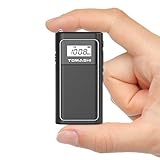
- FM Radio & MP3 Playback: The FM radio portable device supports MP3/WMA file playback from a Micro SD card, giving you a variety of listening options on the go
- USB File Transfer & Easy Charging: Use the USB cable to transfer files directly from your computer to the Micro SD card, while the built-in 400mAh rechargeable lithium battery and mini USB charging port keep your small radio powered up
- LCD Display with Backlight: The tiny radio features a clear LCD display with backlight for easy navigation of stations and track details, even in low light
- Compact & Lightweight Design: This pocket radio measures just 1.65 x 0.63 x 3.15 inches and weighs only 0.13 lbs, making it perfect for travel or outdoor activities
- Private Listening with Earphone Jack: Enjoy your FM radio privately with the earphone jack, offering a personal and uninterrupted listening experience
Playback buffers or disconnects
Test nearer the router, reduce competing network traffic and try a second station. Volumio identifies poor network connectivity as a cause of disconnections and slow response; comparing stations helps distinguish a local connection problem from a single unavailable stream.
There is no sound
Check the selected Volumio output, DAC recognition, amplifier input and speaker connections. The Zero 2 W has no built-in analog audio jack, so confirm that your build actually includes an audio path.
Rank #4

- Touchscreen Bluetooth 5.3 audio:The retro bluetooth speaker is compatible with Android phones, smartphones, tablets and other bluetooth for fast connection. It's also touch-screen operable, very high-definition and silky smooth
- Small Body & Loud Audio:The small portable speaker is equipped with high-fidelity full-range speaker, has very warm and full sound. The wireless radio speaker, its transmission distance is up to 33 feet, the sound is very penetrating even outdoors. This kawaii metal speaker audio output is handled by a 5-watt high-power amplifier for lossless wireless sound
- 40k INTERNET RADIOS:Listen to more than 40,000 internet radio stations from all over the world via 2.4 WiFi or SIM card, with clarity and no noise, categorized by continent, country, province, city, station type and popularity. Connect to the Internet and listen to tens of thousands of radio stations for free, and bookmark your favorite stations with one click. About10 million podcast episodes, includes Spotify and Apple Podcasts
- Surprise features: equipped with GPT, you can directly voice on-demand machine in all radio stations and podcasts, but also can support the independent addition of radio by entering a valid URL directly on the radio, support all audio formats such as mp3, AAC, m3u8, etc
- Portable Radio for many occasions:A retro radio speaker can be a cute decoration on your bedside table, game desk and in the kitchen, bedroom, living room. Bring this mini lightweight portable fm radio speaker to play music or listen to radio during cooking, picnics, walking, hiking or gardening, adding joy of life
Some stations work and others do not
Try another directory entry or the station’s current stream URL. A station’s endpoint may change, and available sources do not establish that every stream format will work with every setup.
Wi-Fi remains weak
Change the radio’s position to improve its connection to the access point. The Zero 2 W does not have built-in Ethernet; a wired connection requires a compatible adapter, which adds another component to the build.
Quick Recap
Best Value

- Compact Internet radio: Handheld, lightweight, practical, and easy to use. Built-in rechargeable battery for power. Store your favorite stations up to 150 and access the top 5 stations with a touch of the 1-5 preset buttons.
- Discover a wide selection of Internet radio stations: Using the [Skytune Search] button is a breeze! Input the CALL letters or keywords of the station name to find the stations. User-friendly web browser control to manage/edit your favorites. Contact us if you can’t find your favorite station.
- Ordinary FM Radio: In addition to Internet radio, this device also receives local FM stations
- Sleep & Dim buttons: You can turn off the display during bedtime and set the radio to auto-off for sleep. Option to display the clock while the radio is playing.
- Connect with other media sources: It allows you to play audio from a Micro SD card and use it as a Bluetooth speaker. You can also play content from UPnP/DLNA-compatible network devices.
Product prices and availability are accurate as of the date/time indicated and are subject to change. Any price and availability information displayed on Amazon at the time of purchase will apply.




